
Multi-Agent Code Review Tool

Project description
🔍 Codetective - Multi-Agent Code Review Tool
A comprehensive code analysis tool that combines multiple scanning engines (SemGrep, Trivy, AI) with automated fixing capabilities using LangGraph orchestration.
Why Codetective?
Modern codebases mix application logic, third‑party libraries, infrastructure as code, and configuration spread across many files and services. Traditional single‑tool scanners catch some classes of issues but often miss others, and they rarely offer actionable fixes. Codetective approaches the problem as a coordinated, multi‑agent system: specialized agents analyze code through different lenses (pattern‑based SAST, dependency and misconfiguration scanning, and AI‑assisted review), while an orchestrator stitches their findings into a coherent story and can automatically suggest or apply improvements. The result is a practical workflow that not only detects problems, but also helps teams remediate them quickly.
In other words, Codetective is designed to be useful during day‑to‑day development and code review. It integrates cleanly into CLI and GUI flows, produces a standard JSON output you can consume in CI, and—when enabled—uses a local LLM to generate comments or edits that explain “why” and “how” to fix issues in context.
video
Features
Codetective merges a few core ideas into one developer‑friendly workflow. It combines specialized agents (SemGrep, Trivy, and an AI reviewer) to surface issues from different angles, and it uses an orchestrator to sequence and aggregate results. In practice, you run a scan on your repository, review the unified findings, and optionally apply automated fixes or insert concise explanatory comments. Everything is available from the command line and a streamlined web interface.
Key capabilities include multi‑agent scanning, automated fixing, a JSON results format for downstream tooling, and a configurable runtime that can execute agents sequentially or in parallel. The system is built to be practical: it can run with or without AI features, and it aims to provide explanations that are short enough to be helpful in code reviews.
- Multi-Agent Scanning: Combines SemGrep, Trivy, and AI-powered analysis
- Automated Fixing: AI-powered code fixes and explanatory comments
- CLI Interface: Command-line interface for automation and CI/CD integration
- Web GUI: Modern web interface with NiceGUI
- LangGraph Orchestration: Intelligent agent coordination and workflow management
- Smart Comment Generation: Concise TODO comments under 100 words
- Intelligent Issue Filtering: Removes fixed issues from GUI automatically
- Configurable: Flexible configuration via files and environment variables
Installation
Prerequisites
Before installing Codetective, ensure you have the following tools installed:
- Python 3.10+
- SemGrep (optional but recommended):
pip install semgrep
- Trivy (optional but recommended):
- Follow installation instructions at: https://aquasecurity.github.io/trivy/latest/getting-started/installation/
- Ollama (optional, for AI features):
- Download from: https://ollama.ai/download
- Install a code model:
ollama pull codellama - Start Ollama:
ollama start
Install Codetective
# Clone the repository
git clone https://github.com/codetective/codetective.git
cd codetective

# Install the package
pip install -e .
# OR
make install

# Or install from PyPI
pip install codetective
Quick Start
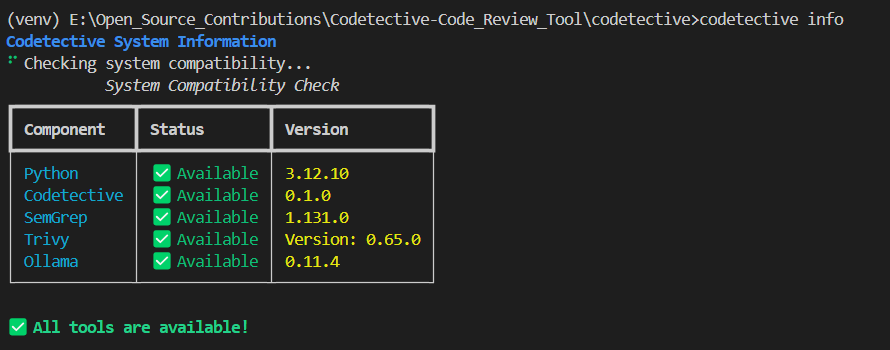
1. Check System Compatibility
ollama start
codetective info
This will show you which tools are available and their versions.
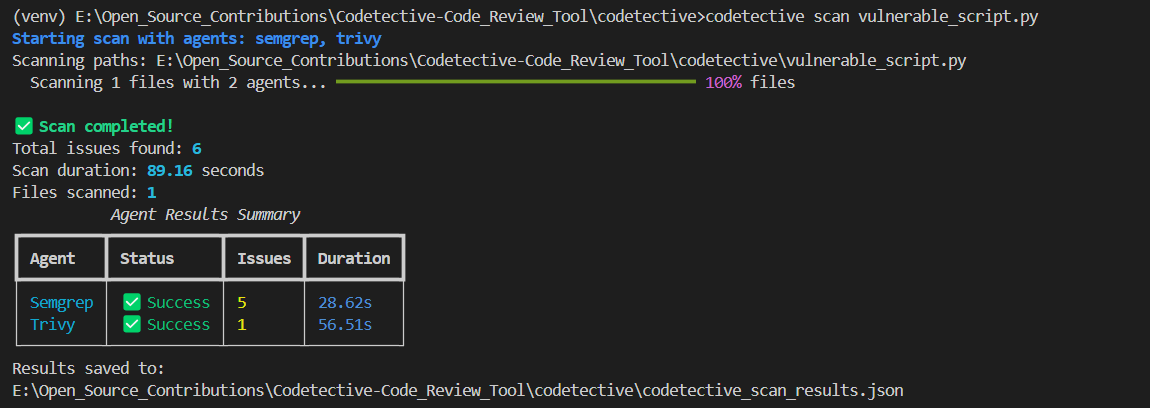
2. Run a Code Scan
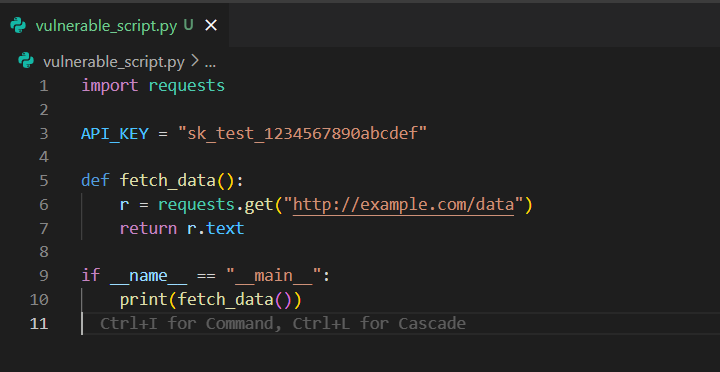
# Scan current directory with all agents
codetective scan .

# Scan specific paths with selected agents
codetective scan /path/to/code --agents semgrep,trivy --timeout 600

# Custom output file
codetective scan . --output my_scan_results.json
3. Apply Fixes
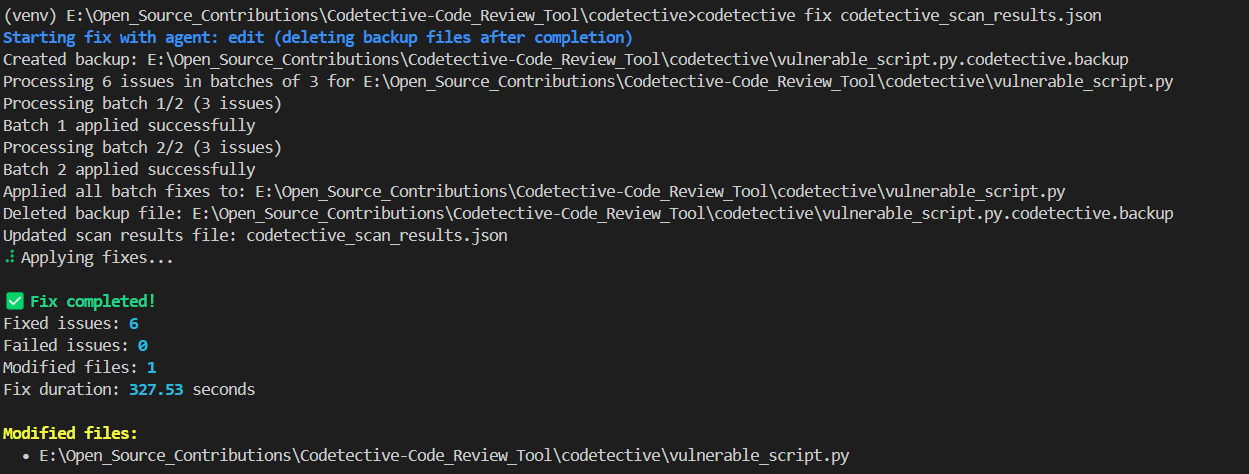
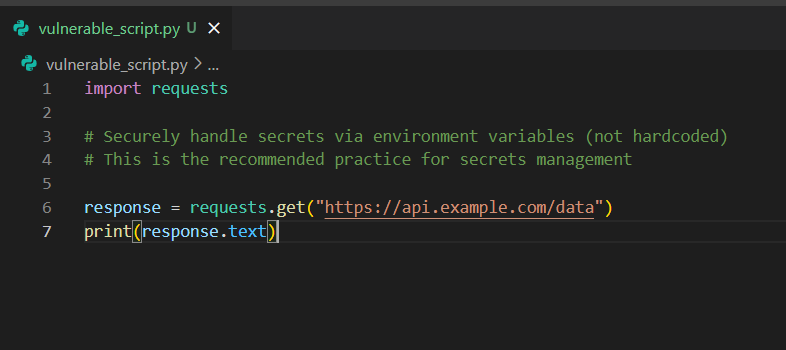
# Apply automatic fixes
codetective fix codetective_scan_results.json
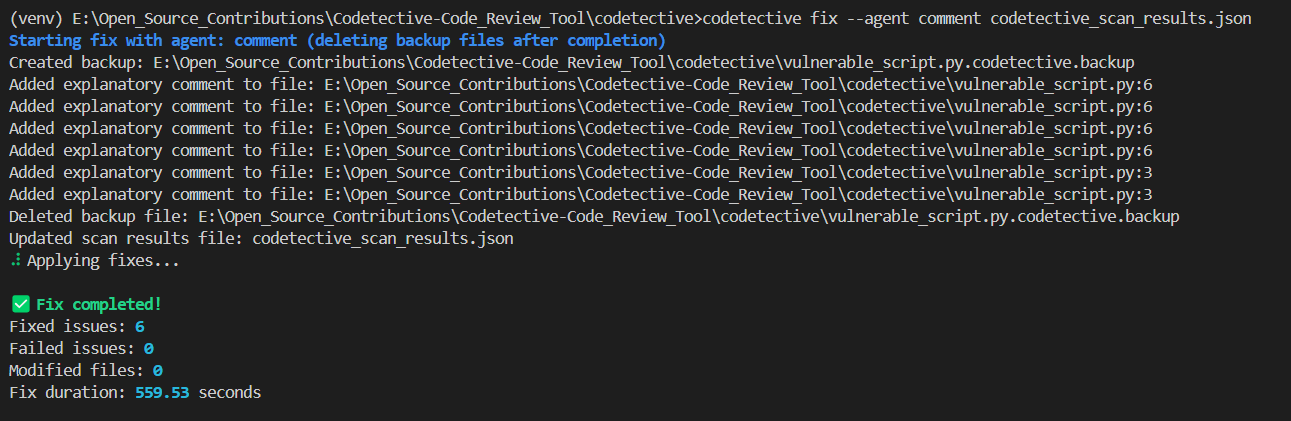
# Add explanatory comments instead
codetective fix codetective_scan_results.json --agent comment
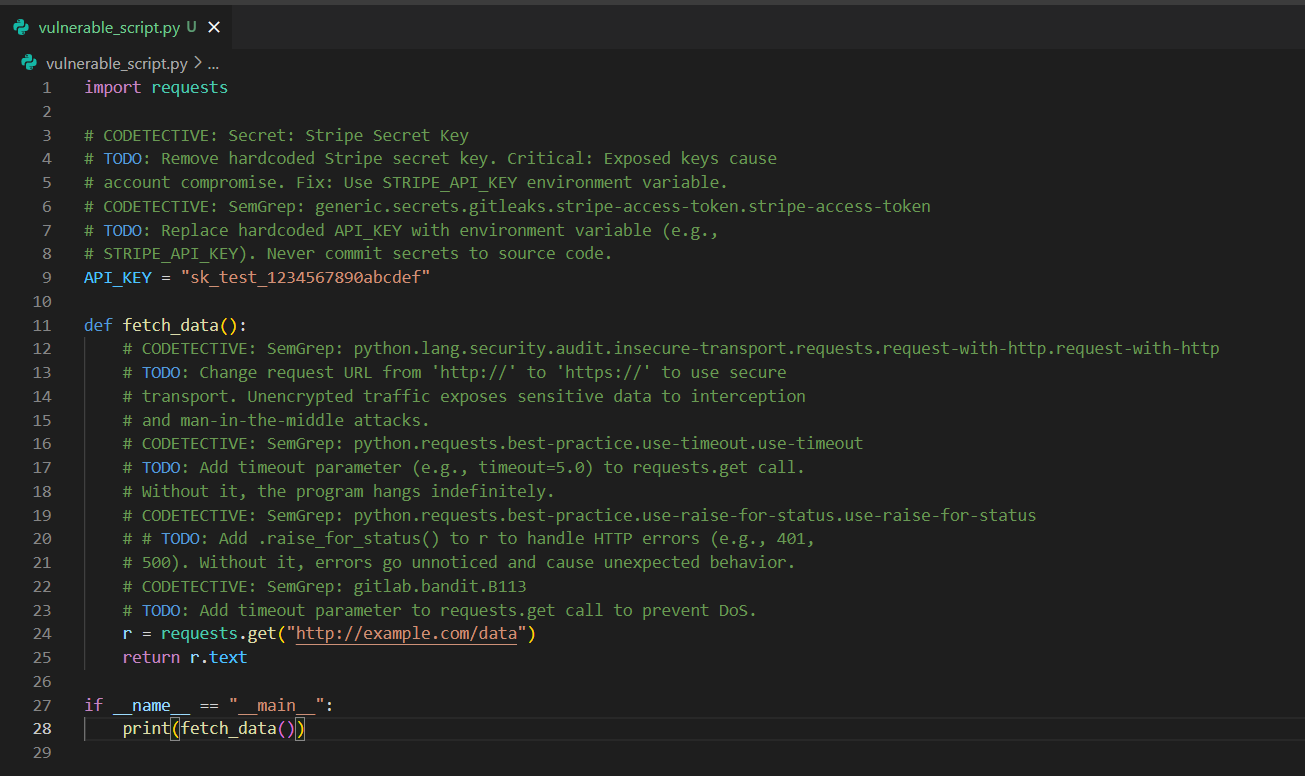
4. Launch Web GUI
# Launch NiceGUI interface
codetective gui

# Custom host and port
codetective gui --host 0.0.0.0 --port 7891
Then open your browser to http://localhost:7891 (NiceGUI)
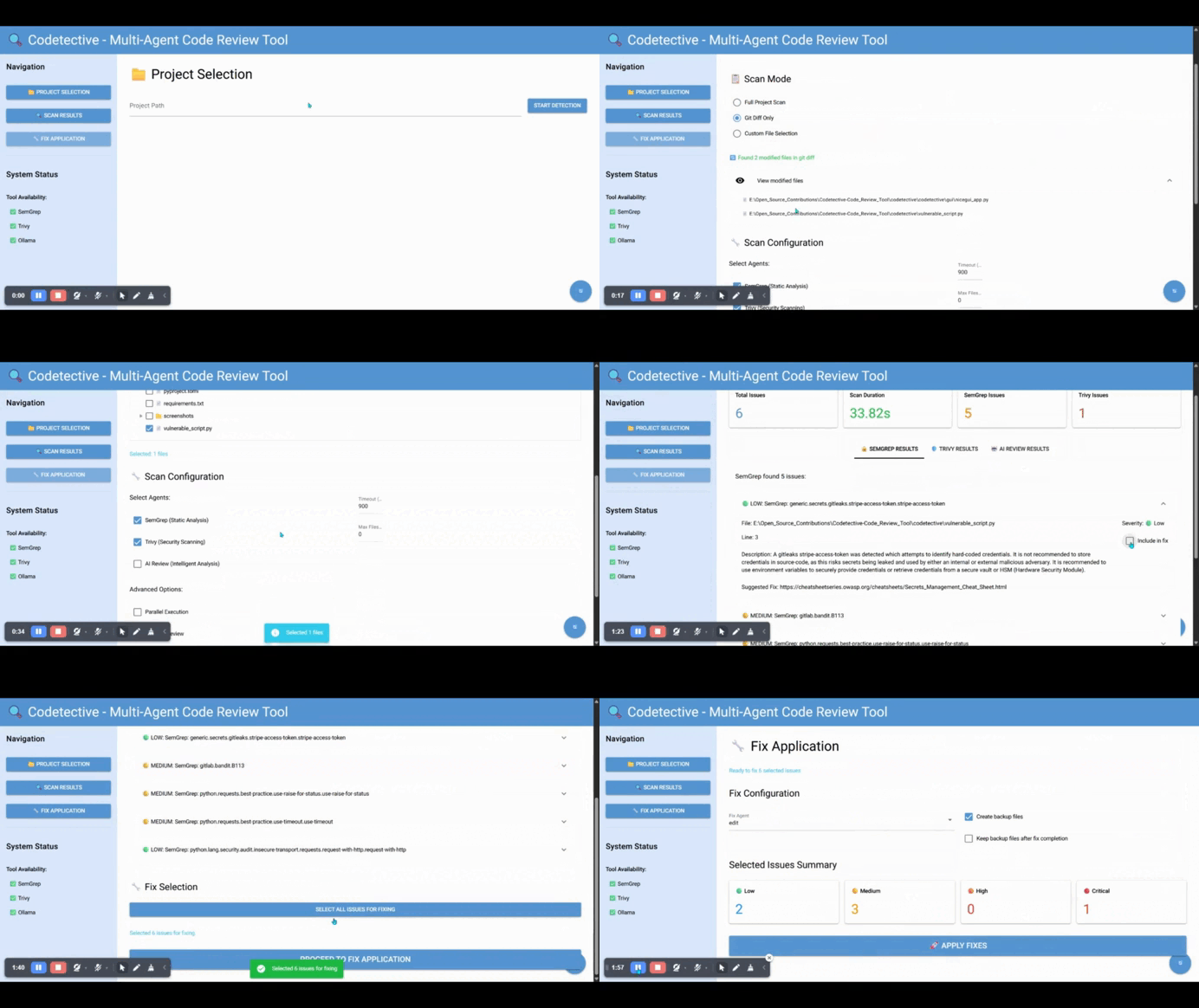
CLI Commands
codetective info
Check system compatibility and tool availability.
codetective scan [paths]
Execute multi-agent code scanning.
Options:
-a, --agents: Comma-separated agents (semgrep,trivy,ai_review)-t, --timeout: Timeout in seconds (default: 900)-o, --output: Output JSON file (default: codetective_scan_results.json)
Examples:
codetective scan .
codetective scan src/ tests/ --agents semgrep,trivy --timeout 600
codetective scan . --output security_scan.json
codetective fix <json_file>
Apply automated fixes to identified issues.
Options:
-a, --agent: Fix agent (comment,edit) (default: edit)--keep-backup: Keep backup files after fix completion--selected-issues: Comma-separated list of issue IDs to fix
Examples:
codetective fix scan_results.json
codetective fix scan_results.json --agent comment
Web GUI Usage
Codetective offers a modern web interface:
NiceGUI Interface
A modern, responsive web interface with better state management and real-time updates.
1. Project Selection
- Enter or browse to your project path
- Select which agents to run
- Configure scan timeout
- Start the scanning process
2. Scan Results
- View results in tabbed interface (one tab per agent)
- See detailed issue information
- Select issues for fixing
- Export results
3. Fix Application
- Choose fix strategy (edit or comment)
- Configure backup options and keep-backup settings
- Select specific issues to fix or use "Select All"
- Apply fixes with progress tracking and button state management
- View fix results and modified files
- Fixed issues are automatically removed from the GUI
- Real-time progress updates with disabled button during operations
JSON Output Format
Codetective always outputs results in a standardized JSON format:
{
  "timestamp": "2024-01-01T12:00:00",
  "scan_path": "/path/to/project",
  "semgrep_results": [
    {
      "id": "semgrep-rule-file-line",
      "title": "Issue title",
      "description": "Detailed description",
      "severity": "high",
      "file_path": "/path/to/file.py",
      "line_number": 42,
      "rule_id": "rule.id",
      "fix_suggestion": "Suggested fix",
      "status": "detected"
    }
  ],
  "trivy_results": [...],
  "ai_review_results": [...],
  "total_issues": 15,
  "scan_duration": 45.2
}
Agent Types
Scan Agents
- SemGrep Agent: Static analysis using SemGrep rules
- Trivy Agent: Security vulnerability and misconfiguration scanning
- AI Review Agent: Intelligent code review using Ollama
Output Agents
- Comment Agent: Generates concise TODO comments (under 100 words) for issues
- Handles None/empty line numbers by adding comments at file beginning
- Processes multiple issues in same file with proper line number tracking
- Ignores existing comments when generating new explanations
- Edit Agent: Automatically applies code fixes
- Focuses only on actual security vulnerabilities, not influenced by existing comments
- Maintains original code structure and functionality
Agent Roles and Responsibilities
-
SemGrepAgent (
agents/scan/semgrep_agent.py)- Purpose: Pattern-based SAST scanning using community and registry rules.
- Input: Project paths or files.
- Output:
Issuelist withrule_id,severity,file_path,line_number, and optional autofix hint asfix_suggestion. - Strengths: Fast, broad language support, customizable rules. Great for secure coding patterns and known antipatterns.
- Limitations: Rule-based (may miss logic flaws). Quality depends on rule set.
-
TrivyAgent (
agents/scan/trivy_agent.py)- Purpose: Detects vulnerabilities in dependencies, secrets, and misconfigurations across files and IaC.
- Input: Paths (directories or files).
- Output:
Issuelist synthesized from Trivy JSON: Vulnerabilities (VulnerabilityID), Secrets, and Misconfigurations. - Strengths: Broad coverage of OS packages, language deps, IaC; easy CI integration.
- Limitations: Not a replacement for SAST logic analysis; complements Semgrep. See Trivy scope for details.
-
DynamicAIReviewAgent (
agents/scan/dynamic_ai_review_agent.py)- Purpose: LLM-driven code review with optional tool-use (web search) to reason about security and code quality.
- Input: Supported source files (common languages), limited file count for performance.
- Output:
Issueentries summarizing key risks and recommendations (consolidated per file). - Strengths: Captures context-driven issues and best-practice gaps beyond rules.
- Limitations: Requires Ollama running; response quality depends on model.
-
CommentAgent (
agents/output/comment_agent.py)- Purpose: Writes concise explanatory comments adjacent to problematic lines.
- Input: Existing
Issuelist (from scan results). - Output: Updated
Issuelist (status remains detected/failed) and modified files (if applicable). - Notes: Preserves indentation, adapts comment style per file type, and supports backup files.
-
EditAgent (
agents/output/edit_agent.py)- Purpose: Generates and applies minimal, targeted fixes to code.
- Input: Existing
Issuelist (from scan results). - Output: Updated
Issuelist with statuses (FIXED/FAILED) and list of modified files. - Strategy: Batches fixes to avoid context shifts; preserves structure/formatting.
Reliability and Error Handling
Codetective is built to fail safely and keep you informed. The orchestrator in core/orchestrator.py records per‑agent errors without halting the entire run: during sequential scans, _run_all_agents() wraps each agent in try/except and appends human‑readable messages to error_messages; during parallel scans, the ThreadPoolExecutor loop captures exceptions from futures and prints a clear note while still aggregating results from successful agents. This means a transient failure in, say, Trivy, won’t prevent SemGrep or the AI reviewer from completing.
External processes are executed through utils/process_utils.py::run_command(), which applies timeouts (configurable via Config.agent_timeout) and attempts graceful termination (SIGTERM) before forceful termination when supported by the OS. Output is always captured as text with replacement for invalid characters so logs remain readable. On timeout, the function returns a failed status with a descriptive message rather than raising, allowing upstream code to handle it predictably.
Agents check their own readiness. For example, SemGrepAgent.is_available() and TrivyAgent.is_available() verify tool availability via utils/system_utils.py; the AI‑based agents inherit from agents/ai_base.py, where is_ai_available() verifies Ollama connectivity and call_ai() centralizes error handling. When Ollama is unreachable, users see a specific, actionable error string (e.g., model not found, connection refused).
When modifying files, safety comes first. The CommentAgent and EditAgent can create backup files prior to changes and respect the keep_backup setting in Config. The comment agent formats annotations using the host language’s comment style, preserves indentation, and handles edge cases such as unknown line numbers by placing notes at the file head. The edit agent processes issues in stable batches to avoid line‑shift hazards and writes back only when a meaningful change has been produced by the model.
Input scope is bounded to keep runs stable and fast. utils/file_utils.py validates paths, respects .gitignore, enforces maximum file size (Config.max_file_size), and allows inclusion/exclusion patterns, while utils/git_utils.py can focus on tracked or changed files. Together, they reduce noise and resource usage on large repositories.
Finally, results are standardized. Both scan and fix operations serialize their outputs (models/schemas.py) with timestamps, durations, and per‑agent summaries. This makes failures auditable and performance measurable across runs, even when some agents are temporarily unavailable.
Architecture
Codetective uses a multi-agent architecture orchestrated by LangGraph:
┌─────────────────┐     ┌──────────────────┐     ┌─────────────────┐
│   CLI/GUI       │     │   Orchestrator   │     │   Config        │
│   Interface     │───▶│   (LangGraph)     │◀───│   Management    │
└─────────────────┘     └──────────────────┘     └─────────────────┘
                                │
                ┌───────────────┼───────────────┐
                │               │               │
        ┌───────▼──────┐ ┌──────▼──────┐ ┌──────▼───────┐
        │ Scan Agents  │ │Output Agents│ │   Utils      │
        │              │ │             │ │              │
        │ • SemGrep    │ │ • Comment   │ │ • File I/O   │
        │ • Trivy      │ │ • Edit      │ │ • Validation │
        │ • AI Review  │ │             │ │ • System     │
        └──────────────┘ └─────────────┘ └──────────────┘
Recent Updates
Security Enhancements ✅
Three-Layer Defense Architecture - Complete security refactoring with clear separation of concerns:
- InputValidator - Validates file paths, sizes, types, and command safety before processing
- PromptGuard - INPUT validation: Detects 20+ prompt injection patterns, sanitizes user inputs before AI
- OutputFilter - OUTPUT validation: Detects 8+ malicious code patterns, blocks 11 dangerous functions, filters sensitive data
Testing & Quality ✅
- >75% overall test coverage with 400+ tests across the codebase
- Agent tests: Comprehensive coverage for all scan and output agents
- Integration tests: End-to-end security flow validation
- Automated testing: pytest with coverage tracking
Documentation ✅
- ARCHITECTURE.md - architecture overview
- DEPLOYMENT.md - deployment guide
Agent System Improvements ✅
- Automatic security validation - All AI calls protected by PromptGuard and OutputFilter
- Enhanced error handling - Graceful failures with detailed error messages
- Consistent response processing - Standardized AI response cleaning and validation
Contributing
Contributions to the Codetective are welcome. Follow the CONTRIBUTING.md for contribution guidelines.
- Fork the repository
- Create a feature branch (
git checkout -b feature/amazing-feature) - Commit your changes (
git commit -m 'Add amazing feature') - Push to the branch (
git push origin feature/amazing-feature) - Open a Pull Request
License
This application is open-source and is released under the Creative Commons Attribution-NonCommercial-ShareAlike 4.0 International License. See the LICENSE file for details.
Shield:

This work is licensed under a Creative Commons Attribution-NonCommercial-ShareAlike 4.0 International License.

Acknowledgments
Release history Release notifications | RSS feed


Download files
Download the file for your platform. If you're not sure which to choose, learn more about installing packages.
Source Distribution
Built Distribution
Filter files by name, interpreter, ABI, and platform.
If you're not sure about the file name format, learn more about wheel file names.
Copy a direct link to the current filters
File details
Details for the file codetective-0.1.0.tar.gz.
File metadata
- Download URL: codetective-0.1.0.tar.gz
- Upload date:
- Size: 67.7 kB
- Tags: Source
- Uploaded using Trusted Publishing? No
- Uploaded via: twine/6.1.0 CPython/3.12.10
File hashes
| Algorithm | Hash digest | |
|---|---|---|
| SHA256 |
aaf8dc7c90fe130958463694b354605850c3aab4d6383e73191b785cb24c3005
|
|
| MD5 |
4c6b6fb0253e73cb15909f11bf26d016
|
|
| BLAKE2b-256 |
dfd293794b14809c99bef5d2e7b7f5bc508156eb5a4e7546928bd55901ec7227
|
File details
Details for the file codetective-0.1.0-py3-none-any.whl.
File metadata
- Download URL: codetective-0.1.0-py3-none-any.whl
- Upload date:
- Size: 73.0 kB
- Tags: Python 3
- Uploaded using Trusted Publishing? No
- Uploaded via: twine/6.1.0 CPython/3.12.10
File hashes
| Algorithm | Hash digest | |
|---|---|---|
| SHA256 |
8a28030cb9926381e8d67c1137c716ae9058fbbce54d6b537d3abda824a86199
|
|
| MD5 |
45b351b4ce6f2ff58c5c31bd152af637
|
|
| BLAKE2b-256 |
b5d0315bb35c686f79bf4934f64ab7f735e1c748c324a39cb1d55635b46ad5dd
|






