
Multi-Agent Code Review Tool

Project description

🔍 Codetective - Multi-Agent Code Review Tool
A comprehensive code analysis tool that combines multiple scanning engines (SemGrep, Trivy, AI) with automated fixing capabilities using LangGraph orchestration.
video

Features
- Multi-Agent Scanning: Combines SemGrep, Trivy, and AI-powered analysis
- Automated Fixing: AI-powered code fixes and explanatory comments
- CLI Interface: Command-line interface for automation and CI/CD integration
- Web GUI: Modern web interface with NiceGUI
- LangGraph Orchestration: Intelligent agent coordination and workflow management
- Smart Comment Generation: Concise TODO comments under 100 words
- Intelligent Issue Filtering: Removes fixed issues from GUI automatically
- Configurable: Flexible configuration via files and environment variables
Installation
Prerequisites
Before installing Codetective, ensure you have the following tools installed:
- Python 3.10+
- SemGrep (optional but recommended):
pip install semgrep
- Trivy (optional but recommended):
- Follow installation instructions at: https://aquasecurity.github.io/trivy/latest/getting-started/installation/
- Ollama (optional, for AI features):
- Download from: https://ollama.ai/download
- Install a code model:
ollama pull codellama - Start Ollama:
ollama start
Install Codetective
# Clone the repository
git clone https://github.com/codetective/codetective.git
cd codetective

# Install the package
pip install -e .
# OR
make install

# Or install from PyPI
pip install codetective
Quick Start
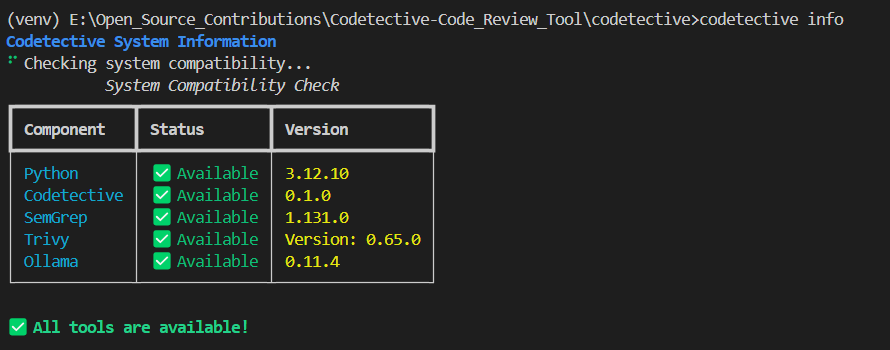
1. Check System Compatibility
ollama start
codetective info
This will show you which tools are available and their versions.
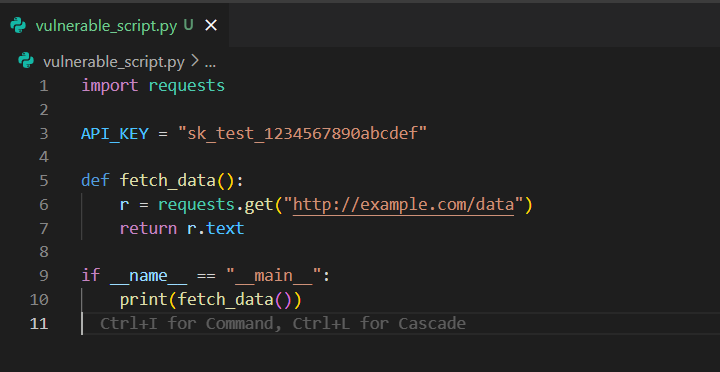
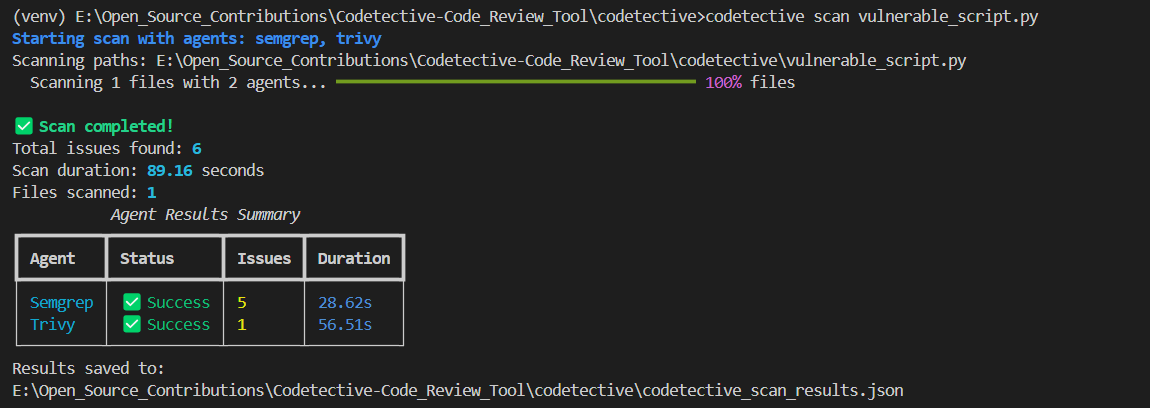
2. Run a Code Scan
# Scan current directory with all agents
codetective scan .

# Scan specific paths with selected agents
codetective scan /path/to/code --agents semgrep,trivy --timeout 600

# Custom output file
codetective scan . --output my_scan_results.json
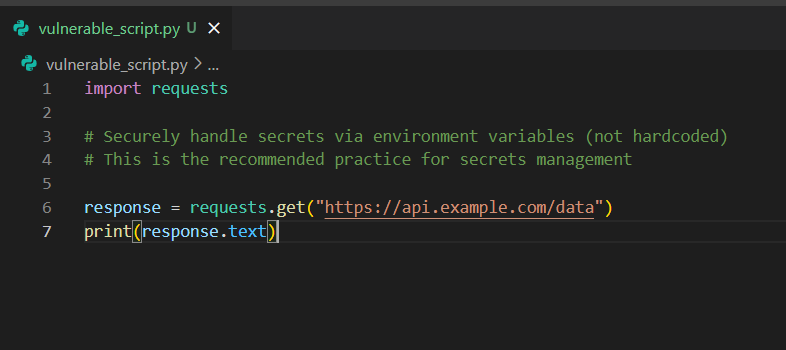
3. Apply Fixes
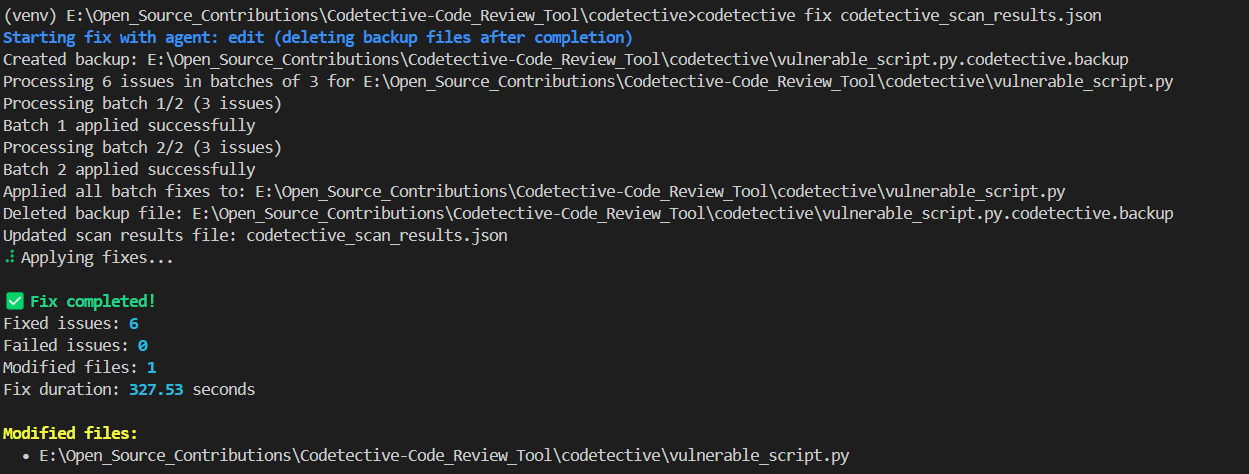
# Apply automatic fixes
codetective fix codetective_scan_results.json
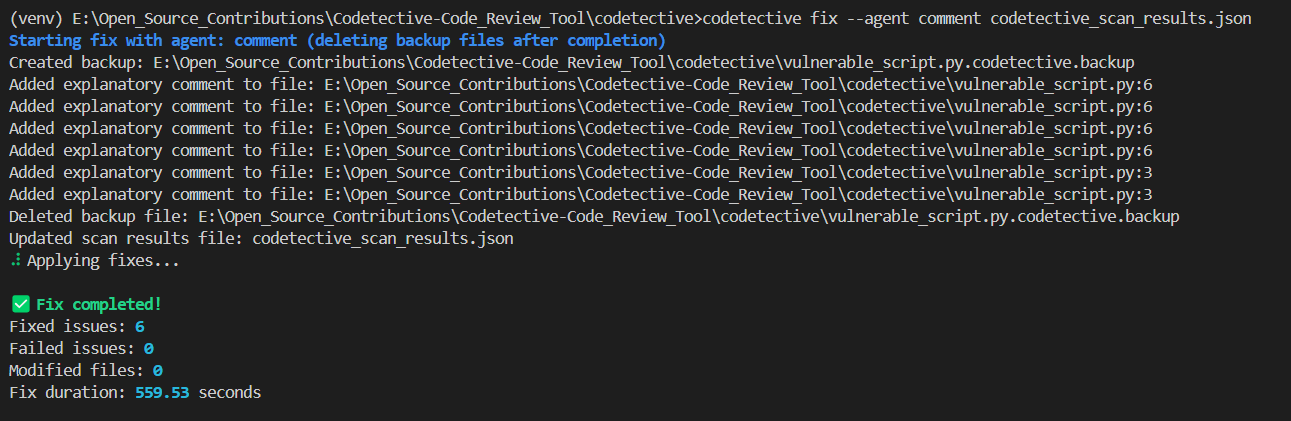
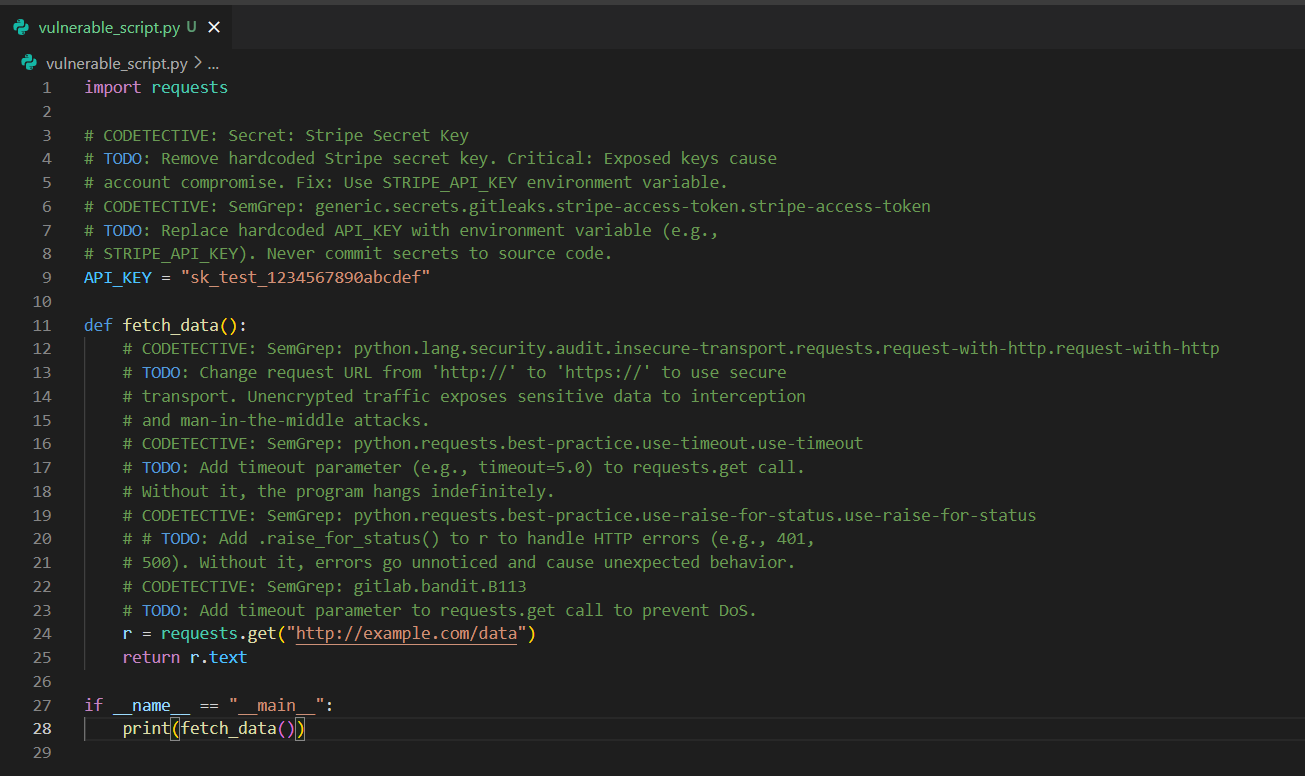
# Add explanatory comments instead
codetective fix codetective_scan_results.json --agent comment
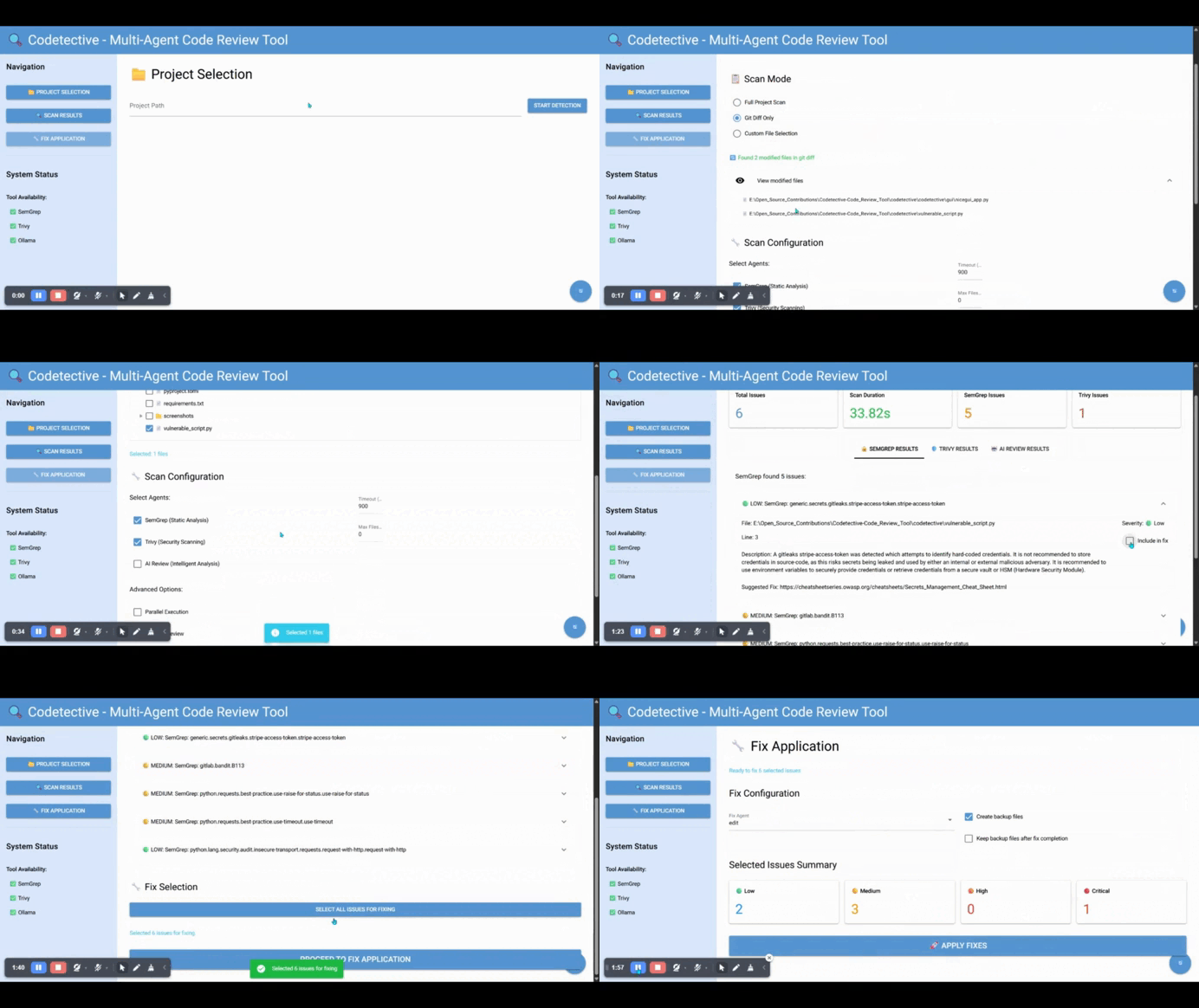
4. Launch Web GUI
# Launch NiceGUI interface (default)
codetective gui

# Custom host and port
codetective gui --host 0.0.0.0 --port 7891
Then open your browser to http://localhost:7891 (NiceGUI)
CLI Commands
codetective info
Check system compatibility and tool availability.
codetective scan [paths]
Execute multi-agent code scanning.
Options:
-a, --agents: Comma-separated agents (semgrep,trivy,ai_review)-t, --timeout: Timeout in seconds (default: 900)-o, --output: Output JSON file (default: codetective_scan_results.json)
Examples:
codetective scan .
codetective scan src/ tests/ --agents semgrep,trivy --timeout 600
codetective scan . --output security_scan.json
codetective fix <json_file>
Apply automated fixes to identified issues.
Options:
-a, --agent: Fix agent (comment,edit) (default: edit)--keep-backup: Keep backup files after fix completion--selected-issues: Comma-separated list of issue IDs to fix
Examples:
codetective fix scan_results.json
codetective fix scan_results.json --agent comment
Web GUI Usage
Codetective offers a modern web interface:
NiceGUI Interface (Default)
A modern, responsive web interface with better state management and real-time updates.
1. Project Selection
- Enter or browse to your project path
- Select which agents to run
- Configure scan timeout
- Start the scanning process
2. Scan Results
- View results in tabbed interface (one tab per agent)
- See detailed issue information
- Select issues for fixing
- Export results
3. Fix Application
- Choose fix strategy (edit or comment)
- Configure backup options and keep-backup settings
- Select specific issues to fix or use "Select All"
- Apply fixes with progress tracking and button state management
- View fix results and modified files
- Fixed issues are automatically removed from the GUI
- Real-time progress updates with disabled button during operations
JSON Output Format
Codetective always outputs results in a standardized JSON format:
{
  "timestamp": "2024-01-01T12:00:00",
  "scan_path": "/path/to/project",
  "semgrep_results": [
    {
      "id": "semgrep-rule-file-line",
      "title": "Issue title",
      "description": "Detailed description",
      "severity": "high",
      "file_path": "/path/to/file.py",
      "line_number": 42,
      "rule_id": "rule.id",
      "fix_suggestion": "Suggested fix",
      "status": "detected"
    }
  ],
  "trivy_results": [...],
  "ai_review_results": [...],
  "total_issues": 15,
  "scan_duration": 45.2
}
Agent Types
Scan Agents
- SemGrep Agent: Static analysis using SemGrep rules
- Trivy Agent: Security vulnerability and misconfiguration scanning
- AI Review Agent: Intelligent code review using Ollama
Output Agents
- Comment Agent: Generates concise TODO comments (under 100 words) for issues
- Handles None/empty line numbers by adding comments at file beginning
- Processes multiple issues in same file with proper line number tracking
- Ignores existing comments when generating new explanations
- Edit Agent: Automatically applies code fixes
- Focuses only on actual security vulnerabilities, not influenced by existing comments
- Maintains original code structure and functionality
Architecture
Codetective uses a multi-agent architecture orchestrated by LangGraph:
┌─────────────────┐     ┌──────────────────┐     ┌─────────────────┐
│   CLI/GUI       │     │   Orchestrator   │     │   Config        │
│   Interface     │───▶│   (LangGraph)     │◀───│   Management    │
└─────────────────┘     └──────────────────┘     └─────────────────┘
                                │
                ┌───────────────┼───────────────┐
                │               │               │
        ┌───────▼──────┐ ┌──────▼──────┐ ┌──────▼───────┐
        │ Scan Agents  │ │Output Agents│ │   Utils      │
        │              │ │             │ │              │
        │ • SemGrep    │ │ • Comment   │ │ • File I/O   │
        │ • Trivy      │ │ • Edit      │ │ • Validation │
        │ • AI Review  │ │             │ │ • System     │
        └──────────────┘ └─────────────┘ └──────────────┘
Contributing
Contributions to the Codetective are welcome. Follow the CONTRIBUTING.md for contribution guidelines.
- Fork the repository
- Create a feature branch (
git checkout -b feature/amazing-feature) - Commit your changes (
git commit -m 'Add amazing feature') - Push to the branch (
git push origin feature/amazing-feature) - Open a Pull Request
License
This application is open-source and is released under the Creative Commons Attribution-NonCommercial-ShareAlike 4.0 International License. See the LICENSE file for details.
Shield:

This work is licensed under a Creative Commons Attribution-NonCommercial-ShareAlike 4.0 International License.

Acknowledgments
Release history Release notifications | RSS feed


Download files
Download the file for your platform. If you're not sure which to choose, learn more about installing packages.
Source Distribution
Built Distribution
Filter files by name, interpreter, ABI, and platform.
If you're not sure about the file name format, learn more about wheel file names.
Copy a direct link to the current filters
File details
Details for the file codetective-0.1.0b3.tar.gz.
File metadata
- Download URL: codetective-0.1.0b3.tar.gz
- Upload date:
- Size: 53.0 kB
- Tags: Source
- Uploaded using Trusted Publishing? No
- Uploaded via: twine/6.1.0 CPython/3.12.10
File hashes
| Algorithm | Hash digest | |
|---|---|---|
| SHA256 |
9dbd178dedab56b1bfa63d4f134bdc98ce2258b97c542a272f79b487cb2739cd
|
|
| MD5 |
b33a8bb464a383297a60140360e70ba3
|
|
| BLAKE2b-256 |
2b6d4bb2739df9903da5fb70dcb6c2bb02e5e95fbe0e6166fd8d31c6580609dc
|
File details
Details for the file codetective-0.1.0b3-py3-none-any.whl.
File metadata
- Download URL: codetective-0.1.0b3-py3-none-any.whl
- Upload date:
- Size: 58.9 kB
- Tags: Python 3
- Uploaded using Trusted Publishing? No
- Uploaded via: twine/6.1.0 CPython/3.12.10
File hashes
| Algorithm | Hash digest | |
|---|---|---|
| SHA256 |
ded7a4dfa77a156e933abbe95df7bcc1fed590a9075920c758a3239fa88e8e60
|
|
| MD5 |
4d7b7bee7675cee44952ee06f2689232
|
|
| BLAKE2b-256 |
3ce4cb723c9b5ea7cec2973d84e5d4fe12b61d002240c34bb1df0db046e3f372
|






