
Autonomous AI CLI for interactive architecture visualization, call-graph mapping, and hybrid codebase intelligence.

Project description
🧠 Codetrace-ai


The Autonomous System Architect for your Terminal and IDE.
Codetrace-ai is a deeply integrated, privacy-first AI agent that understands your entire codebase.
Unlike standard AI coding assistants that rely on naive text chunking, Codetrace builds a "Hybrid Brain"—combining a semantic Vector Database (ChromaDB) with a structural Graph Database (SQLite + NetworkX) using Tree-sitter. It doesn't just read your code; it understands what calls what, who owns what, and what breaks if you change something.
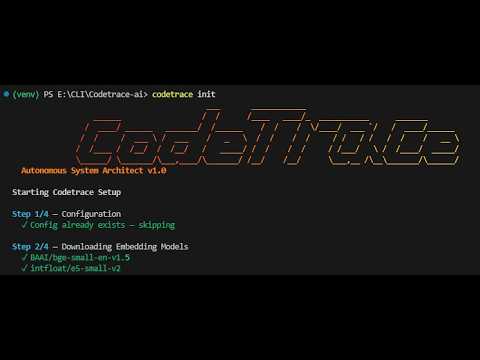
🎥 Action in Demo
✨ What Codetrace Can Do For You
Codetrace acts as a highly knowledgeable senior engineer on your project, capable of:
- Autonomous Code Research: Ask a question, and the agent proactively uses tools to search, read files, and analyze the codebase to find the exact answer.
- Structural Call Graph Mapping: Navigates class and function definitions across 6+ languages (Python, JS, TS, Java, C++, Go) to see exactly how your application is wired.
- Blast Radius Analysis: Analyzes the impact of code modifications before you make them, preventing unintended breakages.
- Proposing Code Edits: Automatically writes and presents interactive code changes in the terminal, giving you a diff preview to approve or decline before saving.
- Smart Delta Syncing: Reacts to changes in your code using SHA-256 hashing to lightning-fast re-indexes only the files you touched.
- IDE Context Injection (MCP): Connects its powerful hybrid brain directly into Cursor, Windsurf, or Claude Code for in-editor assistance.
🔒 100% Local and Air-Gapped Capable
Codetrace-ai is built with a Privacy-First architecture. All parsing, embedding, and graph mapping happens directly on your machine.
It can be used 100% offline with zero internet connection, subject to the following terms and conditions:
- Local LLM Required: You must configure a local Large Language Model via a provider like Ollama (e.g.,
llama3.2ordeepseek-coder). - Initial Model Download: By default, the system requires a brief initial internet connection to download local HuggingFace embedding models (
bge-smallande5-small). - True Air-Gapped Setup: If your machine has absolute zero internet access, you must:
- Run
codetrace initonce on a connected machine to cache the embedding models. - Transfer the cache folder (
~/.cache/huggingface/hubon Mac/Linux orC:\Users\<username>\.cache\huggingface\hubon Windows) to the offline machine via USB.
- Run
- Offline Flag: You must explicitly pass the
--offlineflag to strictly block internal telemetry and external requests (codetrace init --offlineandcodetrace chat --offline).
🚀 Installation
Requires Python 3.10+
pip install codetrace-ai
⚡ Quick Start
The ultimate frictionless setup. Navigate to any local codebase and type:
cd /path/to/your/project
codetrace init
- codetrace index . *(run this once at start and then only if you have added new files to the project)*
codetrace chat
(Note: codetrace init configures your provider, downloads models, indexes your code, and registers the MCP server in one go!)
🛠️ CLI Command Reference
Below is a quick reference of all available Codetrace commands and their 1-line descriptions:
codetrace init— Configures the LLM provider, downloads models, indexes the codebase, and registers MCP.codetrace chat— Launches the interactive autonomous AI chat loop for your codebase.codetrace index <PATH>— Forces a re-scan of a local folder or clones and indexes a GitHub URL.codetrace config— View or update your LLM provider and API key configuration.codetrace visualize— Generates and opens an interactive HTML graph map of your code architecture.codetrace history— Lists all past architectural chat sessions for the current project.codetrace export <ID>— Exports a specific chat session to the terminal or saves it as a Markdown file.
🔌 IDE Integration (MCP)
Codetrace-ai acts as a Model Context Protocol (MCP) server. Running codetrace init automatically installs this configuration into Cursor and Claude Code. You do not need to configure anything manually.
Once connected, your IDE gains access to specialized tools:
search_codebase (semantic search) • get_symbol_relations (call graphs) • analyze_impact (blast radius) • write_file (propose edits) • git_diff
Using Windsurf? Windsurf does not support auto-registration yet. You can add Codetrace manually.
- Open your
mcp.jsonfile in Windsurf. - Add the following to your
mcpServersblock:
"codetrace": {
  "command": "python",
  "args": [
    "/absolute/path/to/your/project/codetrace_mcp/server.py",
    "--project",
    "/absolute/path/to/your/project"
  ]
}
📂 File Structure
After initialization, your project will look like this:
your-project/
├── .codetrace/            ← created by codetrace
│   ├── chroma/            ← vector embeddings (ChromaDB)
│   ├── graph_metadata.db  ← code graph (SQLite)
│   └── chat_history.db    ← chat sessions (SQLite)
├── src/
├── ...
└── your code files
(Global config is stored in ~/.codetrace/config.json)
Run codetrace chat to start the interactive AI chat loop for your codebase. Once started, you can ask questions about your code and the AI will use its tools to find the answers and provide them to you in a conversational format. You can also use the /clear command to start a new session without exiting the chat.
For first time to see if all files are indexed correctly or not ask: inspect_index
To see the call graph of your code ask: visualize


Download files
Download the file for your platform. If you're not sure which to choose, learn more about installing packages.
Source Distribution
Built Distribution
Filter files by name, interpreter, ABI, and platform.
If you're not sure about the file name format, learn more about wheel file names.
Copy a direct link to the current filters
File details
Details for the file codetrace_ai-1.0.0.tar.gz.
File metadata
- Download URL: codetrace_ai-1.0.0.tar.gz
- Upload date:
- Size: 86.4 kB
- Tags: Source
- Uploaded using Trusted Publishing? No
- Uploaded via: twine/6.2.0 CPython/3.11.14
File hashes
| Algorithm | Hash digest | |
|---|---|---|
| SHA256 |
181d23edc285174d8d7bb640e417547a241616476f9f3b273c5595a66033f6cb
|
|
| MD5 |
6c65a0510c22a76306b6aaa8bd5d0c01
|
|
| BLAKE2b-256 |
89e6e210f634e76b6589e8f8d760217ef60a72a4e05a61b04ab83077d577a8b1
|
File details
Details for the file codetrace_ai-1.0.0-py3-none-any.whl.
File metadata
- Download URL: codetrace_ai-1.0.0-py3-none-any.whl
- Upload date:
- Size: 94.4 kB
- Tags: Python 3
- Uploaded using Trusted Publishing? No
- Uploaded via: twine/6.2.0 CPython/3.11.14
File hashes
| Algorithm | Hash digest | |
|---|---|---|
| SHA256 |
39b2dd30b7095222ba09d939da5bdc06141d8815ed1ac9ed8b32b648c5f2a7ad
|
|
| MD5 |
69b6f9426bd0c0f690e88abd9f8cf4d6
|
|
| BLAKE2b-256 |
20562f430ef90a7d79efe08e6947cce17e0cead51838b66a914261853c1f834f
|






