
Codex autorunner CLI per DESIGN-V1
Verified details
These details have been verified by PyPIProject links
GitHub Statistics
Maintainers

Project description
CAR (codex-autorunner)

Plan once, then let your favorite coding agents grind through tickets while you sleep — and ping you on Telegram or Discord when they're stuck.
CAR is a meta-harness for coding agents (Codex, Hermes, OpenCode, anything ACP). It is not a coding agent itself. You bring the plan and the agents; CAR coordinates the long-running execution.
🧪 Built for developers comfortable running long-horizon agent workflows on their own machine. If you babysit every agent turn, this isn't the tool for you.

What you actually do with CAR:
- ✍️ Write a plan, or chat with an AI to generate one
- 🎫 Convert it into CAR tickets (markdown + frontmatter) — use the CAR Ticket Skill with any assistant
- 🚶 Walk away. Agents work the queue and notify you (Telegram, Discord, inbox) only when they need input
🚀 Quickstart
Option 1 — Let your agent install it (recommended)
Paste this to Codex, Cursor, Hermes, OpenCode, or whichever assistant you trust on your machine:
Please walk me through setting up CAR (codex-autorunner) using this guide: https://github.com/Git-on-my-level/codex-autorunner/blob/main/docs/AGENT_SETUP_GUIDE.md
The agent will check prerequisites, install CAR, initialize a hub, and configure your first repo interactively.
Option 2 — Install it yourself
pipx install codex-autorunner   # or: pip install codex-autorunner
car --version
mkdir ~/car-hub && cd ~/car-hub
car init --mode hub
Then open the web UI and add a repo. Full walkthrough: AGENT_SETUP_GUIDE.md.
Recommended add-ons
- 💬 Telegram setup · Discord setup - Pick one
- 🤖 Hermes setup - Recommended PMA, keeps memory across all your CAR projects
- 🐳 Docker runtime per repo/worktree - For running agents in a containerized environment
🧠 How it works
At its core, CAR is a state machine: while there are incomplete tickets, pick the next one and run it against an agent. Tickets can be pre-written by you, by agents, or on the fly.
Tickets are the control plane. Agents are the execution layer.
When an agent wakes up it gets: knowledge of CAR, a pre-defined contextspace, the current ticket, and optionally the previous agent's output. That's it.
📸 See it in action — full screenshot gallery
🎛️ Ways to interact
| Surface | When to use it |
|---|---|
| Web UI | Main control plane. Set up repos, chat with agents, run the autorunner, view usage. Start here. (security notes) |
| CLI | The agent-friendly surface. Not really made for human use. |
| Telegram / Discord | Persistent multi-device chat without exposing your hub to the internet. |
| Project Manager Agent (PMA) | Conversational interface to CAR itself. Available in the web UI and chat apps. Hermes makes an excellent PMA thanks to its global memory. |
🤖 Supported agents
- Codex
- Hermes
- OpenCode
CAR integrates any reasonable ACP agent. Want yours added? Open an issue or PR.
🧭 Philosophy
CAR is very bitter-lesson-pilled. As models and agents get stronger, CAR should serve as leverage and stay out of their way. We treat the filesystem as the first-class data plane and lean on tools agents already know cold (git, python, markdown).
Because tickets are the control plane and agents are the execution layer, CAR is an amplifier. With a strong model it sings; with a model that scope-creeps or reward-hacks (marks tickets done that aren't), it will not.
Tickets as code
Tickets aren't just task descriptions — they're a software layer that operates inside CAR. You can write tickets that scope a feature and generate child tickets, spawn subagent code reviews, repay tech debt, etc. Tickets can be repo-agnostic or project-specific.
I maintain a "blessed" set of templates accessible from any CAR deployment. Got a generalizable ticket that works well across agents? Contribute it.
📚 Learn more
- 🗺️ Interactive architecture explorer (Principal Forks)
- 📜 Codebase constitution
- 🏛️ Architecture map
- 📐 Engineering standards
- 📝 Run history contract · State roots contract
From source
./car --help
The shim tries PYTHONPATH=src first and bootstraps a local .venv if dependencies are missing.
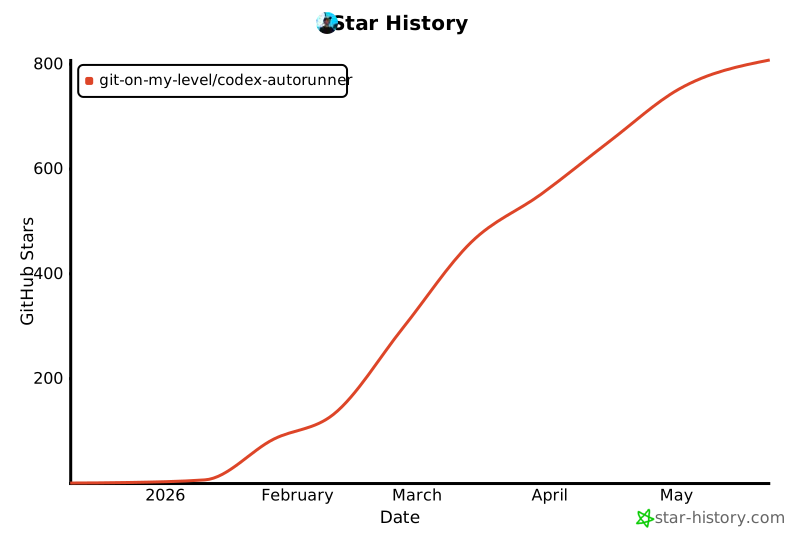
⭐ Star history
Project details
Verified details
These details have been verified by PyPIProject links
GitHub Statistics
Maintainers
Release history Release notifications | RSS feed


Download files
Download the file for your platform. If you're not sure which to choose, learn more about installing packages.
Source Distribution
Built Distribution
Filter files by name, interpreter, ABI, and platform.
If you're not sure about the file name format, learn more about wheel file names.
Copy a direct link to the current filters
File details
Details for the file codex_autorunner-1.11.11.tar.gz.
File metadata
- Download URL: codex_autorunner-1.11.11.tar.gz
- Upload date:
- Size: 2.9 MB
- Tags: Source
- Uploaded using Trusted Publishing? Yes
- Uploaded via: twine/6.1.0 CPython/3.13.12
File hashes
| Algorithm | Hash digest | |
|---|---|---|
| SHA256 |
5ed5a31873a2555780388b69e7a1e63b74ba293ee26644bd3be5bd10398c413c
|
|
| MD5 |
6f72adbb404c6b48f6bc94e60dcf5f55
|
|
| BLAKE2b-256 |
62106ed3f8723ce89c0847a024919c67c7ceb739a4f36de42cca43df3e2bf849
|
Provenance
The following attestation bundles were made for codex_autorunner-1.11.11.tar.gz:
Publisher:
release.yml on Git-on-my-level/codex-autorunner
-
Statement:
-
Statement type:
https://in-toto.io/Statement/v1 -
Predicate type:
https://docs.pypi.org/attestations/publish/v1 -
Subject name:
codex_autorunner-1.11.11.tar.gz -
Subject digest:
5ed5a31873a2555780388b69e7a1e63b74ba293ee26644bd3be5bd10398c413c - Sigstore transparency entry: 1394652899
- Sigstore integration time:
-
Permalink:
Git-on-my-level/codex-autorunner@f16b5d076a59512e1a0d73971824c1933ef9f908 -
Branch / Tag:
refs/tags/v1.11.11 - Owner: https://github.com/Git-on-my-level
-
Access:
public
-
Token Issuer:
https://token.actions.githubusercontent.com -
Runner Environment:
github-hosted -
Publication workflow:
release.yml@f16b5d076a59512e1a0d73971824c1933ef9f908 -
Trigger Event:
push
-
Statement type:
File details
Details for the file codex_autorunner-1.11.11-py3-none-any.whl.
File metadata
- Download URL: codex_autorunner-1.11.11-py3-none-any.whl
- Upload date:
- Size: 2.9 MB
- Tags: Python 3
- Uploaded using Trusted Publishing? Yes
- Uploaded via: twine/6.1.0 CPython/3.13.12
File hashes
| Algorithm | Hash digest | |
|---|---|---|
| SHA256 |
186def3a8b7f4e847909ab78fd0e7c6eae9090b832f57c0db95bf5765e5aab13
|
|
| MD5 |
8025dfa7d2f28411cd32690557168afc
|
|
| BLAKE2b-256 |
cefd2e6c5cecf90e898d4b7f4e0d650694aab88183fcdf8e844516754928bf1b
|
Provenance
The following attestation bundles were made for codex_autorunner-1.11.11-py3-none-any.whl:
Publisher:
release.yml on Git-on-my-level/codex-autorunner
-
Statement:
-
Statement type:
https://in-toto.io/Statement/v1 -
Predicate type:
https://docs.pypi.org/attestations/publish/v1 -
Subject name:
codex_autorunner-1.11.11-py3-none-any.whl -
Subject digest:
186def3a8b7f4e847909ab78fd0e7c6eae9090b832f57c0db95bf5765e5aab13 - Sigstore transparency entry: 1394652919
- Sigstore integration time:
-
Permalink:
Git-on-my-level/codex-autorunner@f16b5d076a59512e1a0d73971824c1933ef9f908 -
Branch / Tag:
refs/tags/v1.11.11 - Owner: https://github.com/Git-on-my-level
-
Access:
public
-
Token Issuer:
https://token.actions.githubusercontent.com -
Runner Environment:
github-hosted -
Publication workflow:
release.yml@f16b5d076a59512e1a0d73971824c1933ef9f908 -
Trigger Event:
push
-
Statement type:






