
Codex autorunner CLI per DESIGN-V1
Verified details
These details have been verified by PyPIProject links
GitHub Statistics
Maintainers

Project description
CAR (codex-autorunner)

CAR provides a set of low-opinion agent coordination tools for you to run long complex implementations using the agents you already love.
What this looks like in practice:
- You write a plan, or generate a plan by chatting with your favorite AI
- You convert the plan (or ask an AI to convert it for you) into CAR compatible tickets (markdown with some frontmatter). Use the CAR Ticket Skill with ChatGPT, Claude, Codex, or your preferred assistant.
- Go off and do something else, no need to babysit the agents, they will notify you if they need your input

How it works
CAR is very simple. At it's core, CAR is a state machine which checks to see if there are any incomplete tickets. If yes, pick the next one and run it against an agent. Tickets can be pre-populated by the user, but agents can also write tickets. Tickets are the control plane for CAR.
When each agent wakes up, it gets knowledge about CAR and how to operate within CAR, a pre-defined set of context (workspace files), the current ticket, and optionally the final output of the previous agent. This simple loop ensures that agents know enough to use CAR while also focusing them on the task at hand.
Philosophy
The philosophy behind CAR is to let the agents do what they do best, and get out of their way. CAR is very bitter-lesson-pilled. As models and agents get more powerful, CAR should serve as a form of leverage, and avoid constraining models and their harnesses. This is why we treat the filesystem as the first class data plane and utilize tools and languages the models are already very familiar with (git, python).
CAR treats tickets as the control plane and models as the execution layer. This means that we rely on agents to follow the instructions written in the tickets. If you use a sufficiently weak model, CAR may not work well for you. CAR is an amplifier for agent capabilities. Agents who like to scope creep (create too many new tickets) or reward hack (mark a ticket as done despite it being incomplete) are not a good fit for CAR.
Interaction patterns
CAR's core is a set of python functions surfaced as a CLI, operating on a file system. There are current 3 UIs built on top of this core.
Web UI
The web UI is the main control plane for CAR. From here you can set up new repositories or clone existing ones, chat with agents using their TUI, and run the ticket autorunner. There are many quality-of-life features like Whisper integration, editing documents by chatting with AI (useful for mobile), viewing usage analytics, and much more. The Web UI is the most full featured user-facing interface and a good starting point for trying out CAR.
I recommend serving the web UI over Tailscale. There is an auth token option but the system is not very battle tested.
Telegram
Telegram is the "on-the-go" and notification hub for CAR. From here you can kick off and monitor existing tickets, set up new tickets, and chat with agents. Your primary UX here is asking the agent to do things for you rather than you doing it yourself like you would on the web UI. This is great for on-the-go work, but it doesn't have full feature parity with the web UI.
Project Manager Agent
The project manager agent (PMA) is a way to use an AI agent to run CAR. For example instead of making/editing tickets in the UI, you can ask the PMA to do it for you. Instead of starting a ticket flow, the PMA can babysit it for you. The PMA can be accessed in the web and in Telegram, and also uses the CAR CLI directly.
Quickstart
The fastest way to get started is to pass this setup guide to your favorite AI agent. The agent will walk you through installation and configuration interactively based on your environment.
From source (repo checkout)
If you're working from a fresh clone of this repo, you can run the repo-local CLI shim:
./car --help
The shim will try PYTHONPATH=src first and, if dependencies are missing, will bootstrap a local .venv and install CAR.
Supported models
CAR currently supports:
- Codex
- Opencode
CAR is built to easily integrate any reasonable agent built for Agent Client Protocol (ACP). If you would like to see your agent supported, please reach out or open a PR.
Examples
Build out complex features and products by providing a series of tickets assigned to various agents.

Tickets are just markdown files that both you and the agent can edit.

You don't have to babysit the agents, they inbox you or ping you on Telegram.

You can collaborate with the agents in a shared workspace, independent of the codebase. Drop context there, extract artifacts, it's like a shared scratchpad.

All core workspace documents are also just markdown files, so you and the agent can easily edit them.

If you need to do something more custom or granular, you can use your favorite agent TUIs in the built-in terminal.


On the go? The web UI is mobile responsive, or if you prefer you can type or voice chat with your agents on Telegram.


Don't want to use the product directly? Delegate work to the PMA.

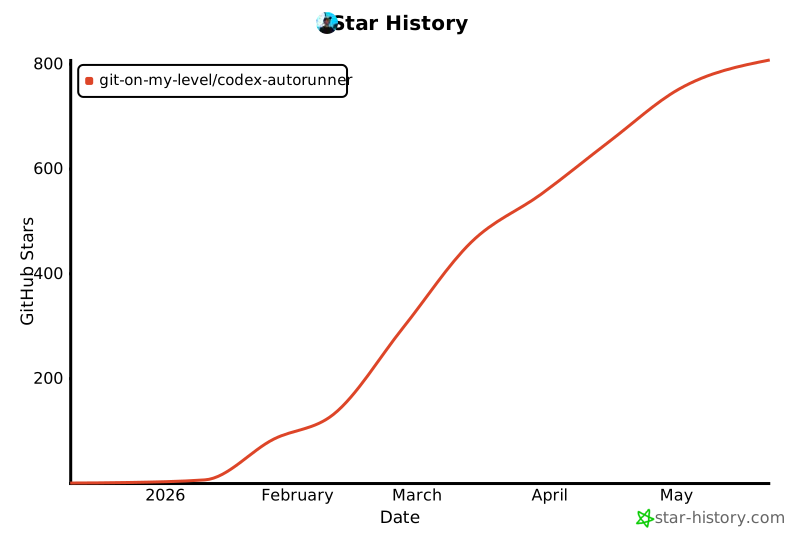
Star history
Project details
Verified details
These details have been verified by PyPIProject links
GitHub Statistics
Maintainers
Release history Release notifications | RSS feed


Download files
Download the file for your platform. If you're not sure which to choose, learn more about installing packages.
Source Distribution
Built Distribution
Filter files by name, interpreter, ABI, and platform.
If you're not sure about the file name format, learn more about wheel file names.
Copy a direct link to the current filters
File details
Details for the file codex_autorunner-1.3.3.tar.gz.
File metadata
- Download URL: codex_autorunner-1.3.3.tar.gz
- Upload date:
- Size: 1.2 MB
- Tags: Source
- Uploaded using Trusted Publishing? Yes
- Uploaded via: twine/6.1.0 CPython/3.13.7
File hashes
| Algorithm | Hash digest | |
|---|---|---|
| SHA256 |
9630c5e1e1da2b9aa2bcf4e2ed47ad0900f4f302e0f4474522e5642f3393d598
|
|
| MD5 |
d30fc971bbfe6154f73142d0070e686b
|
|
| BLAKE2b-256 |
39418fc338659025c8b558df5340f63152e84ab004831d23eff9a5d4cc35a521
|
Provenance
The following attestation bundles were made for codex_autorunner-1.3.3.tar.gz:
Publisher:
release.yml on Git-on-my-level/codex-autorunner
-
Statement:
-
Statement type:
https://in-toto.io/Statement/v1 -
Predicate type:
https://docs.pypi.org/attestations/publish/v1 -
Subject name:
codex_autorunner-1.3.3.tar.gz -
Subject digest:
9630c5e1e1da2b9aa2bcf4e2ed47ad0900f4f302e0f4474522e5642f3393d598 - Sigstore transparency entry: 943834276
- Sigstore integration time:
-
Permalink:
Git-on-my-level/codex-autorunner@2f0e1bcc8c441963a9abc7093921db260bfc0533 -
Branch / Tag:
refs/tags/v1.3.3 - Owner: https://github.com/Git-on-my-level
-
Access:
public
-
Token Issuer:
https://token.actions.githubusercontent.com -
Runner Environment:
github-hosted -
Publication workflow:
release.yml@2f0e1bcc8c441963a9abc7093921db260bfc0533 -
Trigger Event:
push
-
Statement type:
File details
Details for the file codex_autorunner-1.3.3-py3-none-any.whl.
File metadata
- Download URL: codex_autorunner-1.3.3-py3-none-any.whl
- Upload date:
- Size: 1.3 MB
- Tags: Python 3
- Uploaded using Trusted Publishing? Yes
- Uploaded via: twine/6.1.0 CPython/3.13.7
File hashes
| Algorithm | Hash digest | |
|---|---|---|
| SHA256 |
4a040966baf84f48c27d370c7f07a87d9cc7d53f04b839c606832c614d03b336
|
|
| MD5 |
7835b12bfe7341315c85354870030590
|
|
| BLAKE2b-256 |
1e10eb78505f3fa5059e15840c254063f8cb314d1b3b17b2357545efe88efe88
|
Provenance
The following attestation bundles were made for codex_autorunner-1.3.3-py3-none-any.whl:
Publisher:
release.yml on Git-on-my-level/codex-autorunner
-
Statement:
-
Statement type:
https://in-toto.io/Statement/v1 -
Predicate type:
https://docs.pypi.org/attestations/publish/v1 -
Subject name:
codex_autorunner-1.3.3-py3-none-any.whl -
Subject digest:
4a040966baf84f48c27d370c7f07a87d9cc7d53f04b839c606832c614d03b336 - Sigstore transparency entry: 943834283
- Sigstore integration time:
-
Permalink:
Git-on-my-level/codex-autorunner@2f0e1bcc8c441963a9abc7093921db260bfc0533 -
Branch / Tag:
refs/tags/v1.3.3 - Owner: https://github.com/Git-on-my-level
-
Access:
public
-
Token Issuer:
https://token.actions.githubusercontent.com -
Runner Environment:
github-hosted -
Publication workflow:
release.yml@2f0e1bcc8c441963a9abc7093921db260bfc0533 -
Trigger Event:
push
-
Statement type:






