
This release is a pre-release and may not be stable for production use.
Codex Desk
Find an earlier Codex investigation before repeating it. Search your recent local history, read the exact task’s response and its own supplied command or tool results, then decide which check to change or skip. Continue in the same native thread when you need to.
Try the browser sample — no install: search retry budget, read the checkout task’s response, then inspect its printf sample-checkout command and reported result. Optional: continue the sample conversation, save a draft, then reload to return. Sample preparation stays in this browser. Use the installer below for your own Codex history.
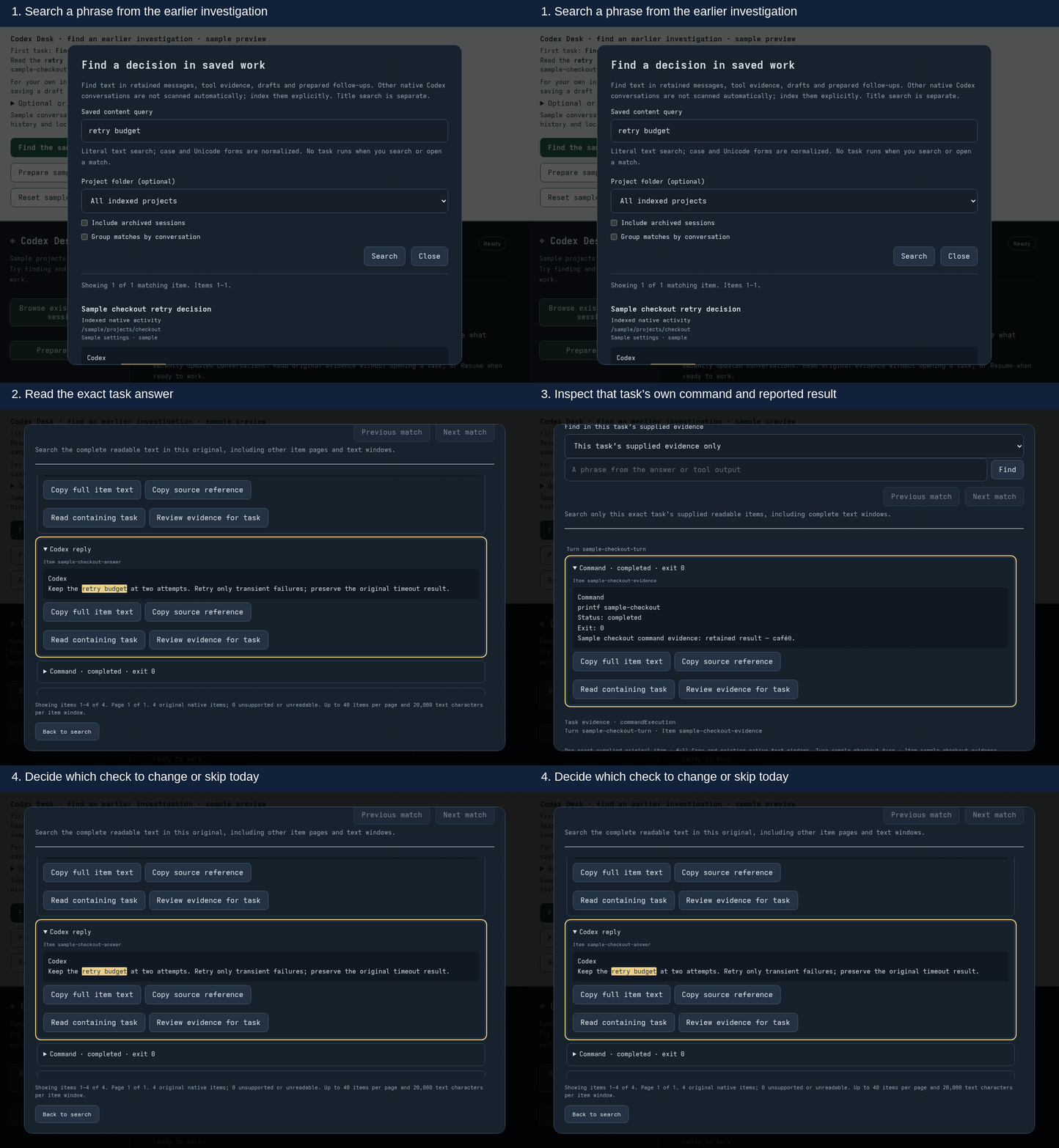
20-second synthetic checkout walkthrough: search “retry budget” → read the exact answer → inspect its own command result. Decide which check to change or skip; continuing is optional.
Install the preview
Use your existing Codex CLI installation and sign-in. Check codex --version in the terminal where you will launch Desk; this reports the native Codex CLI version. On macOS, you can also use the Codex bundled with Desktop through --codex, without installing another CLI. On Windows, check the reader in your installed app; use that bundled entry when its version check succeeds in your ordinary PowerShell terminal.
With uv, one command installs and opens the free local workbench on Linux, macOS, Windows or WSL:
uvx --prerelease allow codex-desk
The current version is an alpha, so --prerelease allow selects the preview from PyPI. The accepted GitHub wheel is also available.
Keep that terminal running. Desk opens the complete launch URL printed in that terminal in your browser (normally at http://127.0.0.1:8787). Run the same command next time and open its newly printed URL; your saved conversations and drafts remain local.
For your first task, pick one earlier investigation you would otherwise repeat. Choose Find a decision in past work → Index existing Codex history, enter a remembered phrase and choose Search, then Read original conversation. From the matching response or tool item, choose Read containing task → Read this task’s evidence to inspect the results supplied for that task. If its original supplies only messages, read the response; keep any check that still needs the missing command or tool result. Decide which check to change or skip; continuing the conversation is optional. First-task guide. Expected history missing?
If that address is already in use, use the complete URL in the existing Desk terminal to reopen that running server. To replace it with an updated version, stop its terminal with Ctrl+C before relaunching. To use a different port, append --port 8788 to the launch command. An occupied port does not create or change Desk state.
Update an existing uvx installation
uvx can reuse an older cached preview. First stop the running Desk terminal with Ctrl+C, then run this command once:
uvx --refresh --prerelease allow codex-desk@latest
Afterwards use the usual uvx --prerelease allow codex-desk launch command. Append any original --codex, --codex-home, --state-dir and --port options to the update and later launches. Reusing the same state directory retains your saved conversations, indexed history, drafts and prepared follow-ups. Check the selected Desk package version with uvx --prerelease allow codex-desk --version; codex --version checks your separate native Codex CLI installation.
Install with Python instead of uv
Python 3.11+ is required. The wheel has no runtime dependencies.
Linux/macOS/WSL:
mkdir -p "$HOME/codex-desk-install"
cd "$HOME/codex-desk-install"
python3 -m venv .venv
. .venv/bin/activate
python3 -m pip install --pre codex-desk
codex-desk
Windows PowerShell:
New-Item -ItemType Directory -Force "$HOME\codex-desk-install" | Out-Null
Set-Location "$HOME\codex-desk-install"
py -3 -m venv .venv
.\.venv\Scripts\python.exe -m pip install --pre codex-desk
.\.venv\Scripts\codex-desk.exe
For later launches, use codex-desk in the activated environment, or .\.venv\Scripts\codex-desk.exe in PowerShell.
Find, read, return
Pick one old investigation you would otherwise repeat:
- Find a decision in past work → Index existing Codex history.
- Search a phrase you remember. Read original conversation opens that exact result, including work whose project folder is gone.
- Read containing task → Read this task’s evidence shows its own response and supplied command/tool results. Decide which check to change or skip today.
Know the title or native thread ID? Use Browse all conversations instead of indexing. When one conversation fills the search results, Group matches by conversation helps you choose another source. Back to search keeps your submitted query and result page.
Continuing is optional. Continue this conversation resumes the same native thread when its project folder exists. Prepare an unsent Work/Plan draft, save paused follow-ups, or carry a reviewed source excerpt into another task. A saved evidence reference returns to the original and then to the same preparation. Relaunch with the same state directory to keep saved work; use the newly printed complete URL.
| Need | Guide |
|---|---|
| Find an old answer or missing history | First useful task |
| Use a thread ID, title or remembered instruction | Choose an entrance — English / 中文 |
| Read a task’s answer and supplied evidence | Task-led original review |
| Save an exact quote and return to it | Evidence preparation |
| Run, review approvals, stop, or recover a lost reply | Workflow reference |
| Open existing work in Chinese | 中文指南 |
| Compare native resume and other history tools | Choose a history workflow |
Local by design
Desk runs on loopback and uses your installed Codex app-server. The printed URL carries a per-launch browser access fragment; the browser keeps it in this tab’s session storage and uses it for private API requests. After a server restart, open the newly printed complete URL. Existing sign-in, model/provider, MCP, trust and sandbox settings come from your Codex configuration. A new Desk account or API key is unnecessary.
Reading-place metadata stays in this browser’s local storage: native home namespace and source IDs, disclosure states, text-window/visible-character offsets and scroll positions. Original supplied-item snapshots retain an item count and exact turn/item boundary for the next deliberate fresh read. Desk reads native content afresh on return; these records contain view and identity metadata. Project bindings, cached activity, indexed native history and drafts live in ~/.local/state/codex-desk/desk.sqlite3. History indexing and the original-conversation reader use native list/read requests; searching uses the local cache. New provider keys stay in a private local sidecar. Desk keeps your main configuration, auth and original rollouts intact. Native Codex sends model requests to your selected provider when you run a task.
Closing the browser leaves Desk running; Ctrl+C stops Desk and its owned native tasks. It runs its own app-server rather than attaching to an already-running Desktop backend.
Other launch options (append to either launcher):
codex-desk --codex /path/to/codex --no-browser
codex-desk --codex-home /your/codex-home --state-dir /your/desk-state --port 8788
codex-desk --version
The native launcher/profile smoke has passed on Ubuntu, Windows and macOS with CLI 0.171.0. Native task/MCP interaction acceptance uses Linux; browser first-use checks exercise desktop and 390px layouts.
Feedback and development
Task help: tell us which earlier decision you need, the step reached, and the first blocker or which check the original changed. Browser sample feedback. Suggestions and contributions are welcome.
From a source checkout with Python 3.11+:
python3 -m codex_desk.server
Run the selected domain checks separately:
python3 -m unittest discover -s tests -p 'test_*.py'
Domain checks use disposable native homes and SQLite state under the checkout’s ignored temp/. Set DESK_TEST_TEMP to choose a different scratch directory.
Daily CI runs the core domain lifecycle, one installed Chromium journey, and the genuine WebKit clipboard path. Native CI checks the installed launcher and retained profiles on Linux, Windows and macOS. Browser fixtures use controlled loopback history and native events. Native MCP recording and fixture · Build the browser sample.
License
MIT.
1 maintainer

Metadata
1 maintainer
Release files for codex-desk 0.1.0a72
For a detailed explanation of source distributions (sdists) and built distributions (wheels), please see the package formats documentation.
Built distribution (wheel)
| File | Interpreter | ABI | Platform | Actions Reset |
|---|---|---|---|---|
| codex_desk-0.1.0a72-py3-none-any.whl | Python 3 | none | any | Details for codex_desk-0.1.0a72-py3-none-any.whl |
Release files / codex_desk-0.1.0a72-py3-none-any.whl
| Download URL | codex_desk-0.1.0a72-py3-none-any.whl |
|---|---|
| Size | 259.2 kB |
| Tags | Python 3 |
|
SHA-256 checksum How to use checksums |
deafa6d66f2334c5341b2739fd8be72f69b47c94c37169e122f9e896caf42fa5
|
|
BLAKE2b-256 checksum How to use checksums |
8fecc380b81a21169be743f43b04ec9aa389917fbe1164ad60c821d6cfe47f73
|
| Upload date | |
|
Uploaded using Trusted Publishing? What is trusted publishing? |
Yes |
| Uploaded via |
twine/7.0.0 CPython/3.13.16
|
Provenance
Provenance describes where a file came from. On PyPI, provenance is shared via attestations, which provide a verifiable record of the build or publishing details. View details, limitations and caveats.


PyPI Publish Attestation
PyPI verified that this artifact, at this checksum, originated from the publisher listed below.
Signed by GitHub Actions, verified by PyPI on Nov 28, 2026.
Transparency logSecurity for codex-desk 0.1.0a72
Provenance
Provenance describes where a file came from. On PyPI, provenance is shared via attestations, which provide a verifiable record of the build or publishing details. View details, limitations and caveats.
Full provenance
1 file in this release has been uploaded with provenance metadata.
Attestation for codex_desk-0.1.0a72-py3-none-any.whl
PyPI Publish Attestation
PyPI verified that this artifact, at this checksum, originated from the publisher listed below.
Signed by GitHub Actions, verified by PyPI on Nov 28, 2026.
Transparency logA note on package security
PyPI is a repository for distributing packages, not a service for auditing them. While third-party security researchers and our staff do their best to detect and remove malicious packages, PyPI cannot guarantee the quality, security or suitability of any given package.
To learn more about protecting yourself from malicious actors, visit our package security documentation.














