
CodExt 
Encode/decode anything.





CodExt is a library (Python 3.10 or later) that extends the native codecs library (namely for adding new custom encodings and character mappings) and provides 120+ new codecs, hence its name combining CODecs EXTension. It also features a guess mode for decoding multiple layers of encoding and CLI tools for convenience.
$ pip install codext
| Want to contribute a new codec ? | Want to contribute a new macro ? |
|---|---|
| Check the documentation first Then PR your new codec |
PR your updated version of macros.json |
Demonstrations
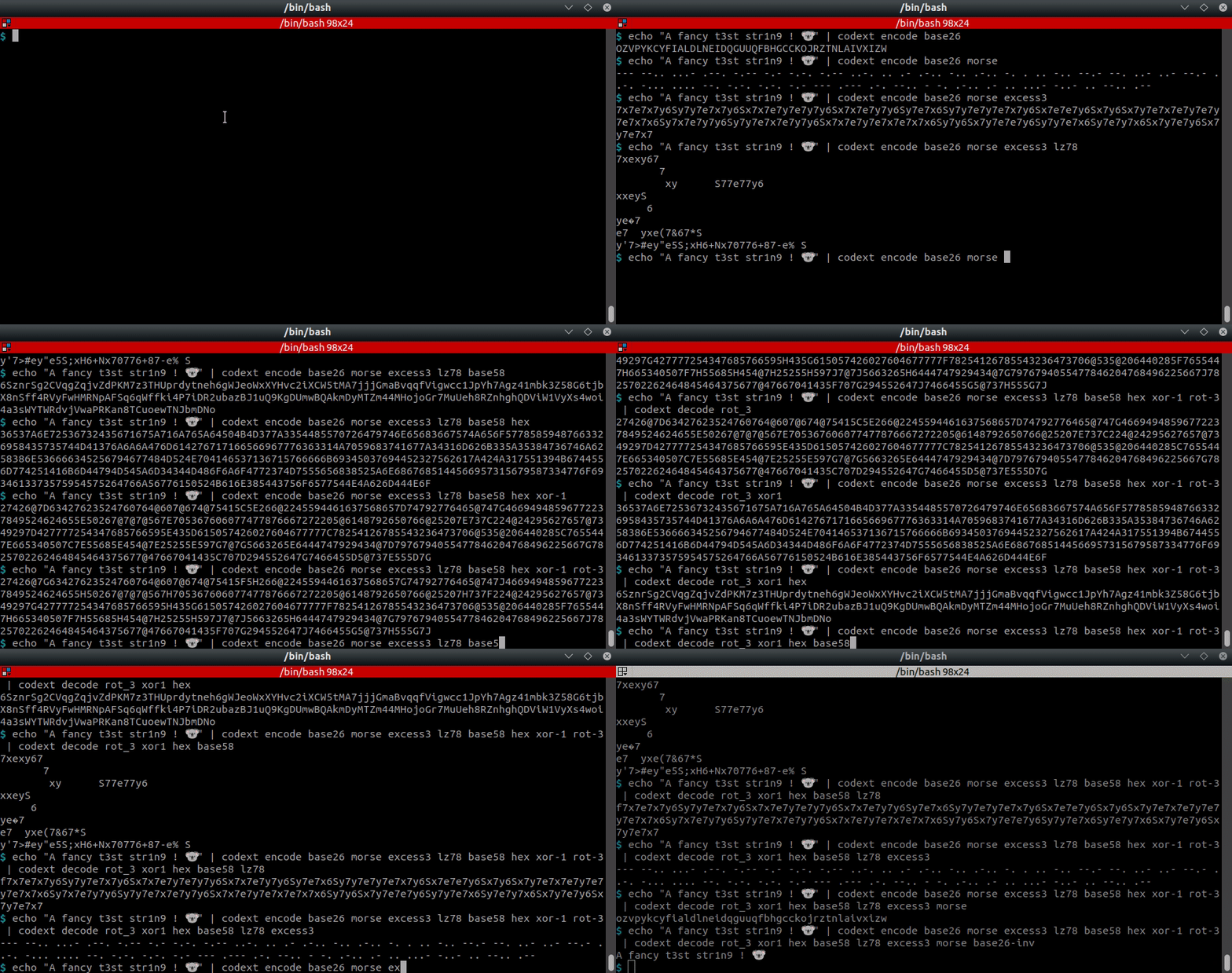

//img.shields.io/badge/Tweet%20(codext)--lightgrey?logo=twitter&style=social" alt="Tweet on codext" height="20"/>
$ codext -i test.txt encode dna-1
GTGAGCGGGTATGTGA

$ echo -en "test" | codext encode morse
- . ... -

$ echo -en "test" | codext encode braille
⠞⠑⠎⠞

$ echo -en "test" | codext encode base100
👫👜👪👫
Chaining codecs
$ echo -en "Test string" | codext encode reverse
gnirts tseT

$ echo -en "Test string" | codext encode reverse morse
--. -. .. .-. - ... / - ... . -

$ echo -en "Test string" | codext encode reverse morse dna-2
AGTCAGTCAGTGAGAAAGTCAGTGAGAAAGTGAGTGAGAAAGTGAGTCAGTGAGAAAGTCAGAAAGTGAGTGAGTGAGAAAGTTAGAAAGTCAGAAAGTGAGTGAGTGAGAAAGTGAGAAAGTC

$ echo -en "Test string" | codext encode reverse morse dna-2 octal
101107124103101107124103101107124107101107101101101107124103101107124107101107101101101107124107101107124107101107101101101107124107101107124103101107124107101107101101101107124103101107101101101107124107101107124107101107124107101107101101101107124124101107101101101107124103101107101101101107124107101107124107101107124107101107101101101107124107101107101101101107124103

$ echo -en "AGTCAGTCAGTGAGAAAGTCAGTGAGAAAGTGAGTGAGAAAGTGAGTCAGTGAGAAAGTCAGAAAGTGAGTGAGTGAGAAAGTTAGAAAGTCAGAAAGTGAGTGAGTGAGAAAGTGAGAAAGTC" | codext -d dna-2 morse reverse
test string
Using macros
$ codext add-macro my-encoding-chain gzip base63 lzma base64

$ codext list macros
example-macro, my-encoding-chain

$ echo -en "Test string" | codext encode my-encoding-chain
CQQFAF0AAIAAABuTgySPa7WaZC5Sunt6FS0ko71BdrYE8zHqg91qaqadZIR2LafUzpeYDBalvE///ug4AA==

$ codext remove-macro my-encoding-chain

$ codext list macros
example-macro
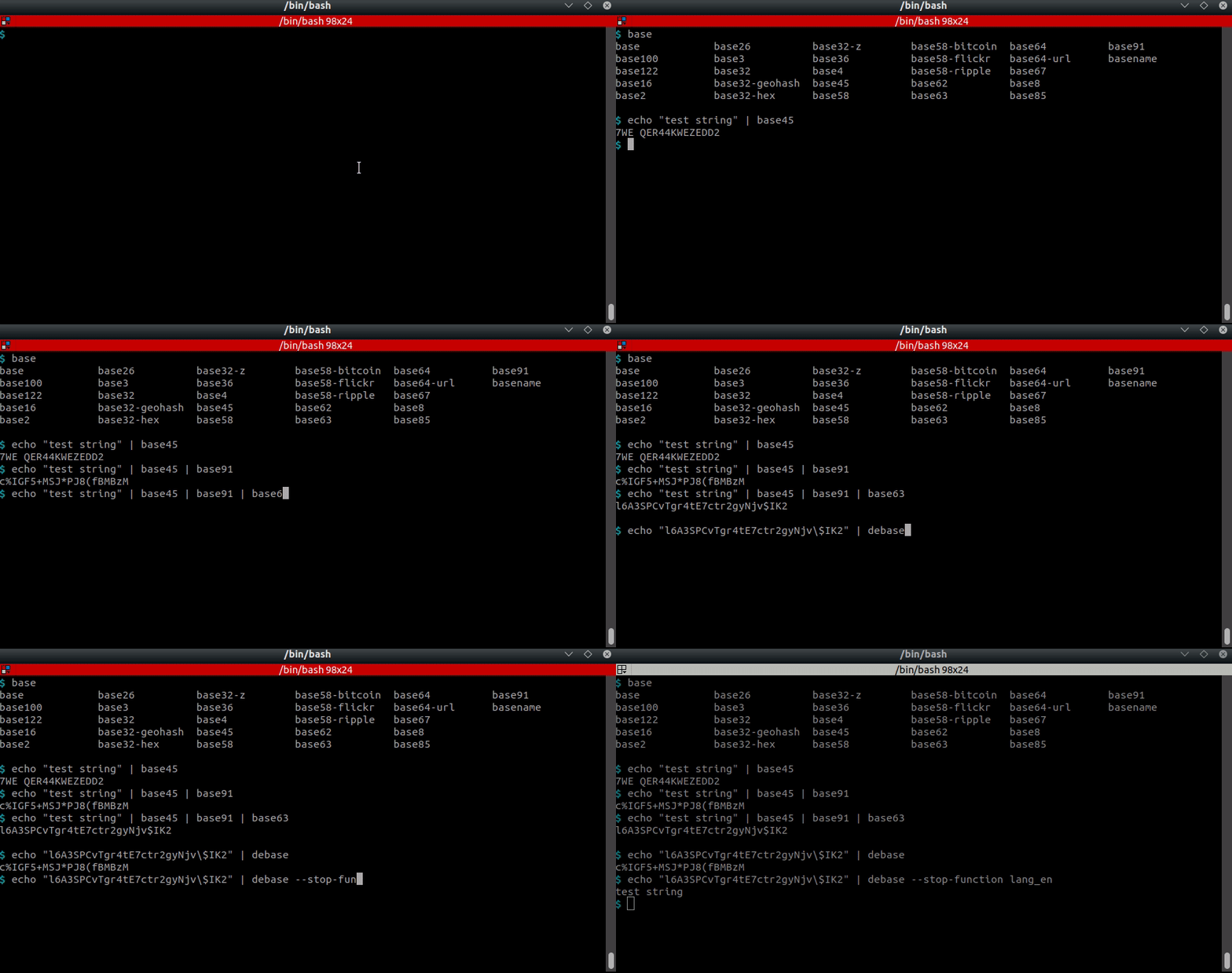
//img.shields.io/badge/Tweet%20(unbase)--lightgrey?logo=twitter&style=social" alt="Tweet on unbase" height="20"/>
Playing with base encodings.
$ echo "Test string !" | base122
*.7!ft9�-f9Â

$ echo "Test string !" | base91
"ONK;WDZM%Z%xE7L

$ echo "Test string !" | base91 | base85
B2P|BJ6A+nO(j|-cttl%

$ echo "Test string !" | base91 | base85 | base36 | base58-flickr
QVx5tvgjvCAkXaMSuKoQmCnjeCV1YyyR3WErUUErFf

$ echo "Test string !" | base91 | base85 | base36 | base58-flickr | base58-flickr -d | base36 -d | base85 -d | base91 -d
Test string !
$ echo "Test string !" | base91 | base85 | base36 | base58-flickr | unbase -m 3
Test string !

$ echo "Test string !" | base91 | base85 | base36 | base58-flickr | unbase -f Test
Test string !
Usage (CLI)
Listing codecs.
$ codext list encodings
a1z26                      adler32               affine             alternative-rot        ascii
atbash                     autoclave             bacon              barbie                 base
base1                      base2                 base3              base4                  base8
<<snipped>>
Finding a codec based on a name.
$ codext search bitcoin
base58
Encoding a string.
$ echo -en "This is a test" | codext encode polybius
44232443 2443 11 44154344
Encoding a file.
$ echo -en "this is a test" > to_be_encoded.txt
$ codext encode base64 < to_be_encoded.txt > text.b64
$ cat text.b64
dGhpcyBpcyBhIHRlc3Q=
Chaining codecs.
$ echo -en "mrdvm6teie6t2cq=" | codext encode upper | codext decode base32 | codext decode base64
test
Iteratively guessing decodings.
$ echo -en "test" | codext encode base64 gzip | codext guess
Codecs: gzip
dGVzdA==
$ echo -en "test" | codext encode base64 gzip | codext guess gzip -i base
Codecs: gzip, base64
test
Usage (Python)
Getting the list of available codecs.
>>> import codext

>>> codext.list()
['ascii85', 'base85', 'base100', 'base122', ..., 'tomtom', 'dna', 'html', 'markdown', 'url', 'resistor', 'sms', 'whitespace', 'whitespace-after-before']

Playing with some base encodings.

```python
>>> codext.encode("this is a test", "base58-bitcoin")
'jo91waLQA1NNeBmZKUF'

>>> codext.encode("this is a test", "base58-ripple")
'jo9rA2LQwr44eBmZK7E'

>>> codext.encode("this is a test", "base58-url")
'JN91Wzkpa1nnDbLyjtf'

>>> codecs.encode("this is a test", "base100")
'👫👟👠👪🐗👠👪🐗👘🐗👫👜👪👫'

>>> codecs.decode("👫👟👠👪🐗👠👪🐗👘🐗👫👜👪👫", "base100")
'this is a test'
Playing with some cryptography-based codecs.
>>> codext.encode("This is a test !", "vigenere-MYSECRETKET")
'Ffaw kj e mowm !'

>>> codext.encode("This is a test !", "autoclave-SECRET")
'Llkj ml t amkb !'
Encoding/decoding with various other codecs.
>>> for i in range(8):
        print(codext.encode("this is a test", "dna-%d" % (i + 1)))
GTGAGCCAGCCGGTATACAAGCCGGTATACAAGCAGACAAGTGAGCGGGTATGTGA
CTCACGGACGGCCTATAGAACGGCCTATAGAACGACAGAACTCACGCCCTATCTCA
ACAGATTGATTAACGCGTGGATTAACGCGTGGATGAGTGGACAGATAAACGCACAG
AGACATTCATTAAGCGCTCCATTAAGCGCTCCATCACTCCAGACATAAAGCGAGAC
TCTGTAAGTAATTCGCGAGGTAATTCGCGAGGTAGTGAGGTCTGTATTTCGCTCTG
TGTCTAACTAATTGCGCACCTAATTGCGCACCTACTCACCTGTCTATTTGCGTGTC
GAGTGCCTGCCGGATATCTTGCCGGATATCTTGCTGTCTTGAGTGCGGGATAGAGT
CACTCGGTCGGCCATATGTTCGGCCATATGTTCGTCTGTTCACTCGCCCATACACT
>>> codext.decode("GTGAGCCAGCCGGTATACAAGCCGGTATACAAGCAGACAAGTGAGCGGGTATGTGA", "dna-1")
'this is a test'

>>> codecs.encode("this is a test", "morse")
'- .... .. ... / .. ... / .- / - . ... -'

>>> codecs.decode("- .... .. ... / .. ... / .- / - . ... -", "morse")
'this is a test'

>>> with open("morse.txt", 'w', encoding="morse") as f:
	f.write("this is a test")
14

>>> with open("morse.txt",encoding="morse") as f:
	f.read()
'this is a test'

>>> print(codext.encode("An example test string", "baudot-tape"))
***.**
   . *
***.*
*  .
   .*
*  .*
   . *
** .*
***.**
** .**
   .*
*  .
* *. *
   .*
* *.
* *. *
*  .
* *.
* *. *
***.
  *.*
***.*
 * .*
List of codecs
BaseXX
-
base1: useless, but for the sake of completeness -
base2: simple conversion to binary (with a variant with a reversed alphabet) -
base3: conversion to ternary (with a variant with a reversed alphabet) -
base4: conversion to quarternary (with a variant with a reversed alphabet) -
base8: simple conversion to octal (with a variant with a reversed alphabet) -
base10: simple conversion to decimal -
base11: conversion to digits with a "a" -
base16: simple conversion to hexadecimal (with a variant holding an alphabet with digits and letters inverted) -
base26: conversion to alphabet letters -
base32: classical conversion according to the RFC4648 with all its variants (zbase32, extended hexadecimal, geohash, Crockford) -
base36: Base36 conversion to letters and digits (with a variant inverting both groups) -
base38: Base38 encoding of the Matter setup QR codes (chunks of 3 bytes) -
base45: Base45 DRAFT algorithm (with a variant inverting letters and digits) -
base58: multiple versions of Base58 (bitcoin, flickr, ripple) -
base62: Base62 conversion to lower- and uppercase letters and digits (with a variant with letters and digits inverted) -
base63: similar tobase62with the "_" added -
base64: classical conversion according to RFC4648 with its variant URL (or file) (it also holds a variant with letters and digits inverted) -
base67: custom conversion using some more special characters (also with a variant with letters and digits inverted) -
base85: all variants of Base85 (Ascii85, z85, Adobe, (x)btoa, RFC1924, XML) -
base91: Base91 custom conversion -
base100(or emoji): Base100 custom conversion -
base122: Base100 custom conversion -
base1024(or ecoji): Ecoji custom conversion (10 bits per emoji, versions 1 and 2) -
base2048: Base2048 custom conversion (11 bits per character, optimised for Twitter) -
base32768: Base32768 custom conversion (15 bits per character, optimised for UTF-16) -
base65536: Base65536 custom conversion (16 bits per character, optimised for UTF-32) -
bech32: Bech32 encoding with a human-readable part ;bech32mfor its Bech32m variant -
leb128(or varint): LEB128 encoding of lists of integers ;sleb128for its signed variant -
base-genericN: see base encodings ; supports any possible base
This category also contains ascii85, adobe, [x]btoa, zeromq with the base85 codec.
Binary
-
baudot: supports CCITT-1, CCITT-2, EU/FR, ITA1, ITA2, MTK-2 (Python3 only), UK, ... -
baudot-spaced: variant ofbaudot; groups of 5 bits are whitespace-separated -
baudot-tape: variant ofbaudot; outputs a string that looks like a perforated tape -
bcd: Binary Coded Decimal, encodes characters from their (zero-left-padded) ordinals -
bcd-extended0: variant ofbcd; encodes characters from their (zero-left-padded) ordinals using prefix bits0000 -
bcd-extended1: variant ofbcd; encodes characters from their (zero-left-padded) ordinals using prefix bits1111 -
chuck-norris: Chuck Norris unary code (runs of the 7-bit ASCII bits written with blocks of zeros) -
elias-gamma,elias-delta: Elias universal codes, encoding characters from their ordinals (or lists of integers with-integers) -
excess3: uses Excess-3 (aka Stibitz code) binary encoding to convert characters from their ordinals -
fibonacci: Fibonacci universal code, encoding characters from their ordinals (or lists of integers with-integers) -
gray: aka reflected binary code -
manchester: XORes each bit of the input with01 -
manchester-inverted: variant ofmanchester; XORes each bit of the input with10 -
rotateN: rotates characters by the specified number of bits (N belongs to [1, 7] ; Python 3 only)
Checksums
-
adler: Adler32 algorithm (relies onzlib) -
crc: CRC of lengths 8, 10-17, 21, 24, 30-32, 40, 64, 82 with a variety of polynoms -
luhn: Luhn mod N algorithm
Common
-
a1z26: keeps words whitespace-separated and uses a custom character separator -
cases: set of case-related encodings (including camel-, kebab-, lower-, pascal-, upper-, snake- and swap-case, slugify, capitalize, title) -
dummy: set of simple encodings (including integer, replace, reverse, word-reverse, substite and strip-spaces) -
octal: dummy octal conversion (converts to 3-digits groups) -
octal-spaced: variant ofoctal; dummy octal conversion, handling whitespace separators -
ordinal: dummy character ordinals conversion (converts to 3-digits groups) -
ordinal-spaced: variant ofordinal; dummy character ordinals conversion, handling whitespace separators
Compression
-
gzip: standard Gzip compression/decompression -
lz77: compresses the given data with the algorithm of Lempel and Ziv of 1977 -
lz78: compresses the given data with the algorithm of Lempel and Ziv of 1978 -
pkzip_deflate: standard Zip-deflate compression/decompression -
pkzip_bzip2: standard BZip2 compression/decompression -
pkzip_lzma: standard LZMA compression/decompression -
rle: compresses runs of identical characters with Run-Length Encoding (count before or after each character, compact, bytes or repeated-byte escape variants)
⚠️ Compression functions are of course definitely NOT encoding functions ; they are implemented for leveraging the
.encode(...)API fromcodecs.
Cryptography
-
adfgx: aka ADFGX Cipher (Polybius square and columnar transposition) ;adfgvxfor its 6x6 variant -
affine: aka Affine Cipher -
atbash: aka Atbash Cipher -
autoclave: aka Autoclave/Autokey Cipher (variant of Vigenere Cipher) -
bacon: aka Baconian Cipher -
barbie-N: aka Barbie Typewriter (N belongs to [1, 4]) -
bazeries: aka Bazeries Cipher (two Polybius grids and a transposition keyed by a number) -
beaufort: aka Beaufort Cipher (variant of Vigenere Cipher) -
bifid: aka Bifid Cipher (Delastelle's fractionation with a 5x5 Polybius square) ;trifidfor its 3x3x3 cube variant -
chaocipher: aka Chaocipher (two alphabets permuted after each letter) -
citrix: aka Citrix CTX1 password encoding -
columnar: aka Columnar Transposition Cipher (keyword-ordered columns ; a second keyword gives the double transposition) -
gronsfeld: aka Gronsfeld Cipher (variant of Vigenere Cipher with a numeric key) -
hill: aka Hill Cipher (blocks of letters multiplied by a key matrix modulo 26) -
nihilist: aka Nihilist Cipher (sums of the Polybius coordinates of the text and of a repeated key) -
playfair: aka Playfair Cipher -
phillips: aka Phillips Cipher (polyalphabetic block cipher with 8 key squares) -
polybius: aka Polybius Square Cipher -
porta: aka Porta Cipher (reciprocal variant of Vigenere Cipher with 13 alphabets) -
railfence: aka Rail Fence Cipher -
rotN: aka Caesar cipher (N belongs to [1,25]) -
scytaleN: encrypts using the number of letters on the rod (N belongs to [1,[) -
shiftN: shift ordinals (N belongs to [1,255]) -
skip: aka Skip Cipher (transposition reading every N-th character, looping on the text) -
trithemius: aka Trithemius Cipher (variant of Vigenere Cipher) -
vic: aka VIC Cipher -
vigenere: aka Vigenere Cipher -
xorN: XOR with a single byte (N belongs to [1,255])
⚠️ Crypto functions are of course definitely NOT encoding functions ; they are implemented for leveraging the
.encode(...)API fromcodecs.
Hashing
-
blake: includes BLAKE2b and BLAKE2s (Python 3 only ; relies onhashlib) -
crypt: Unix's crypt hash for passwords (Python 3 and Unix only ; relies oncrypt) -
md: aka Message Digest ; includes MD4 and MD5 (relies onhashlib) -
sha: aka Secure Hash Algorithms ; includes SHA1, 224, 256, 384, 512 (Python2/3) but also SHA3-224, -256, -384 and -512 (Python 3 only ; relies onhashlib) -
shake: aka SHAKE hashing (Python 3 only ; relies onhashlib)
⚠️ Hash functions are of course definitely NOT encoding functions ; they are implemented for convenience with the
.encode(...)API fromcodecsand useful for chaning codecs.
Languages
-
braille: well-known braille language (Python 3 only) -
ipsum: aka lorem ipsum -
galactic: aka galactic alphabet or Minecraft enchantment language (Python 3 only) -
leetspeak: based on minimalistic elite speaking rules -
morse: uses whitespace as a separator -
navajo: only handles letters (not full words from the Navajo dictionary) -
radio: aka NATO or radio phonetic alphabet -
southpark: converts letters to Kenny's language from Southpark (whitespace is also handled) -
southpark-icase: case insensitive variant ofsouthpark -
tap: converts text to tap/knock code, commonly used by prisoners -
tomtom: similar tomorse, using slashes and backslashes
Others
-
binhex: BinHex 4.0 (.hqx), the binary-to-text encoding of the classic Mac OS -
dna: implements the 8 rules of DNA sequences (N belongs to [1,8]) -
letter-indices: encodes consonants and/or vowels with their corresponding indices -
markdown: unidirectional encoding from Markdown to HTML -
xx: XXencode, a UUencode variant with an alphanumeric alphabet (+,-, digits and letters) -
yenc: Usenet binary-to-text encoding (raw, wrapped or framed with header, trailer and CRC32)
Steganography
-
hexagram: uses Base64 and encodes the result to a charset of I Ching hexagrams (as implemented here) -
klopf: aka Klopf code ; Polybius square with trivial alphabetical distribution -
resistor: aka resistor color codes -
rick: aka Rick cipher (in reference to Rick Astley's song "Never gonna give you up") -
sms: also called T9 code ; uses "-" as a separator for encoding, "-" or "_" or whitespace for decoding -
unicode-tags: aka ASCII smuggling ; hides ASCII text in invisible Unicode tag characters -
whitespace: replaces bits with whitespaces and tabs -
whitespace_after_before: variant ofwhitespace; encodes characters as new characters with whitespaces before and after according to an equation described in the codec name (e.g. "whitespace+2*after-3*before") -
zero-width: hides text in invisible zero-width characters (binary, ternary and quinary variants, compatible with zwsp-steg)
Web
-
html: implements entities according to this reference -
url: aka URL encoding

1 maintainer

Metadata
1 maintainer
Release files for codext 2.0.0
For a detailed explanation of source distributions (sdists) and built distributions (wheels), please see the package formats documentation.
Source distribution (sdist)
| File | Size | Uploaded | Provenance | Actions |
|---|---|---|---|---|
| codext-2.0.0.tar.gz | 6.0 MB | With provenance | Details for codext-2.0.0.tar.gz |
Built distribution (wheel)
| File | Interpreter | ABI | Platform | Actions Reset |
|---|---|---|---|---|
| codext-2.0.0-py3-none-any.whl | Python 3 | none | any | Details for codext-2.0.0-py3-none-any.whl |
Total release size: 6.2 MB
Release files / codext-2.0.0.tar.gz
| Download URL | codext-2.0.0.tar.gz |
|---|---|
| Size | 6.0 MB |
| Tags | Source |
|
SHA-256 checksum How to use checksums |
dbd322b49094bdabbe5e88a90a13bb6733be73e7ec2dc0bcd4e6df4fe12a5d32
|
|
BLAKE2b-256 checksum How to use checksums |
fe49db65c522e04dcc43ebf498211376d7237725b8e40016fb909b8ece24d18a
|
| Upload date | |
|
Uploaded using Trusted Publishing? What is trusted publishing? |
Yes |
| Uploaded via |
twine/7.0.0 CPython/3.13.16
|
Provenance
Provenance describes where a file came from. On PyPI, provenance is shared via attestations, which provide a verifiable record of the build or publishing details. View details, limitations and caveats.


PyPI Publish Attestation
PyPI verified that this artifact, at this checksum, originated from the publisher listed below.
Signed by GitHub Actions, verified by PyPI on Oct 28, 2026.
Transparency logRelease files / codext-2.0.0-py3-none-any.whl
| Download URL | codext-2.0.0-py3-none-any.whl |
|---|---|
| Size | 215.7 kB |
| Tags | Python 3 |
|
SHA-256 checksum How to use checksums |
b5106223d13c5a4606fa1039a64c1caa02f7399c7a107b5c15a4ab675f5434e3
|
|
BLAKE2b-256 checksum How to use checksums |
0f21cc22daf3b5d1ccbcd2dc1636069f40fa017420aa6c7c1614df4ff814b2c1
|
| Upload date | |
|
Uploaded using Trusted Publishing? What is trusted publishing? |
Yes |
| Uploaded via |
twine/7.0.0 CPython/3.13.16
|
Provenance
Provenance describes where a file came from. On PyPI, provenance is shared via attestations, which provide a verifiable record of the build or publishing details. View details, limitations and caveats.
PyPI Publish Attestation
PyPI verified that this artifact, at this checksum, originated from the publisher listed below.
Signed by GitHub Actions, verified by PyPI on Oct 28, 2026.
Transparency logSecurity for codext 2.0.0
Provenance
Provenance describes where a file came from. On PyPI, provenance is shared via attestations, which provide a verifiable record of the build or publishing details. View details, limitations and caveats.
Full provenance
All 2 files in this release have been uploaded with provenance metadata.
Attestation for codext-2.0.0.tar.gz
PyPI Publish Attestation
PyPI verified that this artifact, at this checksum, originated from the publisher listed below.
Signed by GitHub Actions, verified by PyPI on Oct 28, 2026.
Transparency logA note on package security
PyPI is a repository for distributing packages, not a service for auditing them. While third-party security researchers and our staff do their best to detect and remove malicious packages, PyPI cannot guarantee the quality, security or suitability of any given package.
To learn more about protecting yourself from malicious actors, visit our package security documentation.














