
Coding Tools MCP
Coding Tools MCP is a model-neutral coding-agent runtime MCP server. It exposes local coding primitives to any MCP client:
inspect repo -> search/read files -> apply structured patches -> run tests/commands
-> interact with stdin sessions -> inspect git status/diff
Demo Video
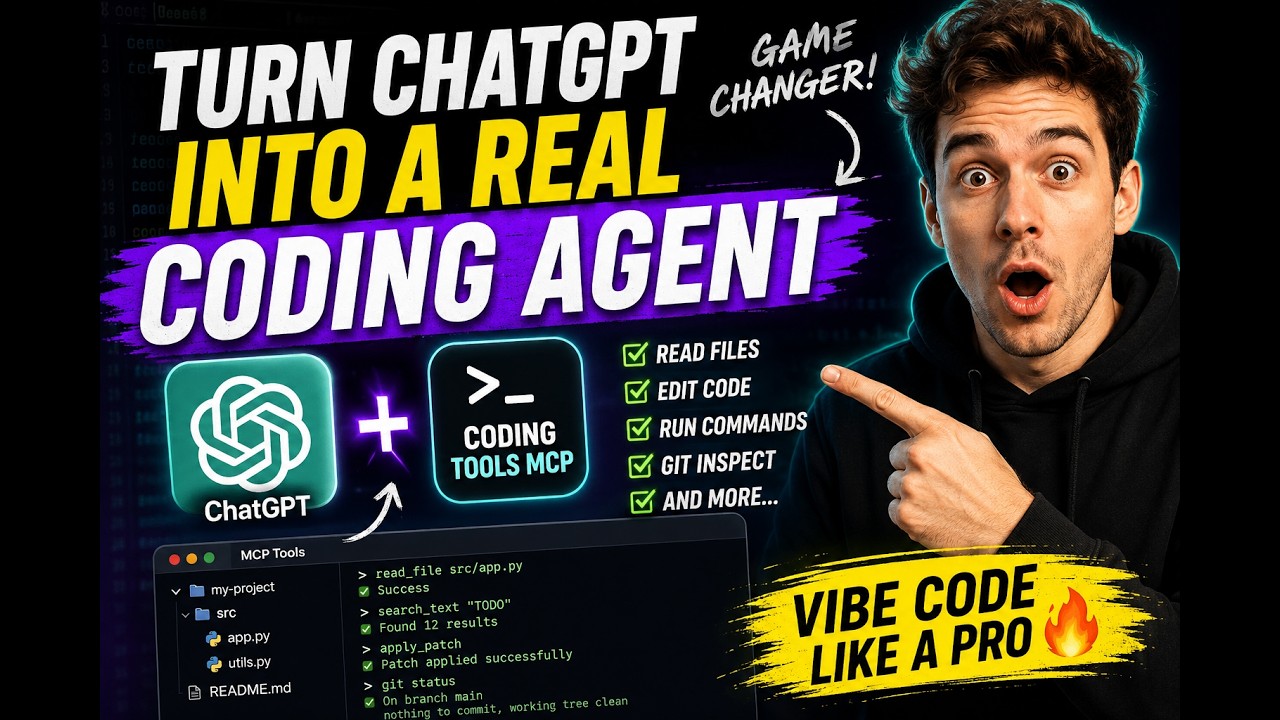
It is not a prompt wrapper. It does not expose external agent accounts, memory, cloud tasks, web search, image generation, model routing, plugin marketplace, or subagent orchestration as MCP tools.
Documentation Map
- Quickstart
- MCP client configuration
- Embedding in your app or agent
- Remote MCP
- Cloudflare sandbox control worker
- npm launcher
- Tools and schemas
- Permission modes
- Exec command recipes
- Docker sandbox
- Security policy
- Security boundary
- CI and test commands
- Dogfood
- SWE-bench evaluation
- Known limitations
- Troubleshooting
- Exec troubleshooting
- Competitive analysis
- Normative runtime contract: docs/runtime-contract-v0.2.md
Quickstart
Install the published command from PyPI:
curl -fsSL https://raw.githubusercontent.com/xyTom/coding-tools-mcp/main/scripts/install.sh | bash
Install and start local Streamable HTTP against a workspace:
curl -fsSL https://raw.githubusercontent.com/xyTom/coding-tools-mcp/main/scripts/install.sh \
  | bash -s -- --start --workspace /path/to/repo
Install and expose an authenticated bearer-token tunnel:
curl -fsSL https://raw.githubusercontent.com/xyTom/coding-tools-mcp/main/scripts/install.sh \
  | bash -s -- --tunnel cloudflared --auto-install-tunnel --workspace /path/to/repo
Or, from this checkout:
scripts/install.sh
Run the published package without a persistent install:
uvx coding-tools-mcp --workspace .
Use stdio for MCP clients:
uvx coding-tools-mcp --stdio --workspace /path/to/repo
If your toolchain is Node-based, launch the same server through npm:
npx coding-tools-mcp --stdio --workspace /path/to/repo
The npm package is a launcher only. The server itself stays the Python package
on PyPI, which the launcher starts through uvx or pipx run, so uv or
pipx must be on PATH. The launcher runs the latest PyPI release; pin a
server version with CODING_TOOLS_MCP_VERSION:
CODING_TOOLS_MCP_VERSION=0.2.0 npx coding-tools-mcp --stdio --workspace /path/to/repo
The launcher's own npm version is independent of the server version it starts.
If you are working from this checkout instead of a published package:
make start
Pass a different workspace, host, port, or extra server flags with Make variables:
make start MCP_WORKSPACE=/path/to/repo MCP_PORT=8000 MCP_ARGS="--permission-mode trusted"
If dependencies are missing, install the runtime in editable mode:
python -m pip install -e ".[dev]"
Run the desktop client MVP:
python -m pip install -e ".[desktop]"
coding-tools-mcp-desktop
The desktop client follows the system language on first launch and can switch between English and Simplified Chinese at runtime.
HTTP endpoint:
http://127.0.0.1:8765/mcp
Install the optional image extra when you want view_image auto-resize support:
python -m pip install -e ".[image]"
Stdio:
coding-tools-mcp --stdio --workspace /path/to/repo
Set CODING_TOOLS_MCP_TRACE=1 to emit redacted JSON tool-call trace events to stderr for local debugging. Logs stay off stdout so stdio JSON-RPC remains clean.
By default, exec_command passes a core shell environment only. For local toolchains that depend on inherited environment variables, such as MSVC developer prompts, start with:
CODING_TOOLS_MCP_SHELL_ENV_INHERIT=all coding-tools-mcp --workspace /path/to/repo
inherit=all still filters secret-looking and loader/startup variables unless dangerous mode is also enabled. For local development with dependency downloads, shell expansion, and inline interpreter snippets, use:
coding-tools-mcp --permission-mode trusted --workspace /path/to/repo
--allow-network remains available as a compatibility flag when you only want to open network-looking commands. If your MCP client does not support permission elicitation and you explicitly want to disable exec_command permission gates inside an isolated container or VM, start with:
coding-tools-mcp --permission-mode dangerous --workspace /path/to/repo
This disables exec_command permission gates such as network-looking commands, destructive command checks, shell expansion, inline scripts, and sensitive env checks. Workspace path boundaries for direct file tools still apply. --dangerously-skip-all-permissions remains as a compatibility alias.
MCP Client Examples
Generic stdio client:
[mcp_servers.coding_tools]
command = "uvx"
args = ["coding-tools-mcp", "--stdio", "--workspace", "/path/to/repo"]
Claude Code:
{
  "mcpServers": {
    "coding-tools": {
      "command": "uvx",
      "args": ["coding-tools-mcp", "--stdio", "--workspace", "/path/to/repo"]
    }
  }
}
Cursor:
{
  "mcpServers": {
    "coding-tools": {
      "command": "uvx",
      "args": ["coding-tools-mcp", "--stdio", "--workspace", "/path/to/repo"]
    }
  }
}
Clients that prefer a Node entry point can swap uvx for npx in any of the
examples above, keeping the same arguments:
{
  "mcpServers": {
    "coding-tools": {
      "command": "npx",
      "args": ["coding-tools-mcp", "--stdio", "--workspace", "/path/to/repo"]
    }
  }
}
Generic Streamable HTTP clients should use MCP protocol version 2025-11-25
and point at http://127.0.0.1:8765/mcp. Version 2025-06-18 remains
supported for existing clients.
Remote MCP
For remote MCP clients and local development over an HTTPS tunnel, keep the server bound to loopback and require bearer or OAuth authentication. The fixed tool set contains command execution and workspace mutation, so an anonymous public tunnel is unsafe:
CODING_TOOLS_MCP_AUTH_MODE=bearer \
./scripts/tunnel.sh cloudflared /path/to/repo
Configure the remote MCP client with the HTTPS tunnel URL:
URL: https://<tunnel-host>/mcp
The tunnel scripts support cloudflared, ngrok, and Microsoft Dev Tunnel. If the selected tunnel CLI is missing, the script asks before installing it:
scripts/tunnel.sh cloudflared /path/to/repo
scripts/tunnel.sh ngrok /path/to/repo
scripts/tunnel.sh devtunnel /path/to/repo
For clients that support custom headers, use bearer-token auth with
Authorization: Bearer <token>. OAuth-aware clients can use OAuth 2.1
Authorization Code + PKCE by setting CODING_TOOLS_MCP_AUTH_MODE=oauth. The
server publishes RFC 7591 dynamic client registration, binds exact redirect
URIs, and can infer its issuer from a one-shot tunnel request. Set
CODING_TOOLS_MCP_SERVER_URL only to pin a stable issuer. Clients that support
neither bearer headers nor OAuth need an external authenticated proxy.
See docs/remote-mcp.md for the exact modes and security notes.
Fixed Tool Set
The server exposes one stable catalog with truthful annotations. It does not
offer tool profiles, dynamically hide process tools, or provide edit_file.
apply_patch is the only direct file-mutation primitive. Permission modes
change command policy, not which tools the model sees.
Tools
P0 tools exposed by default:
server_infocheck_exec_environmentget_default_cwdset_default_cwdread_filelist_dirlist_filessearch_textapply_patchexec_commandwrite_stdinkill_sessionread_outputgit_statusgit_diffgit_loggit_showgit_blamerequest_permissions
Additional image tool exposed by default:
view_image
For input/output schemas and result envelopes, see docs/tools-and-schemas.md and docs/runtime-contract-v0.2.md.
Root AGENTS.md/CLAUDE.md instructions are loaded into the MCP initialize
context automatically; nested instruction files are indexed without eagerly
injecting their contents. No open_workspace tool call is required.
Tool content is concise agent-facing text, while structuredContent is the
complete stable machine result. Commands wait up to 10 seconds by default. Only
commands still running return a write_stdin next action; only truncated output
returns a read_output next action. Image base64 is emitted once in one MCP
image block.
Safety Boundary
The runtime binds one workspace root per server process. Paths are workspace-relative by default. Absolute paths, .. traversal, and symlink escapes are rejected. Recursive listing/search excludes .git, .reference, node_modules, target, dist, build outputs, virtualenvs, and common caches by default.
exec_command runs under policy controls with workspace-bound cwd, configurable shell environment inheritance, timeout, output caps, sensitive-value and loader/startup environment rejection, destructive command checks, network-looking command checks, shell-expansion permission gates, indirect absolute-path checks, cancellation/kill cleanup, session deadline watchdogs, and bounded session buffers. On Linux hosts with Landlock support it also applies filesystem confinement; on Windows, macOS, or Linux hosts without Landlock, command results include a warning and external sandboxing is required before running untrusted commands. This is still not a complete OS/container sandbox; see SECURITY.md.
--permission-mode safe is the default. --permission-mode trusted opens local-development gates while keeping secret filtering and destructive-command checks. --permission-mode dangerous disables exec_command permission gates for operators who accept that risk inside an isolated runner. Do not use dangerous mode for untrusted workspaces or untrusted MCP clients.
Compliance
make compliance
Compliance and CI commands are documented in docs/ci-and-tests.md. The checked-in report files are generated artifacts; inspect their suite field before treating them as full compliance evidence.
Dogfood And Benchmark
Dogfood and SWE-bench notes live in docs/dogfood.md, docs/swe-bench.md, and BENCHMARK.md. This repository does not claim a model-generated SWE-bench leaderboard result.
Development Commands
make lint
make typecheck
make test
make compliance
make ci
See docs/ci-and-tests.md for the full test matrix.
License
This project is licensed under the Apache License 2.0.
If you use code, documentation, substantial implementation details, or derivative work from this project, preserve the copyright notice, license notice, and NOTICE file, and clearly attribute the original project.
Project: Coding Tools MCP
Author: Coding Tools MCP Contributors
Source: https://github.com/xyTom/coding-tools-mcp
Citation metadata is available in CITATION.cff.
1 maintainer

Download files
Download the file for your platform. If you're not sure which to choose, learn more about installing packages.
Source Distribution
Built Distribution
Filter files by name, interpreter, ABI, and platform.
If you're not sure about the file name format, learn more about wheel file names.
Copy a direct link to the current filters
File details
Details for the file coding_tools_mcp-0.2.0.tar.gz.
File metadata
- Download URL: coding_tools_mcp-0.2.0.tar.gz
- Upload date:
- Size: 122.0 kB
- Tags: Source
- Uploaded using Trusted Publishing? Yes
- Uploaded via:
twine/6.1.0 CPython/3.13.14
File hashes
| Algorithm | Hash digest | |
|---|---|---|
| SHA256 |
855ab90b902bce394cd2b0c5c18710dd84ac71c686af9badc36b21830d02b558
|
|
| MD5 |
daf4202b317bc61b3847819f1f120e6c
|
|
| BLAKE2b-256 |
0a6cad5e9f3ee82a7aa8214f87d635b5955e679db79c695447b29e86e6d3a14d
|
Provenance
The following attestation bundles were made for coding_tools_mcp-0.2.0.tar.gz:
Publisher:
publish-pypi.yml on xyTom/coding-tools-mcp
-
Statement:
-
Statement type:
https://in-toto.io/Statement/v1 -
Predicate type:
https://docs.pypi.org/attestations/publish/v1 -
Subject name:
coding_tools_mcp-0.2.0.tar.gz -
Subject digest:
855ab90b902bce394cd2b0c5c18710dd84ac71c686af9badc36b21830d02b558 - Sigstore transparency entry: 2255841919
- Sigstore integration time:
-
Permalink:
xyTom/coding-tools-mcp@48e7e4f28d2550b3cad8cc041c63d1b3079997cb -
Branch / Tag:
refs/tags/v0.2.0 - Owner: https://github.com/xyTom
-
Access:
public
-
Token Issuer:
https://token.actions.githubusercontent.com -
Runner Environment:
github-hosted -
Publication workflow:
publish-pypi.yml@48e7e4f28d2550b3cad8cc041c63d1b3079997cb -
Trigger Event:
release
-
Statement type:
File details
Details for the file coding_tools_mcp-0.2.0-py3-none-any.whl.
File metadata
- Download URL: coding_tools_mcp-0.2.0-py3-none-any.whl
- Upload date:
- Size: 122.3 kB
- Tags: Python 3
- Uploaded using Trusted Publishing? Yes
- Uploaded via:
twine/6.1.0 CPython/3.13.14
File hashes
| Algorithm | Hash digest | |
|---|---|---|
| SHA256 |
ffd23066737c906171a6f63308a8d575913b018452778cb2b7efbc5c710c4666
|
|
| MD5 |
7bb76aba92ccf81fe9d8b5ec752ae073
|
|
| BLAKE2b-256 |
432177fa86c9dad2b85addd651bbcf518117251644aa2fdb7f1c4b37167cada6
|
Provenance
The following attestation bundles were made for coding_tools_mcp-0.2.0-py3-none-any.whl:
Publisher:
publish-pypi.yml on xyTom/coding-tools-mcp
-
Statement:
-
Statement type:
https://in-toto.io/Statement/v1 -
Predicate type:
https://docs.pypi.org/attestations/publish/v1 -
Subject name:
coding_tools_mcp-0.2.0-py3-none-any.whl -
Subject digest:
ffd23066737c906171a6f63308a8d575913b018452778cb2b7efbc5c710c4666 - Sigstore transparency entry: 2255841927
- Sigstore integration time:
-
Permalink:
xyTom/coding-tools-mcp@48e7e4f28d2550b3cad8cc041c63d1b3079997cb -
Branch / Tag:
refs/tags/v0.2.0 - Owner: https://github.com/xyTom
-
Access:
public
-
Token Issuer:
https://token.actions.githubusercontent.com -
Runner Environment:
github-hosted -
Publication workflow:
publish-pypi.yml@48e7e4f28d2550b3cad8cc041c63d1b3079997cb -
Trigger Event:
release
-
Statement type:







