
Parametric coil and inductor geometry generator

Project description


coil-geom
coil-geom is a Python package for generating and visualizing coil and inductor geometries using clean, parametric definitions. It is designed for engineering, scientific visualization, and symbolic / schematic-style plotting.
- Pure geometry first (NumPy-friendly)
- Save coil geometry data as PPTX, SVG, and PDF
- Suitable for electronics, physics, and CAD-style workflows
Coil Types There are four types of coil geometry:
- Circle Coil
- Ellipse Coil
- Ellipse Coil with Curvature Similarity
- Ellipse Coil with Shape Similarity
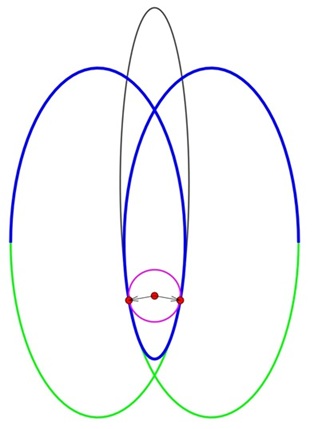
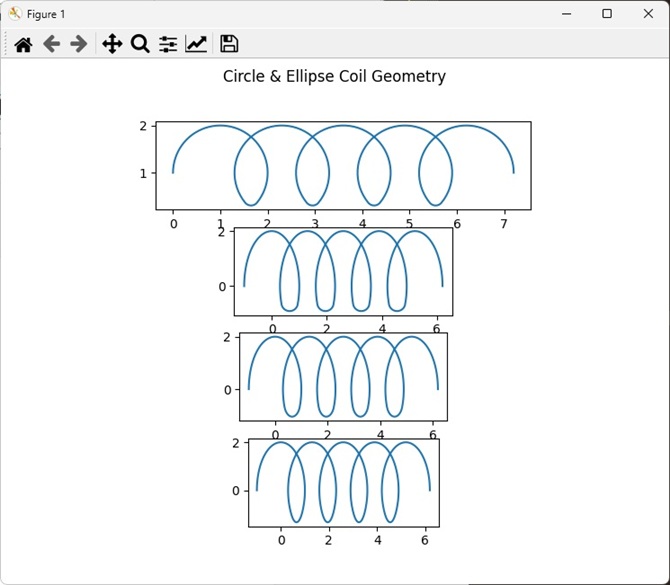
Each coil geometry consists of three parts: primary coil(circle or ellipse) and transition coil(circle or ellipse). Primary coil can be a circle or an ellipse. Transition coil also can be a circle or an ellipse. CircleCoil has two primary circles and a transition circle in-betweens. EllipseCoil has two primary ellipses and a transition circle in-betweens. EllipseCoilShape has two primary ellipses and an transition ellipse with shape similarity. EllipseCoilCurvature has two primary ellipses and a transition ellipse with curvature similarity).
Circle Coil
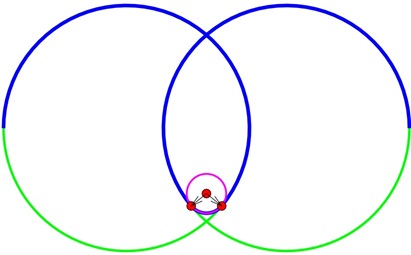
Ellipse Coil
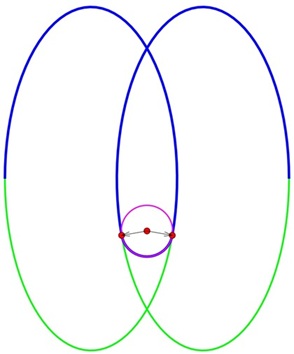
Ellipse Coil Shape Similarity
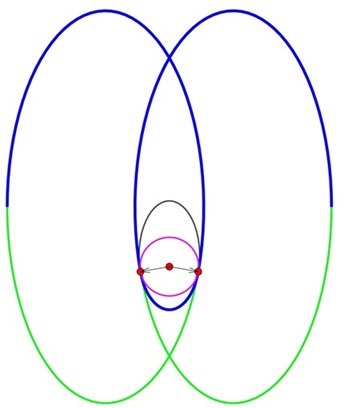
Ellipse Coil Curvature Similarity
🔗 Project Links
- GitHub Repository: https://github.com/uhwang/Coil-Geom
- PyPI Page: https://pypi.org/project/coil-geom/
- Issue Tracker: Report a bug
Installation
pip install coil-geom
Export Coil Geometries (PPTX, SVG, and PDF)
import coil_geom as cg

c_c_up = cg.CircleCoil(p_dist=0.7, ncoil=5)
c_c_dn = cg.CircleCoil(ncoil=5)

c_e_up = cg.EllipseCoil(p_dist=0.4, ncoil=5)
c_e_dn = cg.EllipseCoil(ncoil=5)

c_es_up = cg.EllipseCoilShape(p_dist=0.4, target=0.8, ncoil=5)
c_es_dn = cg.EllipseCoilShape(ncoil=5)

c_ec_up = cg.EllipseCoilCurvature(p_dist=0.4, ncoil=5)
c_ec_dn = cg.EllipseCoilCurvature(ncoil=5)

cg.save_ppt(c_c_up ,  "c_c_up.pptx" )
cg.save_ppt(c_c_dn ,  "c_c_dn.pptx" )
cg.save_ppt(c_e_up ,  "c_e_up.pptx" )
cg.save_ppt(c_e_dn ,  "c_e_dn.pptx" )
cg.save_ppt(c_es_up, "c_es_up.pptx", debug=True)
cg.save_ppt(c_es_dn, "c_es_dn.pptx", debug=True)
cg.save_ppt(c_ec_up, "c_ec_up.pptx", lead_l=2, lead_r=2)
cg.save_ppt(c_ec_dn, "c_ec_dn.pptx")

cg.save_svg(c_c_up ,  "c_c_up.svg" )
cg.save_svg(c_c_dn ,  "c_c_dn.svg" )
cg.save_svg(c_e_up ,  "c_e_up.svg" )
cg.save_svg(c_e_dn ,  "c_e_dn.svg" )
cg.save_svg(c_es_up, "c_es_up.svg", debug=True)
cg.save_svg(c_es_dn, "c_es_dn.svg", debug=True)
cg.save_svg(c_ec_up, "c_ec_up.svg", lead_l=2, lead_r=2)
cg.save_svg(c_ec_dn, "c_ec_dn.svg")

cg.save_pdf(c_c_up ,  "c_c_up.pdf" )
cg.save_pdf(c_c_dn ,  "c_c_dn.pdf" )
cg.save_pdf(c_e_up ,  "c_e_up.pdf" )
cg.save_pdf(c_e_dn ,  "c_e_dn.pdf" )
cg.save_pdf(c_es_up, "c_es_up.pdf", debug=True)
cg.save_pdf(c_es_dn, "c_es_dn.pdf", debug=True)
cg.save_pdf(c_ec_up, "c_ec_up.pdf")
cg.save_pdf(c_ec_dn, "c_ec_dn.pdf")
Plot Coil Geometries
import matplotlib.pyplot as plt
import coil_geom as cg

cc = cg.CircleCoil(ncoil=5)
ce = cg.EllipseCoil(ncoil=5)
ces = cg.EllipseCoilShape(ncoil=5)
cec = cg.EllipseCoilCurvature(ncoil=5)

x1, y1 = cc.create_geom()
x2, y2 = ce.create_geom()
x3, y3 = ces.create_geom()
x4, y4 = cec.create_geom()

fig, axs = plt.subplots(nrows=4, ncols=1,  figsize=(8, 6))
fig.suptitle('Circle & Ellipse Coil Geometry')
axs[0].plot(x1, y1)
axs[0].set_aspect('equal')
axs[1].plot(x2, y2)
axs[1].set_aspect('equal')
axs[2].plot(x3, y3)
axs[2].set_aspect('equal')
axs[3].plot(x4, y4)
axs[3].set_aspect('equal')
plt.show()
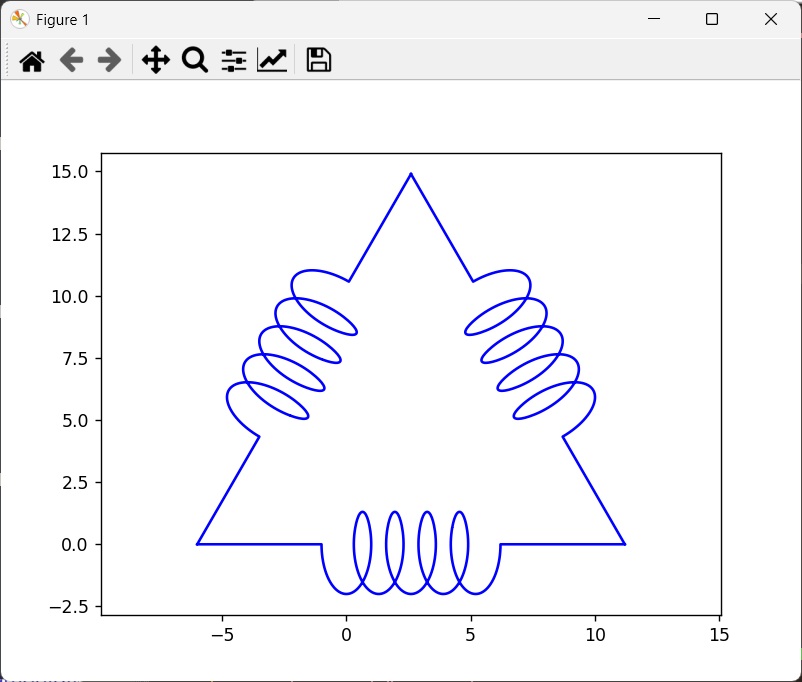
Plot 3 Phase Delta Connection
def three_delta(coil, lead_l, lead_r):

    xs, ys = [], []
    c1 = coil.create_geom(False, lead_l, lead_r)
    x1, y1 = c1.get()
    xs.append(x1)
    ys.append(y1)

    c2 = c1.flipud().rotate(60, axis=0)
    xs.append(c2.x)
    ys.append(c2.y)

    c3 = c1.flipud().rotate(-60, axis=2)
    xs.append(c3.x)
    ys.append(c3.y)

    return xs, ys
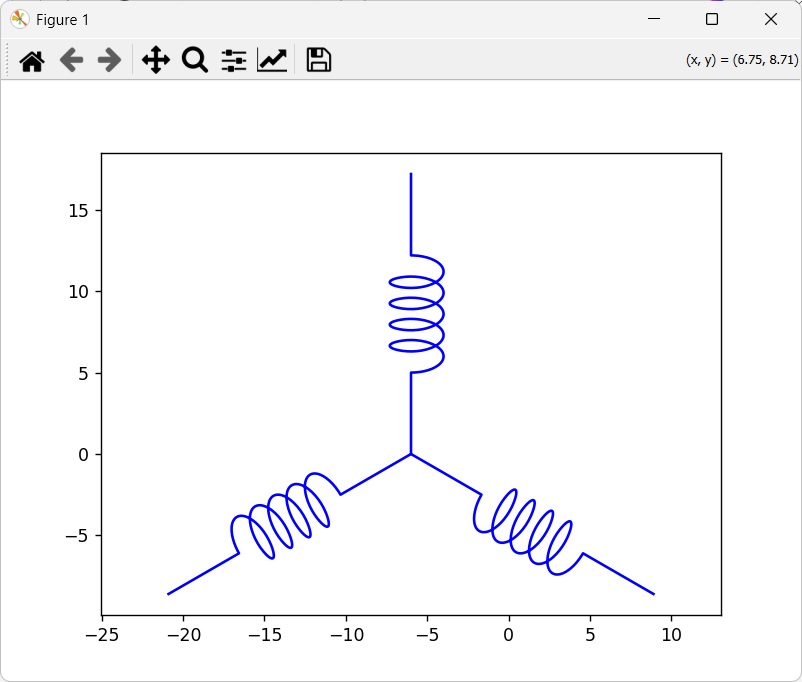
Plot 3 Phase Y Connection
def three_y(coil, lead_l, lead_r):

    xs, ys = [], []
    c = coil.create_geom(False, lead_l, lead_r)
    c1 = c.rotate(90, axis=0)
    xs.append(c1.x)
    ys.append(c1.y)

    c2 = c1.rotate(120, axis=0)
    xs.append(c2.x)
    ys.append(c2.y)

    c3 = c2.rotate(120, axis=0)
    xs.append(c3.x)
    ys.append(c3.y)
    return xs, ys
Release history Release notifications | RSS feed


Download files
Download the file for your platform. If you're not sure which to choose, learn more about installing packages.
Source Distribution
Built Distribution
Filter files by name, interpreter, ABI, and platform.
If you're not sure about the file name format, learn more about wheel file names.
Copy a direct link to the current filters
File details
Details for the file coil_geom-0.2.20.tar.gz.
File metadata
- Download URL: coil_geom-0.2.20.tar.gz
- Upload date:
- Size: 19.6 kB
- Tags: Source
- Uploaded using Trusted Publishing? No
- Uploaded via: twine/6.2.0 CPython/3.9.9
File hashes
| Algorithm | Hash digest | |
|---|---|---|
| SHA256 |
8a85c173c2d0db6c0a32041f8f327f7430eed8b00ca3790eba1f417d68b20be8
|
|
| MD5 |
5af450c93f92a2a311ba0d52ffe1420e
|
|
| BLAKE2b-256 |
a1f29ba1677a2885b076c4173ae8dc3f516648b3662a462017b3f58b1fe8706c
|
File details
Details for the file coil_geom-0.2.20-py3-none-any.whl.
File metadata
- Download URL: coil_geom-0.2.20-py3-none-any.whl
- Upload date:
- Size: 23.4 kB
- Tags: Python 3
- Uploaded using Trusted Publishing? No
- Uploaded via: twine/6.2.0 CPython/3.9.9
File hashes
| Algorithm | Hash digest | |
|---|---|---|
| SHA256 |
58389c2796800062081cdff7eda0613119bdd957cc1dee2ed254325212166f9e
|
|
| MD5 |
7dc93fa593e1d5692e5e3b9b365c251f
|
|
| BLAKE2b-256 |
2d7c6315992ce6d712c25436da5a9825a9ea05a50f9fa32b791a35ec4616941a
|






