
CollapsiblePane (PySide6)




A sleek, customizable, and animated collapsible container widget for PySide6, inspired by JavaFX's TitledPane. It wraps child widgets cleanly with smooth height & opacity transitions, customizable headers, badges, drop shadows, and chevron controls.
Features
- Smooth Animated Transitions: Expanding and collapsing with configurable duration, cubic easing, and opacity fading.
- Interruptible Animations: Mid-flight reverse transitions smoothly from the current height without jumping or flickering.
- JavaFX TitledPane Look & Feel: Complete Modena & Caspian styling with subtle 3D gradients, 1px borders, #0096C9 focus rings, solid directional arrows (
▶/▼), and unified box geometry. - JavaFX Accordion Container: Native
Accordionwidget managing mutually exclusiveCollapsiblePanegroups (at most one expanded at a time). - Full Keyboard Accessibility: Focusable header with Tab, active
:focusoutline, andSpace/Enterkeyboard activation. - JavaFX Properties: Full parity for
is_collapsible(lock open),is_animated,unified_box, andgraphic(set_graphic(widget)). - Customizable Header: Set background color, text color, border, padding, hover styles, and fonts.
- Customizable Chevron / Icons: Supports Unicode glyphs (e.g.,
▸,▾,▶,▼) and image icons (.svg,.png,QIcon). - Card-Style or Unified-Box Container: Choose between modern floating cards or seamless JavaFX-style contiguous bordered panels.
- Badge / Item Count Support: Built-in counter or status badge with pill styling and shadows.
- Pythonic Properties: Intuitive access via
is_expanded,content_widget,title,is_collapsible,is_animated, andgraphic. - Qt Signals: Emits
toggled(bool)whenever the pane expands or collapses, andexpanded_pane_changedonAccordion.
Installation
pip install collapsiblepane
Screenshots
| Collapsed View | Expanded View |
|---|---|
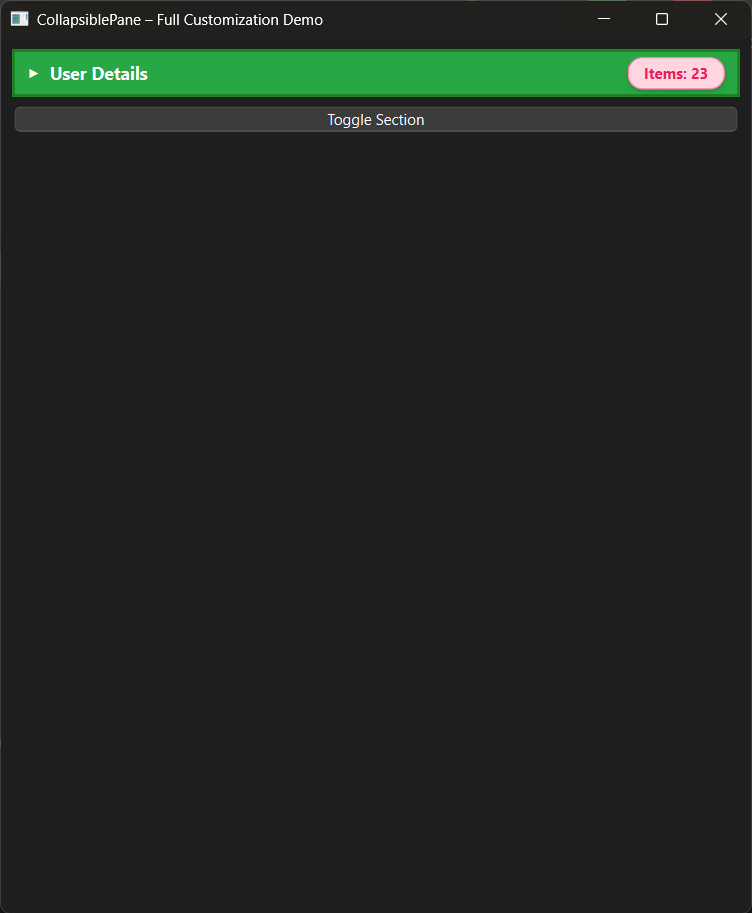 |
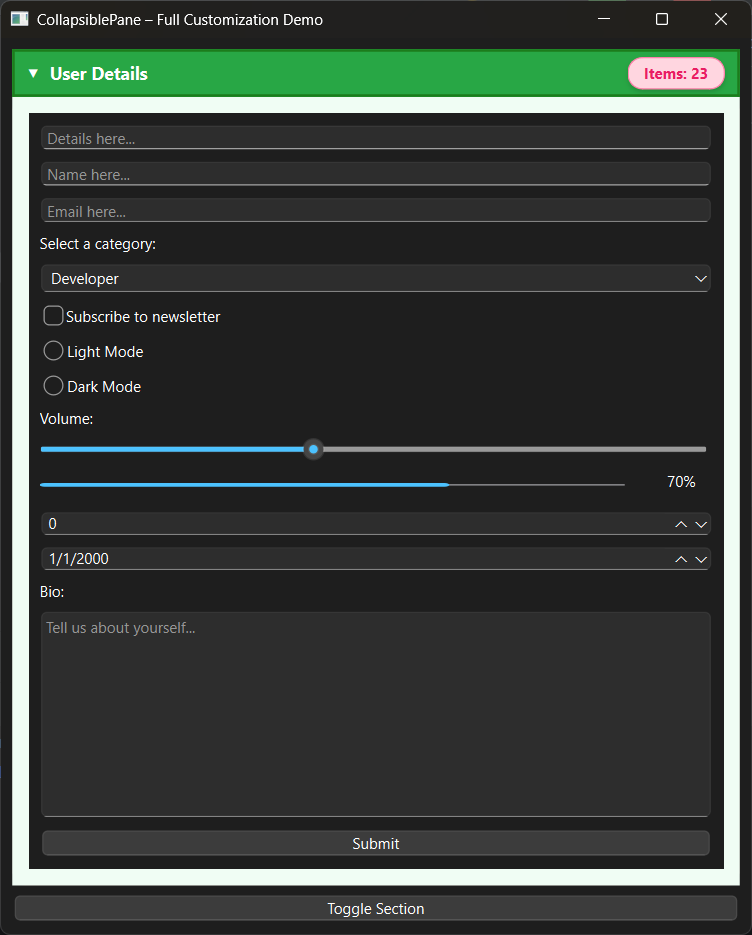 |
Quick Start
import sys
from PySide6.QtWidgets import QApplication, QMainWindow, QWidget, QVBoxLayout, QLabel, QPushButton, QLineEdit
from collapsiblepane import CollapsiblePane

class MainWindow(QMainWindow):
    def __init__(self):
        super().__init__()
        self.setWindowTitle("CollapsiblePane Demo")
        self.resize(500, 400)

        # 1. Create the pane
        pane = CollapsiblePane("User Details", animation_duration=220)

        # 2. Style via modern presets or custom code
        pane.set_header_style(
            background_color="#1e293b",
            text_color="#f8fafc",
            hover_color="#283548",
            border_color="#334155",
            border_radius=8
        )
        pane.set_card_style(background="#0f172a", border="#1e293b", radius=8, padding=12)
        pane.set_item_count(12)

        # 3. Create content widget
        content = QWidget()
        layout = QVBoxLayout(content)
        layout.addWidget(QLabel("Name:"))
        layout.addWidget(QLineEdit())
        layout.addWidget(QPushButton("Save"))

        pane.set_content_widget(content)

        # 4. Add to window layout
        container = QWidget()
        main_layout = QVBoxLayout(container)
        main_layout.addWidget(pane)
        main_layout.addStretch()
        self.setCentralWidget(container)

if __name__ == "__main__":
    app = QApplication(sys.argv)
    window = MainWindow()
    window.show()
    sys.exit(app.exec())
API Reference
Constructor
CollapsiblePane(
    title: str = "",
    animation_duration: int = 200,
    parent: Optional[QWidget] = None,
    *,
    collapsible: bool = True,
    animated: bool = True,
    unified_box: bool = False,
    expanded: bool = False
)
| Parameter | Type | Default | Description |
|---|---|---|---|
title |
str |
"" |
Initial header title. |
animation_duration |
int |
200 |
Duration of expand/collapse animation in milliseconds. |
parent |
Optional[QWidget] |
None |
Parent Qt widget. |
collapsible |
bool |
True |
If False, locks the pane open and hides the arrow (JavaFX collapsible). |
animated |
bool |
True |
If False, opens/closes instantly without animation (JavaFX animated). |
unified_box |
bool |
False |
When True, welds header and content into a single seamless JavaFX-style container. |
expanded |
bool |
False |
Initial expansion state on initialization. |
Properties
| Property | Type | Access | Description |
|---|---|---|---|
is_expanded |
bool |
get / set |
Whether the pane is currently expanded. Setting this animates the change. |
is_collapsible |
bool |
get / set |
When False, user interaction cannot collapse the pane (JavaFX parity). |
is_animated |
bool |
get / set |
Whether expand/collapse transitions animate or snap immediately. |
unified_box |
bool |
get / set |
Whether dynamic corner rounding connects the header and content into one box. |
graphic |
Optional[QWidget] |
get / set |
Custom header widget/icon placed before title (JavaFX graphicProperty). |
content_widget |
Optional[QWidget] |
get |
Returns the currently attached content widget. |
title |
str |
get / set |
Header title string. |
Methods
State & Content
toggle(expand: bool) -> NoneAnimates expanding (True) or collapsing (False).set_collapsed(collapsed: bool = True) -> NoneInstantly sets collapsed (True) or expanded (False) without animation.set_content_widget(widget: QWidget) -> NoneAttacheswidgetto the content area, deleting any previous content widget.clear_widget() -> NoneRemoves and deletes the current content widget.set_title(title: str) -> NoneUpdates the header title.set_graphic(widget: Optional[QWidget]) -> NoneInserts a custom graphic/icon widget into the title bar next to the label (JavaFXsetGraphic).set_collapsible(collapsible: bool) -> NoneEnables or disables collapsing.set_animated(animated: bool) -> NoneEnables or disables animation transitions.set_unified_box(enabled: bool = True) -> NoneEnables or disables the unified contiguous container border.
Styling & Appearance
apply_modena_style(dark: bool = False) -> NoneApplies 100% authentic JavaFX Modena styling: subtle 3D gradients, 1px border,#0096C9focus outline, solid arrows (▶/▼), and unified box geometry.apply_theme(theme: Union[str, dict]) -> NoneApplies a built-in theme ("modena","modena_dark","caspian","dark","light","indigo","slate") or custom token dictionary.set_header_style(...) -> NoneCustomizes the header frame:background_color,text_color,border_color,border_width,border_radius,padding_vertical,padding_horizontal,font_size,font_weight,hover_color.set_chevron_icons(collapsed_icon, expanded_icon) -> NoneAccepts strings (glyphs like"▶","▼","▸","▾"or file paths like"icon.svg") orQIconobjects.set_card_style(background, border, radius, padding, shadow_only) -> NoneStyles the expanded content container scroll area.set_card_shadow(color, blur, offset_y) -> NoneAdds a soft drop shadow beneath the content area.set_content_text_style(color, font_size) -> NoneApplies uniform typography styling to text inside the content area.set_title_style(color, font_size, font_weight, italic) -> NoneFine-tunes header title typography.set_item_count(count: Optional[int], show_badge: bool = True) -> NoneDisplays or hides a numeric count badge.set_item_badge_style(...) -> NoneStyles the badge:text,bg_color,text_color,border_color,border_radius,padding_vertical,padding_horizontal,font_size,font_weight,shadow,min_width.set_max_content_height(max_height: Optional[int]) -> NoneSets maximum height constraint for expanded content before scrollbars appear.
Accordion Control
The Accordion class mirrors JavaFX's javafx.scene.control.Accordion:
from collapsiblepane import Accordion, CollapsiblePane

accordion = Accordion()
pane1 = CollapsiblePane("Section 1")
pane2 = CollapsiblePane("Section 2")

accordion.add_pane(pane1)
accordion.add_pane(pane2)
accordion.set_expanded_pane(pane1)  # Expanding pane1 auto-collapses pane2
| Method / Property | Description |
|---|---|
add_pane(pane: CollapsiblePane) |
Adds a pane to the accordion. |
remove_pane(pane: CollapsiblePane) |
Removes a pane from the accordion. |
panes / get_panes() |
List of all panes in the accordion. |
expanded_pane |
Returns the currently expanded pane, or None. |
set_expanded_pane(pane) |
Sets the single expanded pane, collapsing all others. |
expanded_pane_changed(pane) |
Qt Signal emitted whenever the expanded pane changes. |
Stylesheet (QSS) Theming
Every component has standardized Qt object names for direct QSS customization:
CollapsiblePane {
    background: transparent;
}
QFrame#header_frame {
    background-color: #1e293b;
    border: 1px solid #334155;
    border-radius: 8px;
}
QFrame#header_frame:hover {
    background-color: #283548;
}
QLabel#title_label {
    color: #f8fafc;
    font-size: 13px;
    font-weight: 600;
}
QLabel#chevron_label {
    color: #94a3b8;
}
QLabel#count_label {
    background-color: rgba(99, 102, 241, 0.18);
    color: #a5b4fc;
    border: 1px solid rgba(99, 102, 241, 0.35);
    border-radius: 10px;
    padding: 2px 8px;
}
QScrollArea#content_area {
    background-color: #0f172a;
    border: 1px solid #1e293b;
    border-radius: 8px;
}
Signals
toggled(bool): EmitsTruewhen expanded andFalsewhen collapsed.
Running the Demos
Run the standard demo:
python example.py
Run the authentic JavaFX TitledPane & Accordion showcase:
python javafx_example.py
Running Tests
Run the test suite using unittest or pytest:
python -m unittest discover tests/
# or
pytest
License
This project is licensed under the MIT License.
1 maintainer

Metadata
1 maintainer
Release files for collapsiblepane 0.12.0
For a detailed explanation of source distributions (sdists) and built distributions (wheels), please see the package formats documentation.
Source distribution (sdist)
| File | Size | Uploaded | Provenance | |
|---|---|---|---|---|
| collapsiblepane-0.12.0.tar.gz | 20.9 kB | Without provenance | Details |
Built distribution (wheel)
| File | Interpreter | ABI | Platform | Reset |
|---|---|---|---|---|
| collapsiblepane-0.12.0-py3-none-any.whl | Python 3 | none | any | Details |
Total release size: 36.1 kB
Release files / collapsiblepane-0.12.0.tar.gz
| Download URL | collapsiblepane-0.12.0.tar.gz |
|---|---|
| Size | 20.9 kB |
| Tags | Source |
|
SHA-256 checksum How to use checksums |
b5ce265695600b7bd55f19935ddce3af9a16fc4fb7eaa81bc78bf61dc85e2e20
|
|
BLAKE2b-256 checksum How to use checksums |
dd5544bf8305d7980e76161b652d9f6b20e54bad03c080a5d66986aa1662c404
|
| Upload date | |
|
Uploaded using Trusted Publishing? What is trusted publishing? |
No |
| Uploaded via |
twine/7.0.0 CPython/3.14.3
|
Release files / collapsiblepane-0.12.0-py3-none-any.whl
| Download URL | collapsiblepane-0.12.0-py3-none-any.whl |
|---|---|
| Size | 15.3 kB |
| Tags | Python 3 |
|
SHA-256 checksum How to use checksums |
48367e20948b1cd368492e88d744b8754b28e42dd47be208d03c0b93bbf3356f
|
|
BLAKE2b-256 checksum How to use checksums |
d33790c77b14241540082233b885d43c6ab637896719a0fd6bce9ec740e8e954
|
| Upload date | |
|
Uploaded using Trusted Publishing? What is trusted publishing? |
No |
| Uploaded via |
twine/7.0.0 CPython/3.14.3
|
Security for collapsiblepane 0.12.0
Provenance
Provenance describes where a file came from. On PyPI, provenance is shared via attestations, which provide a verifiable record of the build or publishing details. View details, limitations and caveats.
No provenance found
None of the files in this release were uploaded with provenance metadata.
A note on package security
PyPI is a repository for distributing packages, not a service for auditing them. While third-party security researchers and our staff do their best to detect and remove malicious packages, PyPI cannot guarantee the quality, security or suitability of any given package.
To learn more about protecting yourself from malicious actors, visit our package security documentation.














