
A PySide6 widget for collapsible panels, inspired by JavaFX's TitledPane

Project description
CollapsiblePane (PySide6) 
The CollapsiblePane is a reusable and customizable PySide6 widget that allows users to toggle the visibility of a content area with smooth animations—perfect for organizing UI sections. It mimics JavaFX’s TitledPane behavior and is designed to cleanly encapsulate widgets within collapsible sections.
Inspired by JavaFX's TitledPane.
Features
- Expand/Collapse content with animation
- Fully customizable title bar and content styling
- Add or replace content widgets easily
- Clean, layout-friendly design
- Signal support for toggled state
Usage
import sys
from PySide6.QtWidgets import (
    QApplication, QMainWindow, QWidget, QVBoxLayout, QLabel, QLineEdit,
    QComboBox, QCheckBox, QRadioButton, QSlider, QProgressBar,
    QSpinBox, QDateEdit, QTextEdit, QPushButton
)
from PySide6.QtCore import Qt
from collapsiblepane import CollapsiblePane


class Window(QMainWindow):
    def __init__(self):
        super().__init__()
        self.setWindowTitle("CollapsiblePane – Full Customization Demo")
        self.resize(600, 700)

        # --- Collapsible Section ---
        section = CollapsiblePane("User Details", animation_duration=400)

        # --- Header customization ---
        section.set_header_style(
            background_color="#28a745",  # Green header
            text_color="#FFFFFF",         # White text for contrast
            border_color="#1c7c1c",      # Darker green border
            border_width=2,
            font_size=16,
            font_weight="bold",
            hover_color="#32cd32"        # Lighter green hover
        )

        # --- Chevron customization ---
        section.set_chevron_icons("▸", "▾")

        # --- Card content style ---
        section.set_card_style(
            background="#f0fdf4",  # Soft light green background
            border="#28a74533",    # Subtle green border
            radius=10,
            padding=12
        )

        # --- Item count badge ---
        section.set_item_count(23)
        section.set_item_badge_style(
            bg_color="#ffd6e0",     # Light pink
            text_color="#e91e63",   # Dark pink text
            border_color="#ff80ab", # Matching border
            border_radius=12,
            padding_vertical=4,
            padding_horizontal=12,
            font_size=12,
            font_weight="bold",
            shadow=True,
            min_width=40
        )

        # --- Title style ---
        section.set_title_style(color="#ffffff", font_weight="bold", italic=False)

        # --- Content text style ---
        section.set_content_text_style(color="#333333", font_size=14)

        # --- Content Widget ---
        content_widget = QWidget()
        content_layout = QVBoxLayout(content_widget)
        content_layout.setSpacing(8)

        # User input fields
        details_edit = QLineEdit()
        details_edit.setPlaceholderText("Details here...")
        content_layout.addWidget(details_edit)
        name_edit=QLineEdit()
        name_edit.setPlaceholderText("Name here...")
        content_layout.addWidget(name_edit)
        email_edit = QLineEdit()
        email_edit.setPlaceholderText("Email here...")
        content_layout.addWidget(email_edit)

        # Category selection
        content_layout.addWidget(QLabel("Select a category:"))
        combo = QComboBox()
        combo.addItems(["Developer", "Designer", "Security Researcher", "Engineer"])
        content_layout.addWidget(combo)

        # Preferences
        content_layout.addWidget(QCheckBox("Subscribe to newsletter"))
        content_layout.addWidget(QRadioButton("Light Mode"))
        content_layout.addWidget(QRadioButton("Dark Mode"))

        # Volume and progress
        content_layout.addWidget(QLabel("Volume:"))
        slider = QSlider(Qt.Horizontal)
        slider.setValue(40)
        content_layout.addWidget(slider)

        progress = QProgressBar()
        progress.setValue(70)
        content_layout.addWidget(progress)

        # Additional inputs
        content_layout.addWidget(QSpinBox())
        content_layout.addWidget(QDateEdit())

        # Bio
        content_layout.addWidget(QLabel("Bio:"))
        text_edit = QTextEdit()
        text_edit.setPlaceholderText("Tell us about yourself...")
        content_layout.addWidget(text_edit)

        # Submit button
        content_layout.addWidget(QPushButton("Submit"))

        # Set the content widget
        section.set_content_widget(content_widget)

        # Force collapsed initially
        section.set_collapsed(collapsed=True)

        # --- Layout Setup ---
        container = QWidget()
        main_layout = QVBoxLayout(container)
        main_layout.addWidget(section)

        toggle_button = QPushButton("Toggle Section")
        toggle_button.clicked.connect(lambda: section.toggle(not section._expanded))
        main_layout.addWidget(toggle_button)

        main_layout.addStretch()
        self.setCentralWidget(container)


if __name__ == "__main__":
    app = QApplication(sys.argv)
    window = Window()
    window.show()
    sys.exit(app.exec())
Screenshot
| Collapsed | Expanded |
|---|---|
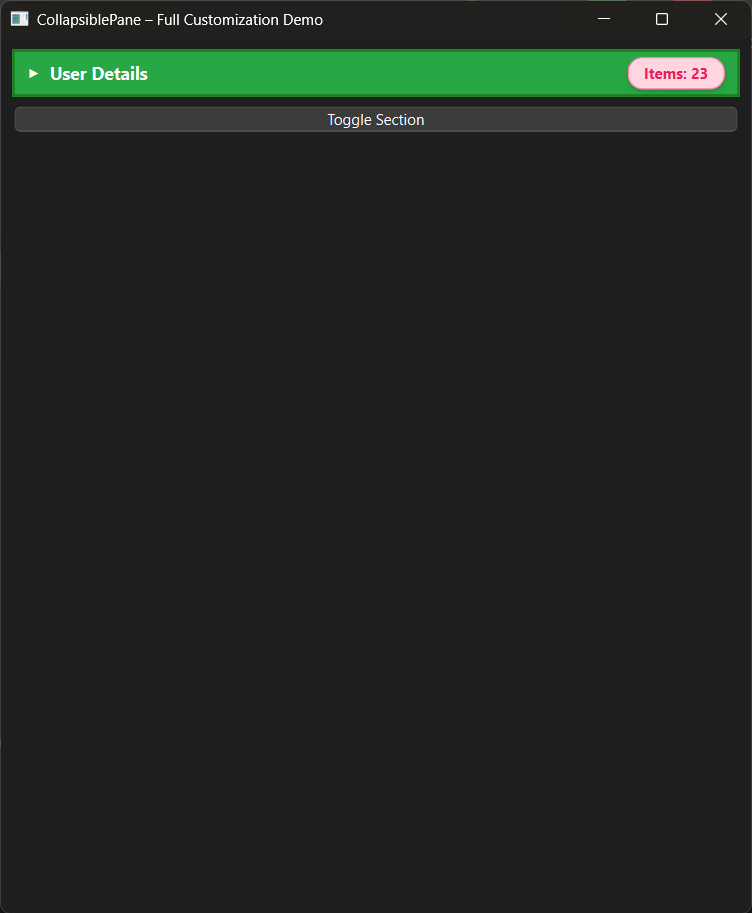 |
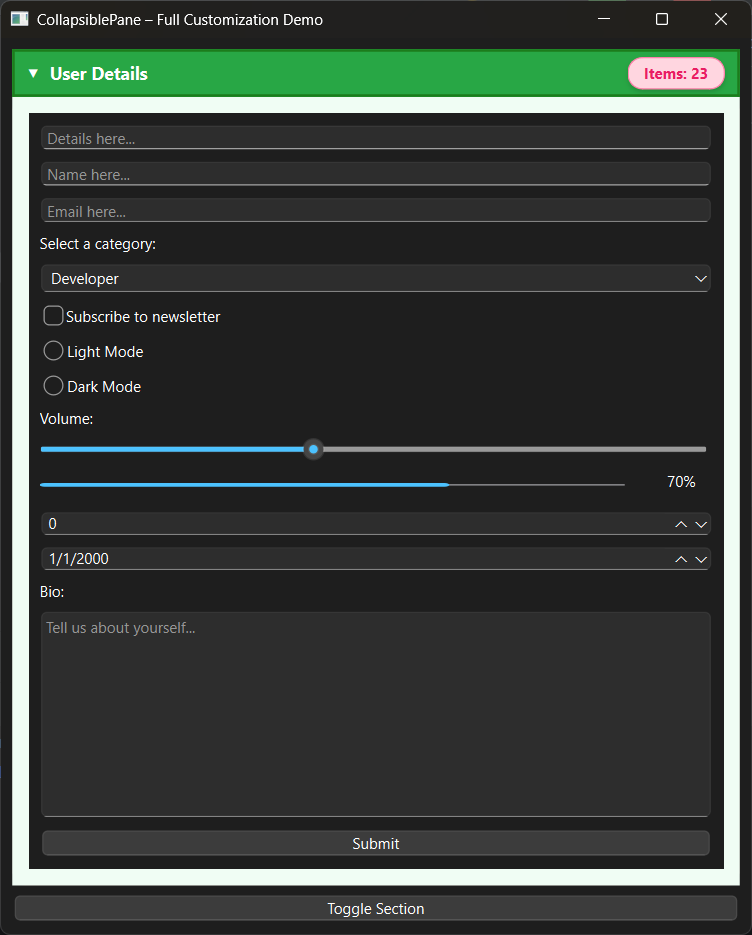 |
API Overview
Constructor
CollapsiblePane(title="", animation_duration=100)
Properties
content_widget:QWidgetis_expanded:bool
Methods
clear_widget()set_content_style(background_color, border_color, ...)set_title_bar_style(background_color, foreground_color)
Signals
toggled(bool)— emits when pane expands or collapses
Changelog
- Added full header customization (
set_header_style) - Added chevron icon customization (
set_chevron_icons) - Added card-style content area (
set_card_style) - Added item count badges with styling API
- Added title-level text customization
- Added content text styling
- Added programmatic expand/collapse methods
- Added
set_content_widget()API - Added initial collapsed state support
New Contributor:
Contributions
For contributions please visit Github Repository


Download files
Download the file for your platform. If you're not sure which to choose, learn more about installing packages.
Source Distribution
Built Distribution
Filter files by name, interpreter, ABI, and platform.
If you're not sure about the file name format, learn more about wheel file names.
Copy a direct link to the current filters
File details
Details for the file collapsiblepane-0.10.30.tar.gz.
File metadata
- Download URL: collapsiblepane-0.10.30.tar.gz
- Upload date:
- Size: 7.7 kB
- Tags: Source
- Uploaded using Trusted Publishing? No
- Uploaded via: twine/6.2.0 CPython/3.13.7
File hashes
| Algorithm | Hash digest | |
|---|---|---|
| SHA256 |
dda71d7297a08d9866d6e85bad272bf04e442caad750f00513ded859496b69e6
|
|
| MD5 |
92a0070f7d70f93c4190c5354106ae24
|
|
| BLAKE2b-256 |
b313082e8917cf1c821f58a7ae3e078040e319c27f3ae0378aba5b9dd61cd21f
|
File details
Details for the file collapsiblepane-0.10.30-py3-none-any.whl.
File metadata
- Download URL: collapsiblepane-0.10.30-py3-none-any.whl
- Upload date:
- Size: 8.0 kB
- Tags: Python 3
- Uploaded using Trusted Publishing? No
- Uploaded via: twine/6.2.0 CPython/3.13.7
File hashes
| Algorithm | Hash digest | |
|---|---|---|
| SHA256 |
1fa5c113941eaf244102c125e33517d78be2ab3251a2c5c13bc5dca6e540731c
|
|
| MD5 |
b0f581f15847a5ea5328b9b1668b04b1
|
|
| BLAKE2b-256 |
8285934310872e8fcb71e48c4b59457ce4ddc084ee9c92b7dd06246111333e5e
|






