
Configure files and images size limit through Plone control panel


Project description

Introduction
Plone Archetypes framework already gives you a max size validation for files and images, but the default configuration has some drawbacks:
is not simple to customize (best way is to use plone.recipe.atcontenttypes)
is the same for every Plone site of the environment
This product will let you customize this validation from Plone user interface.
How to use it
Just add the product to the buildout and install it in the site you want to use.
A new “Limit file size settings” option will be added in the control panel, where you can change the File and Image attachments.
No users will be able to upload files that exceed the limit. Also in TinyMCE text editor.
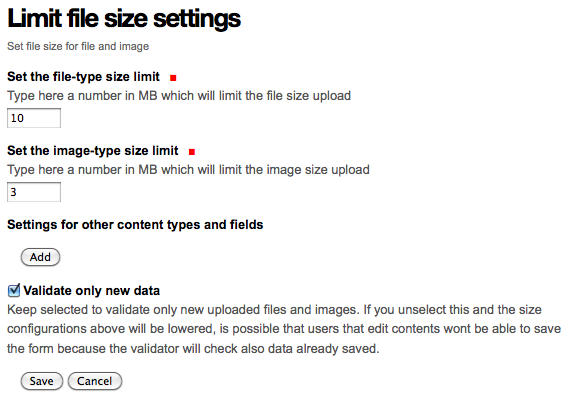
Advanced use
While default general purpose file and image settings can be OK for most common scenarios, you can also define custom settings for specific content types: just fill the “Settings for other content types and fields” section.
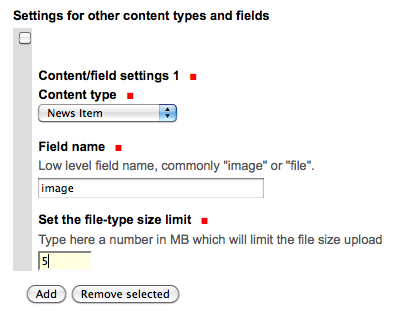
Configuration in that section wins over global configuration.
Validator bypass
If some users need to bypass the validation and upload some larger files, there is a new permission “collective.limitfilesizepanel: Bypass limit size” that allows to do this.
You only need to set this permission to some roles, and they’ll have no upload limits.
Dependencies
This products has been tested on:
Plone 3.3
Plone 4.2
Plone 4.3
It’s based on plone.app.registry that it not part of Plone on 3.3 version. You need to be sure that a compatible version is used (in my experience: use version 1.0b1).
Credits
Developed with the support of:

All of them supports the PloneGov initiative.
Authors
This product was developed by RedTurtle Technology team.

Changelog
2.0.0 (2017-05-04)
Version 1.3 don’t uninstall cleanly [keul]
Now validates also files and images created in TinyMCE [cekk]
Dexterity support [cekk]
1.3 (2015-07-06)
Added type+field configuration [keul]
Pyflakes cleanup [keul]
1.2 (2013-08-19)
Add German translations. [jone]
Ensure consistency of megabyte symbols to be MB. [davidjb]
1.1.2 (2013-03-26)
run rolemap configurations when upgrading from older versions [keul]
1.1.1 (2013-03-26)
fixed pypi classifiers [keul]
1.1 (2013-03-26)
Added a proper uninstall step [keul]
Now based on collective.monkeypatcher [keul]
i18n refactoring [keul]
Do not try to automatically validate file size for already existings attachments.
This provent to get validation error when editing file after size limit has been changed [keul]
Added new permission “collective.limitfilesizepanel: Manage limit file size settings”. Users with this permission can bypass size validation [cekk]
1.0 (Unreleased)
Initial release
Release history Release notifications | RSS feed


Download files
Download the file for your platform. If you're not sure which to choose, learn more about installing packages.
Source Distribution
File details
Details for the file collective.limitfilesizepanel-2.0.0.tar.gz.
File metadata
- Download URL: collective.limitfilesizepanel-2.0.0.tar.gz
- Upload date:
- Size: 83.0 kB
- Tags: Source
- Uploaded using Trusted Publishing? No
File hashes
| Algorithm | Hash digest | |
|---|---|---|
| SHA256 |
f5817a102e2e6627a3029926a024ad23fed42981105dd3b95ba7a8e363395ede
|
|
| MD5 |
c288c9b1f6eaa1e9c9e499ef2912f9b3
|
|
| BLAKE2b-256 |
60f166f2eda1c1af1d5d703a3ce4807b5aad4475a90564932df4de8544ad4f0e
|






