
GenericSetup profiles for plone.app.theming


Project description
collective.themesitesetup

collective.themesitesetup is a plugin for plone.app.theming. With this plugin it’s possible to embed automatically imported generic setup profiles into a zipped theme package: one to be imported when theme is activated from the theming control panel, and the other one to be imported when theme is deactivated (as so called uninstall profile).
Note: Due to regression in plone.app.theming, this package will work only when a fixing pull for it is accepted and new version released (1, 2, 3):
Once this plugin is included into your Plone site (e.g. including it into the buildout eggs list and running the buildout), the plugin is enabled for the theme by adding the following line into its manifest.cfg:
[theme:genericsetup]By default the plugin looks the profile imported during activation from a theme sub-directory called install and the profile imported during deactivation from a sub-directory called uninstall. The default lookup directories can be customized in manifest.cfg:
[theme:genericsetup]
install = my-install
uninstall = my-uninstall
The site setup import can also be disable whenever required by adding the line disabled = true into the plugin configuration in manifest.cfg:
[theme:genericsetup]
disabled = true
...
The importable profile can be edited TTW through the theme editor:
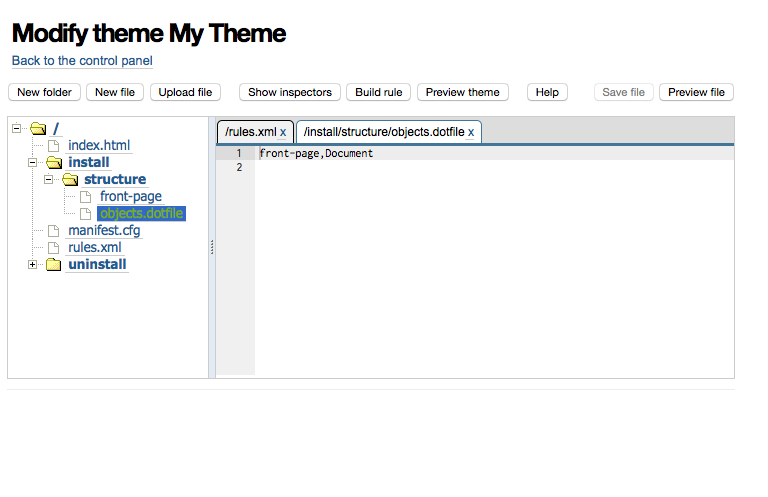
Note: Because the theme editor hides all dotfiles, files starting with a dot must be renamed to end with .dotfile (and to not start with a dot).
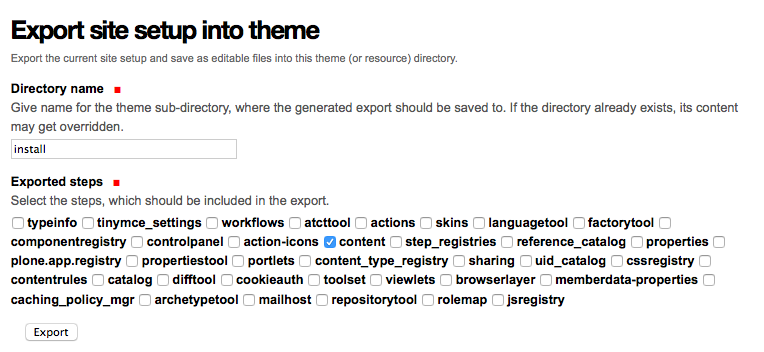
This plugin also provides a helper forms for exporting the current site setup into a through-the-web created (editable) theme and importing the site setup steps from the theme folder.
The site setup export form can be reached by adding @@export-site-setup after the theme resource directory URL, e.g. http://localhost:8080/Plone/++theme++my-theme/@@export-site-setup:
The site setup import form can be reached by adding @@import-site-setup after the theme resource directory URL, e.g. http://localhost:8080/Plone/++theme++my-theme/@@export-site-setup.
The import form should be especially useful for testing the import and performing manual site setup upgrades by importing only the updates step or a special upgrade profile directory.
Changelog
0.11.0 (2015-04-04)
Add site setup import view to allow testing manual upgrading of site setups [datakurre]
Add option to disable setup steps import via plugin configuration variable in theme manifest (either with ‘enabled = false’ or ‘disabled = true’) [datakurre]
0.10.0 (2015-04-03)
Add GS content export support to include non-CMF-containers marked with collective.themesitesetup.interfaces.IGenericSetupExportableContainer [datakurre]
Add GS content export/import to support non-CMF-containers, PythonScripts and PageTemplates. [datakurre]
0.9.0 (2015-04-01)
First release.
Release history Release notifications | RSS feed


Download files
Download the file for your platform. If you're not sure which to choose, learn more about installing packages.
Source Distribution
File details
Details for the file collective.themesitesetup-0.11.0.tar.gz.
File metadata
- Download URL: collective.themesitesetup-0.11.0.tar.gz
- Upload date:
- Size: 15.8 kB
- Tags: Source
- Uploaded using Trusted Publishing? No
File hashes
| Algorithm | Hash digest | |
|---|---|---|
| SHA256 |
1c5ad045c3b9b5cab8f6ee89391b4afbff595e24d860fdc3363bc73cc485d7df
|
|
| MD5 |
7e3d723bebfe12a6a68b4b3f339c8966
|
|
| BLAKE2b-256 |
ad0940183eb0fdc9ef0897c059ba4cfff0106fed7ba9db6e4df5d55c12105972
|






