
colorsynth





A Python library for creating false-color images from spectral cubes: 3D Numpy arrays with two spatial axes and one spectral axis.
colorsynth collapses the spectral axis into red, green, and blue channels
by mapping the spectrum into the human visible range and weighting it by the
CIE 1931 color-matching functions.
The shape of the spectrum controls the hue of each pixel, and the total
intensity controls its brightness, so features like Doppler shifts are
visible directly in the image.
Installation
colorsynth is available on the Python Package Index and can be installed using pip:
pip install colorsynth
Quickstart
Define a spectral cube containing a Gaussian emission line at every point,
with a center wavelength that increases from left to right and a total
intensity that increases from top to bottom, and collapse it into an RGB
image using
colorsynth.rgb():
import numpy as np
import matplotlib.pyplot as plt
import astropy.units as u
import colorsynth

# Define a wavelength grid for the spectral axis
wavelength = np.linspace(400, 700, num=61) * u.nm

# Define a spatial grid
x = np.linspace(0, 1, num=101)[:, np.newaxis, np.newaxis]
y = np.linspace(0, 1, num=101)[np.newaxis, :, np.newaxis]

# Define a spectral cube containing a Gaussian emission line at every point
center = 420 * u.nm + (680 - 420) * u.nm * y
width = 15 * u.nm
spd = x * np.exp(-np.square((wavelength - center) / width))

# Collapse the wavelength axis of the cube into RGB channels
rgb = colorsynth.rgb(spd, wavelength, axis=~0, spd_min=0, spd_max=1)

# Display the result as a false-color image
plt.imshow(rgb)
plt.show()
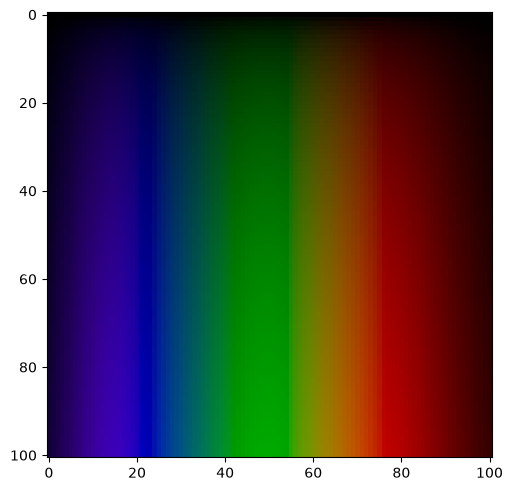
The center wavelength of the emission line appears as hue, and its total intensity appears as brightness.
Gallery
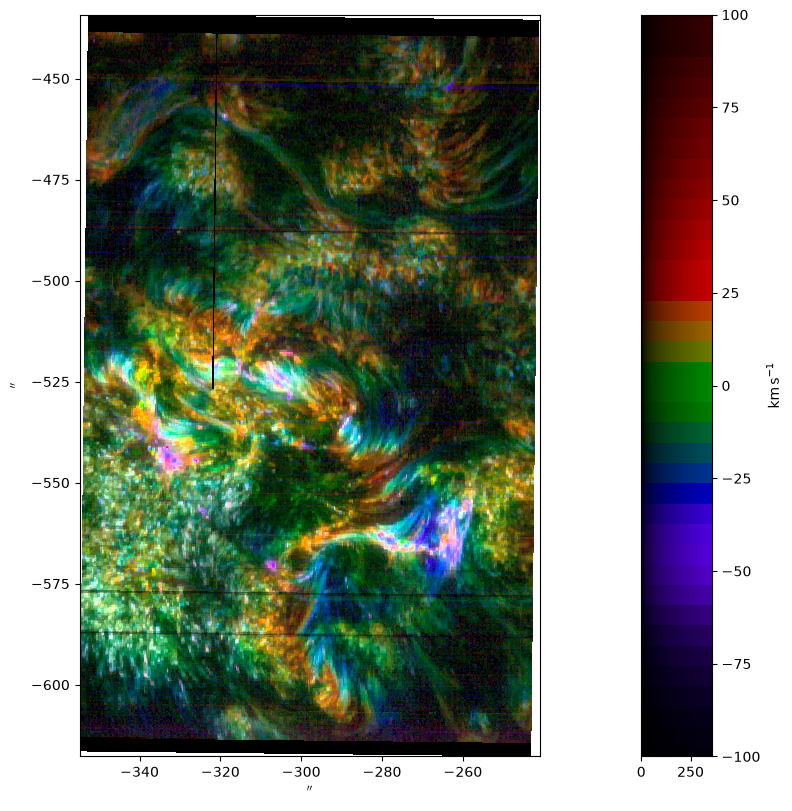
An Si IV 1403 A spectroheliogram captured by the Interface Region Imaging Spectrograph and colorized using
colorsynth.rgb().
The code to create this image can be found in the documentation.
1 maintainer

Download files
Download the file for your platform. If you're not sure which to choose, learn more about installing packages.
Source Distribution
Built Distribution
Filter files by name, interpreter, ABI, and platform.
If you're not sure about the file name format, learn more about wheel file names.
Copy a direct link to the current filters
File details
Details for the file colorsynth-1.0.1.tar.gz.
File metadata
- Download URL: colorsynth-1.0.1.tar.gz
- Upload date:
- Size: 21.9 kB
- Tags: Source
- Uploaded using Trusted Publishing? No
- Uploaded via:
twine/7.0.0 CPython/3.13.14
File hashes
| Algorithm | Hash digest | |
|---|---|---|
| SHA256 |
3792d7caa5e85e7d8b2d6494f20334f037479745e7ba8a5c9be5733d25ce02c1
|
|
| MD5 |
05ad0e7523ad79fdf6ae534ba0939410
|
|
| BLAKE2b-256 |
d449310bf1845b703f647897611deee5b7aff89e6a4d53f5fbc58f82f5dfddd2
|
File details
Details for the file colorsynth-1.0.1-py3-none-any.whl.
File metadata
- Download URL: colorsynth-1.0.1-py3-none-any.whl
- Upload date:
- Size: 14.0 kB
- Tags: Python 3
- Uploaded using Trusted Publishing? No
- Uploaded via:
twine/7.0.0 CPython/3.13.14
File hashes
| Algorithm | Hash digest | |
|---|---|---|
| SHA256 |
f0069786e7a1f2aee595ada5b7c2807c60f58d08cbb9f21b6905417b29225920
|
|
| MD5 |
9c53b7f9d94cf98f7c6df3f6e6402ece
|
|
| BLAKE2b-256 |
34114e371224563a6ce84be20ce03cc03f951f4436c284bfa193f28c92b71c98
|







