
A comprehensive toolkit for standardizing, packaging and deploying ComfyUI workflows as reproducible environments and production-ready REST services
Verified details
These details have been verified by PyPIProject links
GitHub Statistics
Maintainers


Project description
Comfy-Pack: Making ComfyUI Workflows Shareable

comfy-pack is a comprehensive toolkit for reliably packing and unpacking environments for ComfyUI workflows.
- 📦 Pack workflow environments as artifacts: Saves the workflow environment in a
.cpack.zipartifact with Python package versions, ComfyUI and custom node revisions, and model hashes. - ✨ Unpack artifacts to recreate workflow environments: Unpacks the
.cpack.zipartifact to recreate the same environment with the exact Python package versions, ComfyUI and custom node revisions, and model weights. - 🚀 Deploy workflows as APIs: Deploys the workflow as a RESTful API with customizable input and output parameters.
Motivations
ComfyUI Manager is great for find missing custom nodes. But when sharing ComfyUI workflows to others(your audience or team members), you've still likely heard these responses:
- "Custom Node not found"
- "Cannot find the correct model file"
- "Missing Python dependencies"
These are fundamental challenges in workflow sharing – every component should match exactly: custom nodes, model files, and Python dependencies. Modern pacakge managers like npm and poetry introduced "lock" feature, which means record the exact version for every requirement. ComfyUI Manager isn't designed for that.
We learned it from our community and developed comfy-pack to address these problems. With a single click, it captures and locks your entire workflow environment into a .cpack.zip file, including Python packages, custom nodes, model hashes, and required assets.
Users can recreate the exact environment with one command:
comfy-pack unpack workflow.cpack.zip
This means you can focus on your creative work while comfy-pack handles the rest.
Usages
Installation
We recommend you use ComfyUI Manager to install comfy-pack. Simply search for comfy-pack and click Install. Restart the server and refresh your ComfyUI interface to apply changes.
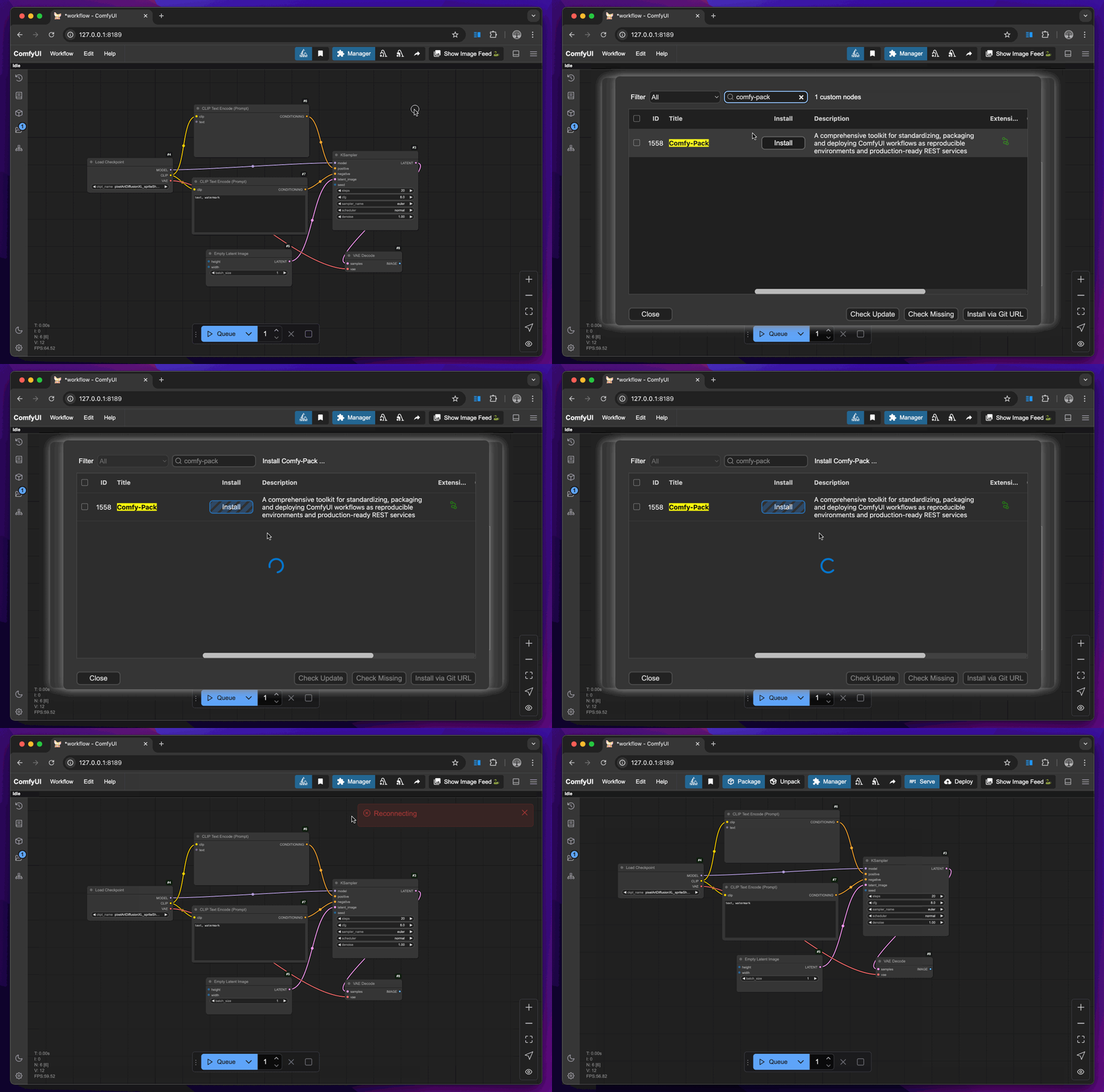
Alternatively, clone the project repository through git.
cd ComfyUI/custom_nodes
git clone https://github.com/bentoml/comfy-pack.git
To install the comfy-pack CLI, run:
pip install comfy-pack
Pack a ComfyUI workflow and its environment
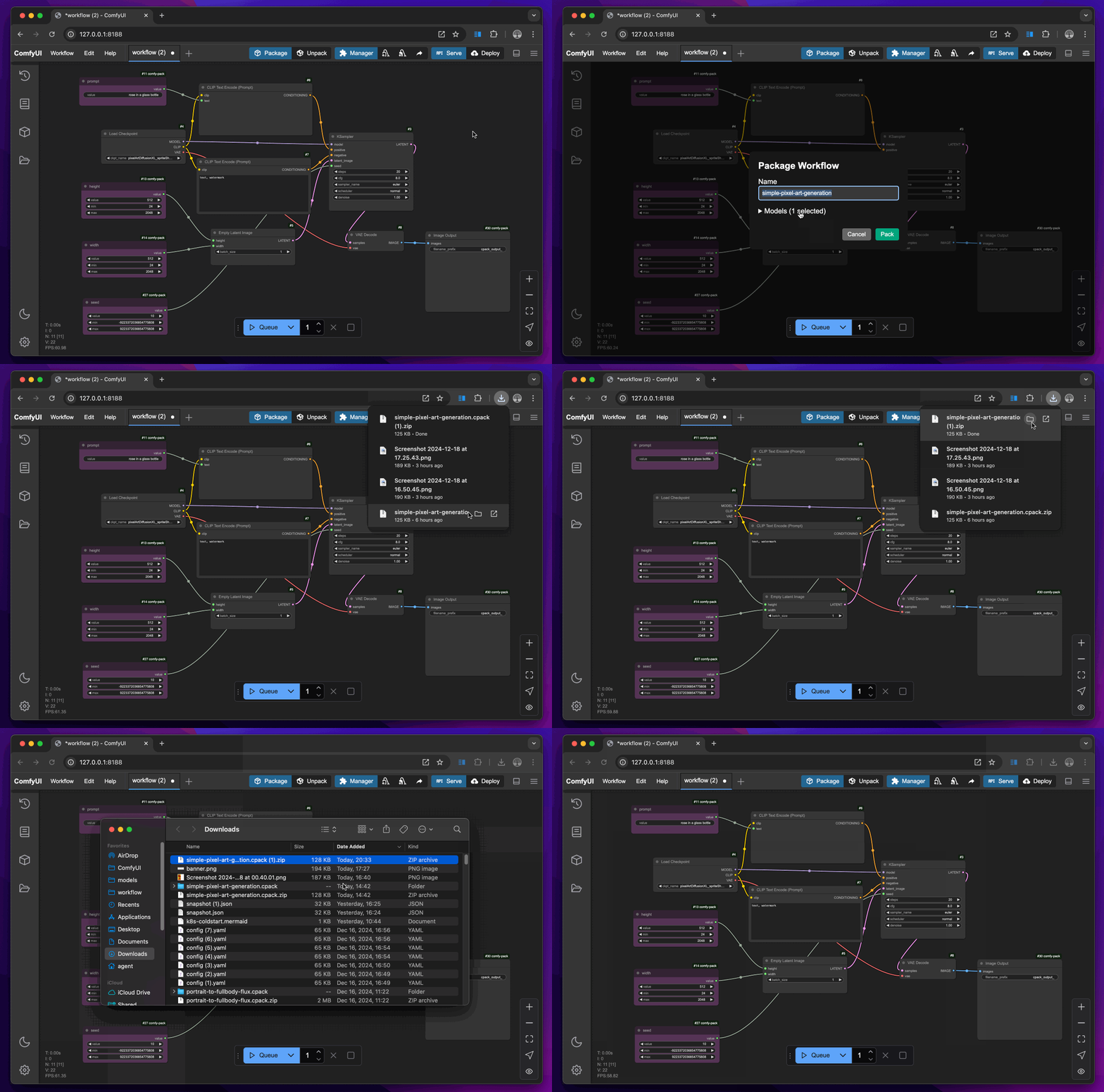
You can package a workflow and the environment required to run the workflow into an artifact that can be unpacked elsewhere.
- Click the Package button to create a
.cpack.zipartifact. - (Optional) Select the models that you want to include (only model hash will be recorded, so you won't get a 100GB zip file).
Unpack the ComfyUI environments
Unpacking a .cpack.zip artifact will restore the ComfyUI environment for the workflow. During unpacking, comfy-pack will perform the following steps.
- Prepare a Python virtual environment with the exact packages used to run the workflow.
- Clone ComfyUI and custom nodes from the exact revisions required by the workflow.
- Search for and download models from common registries like Hugging Face and Civitai. Unpacking workflows using the same model will not cause the model to be downloaded multiple times. Instead, model weights will be symbolically linked.
To unpack:
comfy-pack unpack workflow.cpack.zip
For example cpack files, check our examples folder.
Deploy a workflow as an API
You can turn a ComfyUI workflow into an API endpoint callable using any clients through HTTP.
1. Annotate input & output
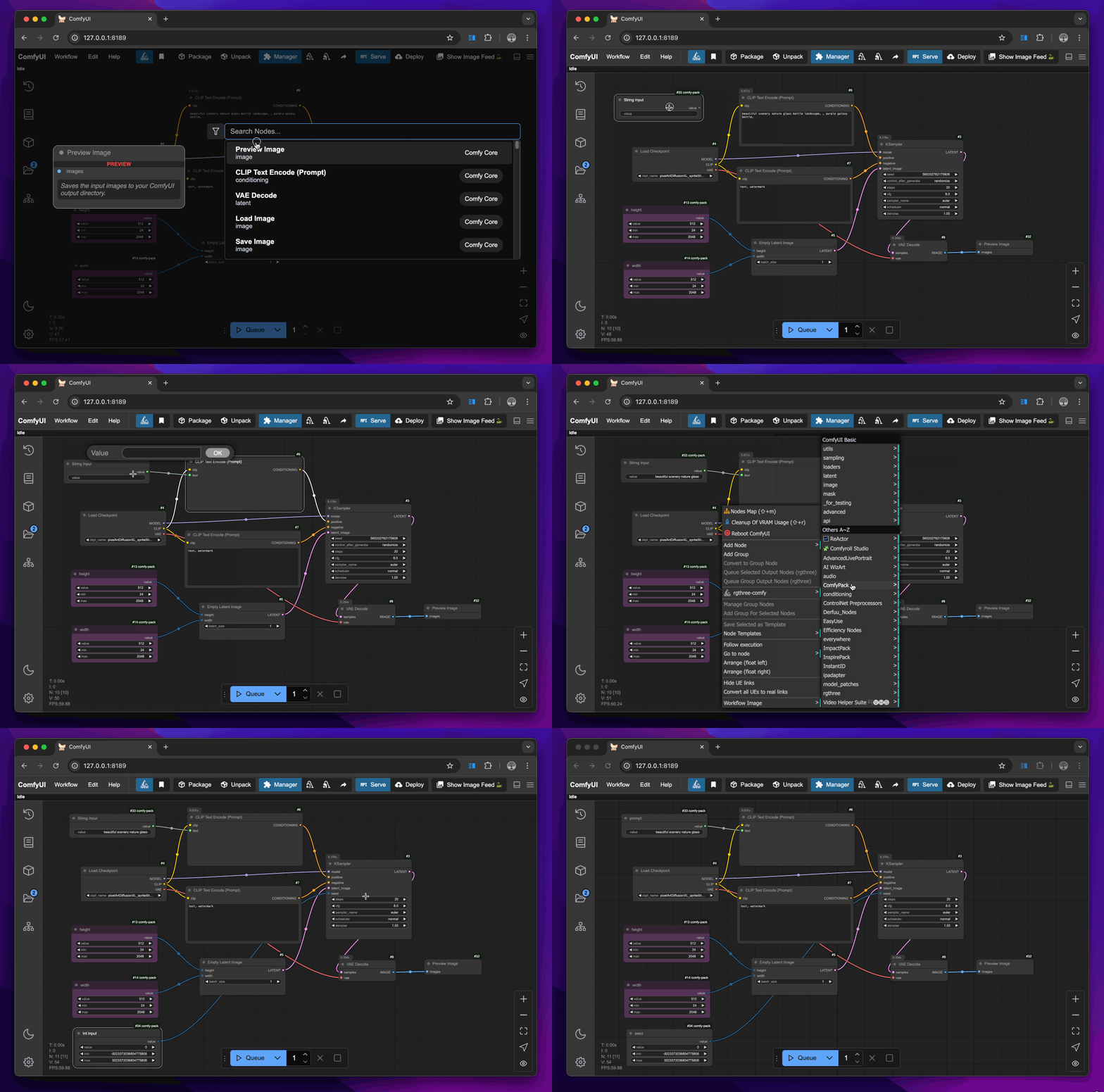
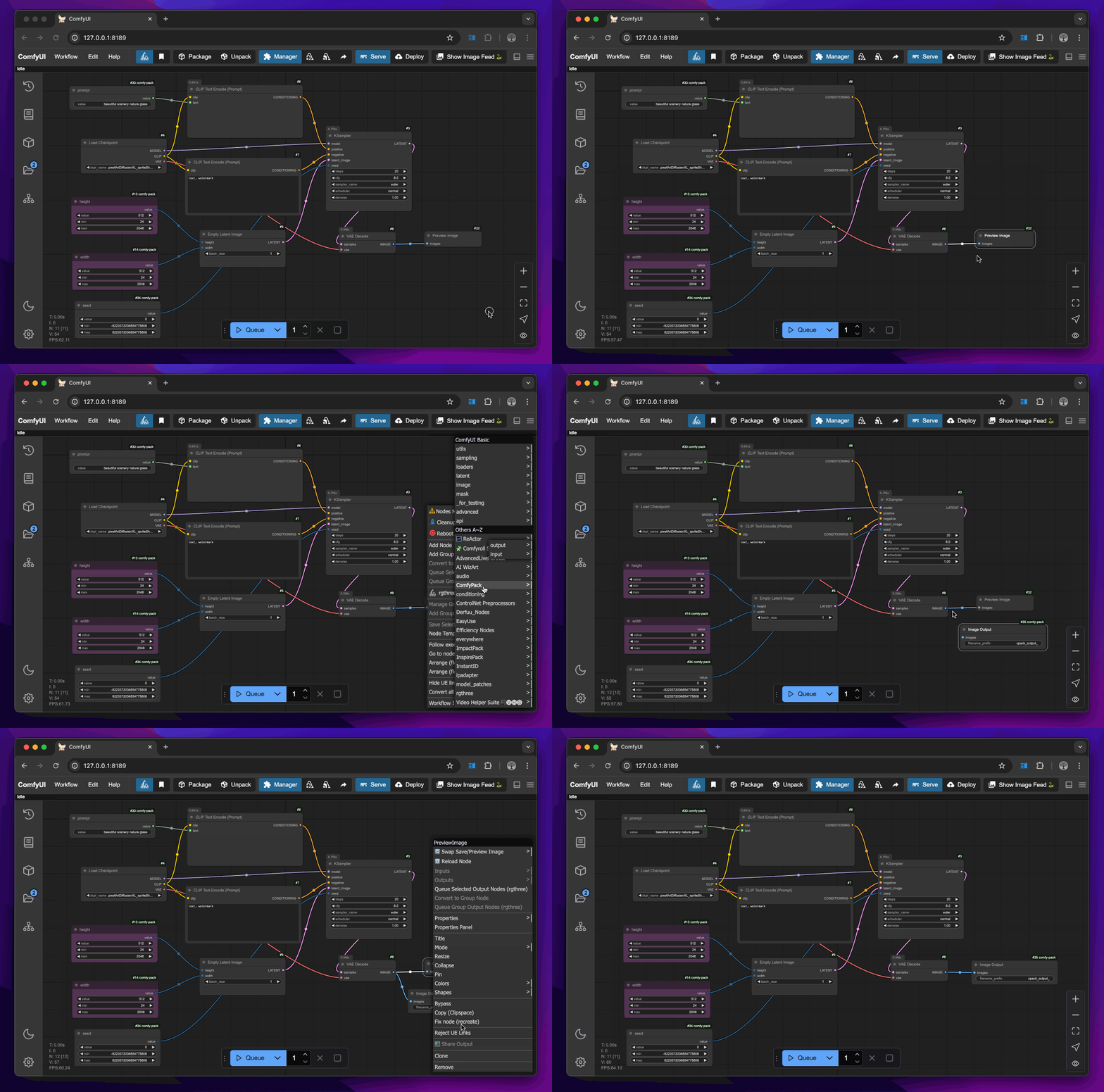
Use custom nodes provided by comfy-pack to annotate the fields to be used as input and output parameters. To add a comfy-pack node, right-click and select Add Node > ComfyPack > output/input > [Select a type]
Input nodes:
- ImageInput: Accepts
imagetype input, similar to the officialLoadImagenode - StringInput: Accepts
stringtype input (e.g., prompts) - IntInput: Accepts
inttype input (e.g., dimensions, seeds) - AnyInput: Accepts
combotype and more input (e.g., custom nodes)
Output nodes:
- ImageOutput: Outputs
imagetype, similar to the officialSaveImagenode - FileOutput: Outputs file path as
stringtype and saves the file under that path
More field types are under way.
2. Serve the workflow
Start an HTTP server at http://127.0.0.1:3000 (default) to serve the workflow under the /generate path.
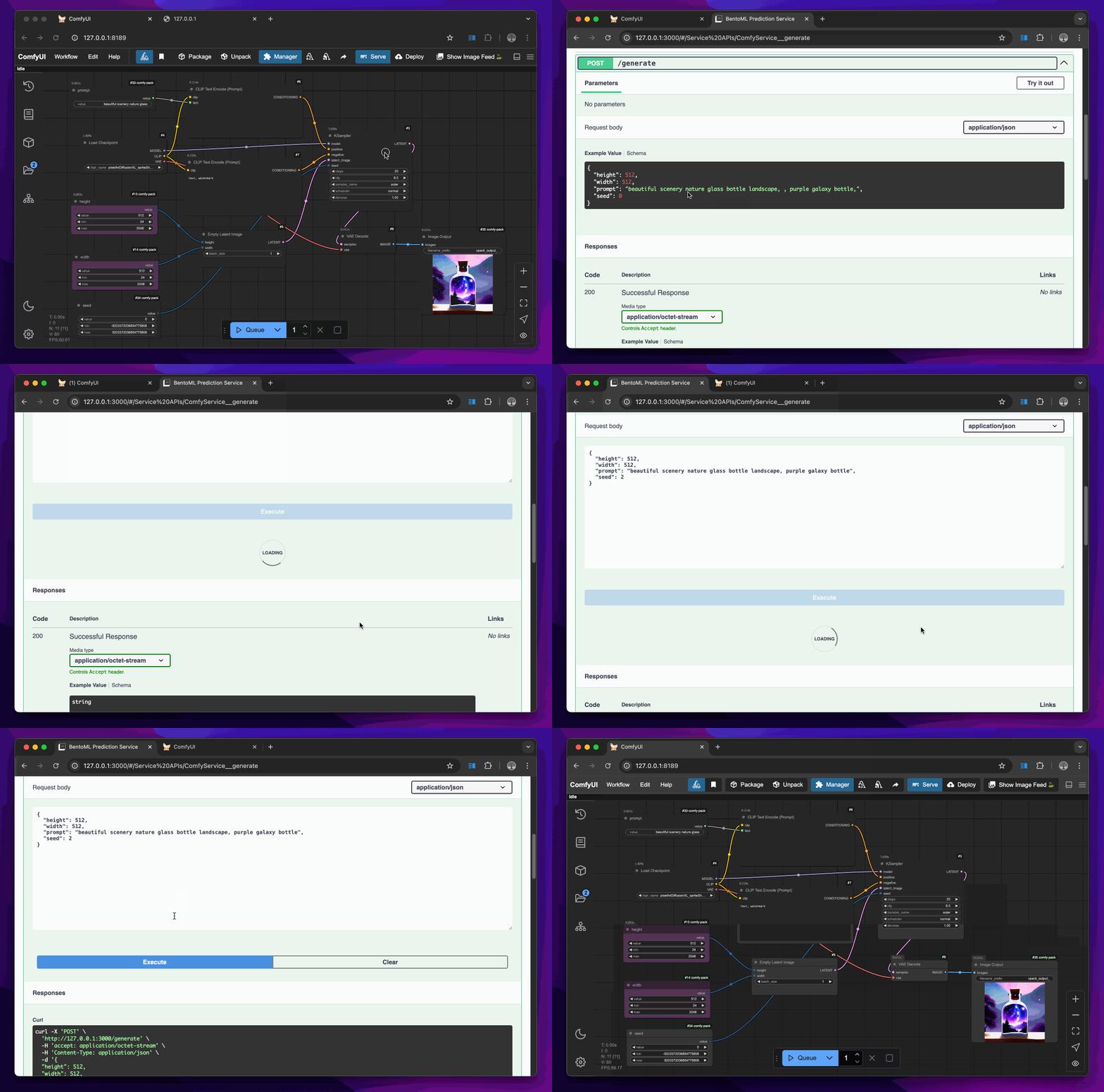
You can call the /generate endpoint by specifying parameters configured through your comfy-pack nodes, such as prompt, width, height, and seed.
[!NOTE] The name of a comfy-pack node is the parameter name used for API calls.
Examples to call the endpoint:
CURL
curl -X 'POST' \
  'http://127.0.0.1:3000/generate' \
  -H 'accept: application/octet-stream' \
  -H 'Content-Type: application/json' \
  -d '{
  "prompt": "rocks in a bottle",
  "width": 512,
  "height": 512,
  "seed": 1
}'
BentoML client
Under the hood, comfy-pack leverages BentoML, the unified model serving framework. You can invoke the endpoint using the BentoML Python client:
import bentoml

with bentoml.SyncHTTPClient("http://127.0.0.1:3000") as client:
        result = client.generate(
            prompt="rocks in a bottle",
            width=512,
            height=512,
            seed=1
        )
3. (Optional) Pack the workflow and environment
Pack the workflow and environment into an artifact that can be unpacked elsewhere to recreate the workflow.
# Get the workflow input spec
comfy-pack run workflow.cpack.zip --help

# Run
comfy-pack run workflow.cpack.zip --src-image image.png --video video.mp4
4. (Optional) Deploy to the cloud
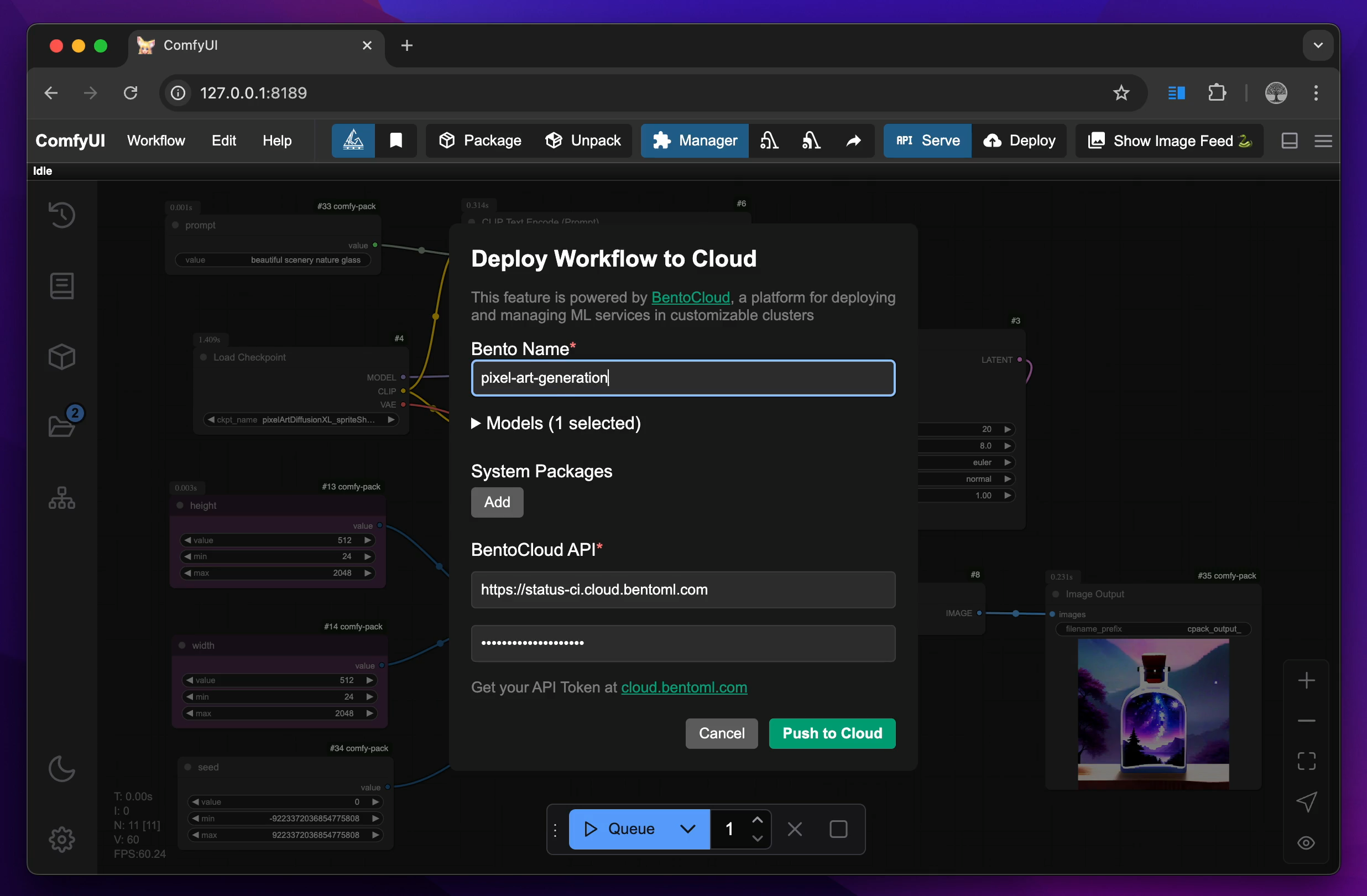
Deploy to BentoCloud with access to a variety of GPUs and blazing fast scaling.
Follow the instructions here to get your BentoCloud access token. If you don’t have a BentoCloud account, you can sign up for free.
Security Guidelines
A cpack file only contains the metadata of the workflow environment, such as Python package versions, ComfyUI and custom node revisions, and model hashes. It does not contain any sensitive information like API keys, passwords, or user data. However, unpacking a cpack file will install custom nodes and Python dependencies. It is recommended to unpack cpack files from trusted sources.
comfy-pack has a strict mode for unpacking. You can enable it by setting the CPACK_STRICT_MODE environment variable to true. It will sacrifice some flexibility and compatibility for security. For now, comfy-pack will:
- Use more strict index strategy in Python package installation
More security features are under way.
Roadmap
This project is under active development. Currently we are working on:
- Enhanced user experience
- Docker support
- Local
.cpackfile management with version control - Enhanced service capabilities
Community
comfy-pack is actively maintained by the BentoML team. Feel free to reach out 👉 Join our Slack community!
Contributing
As an open-source project, we welcome contributions of all kinds, such as new features, bug fixes, and documentation. Here are some of the ways to contribute:
- Repost a bug by creating a GitHub issue.
- Submit a pull request or help review other developers’ pull requests.
Project details
Verified details
These details have been verified by PyPIProject links
GitHub Statistics
Maintainers
Release history Release notifications | RSS feed


Download files
Download the file for your platform. If you're not sure which to choose, learn more about installing packages.
Source Distribution
Built Distribution
Filter files by name, interpreter, ABI, and platform.
If you're not sure about the file name format, learn more about wheel file names.
Copy a direct link to the current filters
File details
Details for the file comfy_pack-0.4.0a2.tar.gz.
File metadata
- Download URL: comfy_pack-0.4.0a2.tar.gz
- Upload date:
- Size: 29.2 kB
- Tags: Source
- Uploaded using Trusted Publishing? Yes
- Uploaded via: twine/6.1.0 CPython/3.12.9
File hashes
| Algorithm | Hash digest | |
|---|---|---|
| SHA256 |
490c753baffc9d5efd7f26ca8638d382dd1ee4a9669c39c5c8625efee35f5344
|
|
| MD5 |
ced594cae4b87a8955ae2f6f8d447000
|
|
| BLAKE2b-256 |
3afd7375e099a99e6fceea27e5f70a620fd14f43d924cc53bf578e6ab4e81a2d
|
Provenance
The following attestation bundles were made for comfy_pack-0.4.0a2.tar.gz:
Publisher:
release.yml on bentoml/comfy-pack
-
Statement:
-
Statement type:
https://in-toto.io/Statement/v1 -
Predicate type:
https://docs.pypi.org/attestations/publish/v1 -
Subject name:
comfy_pack-0.4.0a2.tar.gz -
Subject digest:
490c753baffc9d5efd7f26ca8638d382dd1ee4a9669c39c5c8625efee35f5344 - Sigstore transparency entry: 211849909
- Sigstore integration time:
-
Permalink:
bentoml/comfy-pack@b5244d176efc1d0b8d2792c6b4fe3f0dbf2903c5 -
Branch / Tag:
refs/tags/0.4.0a2 - Owner: https://github.com/bentoml
-
Access:
public
-
Token Issuer:
https://token.actions.githubusercontent.com -
Runner Environment:
github-hosted -
Publication workflow:
release.yml@b5244d176efc1d0b8d2792c6b4fe3f0dbf2903c5 -
Trigger Event:
push
-
Statement type:
File details
Details for the file comfy_pack-0.4.0a2-py3-none-any.whl.
File metadata
- Download URL: comfy_pack-0.4.0a2-py3-none-any.whl
- Upload date:
- Size: 30.9 kB
- Tags: Python 3
- Uploaded using Trusted Publishing? Yes
- Uploaded via: twine/6.1.0 CPython/3.12.9
File hashes
| Algorithm | Hash digest | |
|---|---|---|
| SHA256 |
ad0ef7379a7a33edbee045a2509f6bca5db6d592cb48eba0702ac452e8c88739
|
|
| MD5 |
7a740e7852b7294d4eb2c9b92cc03a38
|
|
| BLAKE2b-256 |
4cf93cf827317173608e903b663d6161fd5b07ac8557bb437d856215b54e5c89
|
Provenance
The following attestation bundles were made for comfy_pack-0.4.0a2-py3-none-any.whl:
Publisher:
release.yml on bentoml/comfy-pack
-
Statement:
-
Statement type:
https://in-toto.io/Statement/v1 -
Predicate type:
https://docs.pypi.org/attestations/publish/v1 -
Subject name:
comfy_pack-0.4.0a2-py3-none-any.whl -
Subject digest:
ad0ef7379a7a33edbee045a2509f6bca5db6d592cb48eba0702ac452e8c88739 - Sigstore transparency entry: 211849914
- Sigstore integration time:
-
Permalink:
bentoml/comfy-pack@b5244d176efc1d0b8d2792c6b4fe3f0dbf2903c5 -
Branch / Tag:
refs/tags/0.4.0a2 - Owner: https://github.com/bentoml
-
Access:
public
-
Token Issuer:
https://token.actions.githubusercontent.com -
Runner Environment:
github-hosted -
Publication workflow:
release.yml@b5244d176efc1d0b8d2792c6b4fe3f0dbf2903c5 -
Trigger Event:
push
-
Statement type:






