
CommiZard






CommiZard is an interactive commit assistant, powered by AI! 🧙♂️ Generate, tweak, and copy commit messages with full control, right from a REPL.
Features
- REPL-style Interface: Stay in an interactive session. Generate multiple commit variations without restarting.
- Smart Generation: Creates commit messages directly from your
git diff. - Simple CLI: Familiar, intuitive commands. No learning curve.
- Flexible AI backends: Easily swap models. Online model support planned!
- Clipboard Magic: Instantly copy generated messages to your system
clipboard, ready to paste into
git commit. - Zero Daemons: No background processes, No Git hooks, no surprises.
- Absolute Control: Run it when you want, and you decide to commit, copy, tweak, or discard.
[!WARNING]
⚠️ Heads up! CommiZard is in alpha development. Not all features are complete or stable yet.
CommiZard is under active development. Expect bugs, crashes, and missing functionality. Please open an issue if you encounter problems.
Many features are still missing, since this project was released as a Minimum Viable Product (MVP). Stay tuned for new improvements!
⚙️ Installation
There are several ways to install this tool. Here are the most common approaches:
- The easiest way to get started is with pip:
pip install commizard
[!TIP] Use
pipxto install in an isolated environment and avoid dependency conflicts.
- If you want the latest development version (bleeding-edge), clone the repo and install in editable mode:
git clone https://github.com/Chungzter/CommiZard
cd CommiZard
pip install -e .
You can update anytime with:
git pull && pip install -e .
- You can also build from source yourself (e.g., with
buildorhatchling):
git clone https://github.com/Chungzter/CommiZard
cd CommiZard
python -m build
# or: hatchling build
pip install dist/commizard-*-py3-none-any.whl
Usage
After installing CommiZard (See Installation), you can launch the interactive REPL in your Git repository:
commizard
You can also use -h or --help to see the available options.
Once launched, you’ll enter the interactive CommiZard terminal, where you can use the following commands:
Commands
| Command | Description |
|---|---|
help |
Show all commands or details for a specific one. |
start <model> |
select a particular model to generate for you. |
list |
List all available Ollama models installed on your system. |
gen |
Generate a new commit message based on the current Git diff. |
cp |
Copy the generated output to your clipboard |
commit |
Directly commit the generated output |
cls or clear |
Clear the terminal screen |
exit or quit |
Exit the REPL session. |
Example Usage
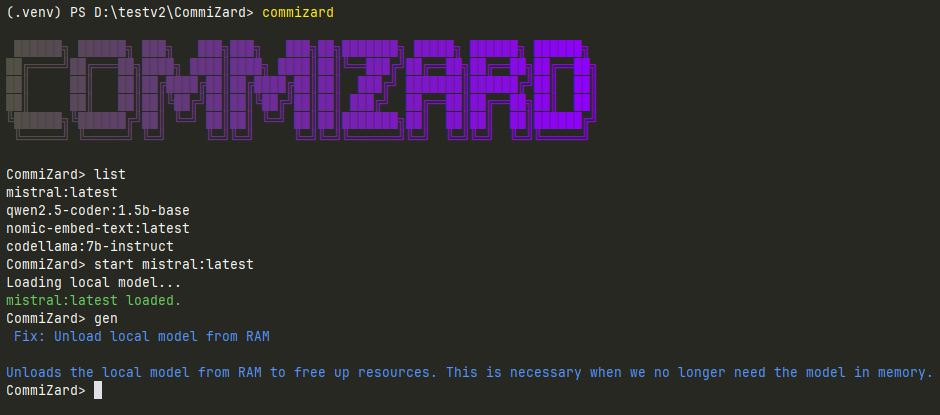
This is one of the very first times the program helped a user (me 😄) write a meaningful commit message.
🧭 Alternatives & Similar Tools
When I started building CommiZard, I made sure to look around. Guess what?
CommiZard isn’t the only wizard in town! 😊
If you’re exploring AI-powered commit tools, here are some other great projects worth checking out:
- easycommit: written in Go, supports Ollama models out of the box.
- aicommit: Packed with features — including a handy VS Code extension.
- AICommit2: The most complete FOSS option I've found
Why did I still follow through and build this?
Because I couldn’t find a tool that gave me both full user control and the little UX comforts I wanted.
So yeah. I built CommiZard for me… and maybe for you too!
Contributing
Contributions of all kinds are welcome.
If you’d like to get involved:
- Read the CONTRIBUTING.md guide for details on how to report bugs, suggest features, or open pull requests.
- Found a bug 🐞 or have an idea 💡? Open an issue and let’s discuss it!
- Starter-friendly tasks are listed in the Starter Tasks section. Check it out if you’re not ready to dive into core features yet.
Not sure where to start? Open an issue or comment "I’d like to help with this," and we’ll figure it out together!
License
CommiZard is released under the MIT license.
Copyright (c) 2025-2026 Chungzter
1 maintainer

Release files for commizard 0.4.3
For a detailed explanation of source distributions (sdists) and built distributions (wheels), please see the package formats documentation.
Source distribution (sdist)
| File | Size | Uploaded | |
|---|---|---|---|
| commizard-0.4.3.tar.gz | 22.3 kB | Details |
Built distribution (wheel)
| File | Interpreter | ABI | Platform | Reset |
|---|---|---|---|---|
| commizard-0.4.3-py3-none-any.whl | Python 3 | none | any | Details |
Total release size: 42.0 kB
Release files / commizard-0.4.3.tar.gz
| Download URL | commizard-0.4.3.tar.gz |
|---|---|
| Size | 22.3 kB |
| Tags | Source |
|
SHA-256 checksum How to use checksums |
92cbecdd14825d9aaa14fadc60fb9ac4e07329773e68f05daeaf9ac47478b5ca
|
|
BLAKE2b-256 checksum How to use checksums |
34616721fec7b44c1bec11cadd26d48a19f8b29f605ba912342e5a211b8327b4
|
| Upload date | |
|
Uploaded using Trusted Publishing? What is trusted publishing? |
Yes |
| Uploaded via |
twine/6.1.0 CPython/3.13.7
|
Provenance
Provenance describes where a file came from. On PyPI, provenance is shared via attestations, which provide a verifiable record of the build or publishing details. View details, limitations and caveats.


PyPI Publish Attestation
PyPI verified that this artifact, at this checksum, originated from the publisher listed below.
Signed by GitHub Actions, verified by PyPI on Feb 5, 2026.
Transparency logRelease files / commizard-0.4.3-py3-none-any.whl
| Download URL | commizard-0.4.3-py3-none-any.whl |
|---|---|
| Size | 19.6 kB |
| Tags | Python 3 |
|
SHA-256 checksum How to use checksums |
d2ce75e6449a3a6c5656f33ec2941a384084edd9ad7bf4d9d52a8b5483594169
|
|
BLAKE2b-256 checksum How to use checksums |
701fa82dddff7e87cab96b16c498a67260e2654cba845e50acff8128e880ab8f
|
| Upload date | |
|
Uploaded using Trusted Publishing? What is trusted publishing? |
Yes |
| Uploaded via |
twine/6.1.0 CPython/3.13.7
|
Provenance
Provenance describes where a file came from. On PyPI, provenance is shared via attestations, which provide a verifiable record of the build or publishing details. View details, limitations and caveats.
PyPI Publish Attestation
PyPI verified that this artifact, at this checksum, originated from the publisher listed below.
Signed by GitHub Actions, verified by PyPI on Feb 5, 2026.
Transparency log













