
The commit writing Wizard Assistant
Verified details
These details have been verified by PyPIProject links
GitHub Statistics
Maintainers

Project description
CommiZard






CommiZard is an interactive commit assistant, powered by AI! 🧙♂️ Generate, tweak, and copy commit messages with full control, right from a REPL.
Features
- REPL-style Interface: Stay in an interactive session. Generate multiple commit variations without restarting.
- Smart Generation: Creates commit messages directly from your
git diff. - Simple CLI: Familiar, intuitive commands. No learning curve.
- Flexible AI backends: Easily swap models. Online model support planned!
- Clipboard Magic: Instantly copy generated messages to your system
clipboard, ready to paste into
git commit. - Zero Daemons: No background processes, No Git hooks, no surprises.
- Absolute Control: Run it when you want, and you decide to commit, copy, tweak, or discard.
[!WARNING]
⚠️ Heads up! CommiZard is in alpha development. Not all features are complete or stable yet.
CommiZard is under active development. Expect bugs, crashes, and missing functionality. Please open an issue if you encounter problems.
Many features are still missing, since this project was released as a Minimum Viable Product (MVP). Stay tuned for new improvements!
⚙️ Installation
There are several ways to install this tool. Here are the most common approaches:
- The easiest way to get started is with pip:
pip install commizard
[!TIP] Use
pipxto install in an isolated environment and avoid dependency conflicts.
- If you want the latest development version (bleeding-edge), clone the repo and install in editable mode:
git clone https://github.com/Chungzter/CommiZard
cd CommiZard
pip install -e .
You can update anytime with:
git pull && pip install -e .
- You can also build from source yourself (e.g., with
buildorhatchling):
git clone https://github.com/Chungzter/CommiZard
cd CommiZard
python -m build
# or: hatchling build
pip install dist/commizard-*-py3-none-any.whl
Usage
After installing CommiZard (See Installation), you can launch the interactive REPL in your Git repository:
commizard
You can also use -h or --help to see the available options.
Once launched, you’ll enter the interactive CommiZard terminal, where you can use the following commands:
Commands
| Command | Description |
|---|---|
help |
Show all commands or details for a specific one. |
start <model> |
select a particular model to generate for you. |
list |
List all available Ollama models installed on your system. |
gen |
Generate a new commit message based on the current Git diff. |
cp |
Copy the generated output to your clipboard |
commit |
Directly commit the generated output |
cls or clear |
Clear the terminal screen |
exit or quit |
Exit the REPL session. |
Example Usage
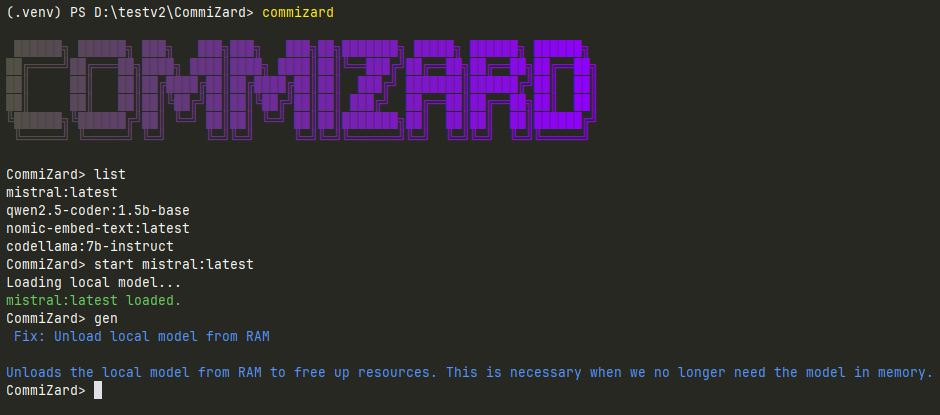
This is one of the very first times the program helped a user (me 😄) write a meaningful commit message.
🧭 Alternatives & Similar Tools
When I started building CommiZard, I made sure to look around. Guess what?
CommiZard isn’t the only wizard in town! 😊
If you’re exploring AI-powered commit tools, here are some other great projects worth checking out:
- easycommit: written in Go, supports Ollama models out of the box.
- aicommit: Packed with features — including a handy VS Code extension.
- AICommit2: The most complete FOSS option I've found
Why did I still follow through and build this?
Because I couldn’t find a tool that gave me both full user control and the little UX comforts I wanted.
So yeah. I built CommiZard for me… and maybe for you too!
Contributing
Contributions of all kinds are welcome.
If you’d like to get involved:
- Read the CONTRIBUTING.md guide for details on how to report bugs, suggest features, or open pull requests.
- Found a bug 🐞 or have an idea 💡? Open an issue and let’s discuss it!
- Starter-friendly tasks are listed in the Starter Tasks section. Check it out if you’re not ready to dive into core features yet.
Not sure where to start? Open an issue or comment "I’d like to help with this," and we’ll figure it out together!
License
CommiZard is released under the MIT license.
Copyright (c) 2025 Chungzter
Project details
Verified details
These details have been verified by PyPIProject links
GitHub Statistics
Maintainers
Release history Release notifications | RSS feed


Download files
Download the file for your platform. If you're not sure which to choose, learn more about installing packages.
Source Distribution
Built Distribution
Filter files by name, interpreter, ABI, and platform.
If you're not sure about the file name format, learn more about wheel file names.
Copy a direct link to the current filters
File details
Details for the file commizard-0.4.2.tar.gz.
File metadata
- Download URL: commizard-0.4.2.tar.gz
- Upload date:
- Size: 21.2 kB
- Tags: Source
- Uploaded using Trusted Publishing? Yes
- Uploaded via: twine/6.1.0 CPython/3.13.7
File hashes
| Algorithm | Hash digest | |
|---|---|---|
| SHA256 |
0ecc41541c6724043b689b0c20d34339153252cefd9719c5f80412a9f549c530
|
|
| MD5 |
70d98ac0eb267541f893dce985f93840
|
|
| BLAKE2b-256 |
8b68fd1c0d18e8128d91914569dc58ae1cbb9c5a14e123575740205005e496ea
|
Provenance
The following attestation bundles were made for commizard-0.4.2.tar.gz:
Publisher:
python-publish.yml on Chungzter/CommiZard
-
Statement:
-
Statement type:
https://in-toto.io/Statement/v1 -
Predicate type:
https://docs.pypi.org/attestations/publish/v1 -
Subject name:
commizard-0.4.2.tar.gz -
Subject digest:
0ecc41541c6724043b689b0c20d34339153252cefd9719c5f80412a9f549c530 - Sigstore transparency entry: 780394904
- Sigstore integration time:
-
Permalink:
Chungzter/CommiZard@684b0d1f0a2ac5fd96d9d92300c9a28a484578e6 -
Branch / Tag:
refs/tags/v0.4.2 - Owner: https://github.com/Chungzter
-
Access:
public
-
Token Issuer:
https://token.actions.githubusercontent.com -
Runner Environment:
github-hosted -
Publication workflow:
python-publish.yml@684b0d1f0a2ac5fd96d9d92300c9a28a484578e6 -
Trigger Event:
release
-
Statement type:
File details
Details for the file commizard-0.4.2-py3-none-any.whl.
File metadata
- Download URL: commizard-0.4.2-py3-none-any.whl
- Upload date:
- Size: 18.8 kB
- Tags: Python 3
- Uploaded using Trusted Publishing? Yes
- Uploaded via: twine/6.1.0 CPython/3.13.7
File hashes
| Algorithm | Hash digest | |
|---|---|---|
| SHA256 |
f8d749b5279e12ac89e9c001e874eb0ab42a4799d9688e222b5577f7f454a125
|
|
| MD5 |
1606ffb4051a1727edab7c830a05c62e
|
|
| BLAKE2b-256 |
60641b58ef900770156a6527edb8f14e6fc4c90e4b0b12ff2fe40510cf8cd2ee
|
Provenance
The following attestation bundles were made for commizard-0.4.2-py3-none-any.whl:
Publisher:
python-publish.yml on Chungzter/CommiZard
-
Statement:
-
Statement type:
https://in-toto.io/Statement/v1 -
Predicate type:
https://docs.pypi.org/attestations/publish/v1 -
Subject name:
commizard-0.4.2-py3-none-any.whl -
Subject digest:
f8d749b5279e12ac89e9c001e874eb0ab42a4799d9688e222b5577f7f454a125 - Sigstore transparency entry: 780394906
- Sigstore integration time:
-
Permalink:
Chungzter/CommiZard@684b0d1f0a2ac5fd96d9d92300c9a28a484578e6 -
Branch / Tag:
refs/tags/v0.4.2 - Owner: https://github.com/Chungzter
-
Access:
public
-
Token Issuer:
https://token.actions.githubusercontent.com -
Runner Environment:
github-hosted -
Publication workflow:
python-publish.yml@684b0d1f0a2ac5fd96d9d92300c9a28a484578e6 -
Trigger Event:
release
-
Statement type:






