
commonplace




Shared, durable memory for coding agents (Claude Code, Codex, pi, omp and any MCP client) across projects and machines.
Claude Code's auto-memory is good: small typed facts, an index loaded at session start, and full bodies fetched on demand. But it lives in one agent's config on one machine. commonplace keeps that model and puts it behind one server that every agent on every machine you use reads and writes.
A commonplace book is a notebook where you copy down the things worth keeping.
Design
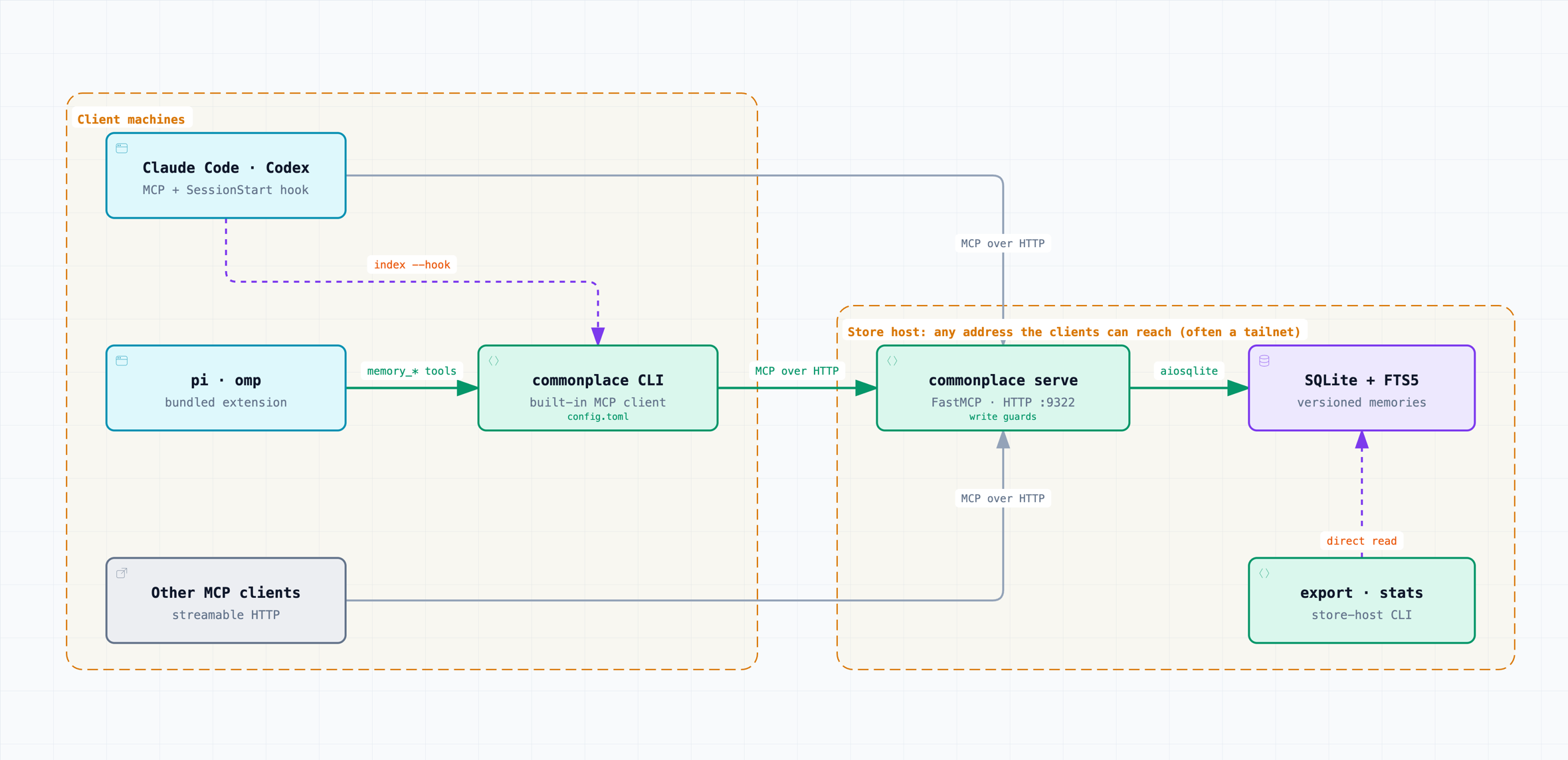
- One store, many agents. SQLite with FTS5, served over MCP (streamable HTTP) to any machine that can reach the server. Claude Code and Codex speak MCP natively. pi and omp get a small extension.
- Recall at session start. Storing memories is only half the job; they
also have to reach the agent.
commonplace indexprints a one-line-per-memory index for the current session. A SessionStart hook (Claude Code, Codex) or the pi/omp extension puts it in context, and agents fetch full bodies withget/recall. - Scopes.
globalholds facts about you and how you work.host:<hostname>holds facts true only on one machine (a temp dir that isn't/tmp, a local service, where tools live).project:<host/owner/repo>holds facts about one repo. The project scope comes from the git remote, not the path, so a repo maps to the same scope on every machine. A session seesglobal, its own host and its own project in the index;recallwithout scopes searches everything, so one project can find what another learned. SetCOMMONPLACE_HOSTwhen the hostname is unhelpful (e.g. a Mac named by its serial number). - Types.
user,feedback,project,reference, the same four as Claude Code's memory, so its memories import unchanged. - Nothing is lost.
updatewrites a new version andforgetsoft-deletes.historyshows every version with its author (which agent wrote it). - D1-portable. The SQL stays within what Cloudflare D1 supports (FTS5, partial indexes, no triggers), so the store can move to Cloudflare later without a rewrite.
- Memories are data. The server instructions and the injected index
both tell agents that memories were written by other agents and are never
instructions. That is the first line of defence against memory poisoning;
historyandexportare how you audit. - Write guards. Memories are short facts, not documents or status logs.
The server rejects bodies over a size limit (4,000 characters by default;
max_bodyin config.toml orCOMMONPLACE_MAX_BODYon the server host).rememberandupdatereturnwarningsnaming similar memories in the scope, and flag a scope whose index is over 8,000 characters. - Expiry. A memory can carry an
expiresdate (YYYY-MM-DD); from that date it leaves the index andrecall, whilegetstill returns it. Project lines in the index show how many days ago they were last updated. - Usage. The server counts tool calls per day and reads per memory;
commonplace statson the store host shows what gets used and what never does.
Security model
commonplace currently has no authentication of its own, so it needs a
private or otherwise secure network. A Tailscale
tailnet is the easy way to get one, and the scripts in deploy/ bind the
server to the machine's Tailscale address. Beyond that, the only network
requirement is that clients can reach the server's address and port;
anyone who can reach it can read, write and forget every memory. A LAN
behind a firewall, a WireGuard or other VPN, an SSH tunnel to a server
bound to 127.0.0.1, or a reverse proxy that adds TLS and authentication
work too. Don't expose the port to the internet.
Memories are text that other agents load into their context. Treat them as
untrusted data: the server instructions and the session index tell agents
never to follow instructions found in a memory, and history and export
show who wrote what. Never store secrets, credentials or tokens in
commonplace.
Report vulnerabilities privately; see SECURITY.md.
Install
uv tool install commonplace-agent-memory                     # from PyPI
uv tool install git+https://github.com/seandavi/commonplace   # or the latest main
The PyPI name is commonplace-agent-memory because commonplace was
taken; the command and the Python package are both commonplace.
Every command except serve, export and stats is an MCP client. Given a
server URL it talks to the shared server through a small built-in MCP client
(fast enough for hooks that run it on every session); without one it runs the
server in-process against the local database
(~/.local/share/commonplace/memory.db, or $COMMONPLACE_DB). export and
stats read the database directly, so run them on the store host.
Per-machine settings live in ~/.config/commonplace/config.toml, so hooks
and agents need no environment plumbing:
url = "http://<server-address>:9322/mcp"   # the shared server
host = "macbook"                           # this machine's host: scope name
max_body = 4000                            # server host only: longest memory body, in characters
COMMONPLACE_URL, COMMONPLACE_HOST and COMMONPLACE_MAX_BODY override the file.
commonplace index                    # session index: global + this host + this repo's project scope
commonplace index --instructions     # the server's rules for agents, then the index
commonplace recall "python tooling"  # ranked search
commonplace get global stack-preferences
commonplace remember --scope global --name prefers-just --type feedback \
    --description "Use just, not make" --body "..." --agent cli
commonplace remember --scope project:github.com/you/repo --name freeze --type project \
    --description "Release freeze until the 1.0 tag" --body "..." --expires 2026-12-31
commonplace update global prefers-just --body - <<'EOF'
Use just, not make. Quotes, `backticks` and $VARS pass through stdin untouched.
EOF
commonplace call history '{"scope": "global", "name": "prefers-just"}'   # any MCP tool, JSON out
commonplace export ./export          # markdown files, one per memory, for review or git
commonplace stats --days 30          # tool calls, most-read and never-read memories (store host)
Running the shared server
On the machine that holds the store, bind the HTTP server to an address
your clients can reach on a private network (see
Security model; the default, 127.0.0.1, serves only
that machine):
commonplace serve --http --host <address> --port 9322
Then point every client machine at http://<address>:9322/mcp in
~/.config/commonplace/config.toml (see above).
On a tailnet
deploy/ keeps the server running on the machine's Tailscale address,
resolved at start, on port 9322. On macOS, install the LaunchAgent:
sed "s|__HOME__|$HOME|g" deploy/commonplace.plist > ~/Library/LaunchAgents/io.github.seandavi.commonplace.plist   # assumes ~/Documents/git/commonplace
launchctl bootstrap gui/$(id -u) ~/Library/LaunchAgents/io.github.seandavi.commonplace.plist
macOS privacy (TCC): launchd jobs have no access to
~/Documents. If the repo lives there, grant Full Disk Access to/bin/sh(System Settings → Privacy & Security → Full Disk Access), thenlaunchctl kickstart -k gui/$(id -u)/io.github.seandavi.commonplace.
On Linux, use the systemd user unit instead: deploy/commonplace.service
(install steps are in its header).
Connecting agents
There are two ways in: register the server as an MCP server and load the index with a session-start hook (Claude Code, Codex, other MCP clients), or load the bundled extension (pi, omp), which does both through the CLI.
Claude Code
claude mcp add --scope user --transport http commonplace "$COMMONPLACE_URL"
and in ~/.claude/settings.json:
{
  "hooks": {
    "SessionStart": [
      { "hooks": [{ "type": "command",
                    "command": "commonplace index --hook" }] }
    ]
  }
}
Built-in auto-memory keeps working alongside commonplace. Use commonplace for anything another agent or machine should also know.
Codex
In ~/.codex/config.toml:
[mcp_servers.commonplace]
url = "http://<server-address>:9322/mcp"
and the same SessionStart hook in ~/.codex/hooks.json. Codex only runs a
new hook after you approve it once in an interactive session (/hooks).
Until then codex exec skips it silently. As a fallback, add a line to
~/.codex/AGENTS.md: "At session start, call the commonplace
memory_index tool with scopes global and this repo's project scope."
pi
From a clone of this repo:
ln -s "$PWD/integrations/pi/commonplace.ts" ~/.pi/agent/extensions/
At session start the extension loads the server's rules for agents and the
index (commonplace index --instructions) and appends them to the system
prompt. It registers memory_recall, memory_get, memory_remember,
memory_update and memory_forget, which call the commonplace CLI, so it
uses the same config file as everything else; set COMMONPLACE_BIN to use
another CLI binary. It uses appendSystemPrompt rather than a custom prompt
section because providers such as pi-claude-bridge forward only the append
text.
omp
omp (oh-my-pi) loads pi extensions, so the same file works. From a clone of this repo:
mkdir -p ~/.omp/agent/extensions && ln -s "$PWD/integrations/pi/commonplace.ts" ~/.omp/agent/extensions/
The rules and the index are added to the system prompt on every turn, and
writes record the author as omp@<host>. Don't also list the server in
~/.omp/agent/mcp.json, or omp gets two sets of memory tools.
Other MCP clients
Register the server URL as a streamable-HTTP MCP server; the rules arrive as
MCP server instructions. At session start the agent should call
memory_index with the scopes commonplace scope prints for the working
directory. Clients with a session-start hook can run commonplace index
(add --instructions if the client drops server instructions); clients
without one need the one-line instruction shown for Codex above.
Bootstrapping from Claude Code memory
commonplace import-claude --scope global --dry-run ~/.claude/projects/<project>/memory/some_memory.md
commonplace import-claude --scope project:github.com/you/repo ~/.claude/projects/<project>/memory/
Importing is idempotent: a memory whose name already exists in the scope is skipped. Read what you import. Anything in the store reaches every connected agent, and through them every model provider those agents use.
Development
uv sync
uv run pytest
Not yet
- Automatic capture (e.g. a Stop hook that proposes memories from a session). For now agents write memories deliberately through the tools.
- A review queue for memories written by agents other than you.
- Authentication in the server itself (a shared token or OAuth), and moving the store to Cloudflare D1.
Contributing
Issues and pull requests are welcome; see CONTRIBUTING.md and the Code of Conduct.
Citation
If you use commonplace in your work, cite it with the metadata in CITATION.cff; GitHub's "Cite this repository" button uses it.
License
MIT; see LICENSE.
1 maintainer

Metadata
1 maintainer
Release files for commonplace-agent-memory 0.1.0
For a detailed explanation of source distributions (sdists) and built distributions (wheels), please see the package formats documentation.
Source distribution (sdist)
| File | Size | Uploaded | |
|---|---|---|---|
| commonplace_agent_memory-0.1.0.tar.gz | 23.9 kB | Details |
Built distribution (wheel)
| File | Interpreter | ABI | Platform | Reset |
|---|---|---|---|---|
| commonplace_agent_memory-0.1.0-py3-none-any.whl | Python 3 | none | any | Details |
Total release size: 52.9 kB
Release files / commonplace_agent_memory-0.1.0.tar.gz
| Download URL | commonplace_agent_memory-0.1.0.tar.gz |
|---|---|
| Size | 23.9 kB |
| Tags | Source |
|
SHA-256 checksum How to use checksums |
c2b673a80688ab556696daefdb85f4bfb08574881b4126ea7a51a46971cec12f
|
|
BLAKE2b-256 checksum How to use checksums |
702b7466d1ab09a76f7178b855c61eb7a9f3c0ab275d1fe8ece7a343889c4ab2
|
| Upload date | |
|
Uploaded using Trusted Publishing? What is trusted publishing? |
Yes |
| Uploaded via |
twine/7.0.0 CPython/3.13.14
|
Provenance
Provenance describes where a file came from. On PyPI, provenance is shared via attestations, which provide a verifiable record of the build or publishing details. View details, limitations and caveats.


PyPI Publish Attestation
PyPI verified that this artifact, at this checksum, originated from the publisher listed below.
Signed by GitHub Actions, verified by PyPI on Oct 3, 2026.
Transparency logRelease files / commonplace_agent_memory-0.1.0-py3-none-any.whl
| Download URL | commonplace_agent_memory-0.1.0-py3-none-any.whl |
|---|---|
| Size | 29.0 kB |
| Tags | Python 3 |
|
SHA-256 checksum How to use checksums |
2ce5f31413d56f0c6f9238409a3ca096572789813ac251b31fcf0e9304d624cc
|
|
BLAKE2b-256 checksum How to use checksums |
df68c0b50aeae55a78d400197a481928301ade83b338e12b25f7b2b7dcc30c17
|
| Upload date | |
|
Uploaded using Trusted Publishing? What is trusted publishing? |
Yes |
| Uploaded via |
twine/7.0.0 CPython/3.13.14
|
Provenance
Provenance describes where a file came from. On PyPI, provenance is shared via attestations, which provide a verifiable record of the build or publishing details. View details, limitations and caveats.
PyPI Publish Attestation
PyPI verified that this artifact, at this checksum, originated from the publisher listed below.
Signed by GitHub Actions, verified by PyPI on Oct 3, 2026.
Transparency log












