
compose-lint
Security-focused linter for Docker Compose files. Catches dangerous misconfigurations before they reach production — and auto-fixes the unambiguous ones, dry-run first. Grounded in OWASP and the CIS Docker Benchmark.









In a scan of 11,111 public Compose files on GitHub, 99% had at least one security finding, and more than one in four carried a literal credential. Read the State of Docker Compose Security report →
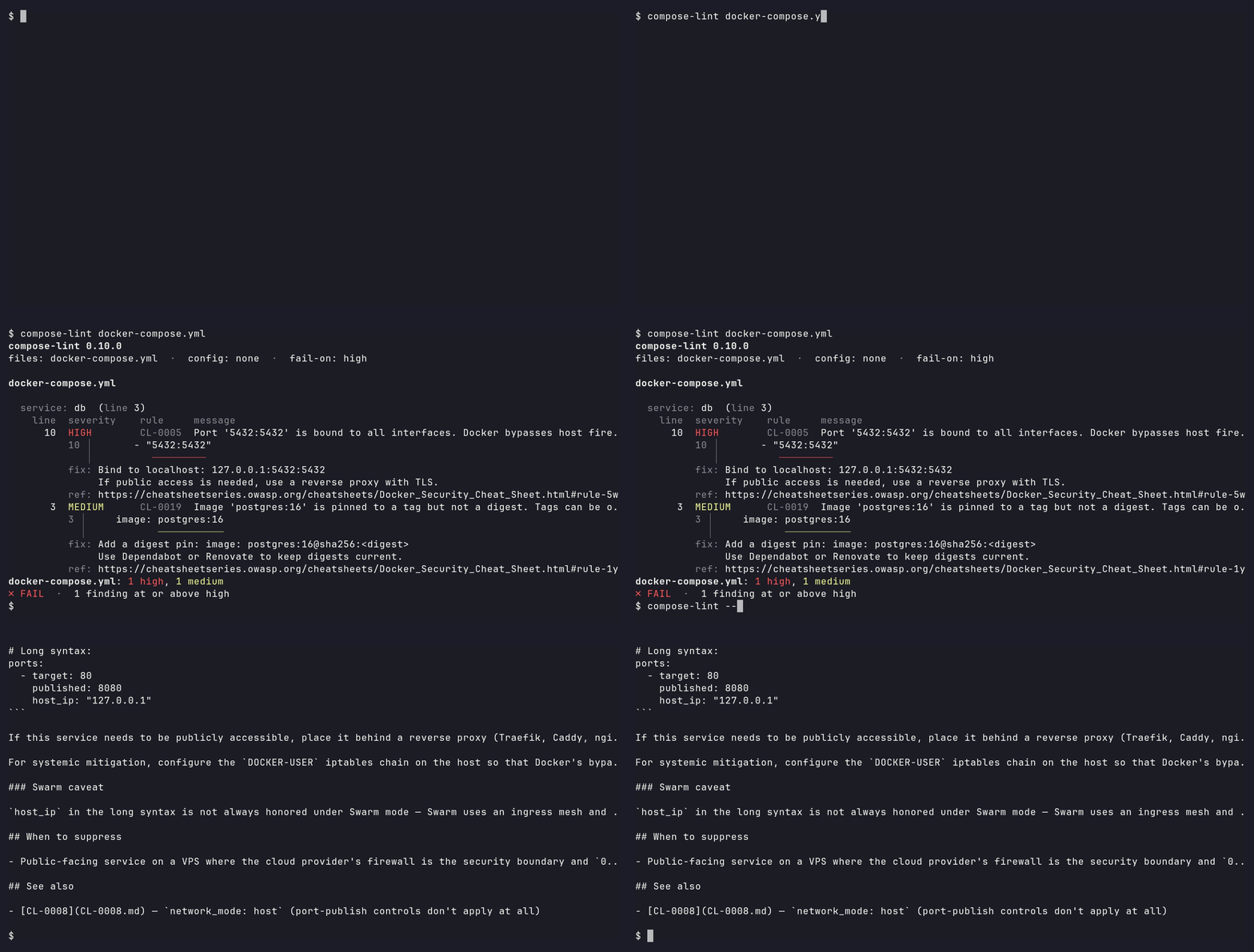
What it catches:
- Privilege flaws —
privileged: true, missingcap_drop,no-new-privilegesnot set, root user, host namespace sharing - Network exposure — wildcard port binds,
network_mode: host - Supply-chain — unpinned images, missing digest pins
- Filesystem and credential leaks — Docker socket mounts, sensitive host paths, plaintext credentials in
environment:
Zero config, sub-second whether you lint one file or a hundred, and grounded in the OWASP Docker Security Cheat Sheet and CIS Docker Benchmark. Full rule docs at tmatens.github.io/compose-lint — the same pages --explain prints offline.
Installation
pip
pip install compose-lint
Or run it ad hoc without installing anything:
uvx compose-lint docker-compose.yml # or: pipx run compose-lint docker-compose.yml
That resolves the newest release at install time. For a reproducible install (CI, production tooling), pin the version and install the dependency set from the repo's hash-pinned lockfile, which release automation keeps current:
curl -fsSLO https://raw.githubusercontent.com/tmatens/compose-lint/v0.29.0/requirements.lock
pip install --require-hashes -r requirements.lock   # dependencies, hash-pinned
pip install --no-deps compose-lint==0.29.0          # the tool, version-pinned
Every pip path needs Python 3.11+; the Docker image is self-contained.
Docker — composelint/compose-lint
docker run --rm -v "$(pwd):/src" composelint/compose-lint:0.29.0
The Docker image is distroless, multi-arch, and runs nonroot — see Security posture below for SLSA, Sigstore, and OpenVEX details.
Running with full hardening
Want to dogfood compose-lint's own rules against the container that runs it? See the hardening guide for the fully-hardened docker run invocation, the flag-to-rule mapping, and digest-pinning instructions.
Quick Start
Run without arguments to auto-detect compose.yml, compose.yaml, docker-compose.yml, or docker-compose.yaml in the current directory:
compose-lint
Or pass files explicitly:
compose-lint docker-compose.yml docker-compose.prod.yml
Preview the auto-fixable findings as a unified diff, then apply them — reading the ⚠ behavior-changing labels first (see Fixing findings):
compose-lint fix              # dry-run diff, writes nothing
compose-lint fix --apply      # write the fixes in place
Don't recognize a rule ID in the output? --explain prints the full rule doc — what it catches, why it matters, the fix, and the OWASP/CIS reference — without leaving the terminal:
compose-lint --explain CL-0005
Docker equivalent:
docker run --rm -v "$(pwd):/src" composelint/compose-lint:0.29.0 docker-compose.prod.yml
Adopting on an existing repo
Most established stacks don't start clean. compose-lint init turns a file's
current findings into a .compose-lint.yml baseline, so the gate can go in
today and you triage afterwards:
compose-lint init docker-compose.yml          # writes ./.compose-lint.yml
compose-lint init docker-compose.yml -o ci.yml # write somewhere else
compose-lint init docker-compose.yml --force   # overwrite an existing config
Each finding becomes a per-service exclude_services entry with a TODO
reason — never a global enabled: false, so a service you add later still
trips the rule. Replace each reason with a real justification, or delete the
entry and fix the issue. Details:
generating a starter config.
Example Output
Given this docker-compose.yml:
services:
  traefik:
    image: traefik:v3.0@sha256:aaaabbbbccccddddeeeeffff00001111222233334444555566667777888899990
    read_only: true
    cap_drop: [ALL]
    security_opt: [no-new-privileges:true]
    mem_limit: 256m
    cpus: 0.5
    volumes:
      - /var/run/docker.sock:/var/run/docker.sock
    ports:
      - "8080:80"

  db:
    image: postgres:16@sha256:bbbbccccddddeeeeffff000011112222333344445555666677778888999900001
    read_only: true
    cap_drop: [ALL]
    security_opt: [no-new-privileges:true]
    mem_limit: 1g
    cpus: 1.0
    environment:
      POSTGRES_PASSWORD: hunter2
    volumes:
      - pgdata:/var/lib/postgresql/data
    tmpfs:
      - /tmp
      - /run

volumes:
  pgdata:
and this .compose-lint.yml (suppressing CL-0001 for traefik with a tracked reason):
rules:
  CL-0001:
    exclude_services:
      traefik: "SEC-1234 approved — socket proxy planned for 2026-Q3"
running compose-lint docker-compose.yml produces:
files: docker-compose.yml  ·  config: .compose-lint.yml  ·  fail-on: high

docker-compose.yml

  service: traefik  (line 10)
    line  severity    rule     message
      10  SUPPRESSED  CL-0001  Docker runtime socket mounted via '/var/run/docker.sock:/var/run/docker.sock'. This gives the container full control over the Docker runtime — equivalent to root on the host.
          reason: SEC-1234 approved — socket proxy planned for 2026-Q3
      12  MEDIUM      CL-0005  Port '8080:80' is bound to all interfaces. Docker bypasses host firewalls (UFW/firewalld), potentially exposing this port to the public internet.
          12 │       - "8080:80"
             │          ───────
          fix: Bind to localhost: 127.0.0.1:8080:80
               If public access is needed, use a reverse proxy with TLS.
          ref: https://cheatsheetseries.owasp.org/cheatsheets/Docker_Security_Cheat_Sheet.html#rule-5a-be-careful-when-mapping-container-ports-to-the-host-with-firewalls-like-ufw

  service: db  (line 22)
    line  severity    rule     message
      22  HIGH        CL-0020  Service has credential-shaped env key 'POSTGRES_PASSWORD' with a literal value. Env vars are exposed via `docker inspect`, `/proc/<pid>/environ`, `docker compose config`, process listings, and CI logs — any process or operator with daemon access can read them.
          22 │       POSTGRES_PASSWORD: hunter2
             │       ─────────────────
          fix: Move 'POSTGRES_PASSWORD' to Compose's `secrets:` primitive. If the image supports the `*_FILE` convention (Postgres, MySQL, MariaDB, MinIO, etc.), set `POSTGRES_PASSWORD_FILE: /run/secrets/<name>` and declare the secret under the top-level `secrets:` block sourced from a gitignored file or `external: true`. Otherwise, have the entrypoint read the secret file at startup and export the value into the workload's environment.
          ref: https://cheatsheetseries.owasp.org/cheatsheets/Docker_Security_Cheat_Sheet.html#rule-12-utilize-docker-secrets-for-sensitive-data-management
docker-compose.yml: 1 high, 1 medium  ·  1 suppressed (not counted)
✗ FAIL  ·  1 finding at or above high
Exit code is 1: one finding at or above the default --fail-on high
threshold. Suppressed findings are shown but not counted. That file is
synthetic; for worked remediations of real stacks, see the
examples gallery.
Grades what actually deploys
For a single Compose file with no siblings, a run reads that file and nothing else. When there is more, compose-lint grades the configuration Compose would actually run, not just the file you named:
- It merges what Compose merges. The sibling
compose.override.yml, the sibling.env(for${VAR}references andCOMPOSE_FILE, never forenvironment:values),env_file:targets, andinclude:/ cross-fileextends:are all resolved, so a socket mount hidden behind a variable or an override is graded as the mount it deploys. - It never reads outside the project. Every document has to resolve inside the named file's own directory. The ambient shell environment is not read, and no registry, daemon, or image is consulted, so the same checkout lints the same on every machine.
- A part of the stack it cannot see is exit 2, not a silent pass. A
reference that is missing, interpolated, or leaves the project is reported
as a coverage gap. Lint the
docker compose configoutput to cover it, or pass--allow-partial-coverageto grade what is visible.
Any Compose Specification file works: one with a top-level services: key, or
an include:-only root. Compose v1 files (services at the top level, retired
by Docker in 2023) and structural fragments with no services are skipped with
a stderr note rather than failed.
Full detail, including the merge order and the flags that switch each source
off (--no-merge-overrides, --no-env):
What a run reads.
Rules
| ID | Severity | Description | Auto-fix | OWASP | CIS |
|---|---|---|---|---|---|
| CL-0001 | CRITICAL | Host control socket exposed | — | Rule #1 | 5.32 |
| CL-0002 | CRITICAL | Privileged mode enabled | — | Rule #3 | 5.5 |
| CL-0003 | MEDIUM | Privilege escalation not blocked | ✅ | Rule #4 | 5.26 |
| CL-0004 | MEDIUM | Image not pinned to version | — | Rule #13 | 5.28 |
| CL-0005 | MEDIUM | Ports bound to all interfaces | ✅ | Rule #5a | 5.14 |
| CL-0006 | MEDIUM | No capability restrictions | — | Rule #3 | 5.4 |
| CL-0007 | LOW | Filesystem not read-only | ✅ | Rule #8 | 5.13 |
| CL-0008 | HIGH | Host network mode | — | Rule #5 | 5.10 |
| CL-0009 | HIGH | Security profile disabled | ✅ | Rule #6 | 5.2, 5.3, 5.22 |
| CL-0010 | HIGH | Host namespace sharing | — | Rule #3 | 5.16, 5.17, 5.21, 5.31 |
| CL-0011 | HIGH | Strong host-adjacent capability added | — | Rule #3 | 5.4 |
| CL-0013 | HIGH | Sensitive host path exposed | — | Rule #8 | 5.6 |
| CL-0014 | LOW | Logging driver disabled | ✅ | — | — |
| CL-0016 | CRITICAL | Dangerous host device exposed | — | — | 5.18 |
| CL-0017 | LOW | Shared mount propagation | — | — | 5.20 |
| CL-0018 | MEDIUM | Explicit root user | — | Rule #2 | — |
| CL-0019 | MEDIUM | Image tag without digest | — | Rule #13 | — |
| CL-0020 | HIGH | Credential-shaped env key with literal value | — | Rule #12 | — |
| CL-0021 | HIGH | Credential embedded in connection-string env value | — | Rule #12 | — |
| CL-0022 | LOW | tmpfs mount re-enables exec/suid | ✅ | Rule #8 | — |
| CL-0024 | CRITICAL | Host-code-execution capability added | — | Rule #3 | 5.4 |
| CL-0025 | CRITICAL | Root-equivalent host path mounted writable | — | Rule #8 | 5.6 |
| CL-0026 | MEDIUM | No resource limits (memory/CPU) | — | Rule #7 | 5.10, 5.11 |
| CL-0027 | MEDIUM | Bounded-grant capability added | — | Rule #3 | 5.4 |
| CL-0028 | HIGH | Host-reaching capability added | — | Rule #3 | 5.4 |
| CL-0029 | HIGH | Host-availability capability added | — | Rule #3 | 5.4 |
| CL-0030 | HIGH | Host-disclosure capability added | — | Rule #3 | 5.4 |
Rules marked ✅ have a mechanically unambiguous remediation that compose-lint fix applies for you, dry-run first — see Fixing findings.
Every other rule reports specific fix guidance for a change only you can
choose, and is never auto-edited.
The gaps in the numbering — CL-0012, CL-0015, CL-0023 — are retired ids kept fallow forever: reusing one would silently change the meaning of a suppression someone has already written (ADR-005, ADR-028).
Severity Levels
Findings are rated LOW, MEDIUM, HIGH, or CRITICAL. Each rule's severity is derived from a two-axis matrix — the attacker precondition the misconfiguration creates, and the impact scope it reaches — under a stated attacker baseline and a stated Docker posture. See docs/severity.md for the full scoring matrix, the derivation of every rule, and the override mechanism.
Configuration
Create .compose-lint.yml to disable rules, exclude specific services, or adjust severity:
rules:
  CL-0001:
    enabled: false
    reason: "SEC-1234 — approved 2026-07-01"
  CL-0003:
    exclude_services:
      minecraft: "entrypoint switches users via su-exec"
  CL-0005:
    severity: medium
Suppressed findings still appear, marked SUPPRESSED, with the reason
carried into JSON and SARIF; they do not affect the exit code, and
--skip-suppressed hides them. A severity: override is reported as such.
See docs/configuration.md
for per-service semantics, precedence, and the output-format mapping.
CLI Reference
Three subcommands: check (the default — a bare compose-lint works), fix,
and init. Every flag is described in compose-lint --help and the
CLI reference, along with color
control (NO_COLOR / FORCE_COLOR) and end-of-options semantics. Text
output prints each rule's fix block once per file; -v repeats it on every
finding, -q gives one line per finding.
Fixing findings
compose-lint fix auto-remediates the findings whose edit is mechanically
unambiguous — one correct value, in one place, with no collateral change to
the rest of the file: adding read_only: true or no-new-privileges:true,
binding a published port to 127.0.0.1, restoring a disabled logging driver
or seccomp profile, and similar. It is dry-run by default: it
prints a unified diff and writes nothing.
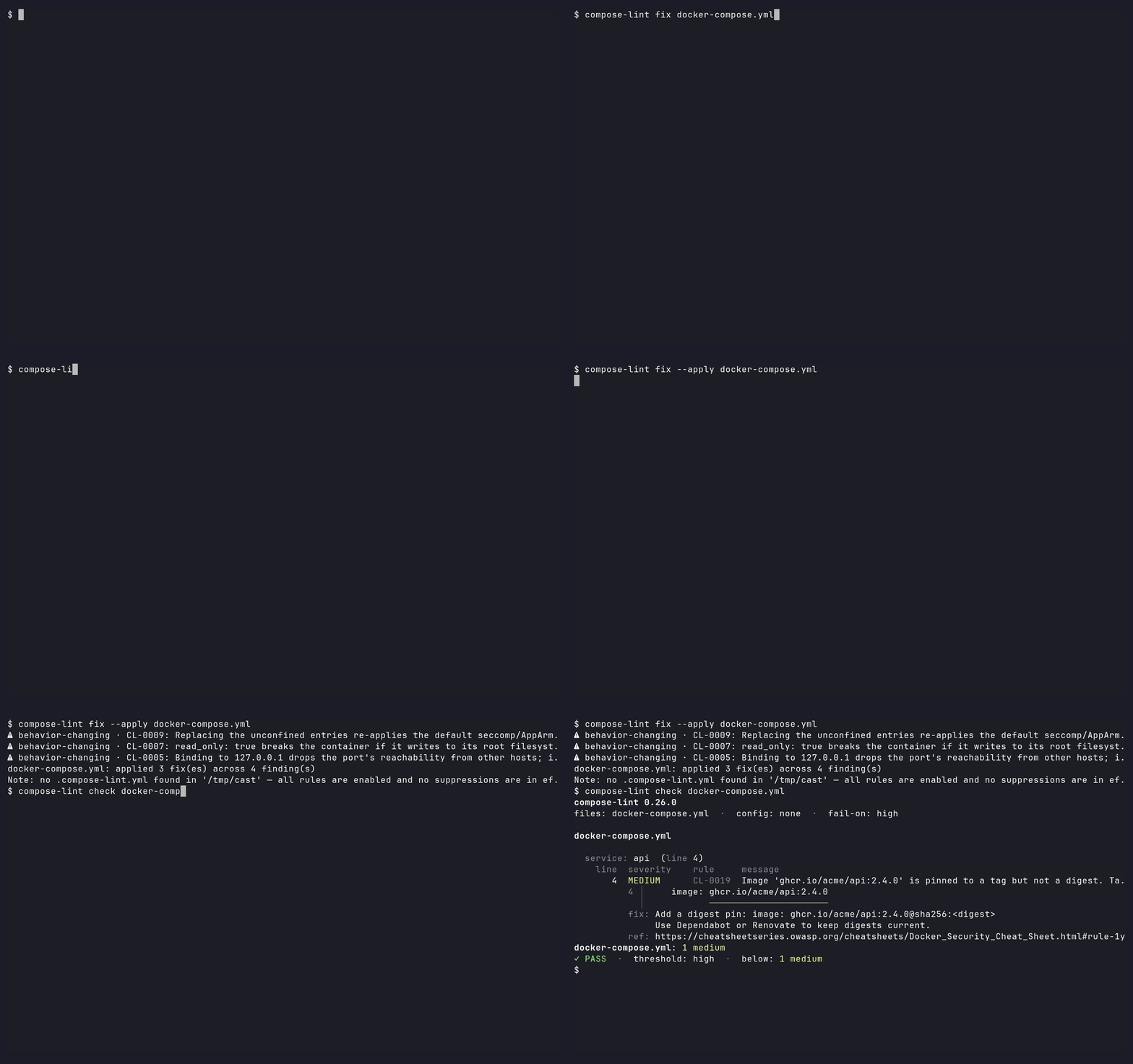
Auto-fixable does not mean harmless.
fixwill not corrupt or reflow your file, but it will change how your stack behaves:read_only: truebreaks a container that writes to its root filesystem, and rebinding a port to127.0.0.1cuts off remote clients. Each such edit is labelled⚠ behavior-changingin the diff with the breakage named. Read those lines before--apply, and roll out to staging first.
compose-lint fix docker-compose.yml            # preview the diff, write nothing
compose-lint fix --apply docker-compose.yml    # write the fixes in place
compose-lint fix --only CL-0007 --apply .      # restrict to one rule
Context-dependent findings (capability lists, socket mounts) are reported for
manual review, and a region using YAML anchors, merge keys, or ${VAR}
interpolation is refused rather than guessed. The full contract is in the
fix guide.
How it compares
| Tool | Compose security rules | Auto-fix | Scope | Zero config |
|---|---|---|---|---|
| compose-lint | Yes | Yes — dry-run diff first | Docker Compose | Yes |
| KICS | Yes | Yes (remediate command) |
Broad IaC (Terraform, K8s, Compose, ...) | No |
| Hadolint | No — Dockerfile only | No | Dockerfile | Yes |
| dclint | Yes — schema/structure only | Style/formatting only | Docker Compose | Yes |
| Trivy | No — image/CVE + IaC misconfig scanning, no dedicated Compose ruleset | No | Dockerfiles, images, IaC | Yes |
| Checkov | No — no dedicated Compose ruleset | No | Broad IaC (Terraform, K8s, ...) | No |
A capability snapshot, verified July 2026 — check each tool's docs for current state.
Not in scope: compose-lint does not validate Compose schema, scan images for CVEs, or lint Dockerfiles. Pair it with dclint for schema/structure, Hadolint for Dockerfiles, and Trivy for image CVEs.
Versioning & stability
compose-lint follows Semantic Versioning. From 1.0, the CLI, exit codes, config schema, and JSON/SARIF output are stable. New and tightened rules ship in MINOR releases, so pin a version or use --fail-on if you need deterministic CI. See docs/compatibility.md for the full stability promise and deprecation policy.
Release-by-release changes are in
CHANGELOG.md;
planned work is on the roadmap.
Exit Codes
| Code | Meaning |
|---|---|
| 0 | No findings at or above the --fail-on threshold |
| 1 | One or more findings at or above the --fail-on threshold |
| 2 | compose-lint couldn't run, or couldn't see the whole stack (invalid args, file not found, invalid Compose file, a rule crashed, or a coverage gap — see Grades what actually deploys) |
The default threshold is high — medium and low findings don't fail CI unless you opt in:
compose-lint --fail-on low docker-compose.yml   # fail on everything
compose-lint --fail-on critical docker-compose.yml  # only critical
CI Integration
GitHub Actions
Runs compose-lint and uploads findings to GitHub Code Scanning:
# .github/workflows/lint.yml
name: Compose Lint
on: [push, pull_request]

permissions: {}

jobs:
  compose-lint:
    runs-on: ubuntu-latest
    permissions:
      contents: read          # checkout
      security-events: write  # upload the SARIF to Code Scanning
    steps:
      - uses: actions/checkout@de0fac2e4500dabe0009e67214ff5f5447ce83dd # v6.0.2
      - uses: tmatens/compose-lint@d0434054779e9026c6082bc47ecc818ec2aa981d # v0.28.0
        with:
          sarif-file: results.sarif
The uses: line pins a commit SHA, which is what OpenSSF Scorecard grades
for and what Renovate keeps fresh; from 1.0, tmatens/compose-lint@v1 floats
with releases instead. The permissions: blocks are part of the recipe: the
job holds only the two scopes it uses. If you want the SARIF file without the
Code Scanning upload, set upload-sarif: "false" and drop
security-events: write. Every input, and the reasoning behind the pin and
the permissions, is in the
GitHub Action guide.
Or install from PyPI directly:
      - uses: actions/setup-python@v6
        with:
          python-version: "3.13"
      - run: pip install compose-lint
      - run: compose-lint docker-compose.yml
Forgejo Actions
compose-lint runs on Forgejo Actions too, with two practical differences (cross-instance action URLs and a checkout/node quirk in job containers). The recipe is in the Forgejo guide, and the weekly forgejo-smoke workflow runs it against a live Forgejo.
SARIF output
compose-lint --format sarif docker-compose.yml > results.sarif
Pre-commit
# .pre-commit-config.yaml
repos:
  - repo: https://github.com/tmatens/compose-lint
    rev: v0.29.0
    hooks:
      - id: compose-lint
The hook ships args: [--], and setting args: replaces that default.
Keep -- last if you pass flags, so a repository path can never be read as
an option (why):
      - id: compose-lint
        args: [--fail-on, low, --]
Agent-written Compose
If a coding agent writes Compose in your repo, the two gates above already
cover it: the pre-commit hook catches it before the commit, the Action before
the merge, on the same terms as anyone else's. If you are driving compose-lint
from an agent or script, parse --format json (a versioned envelope) and
read Automation and agent use,
which covers what agents get wrong: exit 2 is a coverage gap, fix is a dry
run, there are no inline suppressions, and --explain works offline.
Security posture
compose-lint is built to be safe to depend on:
- Runtime image: distroless Python on Debian, multi-arch (
linux/amd64+linux/arm64), nonroot UID 65532, no shell or package manager at runtime. See ADR-009. - Supply chain: every release ships SLSA build provenance and Sigstore attestations. Published to PyPI via Trusted Publishers (OIDC) — no manual
twine upload, no long-lived API tokens. - Vulnerability transparency: each release ships an OpenVEX document declaring known pip CVEs
not_affected: pip code is stripped from the runtime image. - External audit: tracked on OpenSSF Scorecard and OpenSSF Best Practices Baseline 2; CodeQL runs on every PR, ClusterFuzzLite fuzzes code-touching PRs, and Docker Scout scans the published image daily.
- Reporting vulnerabilities: see SECURITY.md.
Contributing
See CONTRIBUTING.md for development setup and how to add rules.
License
1 maintainer

Download files
Download the file for your platform. If you're not sure which to choose, learn more about installing packages.
Source Distribution
Built Distribution
Filter files by name, interpreter, ABI, and platform.
If you're not sure about the file name format, learn more about wheel file names.
Copy a direct link to the current filters
File details
Details for the file compose_lint-0.29.0.tar.gz.
File metadata
- Download URL: compose_lint-0.29.0.tar.gz
- Upload date:
- Size: 4.2 MB
- Tags: Source
- Uploaded using Trusted Publishing? Yes
- Uploaded via:
twine/7.0.0 CPython/3.13.14
File hashes
| Algorithm | Hash digest | |
|---|---|---|
| SHA256 |
60c707f9c89d7de297baa37ad2eaa66c48fd85cb004fd7cd2fd1d0351787045b
|
|
| MD5 |
528a2267e9e2f9da199731727a48703a
|
|
| BLAKE2b-256 |
c809a5c59f9184e3bb7a0a69201084d0d1fc0836ce06963acd30bab092c1f386
|
Provenance
The following attestation bundles were made for compose_lint-0.29.0.tar.gz:
Publisher:
publish.yml on tmatens/compose-lint
-
Statement:
-
Statement type:
https://in-toto.io/Statement/v1 -
Predicate type:
https://docs.pypi.org/attestations/publish/v1 -
Subject name:
compose_lint-0.29.0.tar.gz -
Subject digest:
60c707f9c89d7de297baa37ad2eaa66c48fd85cb004fd7cd2fd1d0351787045b - Sigstore transparency entry: 2809156449
- Sigstore integration time:
-
Permalink:
tmatens/compose-lint@34fa9ae3fc89217b270668522dfa13855b91581a -
Branch / Tag:
refs/tags/v0.29.0 - Owner: https://github.com/tmatens
-
Access:
public
-
Token Issuer:
https://token.actions.githubusercontent.com -
Runner Environment:
github-hosted -
Publication workflow:
publish.yml@34fa9ae3fc89217b270668522dfa13855b91581a -
Trigger Event:
push
-
Statement type:
File details
Details for the file compose_lint-0.29.0-py3-none-any.whl.
File metadata
- Download URL: compose_lint-0.29.0-py3-none-any.whl
- Upload date:
- Size: 334.4 kB
- Tags: Python 3
- Uploaded using Trusted Publishing? Yes
- Uploaded via:
twine/7.0.0 CPython/3.13.14
File hashes
| Algorithm | Hash digest | |
|---|---|---|
| SHA256 |
3d7925b1c4a46279478131f6182287a73a041f983554af5de803be527fffad39
|
|
| MD5 |
7e167a3af266208844cdd970a2175980
|
|
| BLAKE2b-256 |
a3fbcf4e4fb78ecaefe6b385ccabaaa0c5eb0cd534d32af8ab7c4f1bac744808
|
Provenance
The following attestation bundles were made for compose_lint-0.29.0-py3-none-any.whl:
Publisher:
publish.yml on tmatens/compose-lint
-
Statement:
-
Statement type:
https://in-toto.io/Statement/v1 -
Predicate type:
https://docs.pypi.org/attestations/publish/v1 -
Subject name:
compose_lint-0.29.0-py3-none-any.whl -
Subject digest:
3d7925b1c4a46279478131f6182287a73a041f983554af5de803be527fffad39 - Sigstore transparency entry: 2809156512
- Sigstore integration time:
-
Permalink:
tmatens/compose-lint@34fa9ae3fc89217b270668522dfa13855b91581a -
Branch / Tag:
refs/tags/v0.29.0 - Owner: https://github.com/tmatens
-
Access:
public
-
Token Issuer:
https://token.actions.githubusercontent.com -
Runner Environment:
github-hosted -
Publication workflow:
publish.yml@34fa9ae3fc89217b270668522dfa13855b91581a -
Trigger Event:
push
-
Statement type:














