
lightweight repository for building torch networks from a config file

Project description
Lightweight repository for building torch networks from a config file
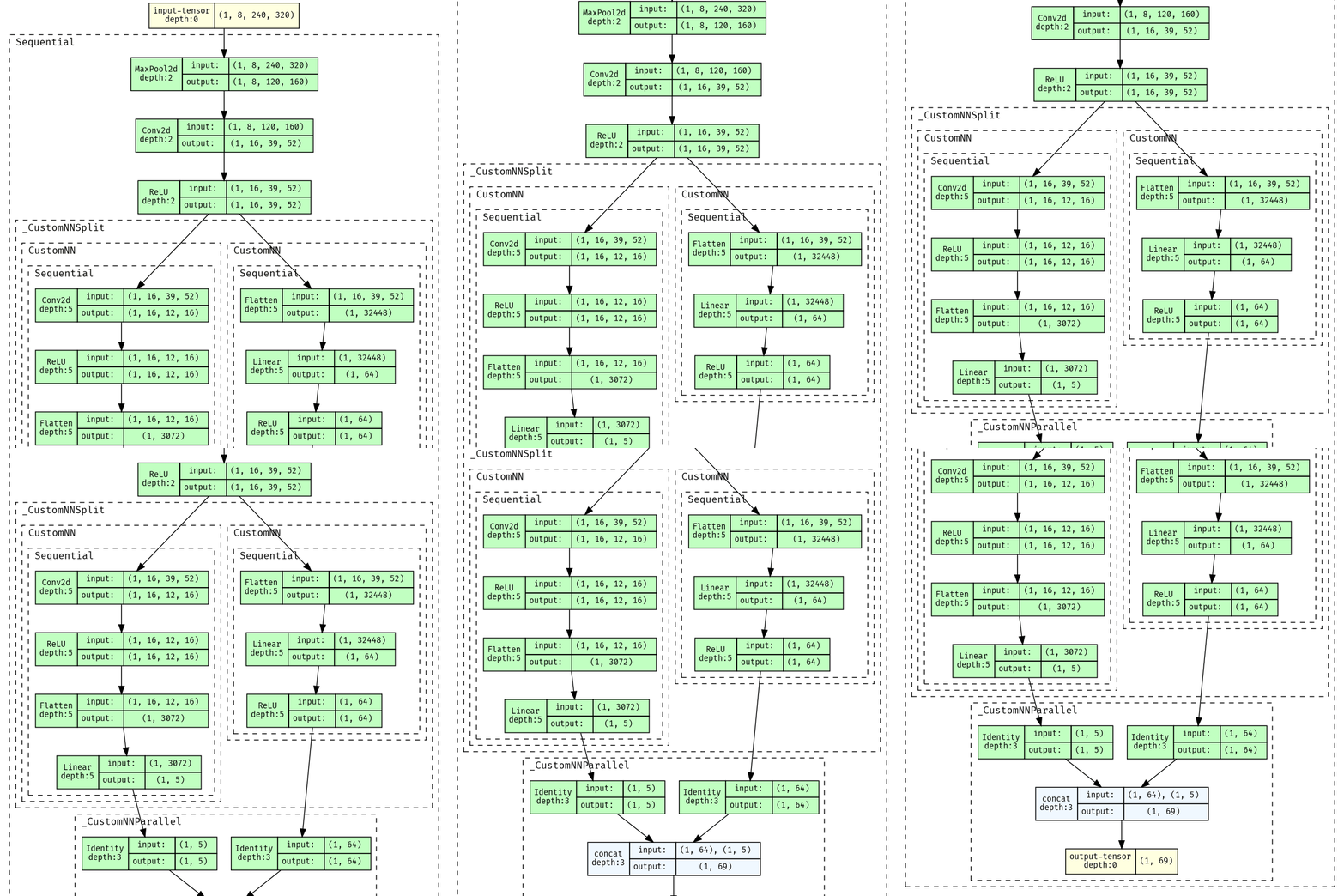
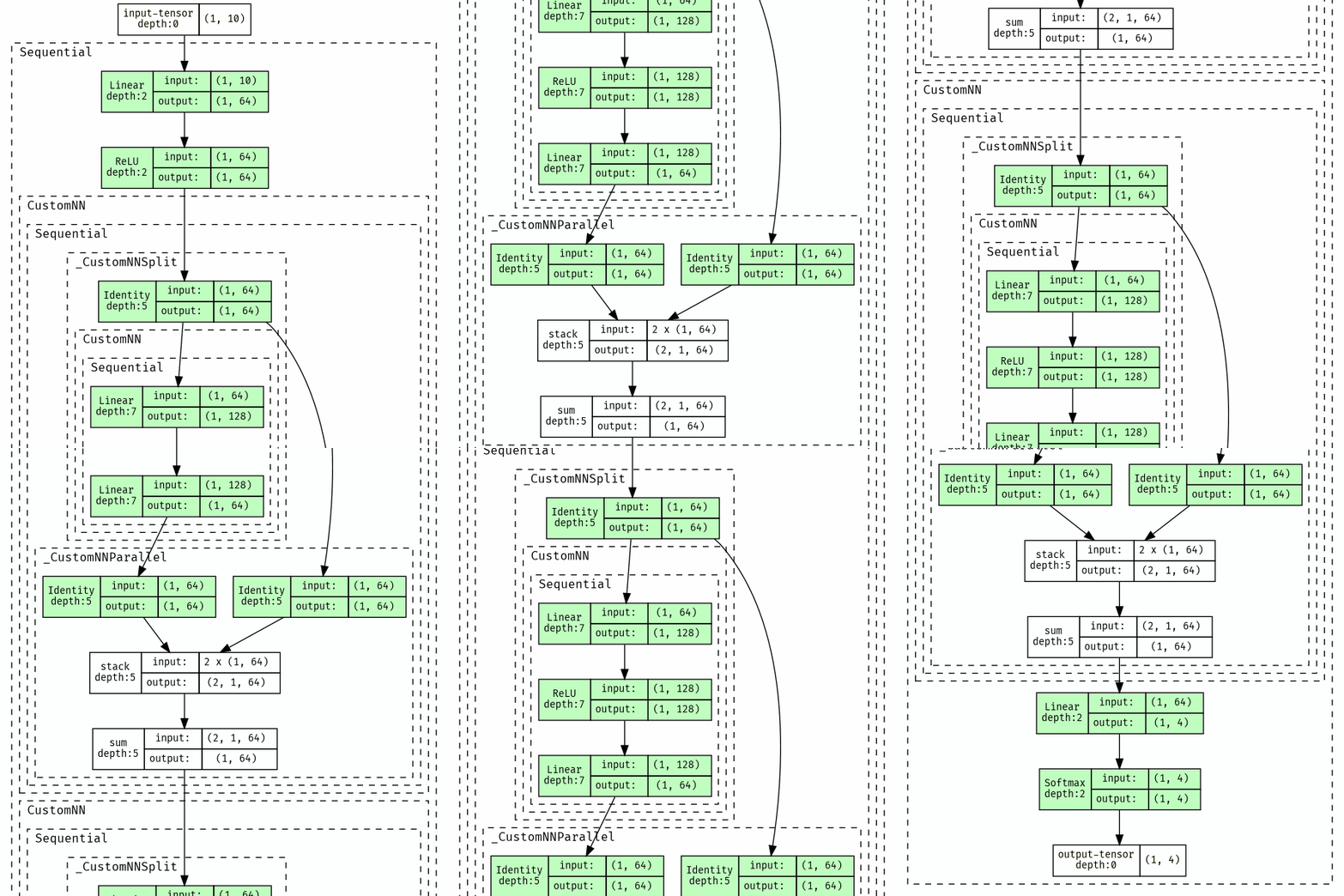
For examples of config dicts, look in net_configs.
To generate a network given a dictionary, use net = CustomNN(structure=config_dict).
For example, net = CustomNN(structure=ast.literal_eval(open(<config file>).read()))
A valid configuration is a dictionary. The required keys are:
input_shape: the UNBATCHED input shape of the networklayers: list of network layers, each layer is a dictionary with layer specific keys
setup
Tested with Python ≥ 3.7
Clone repository, install
git clone https://github.com/pranavraj575/config_networks
cd config_networks
pip install -e .
Optionally, install with dev tools:
pip install -e .[dev]
If installed with dev, can test installation, and reformat before pushing:
python -m pytest
ruff check; ruff format; pyright
layer dictionaries
All layer dictionaries are REQUIRED to contain type: name of layer type.
Supported torch layer types include identity, relu, tanh, dropout, flatten, linear, cnn, maxpool,
avgpool.
If a layer corresponds to a torch module, any keys that correspond to a keyword argument of that module will
automatically get passed to that module.
E.g. for "type":"softmax", having the additional key "dim":-1 will automatically pass this to create torch.nn.Softmax(dim=-1).
We describe keys that are required (and some optional ones) in detail below.
There are also special types.
split breaks the network into two parallel networks at a particular layer, and can combine the results.
This is useful for different heads (i.e. policy, value network), or for resnets to sum a computation with the identity
map.
repeat makes k copies of a block.
identity, sigmoid, relu, tanh
Identity, Sigmoid, ReLU, Tanh torch layers respectively.
These layers require no additional dictionary keys, and do not change the network shape.
Example: {"type": "ReLU"}
leakyrelu
LeakyReLU activation layer, has optional parameter negative_slope with default "negative_slope":1e-2.
Example: {"type": "LeakyReLU", "negative_slope": 1e-2}
softmax
The Softmax torch layer.
dim: optional parameter with default"dim": -1, probability of element to be zeroed
Example: {"type": "Softmax", "dim": -1}
dropout, dropout1d, dropout2d, dropout3d
The Dropout, Dropout1D, Dropout2D, and Dropout3D torch layers respectively.
p: optional parameter with default"p": 0.5, probability of element to be zeroed
Example: {"type": "Dropout", "p": 0.69}
flatten
Flatten torch layer
start_dim: optional parameter with default"start_dim": 1, represnents first dimension for flatteningend_dim: optional parameter with default"end_dim": -1, represents last dimension to be flattened
Example: {"type": "Flatten", "start_dim": 1, "end_dim": -1}
linear
Linear torch layer
out_features: REQUIRED parameter, the number of output features to transform input tobias: optional parameter with default"bias": True, whether to include bias
Note that input_features is calculated automatically, and does not need to be specified.
Example: {"type": "linear", "out_features": 128, "bias": False}
embedding
Embedding torch layer
num_embeddings: REQUIRED parameter, the number of unique embeddings to storeembedding_dim: REQUIRED parameter, the dimension of each embedding
Example: {"type": "Embedding", "num_embeddings": 128, "embedding_dim": 512}
cnn, maxpool, avgpool
Conv2d, MaxPool2d, AvgPool2d torch layers respectively
out_channels: REQUIRED FORcnn, number of output channels of the layer.kernel_size: REQUIRED parameter, the shape of the kernel passed to each torch layerstride: optional parameter with default"stride": (1,1), stride to usepadding: optional parameter with default"padding": (0,0), padding to use
Example:
{"type": "CNN", "out_channels": 16, "kernel_size": [5, 5], "stride": [3, 3]}
torch.nn.<MODULE NAME>
Can retrieve any module in torch.nn, assuming the spelling and capitalization is correct. Relevant keyword arguments will be passed to the torch.nn init function.
output_shape: REQUIRED parameter, the unbatched output shape after this layer is passed This is necessary to calculate the input dimension of the next layer, and cannot be easily pulled from torch documentation.
Example: {"type": "torch.nn.LogSoftmax", "dim": -1, "output_shape": [4]}
Alternatively works if torch.nn is unspecified: {"type": "LogSoftmax", "dim": -1, "output_shape": [4]}
net_configs/resnet.txt has an example of using this to make a torch.nn.Softmax layer:

custom
Can retrieve a custom module (that inherits torch.nn.Module). Relevant keyword arguments will be passed to the module init function.
module: REQUIRED parameter, the constructor of the custom module.output_shape: REQUIRED parameter, the unbatched output shape after this layer is passed This is necessary to calculate the input dimension of the next layer, and cannot be easily pulled from torch documentation.
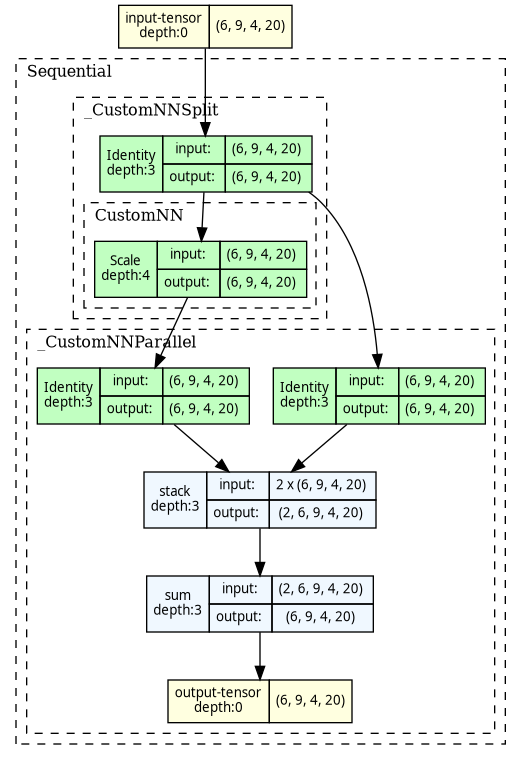
Example: {"type": "custom", "module": Scale, "scalar": -1, "output_shape": [10]}
Example of this is in example\use_custom_module.py:
split
Splits network into branches, computed independently.
branches: REQUIRED parameter, list of lists of layer dictionaries. With k lists of layer dictionaries, the network will split into k branches, each computing the network associated with one of the branches. If a list is replaced withNone, the associated branch will be the identity.combination: optional parameter with default"combination": "tuple". Determines how to combine the results of branches. Works the same as thecombinationargument for theparallellayer below. Specifying this is equivalent to adding aparallellayer with no branches.
This is computed recursively, so splits can be repeatedly applied (though there is probably no reason to do this).
An example of this is in net_configs/split_cnn.json.
A example of splitting multiple times is in net_configs/double_split_cnn.json.
The input for each branch will be the output of the layer immediately before it. This is why we do not need to specify the input shape.
Example (this splits into an identity branch, and a branch that computes a single linear layer):
{"type": "split", "branches": [None, [{"type": "linear", "out_features": 64}]], "combination": "tuple"}
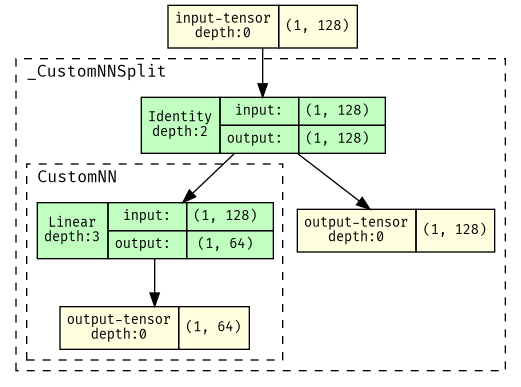
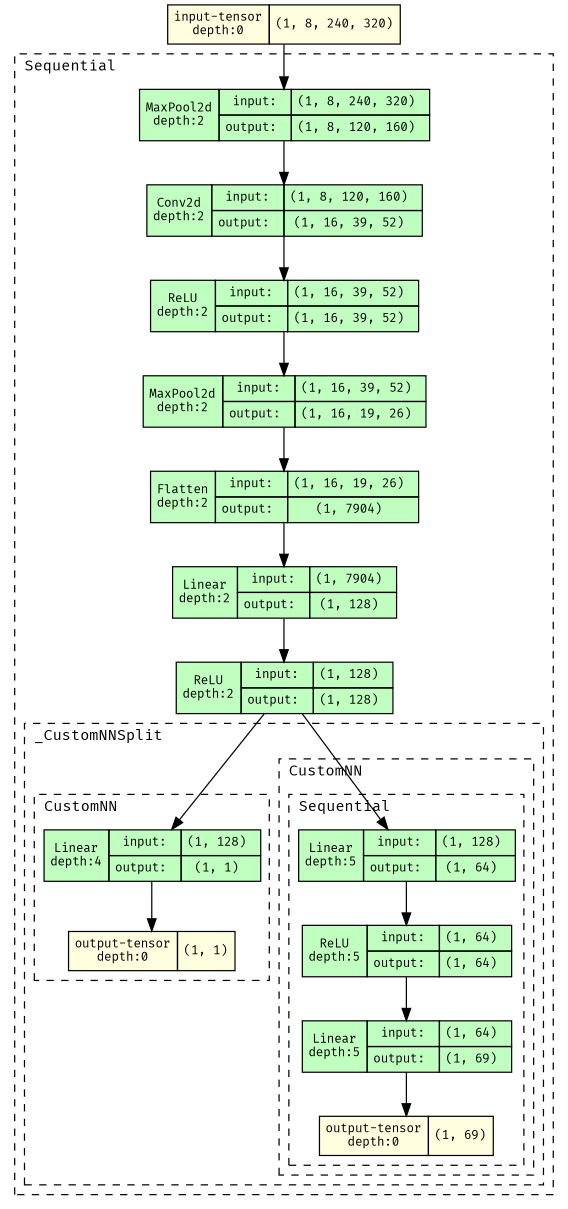
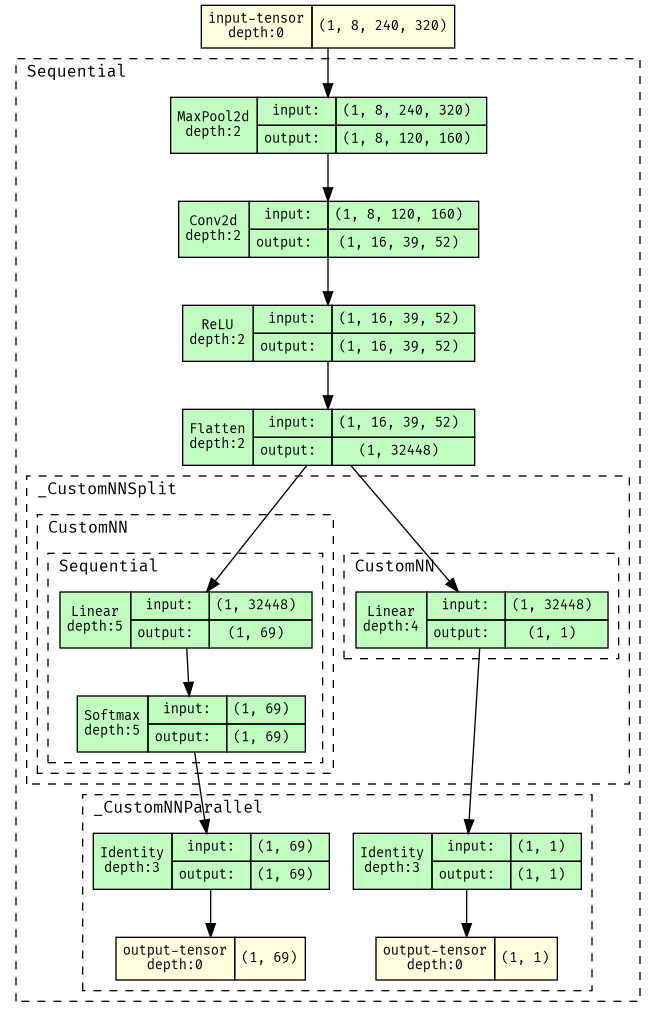
Splitting once:
Note that the torchviz display does not order the output tuple in any particular way. The true output shape is ((69,), (1,)).
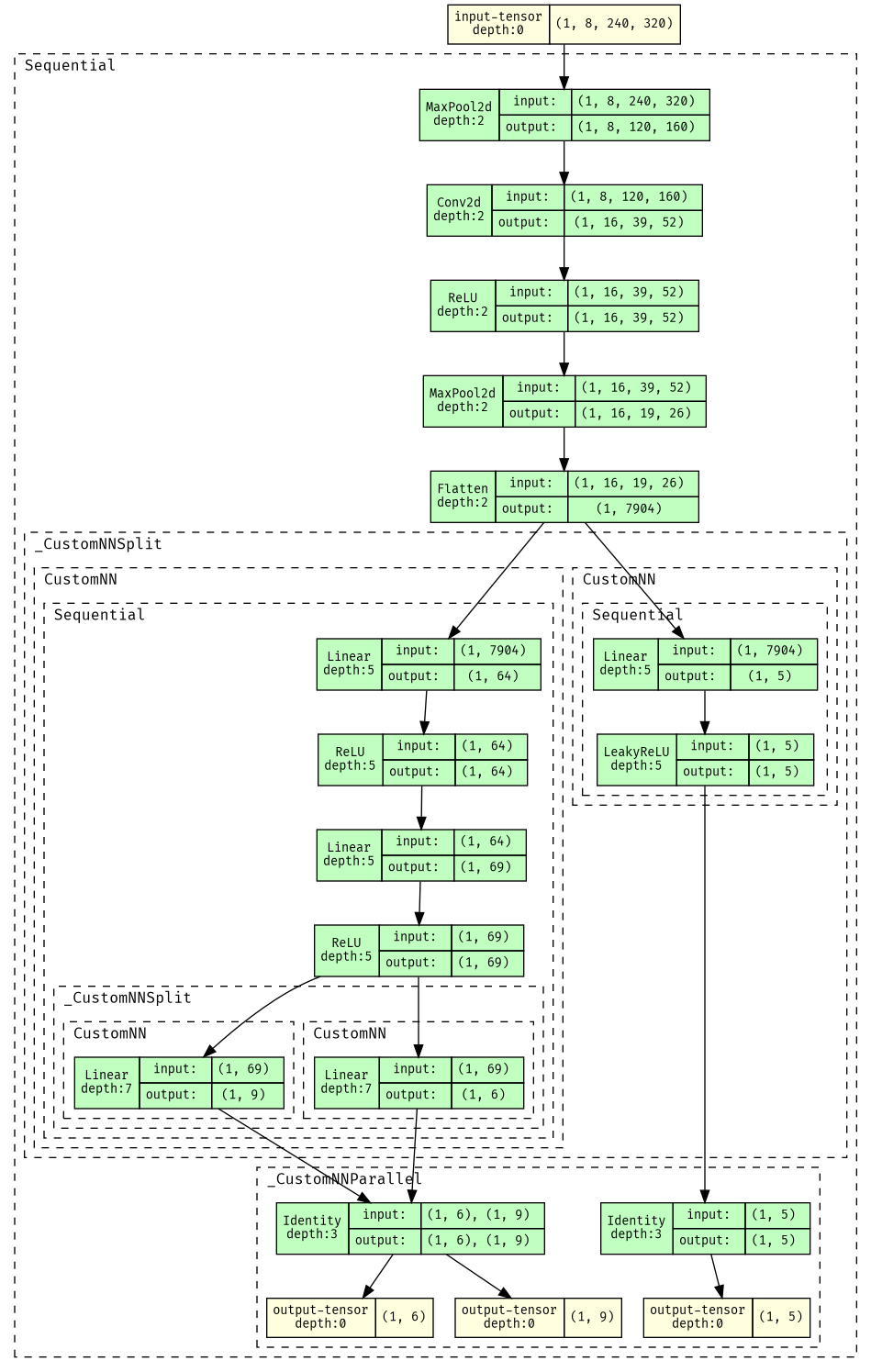
Splitting multiple times:
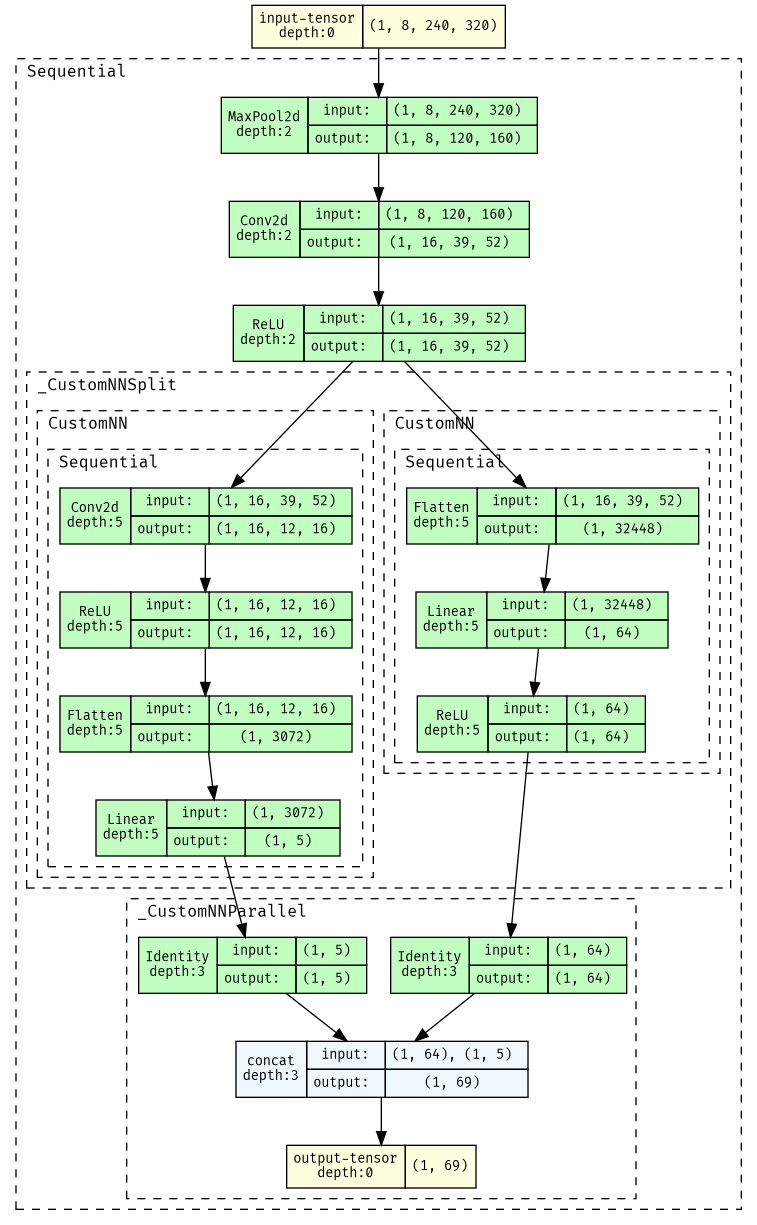
Splitting and recombining (net_configs/small_split_recombine_cnn.json):
parallel
Computes a tuple of k tensors independently, may merge at end of computation.
This can compute a dictionary (if branches is a dict type). In this case, look at parallel (dictionary input).
branches: optional parameter, list of k lists of layer dictionaries. Defaults to doing no computation. Each list can also beNoneto do no computationcombination: optional parameter with default"combination": "tuple". Determines how to combine the results of branches.-
For
"tuple", the result will be a k-tuple of the outputs of each branch. Optional"extract_sub_tuples"argument, with defaut"extract_sub_tuples":[]."extract_sub_tuples"is a list of indices for branches with tuple outputs that should be extracted and tupled at a higher level. I.e. if the output shape of branch 0 is(5,), branch 1 is((2,),(3,)), and branch 2 is(4,)the overall output shape will be((5,),((2,),(3,)),(4,))normally. If"extract_sub_tuples":[1], the output shape will instead be((5,),(2,),(3,),(4,)).net_configs/tuple_extraction.txthas an example of using this as described. -
For
"dict", the result will be a dict of the outputs of each branch. In this case,"output_keys"must be additionally specified, which is a list of keys that will refer to each element in the tuple. Optional"extract_sub_tuples"argument, that works the same as in"tuple".small_split_cnn_output_dict.txthas an example of using this to create a dictionary{'policy':policy, 'value':value}..- For
"sum", the results of each branch will be summed. For this, each branch MUST have the same output dimension. If"combined_idxs"is additionally included (e.g."combined_idxs":[0,2]), only the specified branches will be summed. The result will be a tuple of (uncombined branch 0, uncombined branch 1, ... , sum of combined branches) If"idx_of_combination"is specified, the combination will be placed at this index (otherwise it will be placed last).net_configs/tuple_sum.txtandnet_configs/tuple_sum_specific_indices.txthave examples of using this as described. - For
"concat", the results of each branch will be concatenated. The dimension of concatenation will be the optionaldimkey, with default"dim":-1. This can also specify"combined_idxs"with the same behavior as insum. This will concatenate in the order specified by"combined_idxs", or in default order if unspecified.
- For
-
Example (this flattens both inputs, then concatenates them):
{"type": "parallel", "combination": "concat", "branches": [[{"type": "flatten"}], [{"type": "flatten"}]]}
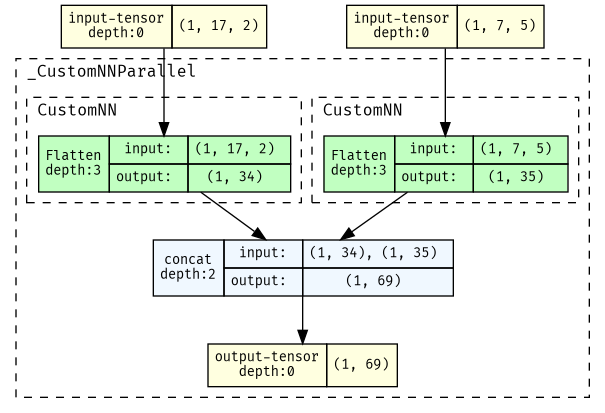
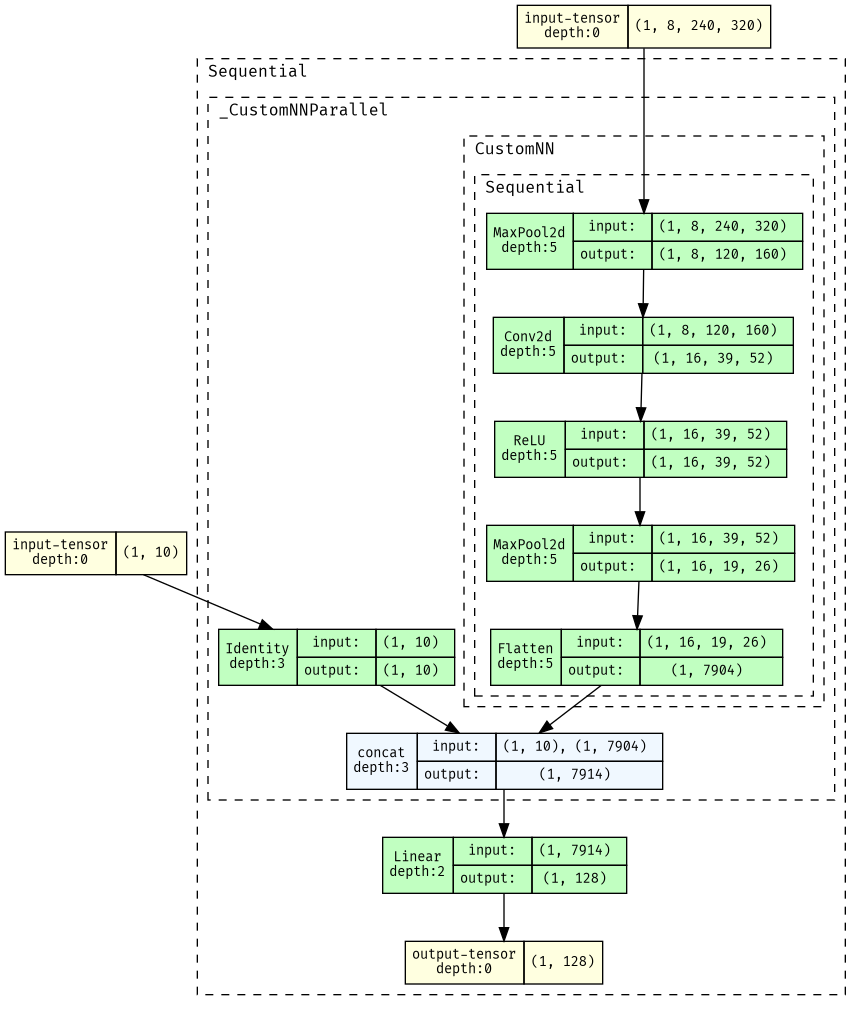
net_configs/multimodal.txt has an example of using these to take in (image, vector) input:
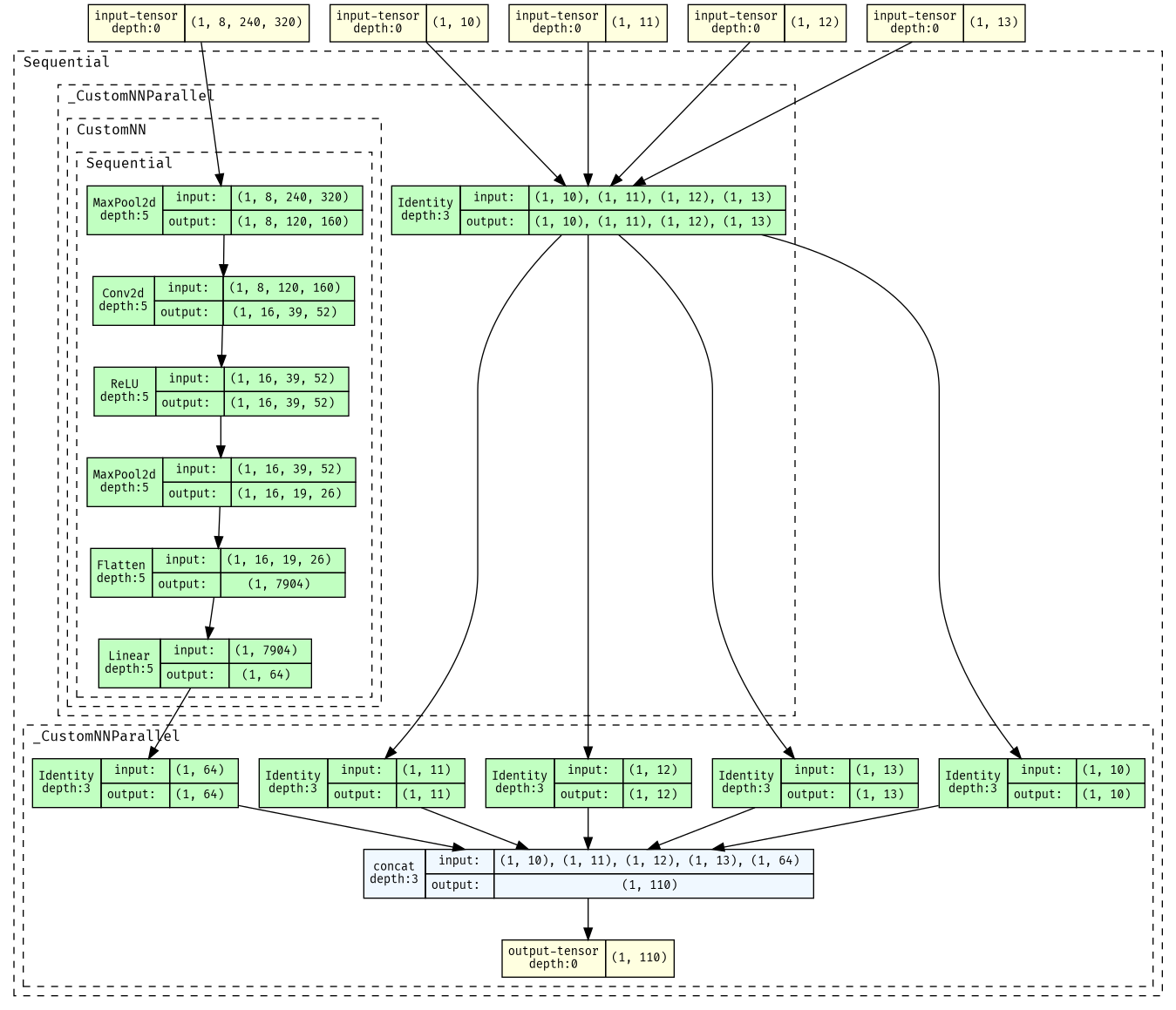
Example of using this to extract (then concatenate) sub-tuples (net_configs/tuple_extraction.txt):
Note that the input shape is actually (((10,), (11,), (12,), (13,)), (8, 240, 320)), the package torchviz does not correctly display subtuples.
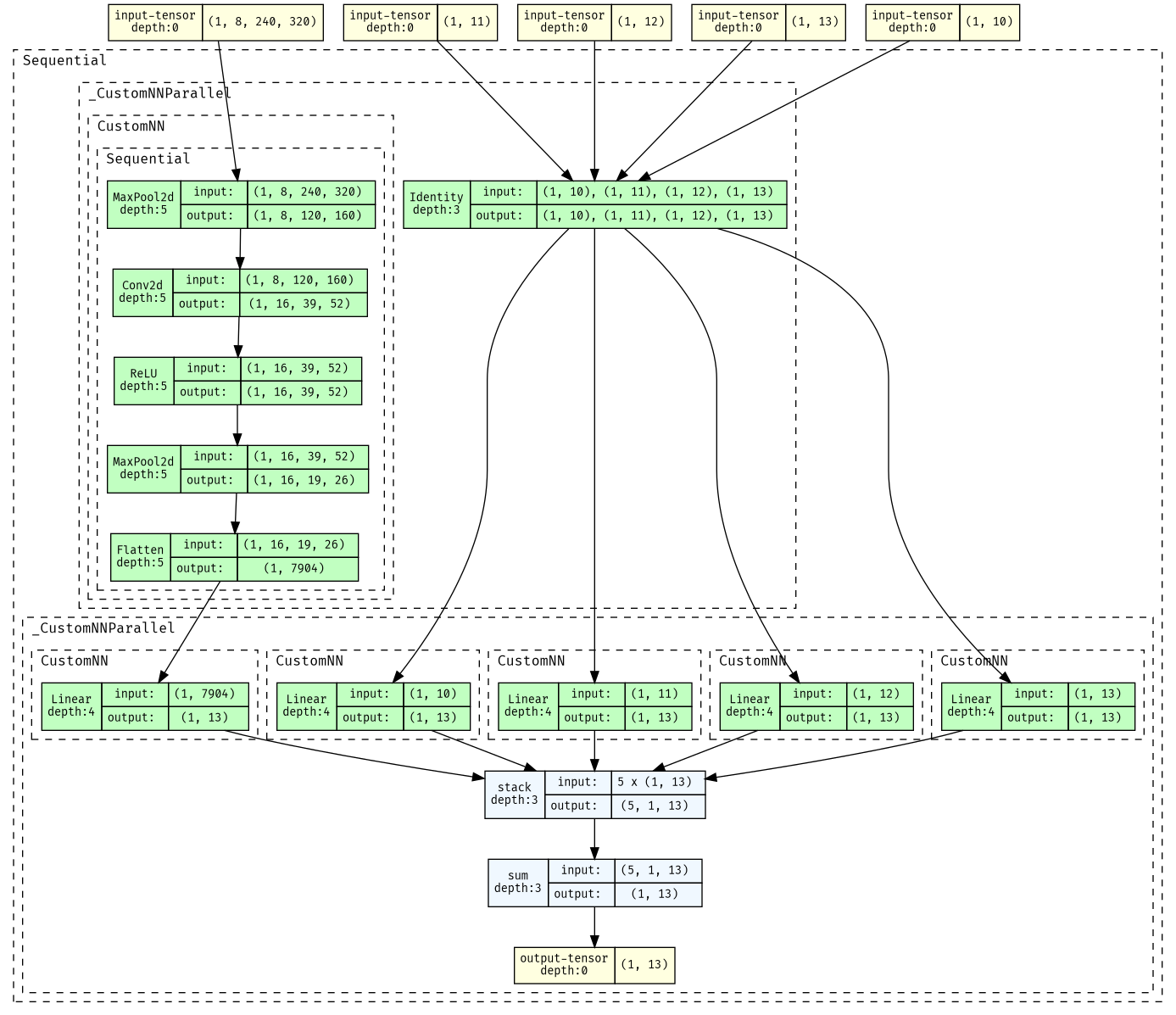
Example of using this to sum all branches (net_configs/tuple_sum.txt), and specific branches (net_configs/tuple_sum_specific_indices.txt):
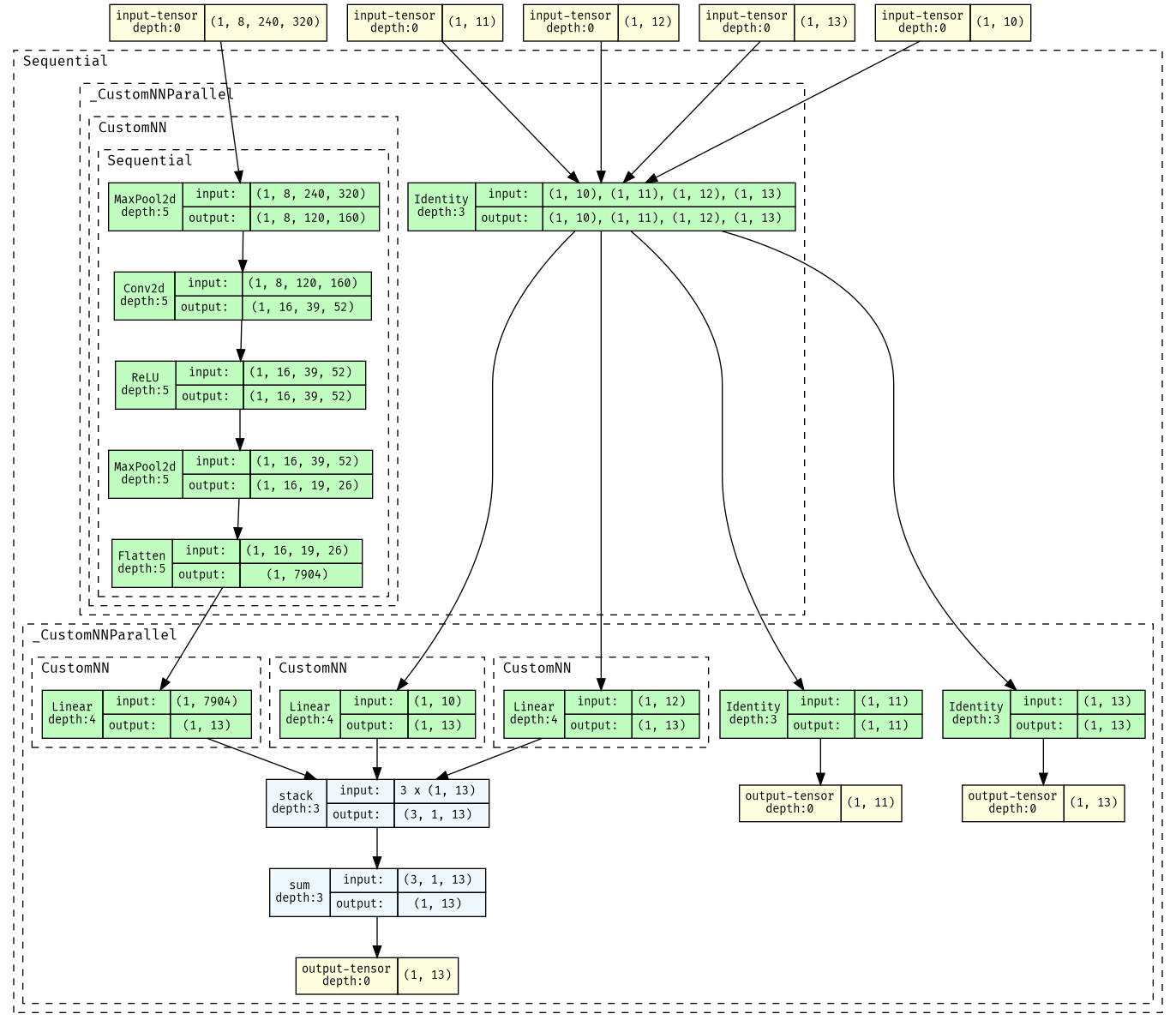
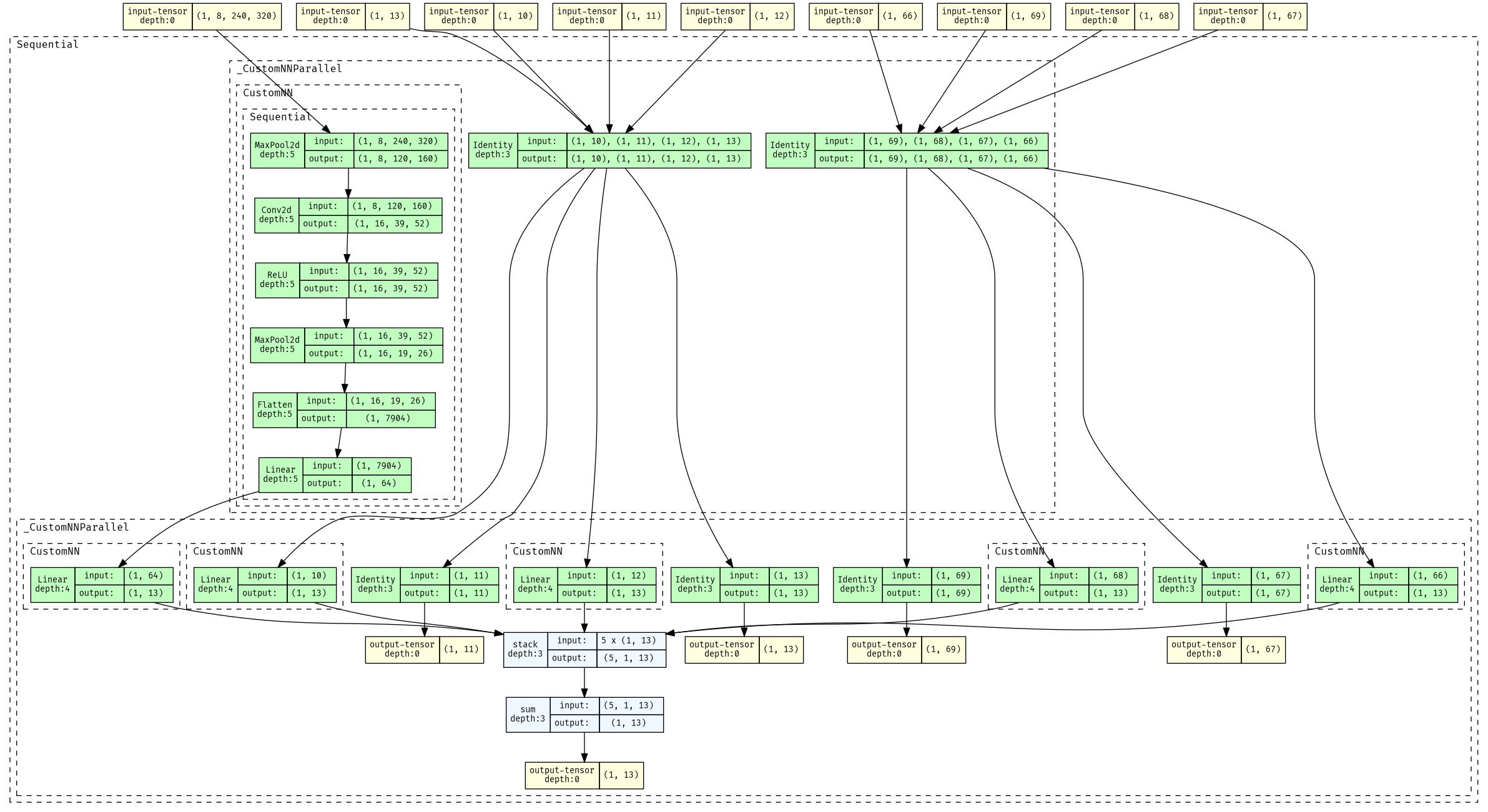
Example of using this to extract (then sum) multiple sub-tuples (net_configs/tuple_multiple_extraction.txt):
Example of using this to output dictionarysmall_split_cnn_output_dict.txt:
Note that torchviz does not display the dictionary output shape, which is {'policy': (69,), 'value': (1,)}
parallel (dictionary input)
Computes a dictionary of k tensors independently, may merge at end of computation.
branches: required parameter, DICTIONARY of {key -> list of layer dictionaries}. Each list can also beNoneto do no computationcombination: optional parameter with default"combination": "dict". Determines how to combine the results of branches.- For
"dict", the result will be a dictionary of the outputs of each branch, defaulting to the keys being unchanged. However, if"output_keys_to_combination"is additionally included (e.g."output_keys_to_combination":{"input_keys":["vector", "vector2"],"combination":"tuple"}), we can control the keys and combination method of the output dictionary."output_keys_to_combination"should be a dictionary with the following keys:combination: Required parameter, determines the combination method used (same as inparallel, the tuple version).input_keys: Required parameter, points to a list of keys in the order they will be combined.- Any other arguments (e.g.
"extract_sub_tuples"specified in this dictionary will behave exactly as in theparallelcombination)
- For any other combination method is provided, this will again behave exactly the same as in the
parallelcombination. In this case,"key_order"is a required parameter that decides the order of the keys when passed to the combination method.
- For
Examples are somewhat in depth, can be found in
net_configs/multimodal_dict.txt (which does not specify a combination method),
net_configs/multimodal_dict_concat.txt (which concatenates all branches),
and net_configs/multimodal_dict_concat_some_keys.txt (which creates a new dict by concatenating various selections of keys).
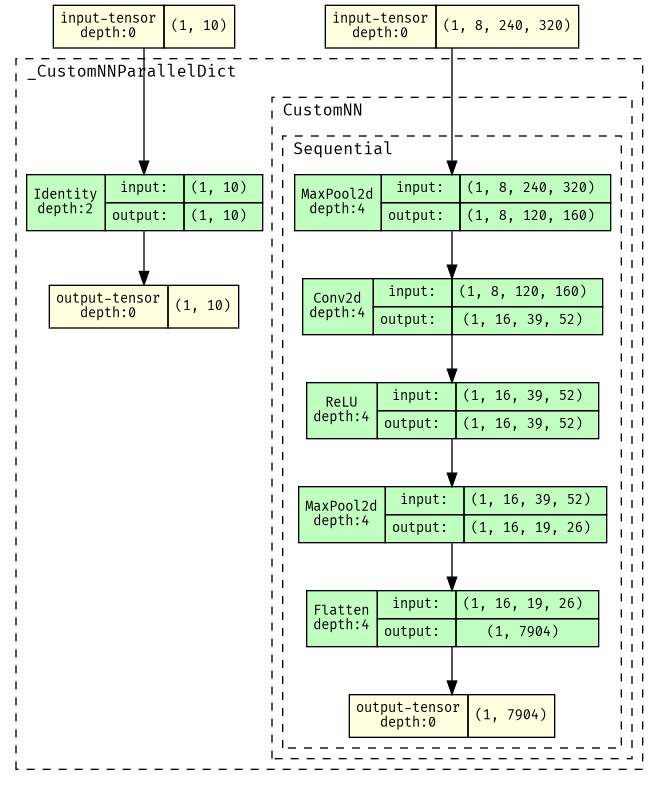
Visualization of net_configs/multimodal_dict.txt
(with input shape {'vector':(10,),'image':(8, 240, 320)}
and output shape {'image': (7904,), 'vector': (10,)}):
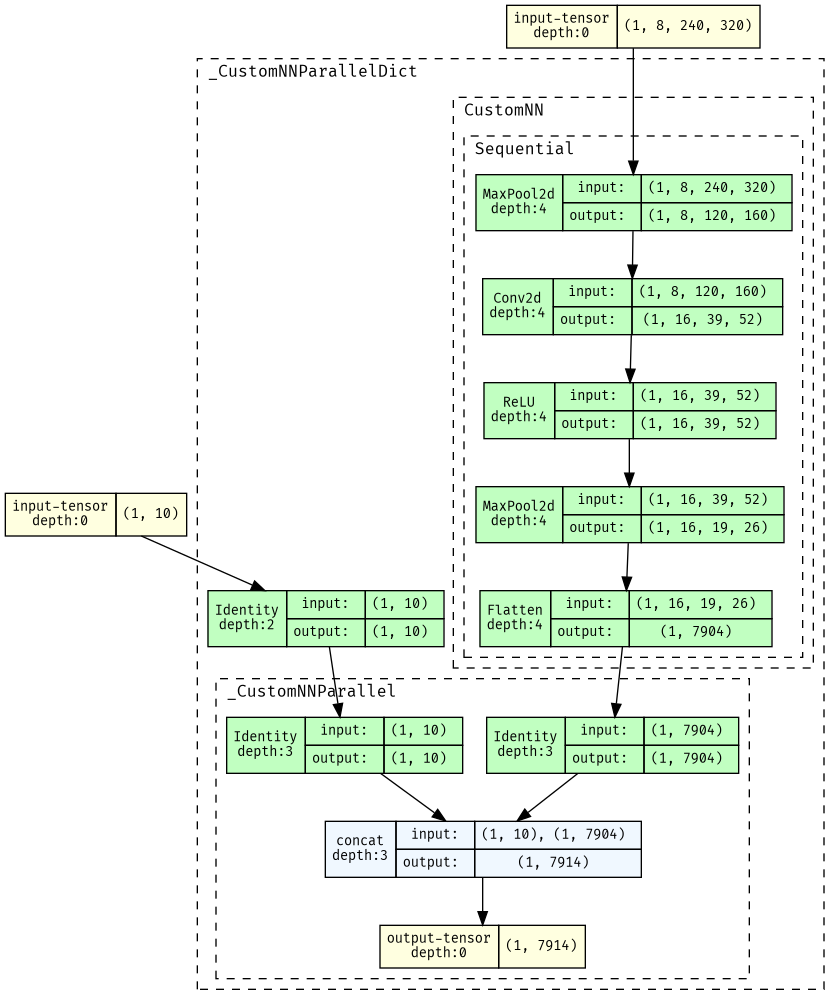
Visualization of net_configs/multimodal_dict_concat.txt
(with input shape {'vector':(10,),'image':(8, 240, 320)}
and output shape (7914,)):
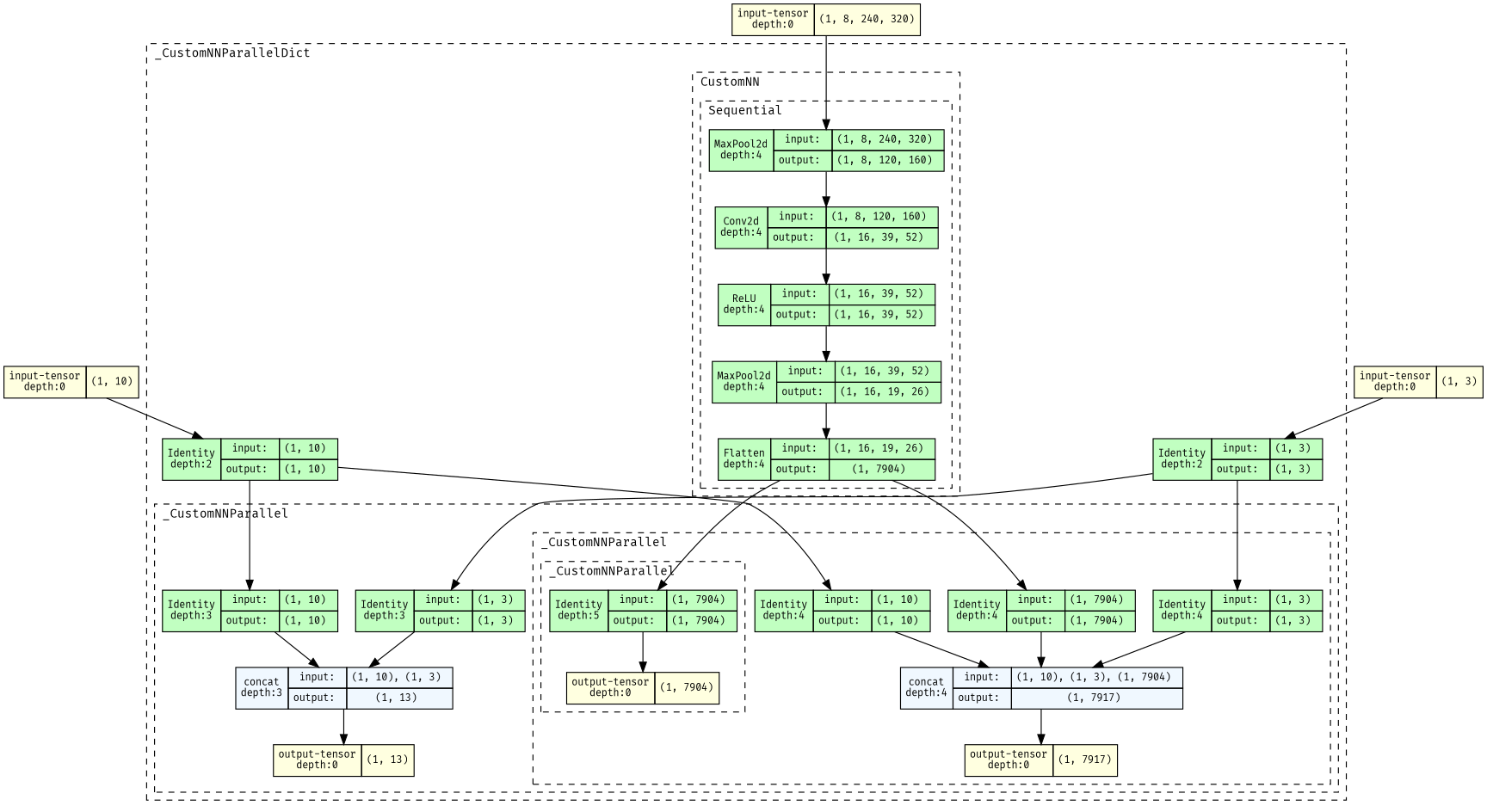
Visualization of net_configs/multimodal_dict_concat_some_keys.txt
(with input shape {'vector':(10,),'vector2':(3,),'image':(8, 240, 320)}
and output shape {'vectors': (13,), 'concatenated': (7917,), 'image': ((7904,),)}):
repeat
Repeats a block a certian number of times.
block: REQUIRED parameter, list of layer dictionaries to be repeatedly added.times: REQUIRED parameter, number of times to repeat block.
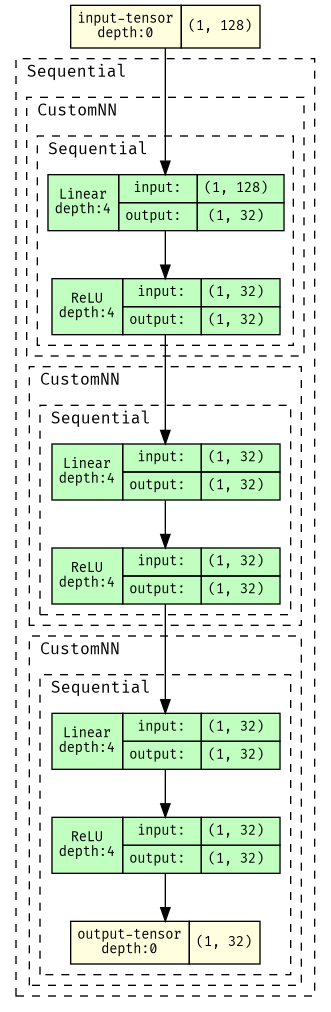
Example (this repeats a linear+activation layer a few times):
{"type": "repeat", "times": 3, "block": [{"type": "linear", "out_features": 32}, {"type": "relu"}]}
net_configs/resnet.txt has an example of using this to make a resnet, which repeatedly computes x'=f(x)+x:
visualize network
To make network visualizations, install torchview:
sudo apt-get install graphviz
pip install torchview
Example script to make visualization of a .json config file is example/viz.py
Result of python example/viz.py --config_file net_configs/small_split_recombine_cnn.json --save_gif --duration 200 --scroll 10:
Result of python example/viz.py --config_file net_configs/resnet.txt --save_gif --duration 200 --scroll 10:
Release history Release notifications | RSS feed


Download files
Download the file for your platform. If you're not sure which to choose, learn more about installing packages.
Source Distribution
Built Distribution
Filter files by name, interpreter, ABI, and platform.
If you're not sure about the file name format, learn more about wheel file names.
Copy a direct link to the current filters
File details
Details for the file config_networks-0.6.9.tar.gz.
File metadata
- Download URL: config_networks-0.6.9.tar.gz
- Upload date:
- Size: 14.9 kB
- Tags: Source
- Uploaded using Trusted Publishing? No
- Uploaded via: twine/4.0.2 CPython/3.12.13
File hashes
| Algorithm | Hash digest | |
|---|---|---|
| SHA256 |
ac2d1fbcb8a92be20bc1d55d697fd49825771aafb07b1ee85d55295ff9f8586e
|
|
| MD5 |
f4ec6e5f67453607982dc2beab86a615
|
|
| BLAKE2b-256 |
37dd421a3ca94b48d62b48f8f07611af672503be5d5fe01ad269ee8b0de7e0e9
|
File details
Details for the file config_networks-0.6.9-py3-none-any.whl.
File metadata
- Download URL: config_networks-0.6.9-py3-none-any.whl
- Upload date:
- Size: 12.4 kB
- Tags: Python 3
- Uploaded using Trusted Publishing? No
- Uploaded via: twine/4.0.2 CPython/3.12.13
File hashes
| Algorithm | Hash digest | |
|---|---|---|
| SHA256 |
8772aa533e072529378d26cb864eac1ba1bd902a889b24dab1b746d9b167e7e1
|
|
| MD5 |
6eecc1f23cf4afdbccf6ba738bcb1a4e
|
|
| BLAKE2b-256 |
231828260291fb3451d36a6ce4d3e6528c8904e0d0465936e0afed715d8d904b
|






