
Tool to simply display information about the state of the code during execution.

Project description
By adding only a few lines of code at strategic places in your program, you will get a nice console display that will let you know what stage your code is at.
fork of context-printer:
This project is a fork of the context_printer project. The philosophy of this project is strictly the same as the original project. Nevertheless, this project offers the following improvements:
Support for the with keyword (context manager).
Formatting of exceptions for better debugging.
Added decorator behavior.
Possibility to implicitly name a section.
More formatting possible (adding highlighting and flashing).
No conflicts between thread and process (clients send text to a single server).
Integrated timer for display the sections duration.
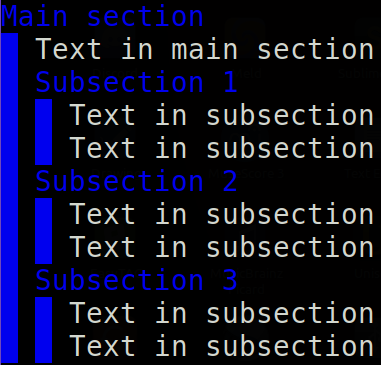
Basic usage example:
from context_verbose import printer as ctp
with ctp('Main Section', color='blue'):
    ctp.print('Text in main section')
    for i in range(3):
        with ctp(f'Subsection {i}'):
            ctp.print('Text in subsection')
            ctp.print('Text in subsection')
The above example will print the following:
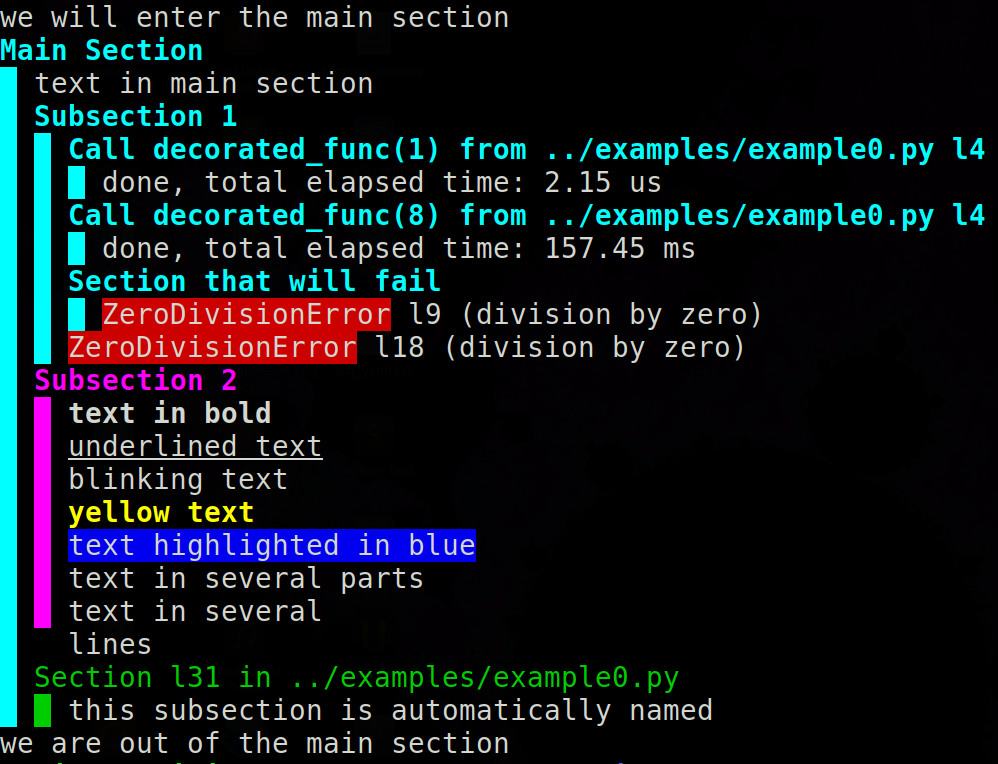
Exaustive example of usage:
from context_verbose import printer as ctp

@ctp
def decorated_func(x):
    return x**x**x

def error_func():
    with ctp('Section that will fail'):
        return 1/0

ctp.print('we will enter the main section')
with ctp('Main Section', color='cyan'):
    ctp.print('text in main section')
    try:
        with ctp('Subsection 1'):
            for x in [1, 8]:
                decorated_func(x)
            error_func()
    except ZeroDivisionError:
        pass
    with ctp('Subsection 2', color='magenta'):
        ctp.print('text in bold', bold=True)
        ctp.print('underlined text', underline=True)
        ctp.print('blinking text', blink=True)
        ctp.print('yellow text', color='yellow')
        ctp.print('text highlighted in blue', bg='blue')
        ctp.print('text in several ', end='')
        ctp.print('parts', print_headers=False)
        ctp.print('''text in several
                     lines''')
    with ctp(color='green'):
        ctp.print('this subsection is automatically named')
ctp.print('we are out of the main section')
The above example will print the following:
Release history Release notifications | RSS feed


Download files
Download the file for your platform. If you're not sure which to choose, learn more about installing packages.
Source Distribution
Built Distribution
Filter files by name, interpreter, ABI, and platform.
If you're not sure about the file name format, learn more about wheel file names.
Copy a direct link to the current filters
File details
Details for the file context-verbose-2.1.4.tar.gz.
File metadata
- Download URL: context-verbose-2.1.4.tar.gz
- Upload date:
- Size: 28.5 kB
- Tags: Source
- Uploaded using Trusted Publishing? No
- Uploaded via: twine/4.0.1 CPython/3.8.13+
File hashes
| Algorithm | Hash digest | |
|---|---|---|
| SHA256 |
ee67645a111e388038969eab9ace46c6ed84cc3dd1acdf0b85364f734a3644b5
|
|
| MD5 |
b4b07e0e4f3cdba69a8e5e96326df570
|
|
| BLAKE2b-256 |
0283d58dc40d8a0a7e46c1ea542c9f14147da6778b7fed033de51a64e5a67894
|
File details
Details for the file context_verbose-2.1.4-py3-none-any.whl.
File metadata
- Download URL: context_verbose-2.1.4-py3-none-any.whl
- Upload date:
- Size: 30.2 kB
- Tags: Python 3
- Uploaded using Trusted Publishing? No
- Uploaded via: twine/4.0.1 CPython/3.8.13+
File hashes
| Algorithm | Hash digest | |
|---|---|---|
| SHA256 |
f11cc12e35a5d1dad6daadde545a0c38de231940b654a9c9252c22e4276c7152
|
|
| MD5 |
7abeec774f9b1e3634583ee0ee9f244e
|
|
| BLAKE2b-256 |
0172b4b341944b0d44750c2db32d3b52f34f4af1e4700b85204d15195b378d0e
|






