

ContextGem: Effortless LLM extraction from documents
| Package |     |
| Quality |       |
| Tools |         |
| Docs |     |
| Community |    |

ContextGem is a free, open-source LLM framework that makes it radically easier to extract structured data and insights from documents — with minimal code.
💎 Why ContextGem?
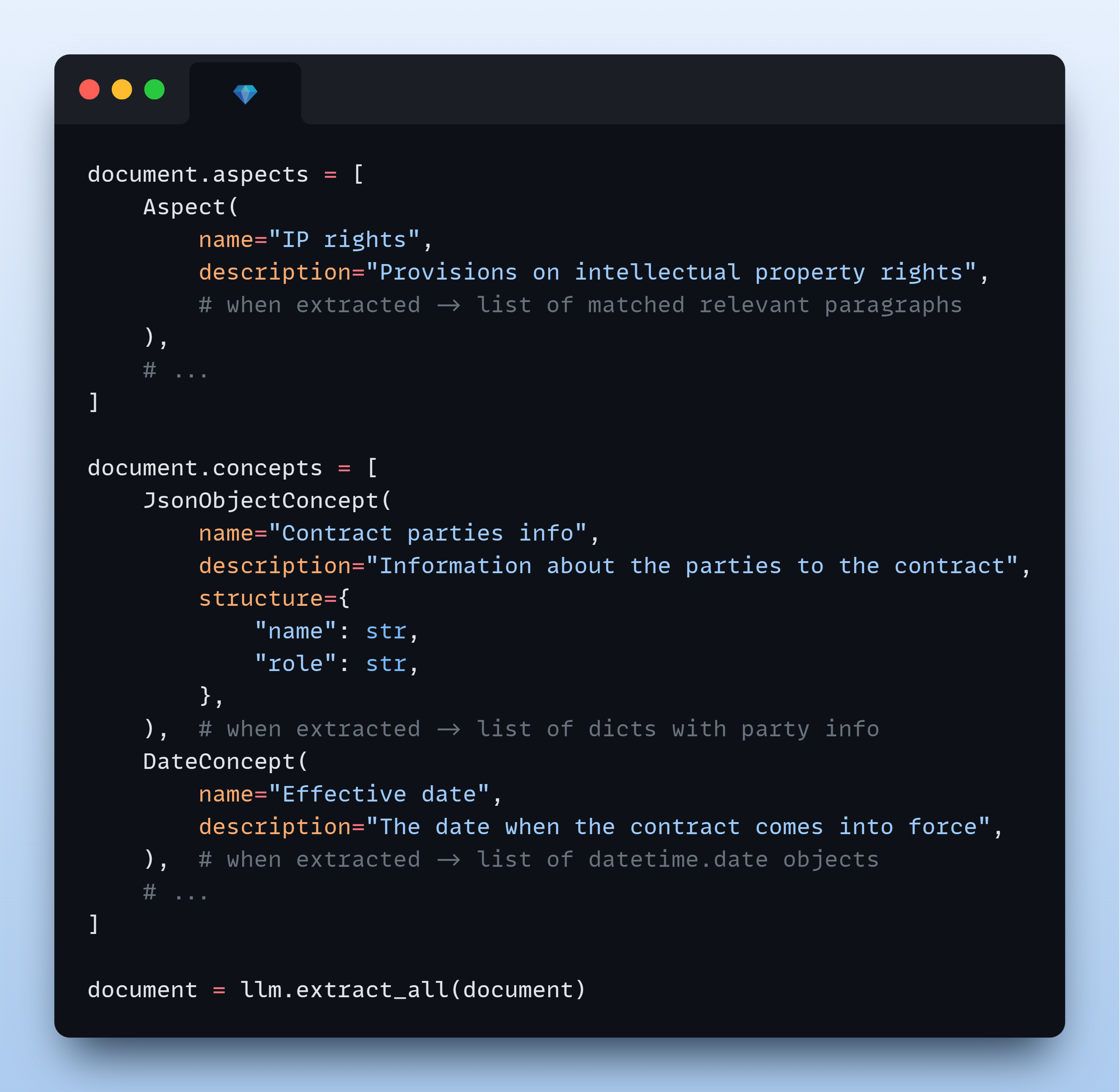
Reliable structured extraction from documents typically involves writing extraction prompts, designing validation models, mapping outputs back to source references, orchestrating multi-step pipelines, and tracking usage across LLMs. ContextGem handles all of this through powerful abstractions — you describe what to extract in natural language, and the framework handles how.
The result: structured data with precise paragraph- and sentence-level references, automatic justifications, hierarchical multi-aspect extraction, and a unified, serializable document storage model — all from minimal code.
📖 Read more on the project motivation in the documentation.
⭐ Key features
| ✨ Automated dynamic prompts | 📐 Automated data modelling | 📍 Granular reference mapping |
| 💭 Built-in justifications | 🪆 Nested context extraction | 🔗 Unified declarative pipeline |
💡 What you can build
With minimal code, you can:
- Extract structured data from documents (text, images)
- Identify and analyze key aspects (topics, themes, categories) within documents (learn more)
- Extract specific concepts (entities, facts, conclusions, assessments) from documents (learn more)
- Build complex extraction workflows through a simple, intuitive API
- Create multi-level extraction pipelines (aspects containing concepts, hierarchical aspects)
📦 Installation
Using uv (recommended):
uv add contextgem
Or using pip:
pip install -U contextgem
🚀 Quick start
The following example demonstrates how to use ContextGem to extract anomalies from a legal document - a complex concept that requires contextual understanding. Unlike traditional RAG approaches that might miss subtle inconsistencies, ContextGem analyzes the entire document context to identify content that doesn't belong, complete with source references and justifications.
# Quick Start Example - Extracting anomalies from a document, with source references and justifications

import os

from contextgem import Document, DocumentLLM, StringConcept


# Sample document text (shortened for brevity)
doc = Document(
    raw_text=(
        "Consultancy Agreement\n"
        "This agreement between Company A (Supplier) and Company B (Customer)...\n"
        "The term of the agreement is 1 year from the Effective Date...\n"
        "The Supplier shall provide consultancy services as described in Annex 2...\n"
        "The Customer shall pay the Supplier within 30 calendar days of receiving an invoice...\n"
        "The purple elephant danced gracefully on the moon while eating ice cream.\n"  # 💎 anomaly
        "Time-traveling dinosaurs will review all deliverables before acceptance.\n"  # 💎 another anomaly
        "This agreement is governed by the laws of Norway...\n"
    ),
)

# Attach a document-level concept
doc.concepts = [
    StringConcept(
        name="Anomalies",  # in longer contexts, this concept is hard to capture with RAG
        description="Anomalies in the document",
        add_references=True,
        reference_depth="sentences",
        add_justifications=True,
        justification_depth="brief",
        # see the docs for more configuration options
    )
    # add more concepts to the document, if needed
    # see the docs for available concepts: StringConcept, JsonObjectConcept, etc.
]
# Or use `doc.add_concepts([...])`

# Define an LLM for extracting information from the document
llm = DocumentLLM(
    model="openai/gpt-4o-mini",  # or another provider/LLM
    api_key=os.environ.get(
        "CONTEXTGEM_OPENAI_API_KEY"
    ),  # your API key for the LLM provider
    # see the docs for more configuration options
)

# Extract information from the document
doc = llm.extract_all(doc)  # or use async version `await llm.extract_all_async(doc)`

# Access extracted information in the document object
anomalies_concept = doc.concepts[0]
# or `doc.get_concept_by_name("Anomalies")`
for item in anomalies_concept.extracted_items:
    print("Anomaly:")
    print(f"  {item.value}")
    print("Justification:")
    print(f"  {item.justification}")
    print("Reference paragraphs:")
    for p in item.reference_paragraphs:
        print(f"  - {p.raw_text}")
    print("Reference sentences:")
    for s in item.reference_sentences:
        print(f"  - {s.raw_text}")
    print()

🧠 How it works
📝 Step 1: Define extraction context
| 📄 Document |
|---|
| Create a Document that contains text and/or visual content representing your document (contract, invoice, report, CV, etc.), from which an LLM extracts information (aspects and/or concepts). Learn more |
document = Document(raw_text="Non-Disclosure Agreement...")
🎯 Step 2: Define what to extract
| 🔍 Aspects | 💡 Concepts |
|---|---|
| Define Aspects to extract text segments from the document (sections, topics, themes). You can organize content hierarchically and combine with concepts for comprehensive analysis. Learn more | Define Concepts to extract specific data points with intelligent inference: entities, insights, structured objects, classifications, numerical calculations, dates, ratings, and assessments. Learn more |
# Extract document sections
aspect = Aspect(
    name="Term and termination",
    description="Clauses on contract term and termination",
)
# Extract specific data points
concept = BooleanConcept(
    name="NDA check",
    description="Is the contract an NDA?",
)
# Add these to the document instance for further extraction
document.add_aspects([aspect])
document.add_concepts([concept])
| 🔄 Alternative: Configure Extraction Pipeline |
|---|
| Create a reusable collection of predefined aspects and concepts that enables consistent extraction across multiple documents. Learn more |
🧠 Step 3: Run LLM extraction
| 🤖 LLM | 🤖🤖 Alternative: LLM Group (advanced) |
|---|---|
| Configure a cloud or local LLM that will extract aspects and/or concepts from the document. DocumentLLM supports fallback models and role-based task routing for optimal performance. Learn more | Configure a group of LLMs with unique roles for complex extraction workflows. You can route different aspects and/or concepts to specialized LLMs (e.g., simple extraction vs. reasoning tasks). Learn more |
llm = DocumentLLM(
    model="openai/gpt-5-mini",  # or another provider/LLM
    api_key="...",
)
document = llm.extract_all(document)
# print(document.aspects[0].extracted_items)
# print(document.concepts[0].extracted_items)
📖 Learn more about ContextGem's core components and their practical examples in the documentation.
📚 Usage Examples
🌟 Basic usage:
- Aspect Extraction from Document
- Extracting Aspect with Sub-Aspects
- Concept Extraction from Aspect
- Concept Extraction from Document (text)
- Concept Extraction from Document (vision)
- LLM chat interface with tool calling
🚀 Advanced usage:
- Extracting Aspects Containing Concepts
- Extracting Aspects and Concepts from a Document
- Using a Multi-LLM Pipeline to Extract Data from Several Documents
🎯 Focused document analysis
ContextGem leverages LLMs' long context windows to deliver superior extraction accuracy from individual documents. Unlike RAG approaches that often struggle with complex concepts and nuanced insights, ContextGem capitalizes on continuously expanding context capacity, evolving LLM capabilities, and decreasing costs. This focused approach enables direct information extraction from complete documents, eliminating retrieval inconsistencies while optimizing for in-depth single-document analysis. While this delivers higher accuracy for individual documents, ContextGem does not currently support cross-document querying or corpus-wide retrieval - for these use cases, modern RAG frameworks (e.g., LlamaIndex, Haystack) remain more appropriate.
📖 Read more on how ContextGem works in the documentation.
🤖 Supported LLMs
ContextGem supports both cloud-based and local LLMs through LiteLLM integration:
- Cloud LLMs: OpenAI, Anthropic, Google, Azure OpenAI, xAI, and more
- Local LLMs: Run models locally using providers like Ollama, LM Studio, etc.
- Model Architectures: Works with both reasoning/CoT-capable (e.g. gpt-5) and non-reasoning models (e.g. gpt-4.1)
- Simple API: Unified interface for all LLMs with easy provider switching
💡 Model Selection Note: For reliable structured extraction, we recommend using models with performance equivalent to or exceeding
gpt-4o-mini. Smaller models (such as 8B parameter models) may struggle with ContextGem's detailed extraction instructions. If you encounter issues with smaller models, see our troubleshooting guide for potential solutions.
📖 Learn more about supported LLM providers and models, how to configure LLMs, and LLM extraction methods in the documentation.
⚡ Optimizations
ContextGem documentation offers guidance on optimization strategies to maximize performance, minimize costs, and enhance extraction accuracy:
- Optimizing for Accuracy
- Optimizing for Speed
- Optimizing for Cost
- Dealing with Long Documents
- Choosing the Right LLM(s)
- Troubleshooting Issues with Small Models
💾 Serializing results
ContextGem allows you to save and load Document objects, pipelines, and LLM configurations with built-in serialization methods:
- Save processed documents to avoid repeating expensive LLM calls
- Transfer extraction results between systems
- Persist pipeline and LLM configurations for later reuse
📖 Learn more about serialization options in the documentation.
📚 Documentation
📖 Full documentation: contextgem.dev
🤖 AI-powered code exploration: DeepWiki provides visual architecture maps and natural language Q&A for the codebase.
📈 Change history: See the CHANGELOG for version history, improvements, and bug fixes.
💬 Community
🐛 Found a bug or have a feature request? Open an issue on GitHub.
💭 Need help or want to discuss? Start a thread in GitHub Discussions.
🤝 Contributing
We welcome contributions from the community - whether it's fixing a typo or developing a completely new feature!
📋 Get started: Check out our Contributor Guidelines.
🔐 Security
This project is automatically scanned for security vulnerabilities using multiple security tools:
- CodeQL - GitHub's semantic code analysis engine for vulnerability detection
- Bandit - Python security linter for common security issues
- Snyk - Dependency vulnerability monitoring (used as needed)
🛡️ Security policy: See SECURITY file for details.
💖 Acknowledgements
ContextGem relies on these excellent open-source packages:
- aiolimiter: Powerful rate limiting for async operations
- colorlog: Colored formatter for Python's logging module
- docstring-parser: Docstring parsing for auto-generating tool schemas
- fastjsonschema: Ultra-fast JSON schema validation
- genai-prices: LLM pricing data and utilities (by Pydantic) to automatically estimate costs
- Jinja2: Fast, expressive, extensible templating engine used for prompt rendering
- litellm: Unified interface to multiple LLM providers with seamless provider switching
- lxml: High-performance XML processing library for parsing DOCX document structure
- pillow: Image processing library for local model image handling
- pydantic: The gold standard for data validation
- python-ulid: Efficient ULID generation for unique object identification
- tenacity: General-purpose retry library for Python
- typing-extensions: Backports of the latest typing features for enhanced type annotations
- wtpsplit-lite: Lightweight version of wtpsplit for state-of-the-art paragraph/sentence segmentation using wtpsplit's SaT models
📄 License & Contact
License: Apache 2.0 License - see the LICENSE and NOTICE files for details.
Copyright: © 2025 Shcherbak AI AS — Enterprise AI Engineering. We build AI agents that transform how enterprises operate.
Connect: LinkedIn or X for questions or collaboration ideas.
Built with ❤️ in Oslo, Norway.
📦 More from Shcherbak AI
| Package | Description |
|---|---|
licenseal   |
Fast cross-ecosystem license compatibility checker for CI, audits, and enterprise adoption. Scans manifests, lockfiles, and public registry metadata without installing dependencies. |
tethered   |
Runtime network egress control for Python. One function call blocks all unauthorized outbound connections — zero dependencies, no infrastructure changes. Ideal for supply chain defense, AI agent guardrails, and test isolation. |
1 maintainer

Metadata
1 maintainer
Release files for contextgem 0.27.0
For a detailed explanation of source distributions (sdists) and built distributions (wheels), please see the package formats documentation.
Source distribution (sdist)
| File | Size | Uploaded | |
|---|---|---|---|
| contextgem-0.27.0.tar.gz | 200.2 kB | Details |
Built distribution (wheel)
| File | Interpreter | ABI | Platform | Reset |
|---|---|---|---|---|
| contextgem-0.27.0-py3-none-any.whl | Python 3 | none | any | Details |
Total release size: 451.6 kB
Release files / contextgem-0.27.0.tar.gz
| Download URL | contextgem-0.27.0.tar.gz |
|---|---|
| Size | 200.2 kB |
| Tags | Source |
|
SHA-256 checksum How to use checksums |
24eecbcbc616f4f037fb4efd1d376ae21e4197852e42ace1fdec615c41c260cf
|
|
BLAKE2b-256 checksum How to use checksums |
470d491adec205e0e5925fa2d42019162543b260e100f38a3878ca884f803f97
|
| Upload date | |
|
Uploaded using Trusted Publishing? What is trusted publishing? |
Yes |
| Uploaded via |
twine/7.0.0 CPython/3.13.14
|
Provenance
Provenance describes where a file came from. On PyPI, provenance is shared via attestations, which provide a verifiable record of the build or publishing details. View details, limitations and caveats.


PyPI Publish Attestation
PyPI verified that this artifact, at this checksum, originated from the publisher listed below.
Signed by GitHub Actions, verified by PyPI on Aug 13, 2026.
Transparency logRelease files / contextgem-0.27.0-py3-none-any.whl
| Download URL | contextgem-0.27.0-py3-none-any.whl |
|---|---|
| Size | 251.5 kB |
| Tags | Python 3 |
|
SHA-256 checksum How to use checksums |
3b67267fdf8447fc0e143aa02d4b1b581ff1211ceb323fc1415799c8468091ca
|
|
BLAKE2b-256 checksum How to use checksums |
1eb3178c7e21954464af4ccaee8a890fd235f0b6ac175aaf7b704914d0473e53
|
| Upload date | |
|
Uploaded using Trusted Publishing? What is trusted publishing? |
Yes |
| Uploaded via |
twine/7.0.0 CPython/3.13.14
|
Provenance
Provenance describes where a file came from. On PyPI, provenance is shared via attestations, which provide a verifiable record of the build or publishing details. View details, limitations and caveats.
PyPI Publish Attestation
PyPI verified that this artifact, at this checksum, originated from the publisher listed below.
Signed by GitHub Actions, verified by PyPI on Aug 13, 2026.
Transparency log













