

contextrot
Does your coding agent get worse as its context fills?
Find out on the sessions already on your disk — and what actually moves its failure rate.





Everyone says coding agents get worse as their context fills — /clear often, keep it
small, use subagents. That advice comes from lab benchmarks. contextrot checks it against
your own real sessions. Sometimes it's true. Often it isn't, and something else is what's
hurting you.
No setup, no API keys. It reads the transcripts your agent CLI already keeps, runs entirely on your machine, and makes zero network calls.
Quick start
uvx contextrot
or pip install contextrot then contextrot (Python 3.9+).
contextrot: command not found after pip install?
Your Python scripts folder isn't on PATH — common with the stock macOS python3. Use
uvx contextrot, or run it as python3 -m contextrot.
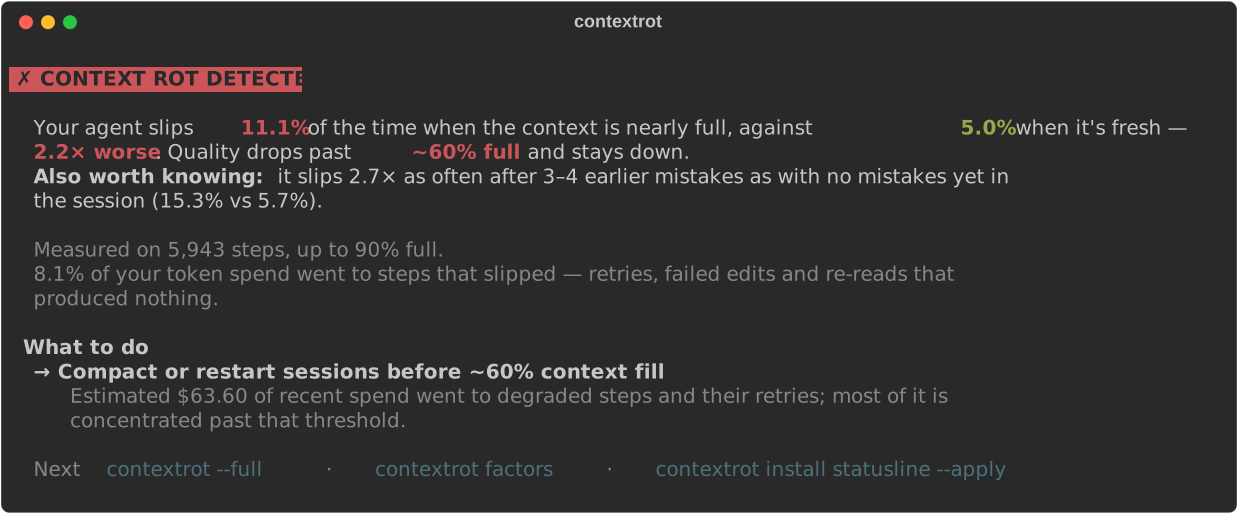
You get one of four honest answers:
| Verdict | Meaning | |
|---|---|---|
| ✗ | Context rot detected | your failure rate climbs as context fills — and here's where |
| ! | Edge rot | flat until near the limit, then it climbs |
| ✓ | No measurable rot | filling the window isn't what's hurting you |
| ? | Not enough data | keep using your agent, or look further back with --days 0 |
A tool that can say "you're fine" is a tool you can trust when it says you're not.
Then, three things worth doing
1. Find what actually moves your failure rate
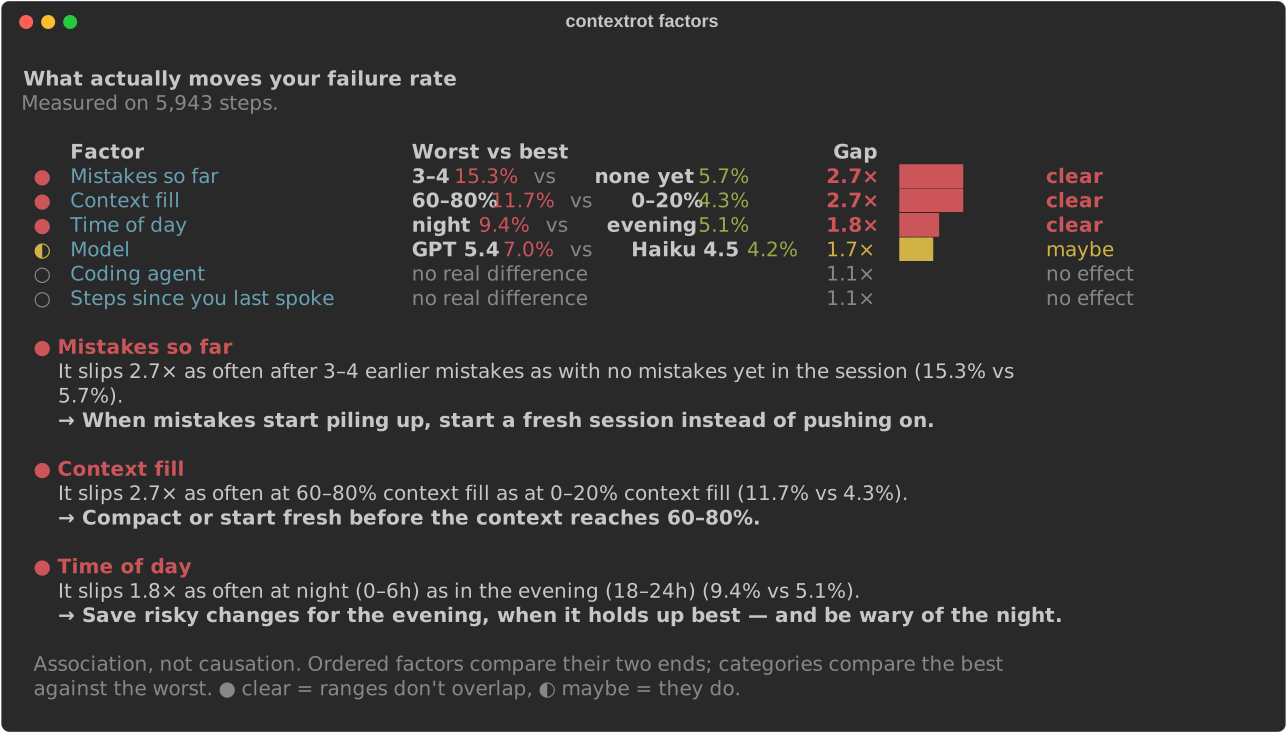
contextrot factors
Context fill is one suspect. This checks the others with the same statistics — time of day, how long the agent runs without you, mistakes piling up, which model, which agent — and ranks what genuinely separates your good steps from your bad ones.
2. Keep it watching
contextrot install statusline --apply    # Claude Code: a live meter in your status bar
contextrot status --setup tmux           # any agent: one line for tmux, Starship, your prompt
A report you run once is forgotten. A meter you see every turn isn't — it shows how full the window is, how many turns are left, and goes red where your curve says it should, not at a generic 70%.
3. Add your curve to the dataset
contextrot share --copy
Nobody knows what context rot looks like on real work across many people, because nobody has had the data. This prints your curve as anonymized numbers — no project names, paths, prompts or code — and sends nothing. You read it, then paste it into a Share your curve issue. Clean curves count as much as rotten ones. What's in it, exactly →
Everything else
| You want to… | Run |
|---|---|
| See the full analysis behind the verdict | contextrot --full |
| Know which kinds of slip cost the most | contextrot waste |
| Compare your coding agents on your own work | contextrot agents |
| Find which repo degrades first | contextrot projects |
| See whether it's getting better week by week | contextrot trends |
| Get concrete fixes, including unused MCP servers | contextrot fix |
| Share a report as a single HTML file | contextrot --html report.html |
| Work out why you have no verdict | contextrot doctor |
| See how much water your agents' inference used | contextrot water |
Every command animates when you're watching and prints plain output when you're not. The guide covers every command, the status line segment by segment, troubleshooting and the FAQ. The showcase shows each screen.
Supported agents
| Agent | |
|---|---|
| Claude Code · Codex CLI · Gemini CLI · Qwen Code · OpenCode | ✅ |
| Cline · Roo Code · Kilo Code (VS Code) | ✅ |
| Google Antigravity | 🔬 investigating |
| Cursor · Windsurf · Kiro | ⚠️ their local files don't record per-message token counts |
Adding an agent is one small file with a fixture and a test — the paved first contribution.
How it works
Agent CLIs log every step to local transcripts, with token counts and what happened. For each step, contextrot records how full the context window was and whether one of five failure signals fired — a failed edit, a retried call, a re-read of a file already read, a tool error, or an "I apologize, let me fix that". Then it measures how the rate of those changes as context fills.
The statistics are conservative on purpose: Wilson 95% confidence intervals, visible sample sizes, and a threshold declared only when the evidence clears the baseline — one noisy bucket can't scare you. It's observational, and it says so: deeper context also means later in the task. The full method is in methodology.md.
Privacy
Local files in; terminal, or a local HTML file, out. Zero network calls — there's no
HTTP client in the codebase. share prints and copies to your clipboard; whether anything
leaves your machine is entirely your decision.
Contributing
The most valuable first PR is an adapter for the agent CLI you use — see CONTRIBUTING.md. Bugs and ideas are welcome in issues and discussions. If it told you something useful about your setup, a ⭐ helps other people find it.

License
1 maintainer

Metadata
1 maintainer
Release files for contextrot 2.0.0
For a detailed explanation of source distributions (sdists) and built distributions (wheels), please see the package formats documentation.
Source distribution (sdist)
| File | Size | Uploaded | |
|---|---|---|---|
| contextrot-2.0.0.tar.gz | 228.8 kB | Details |
Built distribution (wheel)
| File | Interpreter | ABI | Platform | Reset |
|---|---|---|---|---|
| contextrot-2.0.0-py3-none-any.whl | Python 3 | none | any | Details |
Total release size: 389.5 kB
Release files / contextrot-2.0.0.tar.gz
| Download URL | contextrot-2.0.0.tar.gz |
|---|---|
| Size | 228.8 kB |
| Tags | Source |
|
SHA-256 checksum How to use checksums |
3f25787ecba04bad5574a60a79c30ef7be288bc15eca874e8bfeda26779c3ba2
|
|
BLAKE2b-256 checksum How to use checksums |
15cc1fd8a5601dfe8dd2a3c2a6c4ce570528f36626df94c3cc81ded71dfcc799
|
| Upload date | |
|
Uploaded using Trusted Publishing? What is trusted publishing? |
Yes |
| Uploaded via |
twine/7.0.0 CPython/3.13.14
|
Provenance
Provenance describes where a file came from. On PyPI, provenance is shared via attestations, which provide a verifiable record of the build or publishing details. View details, limitations and caveats.


PyPI Publish Attestation
PyPI verified that this artifact, at this checksum, originated from the publisher listed below.
Signed by GitHub Actions, verified by PyPI on Oct 3, 2026.
Transparency logRelease files / contextrot-2.0.0-py3-none-any.whl
| Download URL | contextrot-2.0.0-py3-none-any.whl |
|---|---|
| Size | 160.6 kB |
| Tags | Python 3 |
|
SHA-256 checksum How to use checksums |
3dd8099831612e781d767a9f03a6b433362f86003849464ea7021ff3e8869eda
|
|
BLAKE2b-256 checksum How to use checksums |
dd17f4f0097c4afc10336e21f5e454f088173013a2d6f689cf018f6736e95914
|
| Upload date | |
|
Uploaded using Trusted Publishing? What is trusted publishing? |
Yes |
| Uploaded via |
twine/7.0.0 CPython/3.13.14
|
Provenance
Provenance describes where a file came from. On PyPI, provenance is shared via attestations, which provide a verifiable record of the build or publishing details. View details, limitations and caveats.
PyPI Publish Attestation
PyPI verified that this artifact, at this checksum, originated from the publisher listed below.
Signed by GitHub Actions, verified by PyPI on Oct 3, 2026.
Transparency log













