


convolinear - Fluent Signal Processing for Python
Fluent signal processing for Python, one line at a time.
convolinear wraps the power of NumPy and SciPy in a fluent, readable API. Common DSP tasks -
loading audio, filtering, mixing, and spectral analysis - become short, expressive one-liners
instead of 10+ lines of boilerplate.
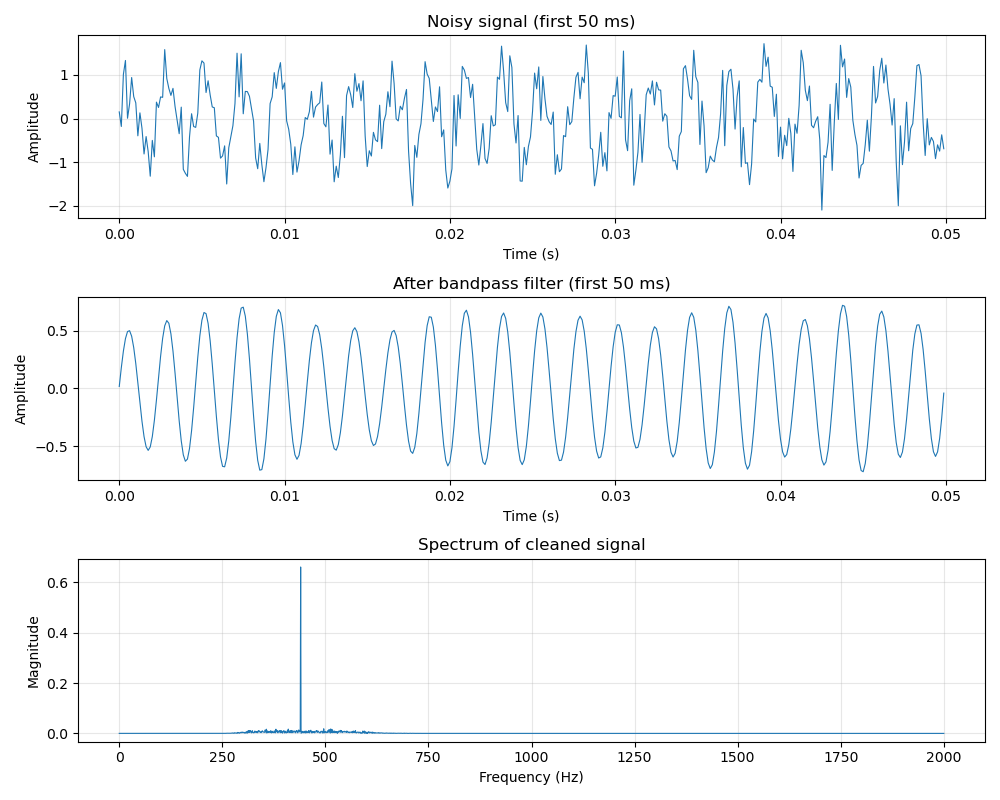
Extract data from a .wav file, bandpass it, normalise it, take the Fourier transform, and plot it.
All in a single line of code:
Signal.from_wav("audio.wav").bandpass(300, 3000).normalize().fft().plot()
Installation
Core requirements: Python 3.11+, NumPy >= 1.23.2, SciPy >= 1.9.2
Optional dependencies unlock the following loaders and features:
| Extra | Packages installed | Unlocks |
|---|---|---|
plot |
matplotlib | every .plot() method |
audio |
soundfile | Signal.from_audio() |
pandas |
pandas, pyarrow | from_csv(), from_parquet(), from_pandas(), to_dataframe() |
MATLAB .mat files load through SciPy, already a core dependency - no extra needed.
With pip
convolinear is published on PyPi:
pip install convolinear
pip install "convolinear[plot,audio,pandas]"
With conda
convolinear is published on conda-forge:
conda install -c conda-forge convolinear
conda-forge packages don't support pip-style extras - install the optional dependencies as separate packages instead:
conda install -c conda-forge convolinear matplotlib soundfile pandas pyarrow
With uv
uv add convolinear
uv add "convolinear[plot,audio,pandas]"
Quickstart
Clean up a noisy tone, then find out what is in it:
from convolinear import Signal

tone = Signal.sine(440, duration=1.0, sample_rate=8000)
noise = Signal.noise(duration=1.0, sample_rate=8000, amplitude=0.5, seed=42)

cleaned = (tone + noise).bandpass(300, 600).normalize()

spectrum = cleaned.fft()
print(f"Dominant frequency: {spectrum.peak_frequency:.1f} Hz")   # ~440.0 Hz

for freq, magnitude in spectrum.top_n(3):
    print(f"{freq:7.1f} Hz   magnitude {magnitude:.4f}")
Every transformation returns a new object - the original is never modified, and a Signal's
sample array is genuinely read-only - so branching from one source is always safe.
Not just audio
Sample rates are floats, and rates below 1 Hz work exactly like any other. Three years of daily temperatures, one sample per day:
sig = Signal(temps, sample_rate=1 / 86400)
cycle_hz = sig.remove_dc().fft(window="hann").peak_frequency
print(f"Dominant period: {1 / cycle_hz / 86400:.0f} days")   # Dominant period: 365 days
Capabilities
- Load from anywhere - WAV, FLAC/OGG/MP3 (via soundfile), CSV, Parquet, NumPy, pandas, MATLAB, or generated tones, noise and arbitrary functions. Sample rates are inferred from dated data.
- Transform - normalize, trim, gain, concat, resample, window, remove DC, reverse, clip, fade.
- Filter - Butterworth lowpass, highpass, bandpass and bandstop.
- Analyse - convolution and correlation, time-delay estimation, peak detection.
- Frequency domain -
fft()returns aSpectrumof raw complex coefficients that inverts losslessly;psd()gives a Welch power spectral density;spectrogram()shows how content evolves over time. - Plot - one-call matplotlib views of any signal, spectrum, PSD or spectrogram.
Documentation
- Full documentation and API reference
- Quickstart - five worked recipes.
- ECG: heart rate from raw samples - raw signal to beats per minute.
- Daily data: finding slow cycles - sub-1 Hz sample rates.
- Benchmarks - measured throughput.
- CHANGELOG - release history and migration notes.
Runnable scripts live in examples/.
Development
If you want to contribute to this project:
- Fork the repository on GitHub.
- Set up an editable clone with uv:
git clone https://github.com/yourusername/convolinear
cd convolinear
uv sync
uv run pytest
- Make a new branch for your edits.
- Make changes.
- Run the same checks CI runs:
uv run ruff check .
uv run ruff format --check .
uv run mypy convolinear
uv run pytest
- Commit changes to your fork.
- Open a Pull Request.
License
This project is licensed under the MIT License.
Copyright © 2026 Sajid Ahmed
1 maintainer

Metadata
1 maintainer
Release files for convolinear 0.2.0
For a detailed explanation of source distributions (sdists) and built distributions (wheels), please see the package formats documentation.
Source distribution (sdist)
| File | Size | Uploaded | |
|---|---|---|---|
| convolinear-0.2.0.tar.gz | 27.7 kB | Details |
Built distribution (wheel)
| File | Interpreter | ABI | Platform | Reset |
|---|---|---|---|---|
| convolinear-0.2.0-py3-none-any.whl | Python 3 | none | any | Details |
Total release size: 56.4 kB
Release files / convolinear-0.2.0.tar.gz
| Download URL | convolinear-0.2.0.tar.gz |
|---|---|
| Size | 27.7 kB |
| Tags | Source |
|
SHA-256 checksum How to use checksums |
ed4e866d9029e38c6abe10a146a464fa9557e2a415ea9d79cecf559f2c8d9a68
|
|
BLAKE2b-256 checksum How to use checksums |
bd16e217a8bbbc20428f8c5befba2c053aa4997cb2488139e333ac3cc29f9b21
|
| Upload date | |
|
Uploaded using Trusted Publishing? What is trusted publishing? |
No |
| Uploaded via |
uv/0.11.15 {"installer":{"name":"uv","version":"0.11.15","subcommand":["publish"]},"python":null,"implementation":{"name":null,"version":null},"distro":null,"system":{"name":null,"release":null},"cpu":null,"openssl_version":null,"setuptools_version":null,"rustc_version":null,"ci":null}
|
Release files / convolinear-0.2.0-py3-none-any.whl
| Download URL | convolinear-0.2.0-py3-none-any.whl |
|---|---|
| Size | 28.7 kB |
| Tags | Python 3 |
|
SHA-256 checksum How to use checksums |
09f4312ba911105e9fc0fde35cb2842c9263692fd390b6907c0b98fb87ccdadc
|
|
BLAKE2b-256 checksum How to use checksums |
3ef07dc3b1b58ed9b92f75f894ac538c70676f237d6a7de06306c18025b686b0
|
| Upload date | |
|
Uploaded using Trusted Publishing? What is trusted publishing? |
No |
| Uploaded via |
uv/0.11.15 {"installer":{"name":"uv","version":"0.11.15","subcommand":["publish"]},"python":null,"implementation":{"name":null,"version":null},"distro":null,"system":{"name":null,"release":null},"cpu":null,"openssl_version":null,"setuptools_version":null,"rustc_version":null,"ci":null}
|














