
This release is a pre-release and may not be stable for production use.






convolinear - Fluent Signal Processing for Python
Fluent signal processing for Python, one line at a time.
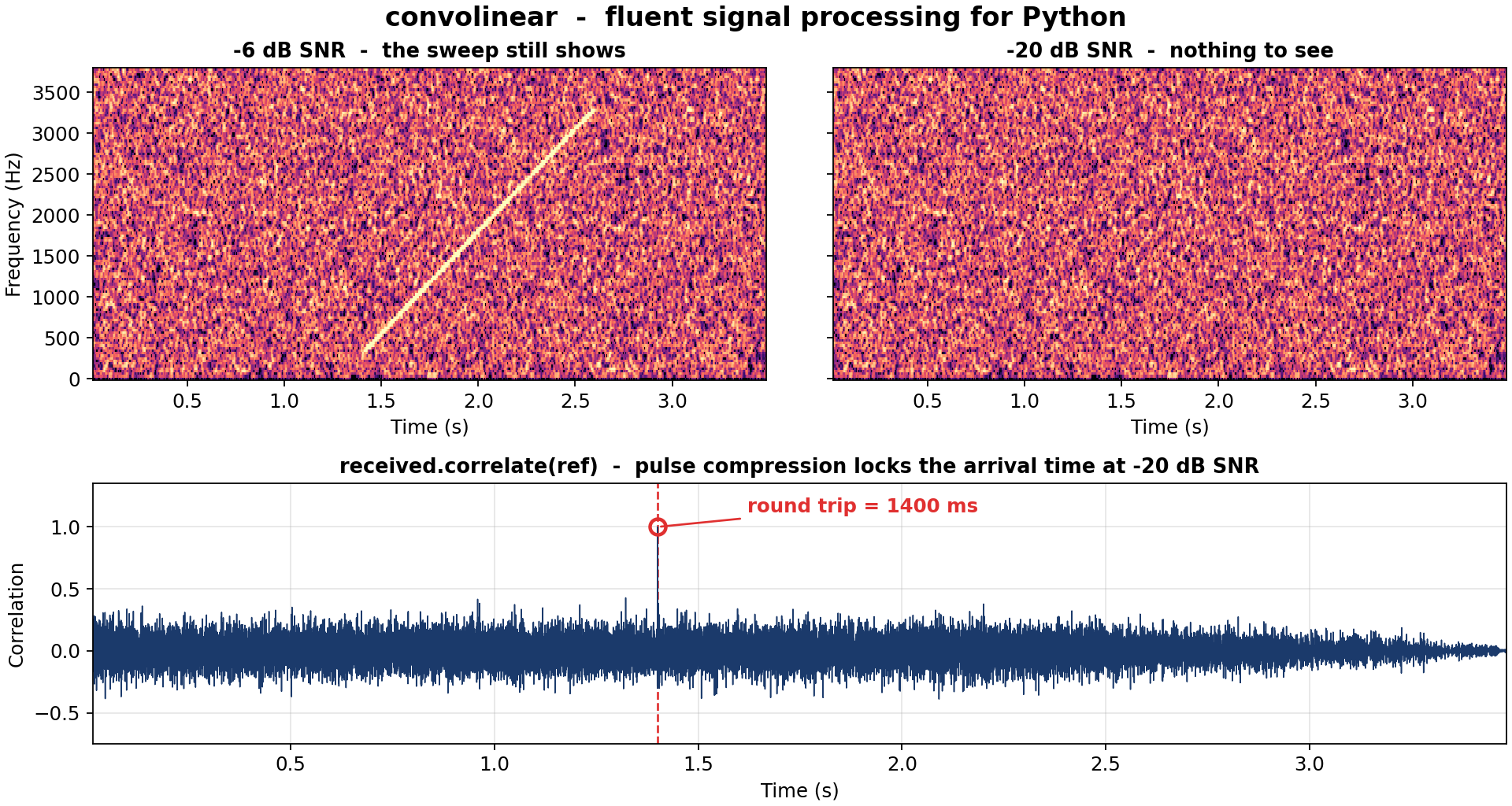
Pulse compression - the core of every radar, sonar and GPS receiver. The same echo is shown
at -6 dB and at -20 dB SNR (echo power against noise power). At -20 dB the spectrogram shows
nothing at all, and one correlate() call still collapses the echo into a spike at
the exact round-trip delay. Reproduce with python examples/hero.py.
convolinear wraps the power of NumPy and SciPy in a fluent, readable API. Common DSP tasks -
loading audio, filtering, mixing, and spectral analysis - become short, expressive one-liners
instead of 10+ lines of boilerplate.
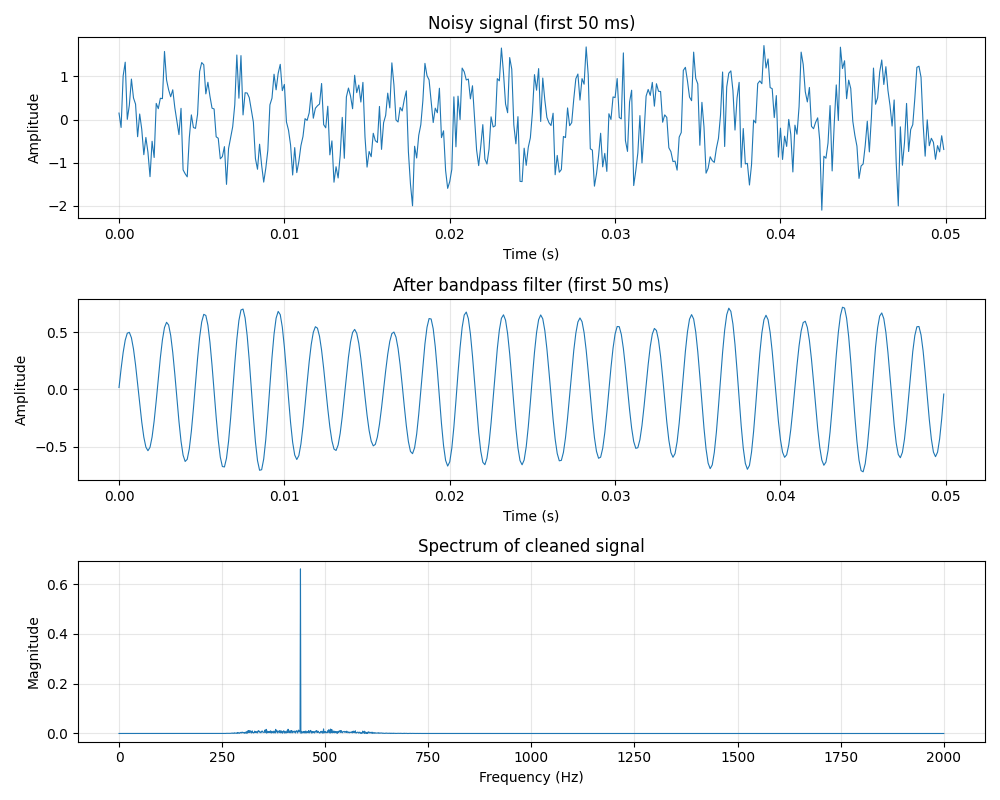
Extract data from a .wav file, bandpass it, normalise it, take the Fourier transform, and plot it.
All in a single line of code:
Signal.from_wav("audio.wav").bandpass(300, 3000).normalize().fft().plot()
Installation
Core requirements: Python 3.11+, NumPy >= 1.23.2, SciPy >= 1.9.2
Optional dependencies unlock the following loaders and features:
| Extra | Packages installed | Unlocks |
|---|---|---|
plot |
matplotlib | every .plot() method |
audio |
soundfile | Signal.from_audio() |
pandas |
pandas, pyarrow | from_csv(), from_parquet(), from_pandas(), to_dataframe() |
MATLAB .mat files load through SciPy, already a core dependency - no extra needed.
With pip
convolinear is published on PyPi:
pip install convolinear
pip install "convolinear[plot,audio,pandas]"
With conda
convolinear is published on conda-forge:
conda install -c conda-forge convolinear
conda-forge packages don't support pip-style extras - install the optional dependencies as separate packages instead:
conda install -c conda-forge convolinear matplotlib soundfile pandas pyarrow
With uv
uv add convolinear
uv add "convolinear[plot,audio,pandas]"
Quickstart
Clean up a noisy tone, then find out what is in it:
from convolinear import Signal

tone = Signal.sine(440, duration=1.0, sample_rate=8000)
noise = Signal.noise(duration=1.0, sample_rate=8000, amplitude=0.5, seed=42)

cleaned = (tone + noise).bandpass(300, 600).normalize()

spectrum = cleaned.fft()
print(f"Dominant frequency: {spectrum.peak_frequency:.1f} Hz")   # ~440.0 Hz

for freq, magnitude in spectrum.top_n(3):
    print(f"{freq:7.1f} Hz   magnitude {magnitude:.4f}")
Every transformation returns a new object - the original is never modified, and a Signal's
sample array is genuinely read-only - so branching from one source is always safe.
Not just audio
Sample rates are floats, and rates below 1 Hz work exactly like any other. Three years of daily temperatures, one sample per day:
sig = Signal(temps, sample_rate=1 / 86400)
cycle_hz = sig.remove_dc().fft(window="hann").peak_frequency
print(f"Dominant period: {1 / cycle_hz / 86400:.0f} days")   # Dominant period: 365 days
Capabilities
- Load from anywhere - WAV, FLAC/OGG/MP3 (via soundfile), CSV, Parquet, NumPy, pandas, MATLAB, or generated tones, noise and arbitrary functions. Sample rates are inferred from dated data.
- Transform - normalize, trim, gain, concat, resample, window, remove DC, reverse, clip, fade.
- Filter - Butterworth lowpass, highpass, bandpass and bandstop.
- Analyse - convolution and correlation, time-delay estimation, peak detection.
- Frequency domain -
fft()returns aSpectrumof raw complex coefficients that inverts losslessly;psd()gives a Welch power spectral density;spectrogram()shows how content evolves over time. - Plot - one-call matplotlib views of any signal, spectrum, PSD or spectrogram.
Documentation
- Full documentation and API reference
- Quickstart - five worked recipes.
- ECG: heart rate from raw samples - raw signal to beats per minute.
- Daily data: finding slow cycles - sub-1 Hz sample rates.
- Benchmarks - measured throughput.
- CHANGELOG - release history and migration notes.
Runnable scripts live in examples/.
Development
If you want to contribute to this project:
- Fork the repository on GitHub.
- Set up an editable clone with uv:
git clone https://github.com/yourusername/convolinear
cd convolinear
uv sync
uv run pytest
- Make a new branch for your edits.
- Make changes.
- Run the same checks CI runs:
uv run ruff check .
uv run ruff format --check .
uv run mypy convolinear
uv run pytest
- Commit changes to your fork.
- Open a Pull Request.
License
This project is licensed under the MIT License.
Copyright © 2026 Sajid Ahmed
1 maintainer

Metadata
1 maintainer
Release files for convolinear 0.2.1rc1
For a detailed explanation of source distributions (sdists) and built distributions (wheels), please see the package formats documentation.
Source distribution (sdist)
| File | Size | Uploaded | |
|---|---|---|---|
| convolinear-0.2.1rc1.tar.gz | 28.3 kB | Details |
Built distribution (wheel)
| File | Interpreter | ABI | Platform | Reset |
|---|---|---|---|---|
| convolinear-0.2.1rc1-py3-none-any.whl | Python 3 | none | any | Details |
Total release size: 58.5 kB
Release files / convolinear-0.2.1rc1.tar.gz
| Download URL | convolinear-0.2.1rc1.tar.gz |
|---|---|
| Size | 28.3 kB |
| Tags | Source |
|
SHA-256 checksum How to use checksums |
b328c84d7ddd673429cd3a45cd4b31f5f76c11e838539de36c5fc92b3f89a11d
|
|
BLAKE2b-256 checksum How to use checksums |
311cb1ed5c82130a15b20265020cd7fb82af7e04b63433a4871b4eefe8a2aeb1
|
| Upload date | |
|
Uploaded using Trusted Publishing? What is trusted publishing? |
Yes |
| Uploaded via |
twine/7.0.0 CPython/3.13.14
|
Provenance
Provenance describes where a file came from. On PyPI, provenance is shared via attestations, which provide a verifiable record of the build or publishing details. View details, limitations and caveats.


PyPI Publish Attestation
PyPI verified that this artifact, at this checksum, originated from the publisher listed below.
Signed by GitHub Actions, verified by PyPI on Oct 3, 2026.
Transparency logRelease files / convolinear-0.2.1rc1-py3-none-any.whl
| Download URL | convolinear-0.2.1rc1-py3-none-any.whl |
|---|---|
| Size | 30.2 kB |
| Tags | Python 3 |
|
SHA-256 checksum How to use checksums |
822fdab02dd94f0ac49bbb70f6e506a9d7a402d2b9714ae1b4c437485644f3c9
|
|
BLAKE2b-256 checksum How to use checksums |
461f2c67227dff44d5282265f7bf095bd143ab069d3684f7fe79ca60131ca956
|
| Upload date | |
|
Uploaded using Trusted Publishing? What is trusted publishing? |
Yes |
| Uploaded via |
twine/7.0.0 CPython/3.13.14
|
Provenance
Provenance describes where a file came from. On PyPI, provenance is shared via attestations, which provide a verifiable record of the build or publishing details. View details, limitations and caveats.
PyPI Publish Attestation
PyPI verified that this artifact, at this checksum, originated from the publisher listed below.
Signed by GitHub Actions, verified by PyPI on Oct 3, 2026.
Transparency log













