
copy-n-launch-xlsx

The best way to launch this application is to install the CLI using pipx, or to download a release binary.
pipx install copy-n-launch-xlsx
cnlx gui
Download binaries here: Releases

Purpose
This program:
-
Copies a blank spreadsheet file.
-
Renames it, with the date in the filename.
-
Moves the new renamed file to a target folder
In this way, the stable file can be updated in a centralized way. Users can safely launch new daily data entry sheets, without needing to choose a file to launch directly.
Blurb
Spreadsheet templating isn't a new problem.
It's been solved many different ways over the years.
This is just one more solution—built around a very simple workflow that's now used every day by operators at my wastewater treatment plant.
Bring your own spreadsheet.
Click one button.
Get today's dated copy, ready for data entry.
The code is open source (thank you, Memphis taxpayers), and it's been tested on macOS, Windows 11, WSL, and Termux on Android.
XLSX Best Practices
Sheets should use Name Manager variable names and possibly tables, for reference and data aggregation. Variable names allow the cell locations to be adjusted and not referenced.
How To
- Place a spreadsheet named daily_blank.xlsx in the filepath: ~/.copy-n-launch-xlsx/blank/
Blank template:
~/.copy-n-launch-xlsx/blank/daily_blank.xlsx
- Hit the single green button.
Automatically generated files:
~/.copy-n-launch-xlsx/filled/daily-YYYY-MM-DD.xlsx
Helptree
See the copy-n-launch-xlsx Typer CLI structure.
cnlx helptree
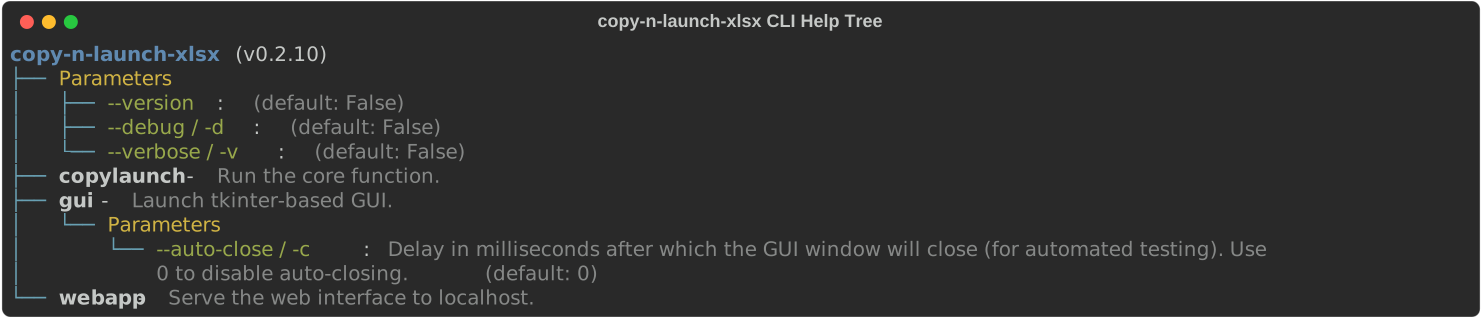
- GitHub: https://github.com/City-of-Memphis-Wastewater/typer-helptree
- PyPI: https://pypi.org/project/typer-helptree/
Operator Data Entry Instructions Specific to Maxson Wastewater Treatment Facility
Generally this workflow applies to any context, with the exception of:
- Color meanings
- "Print" page
- The XLIMS reference
Or any other information relating to a specific spreadsheet design.
The specific spreadsheet in question is maintained separately in the Maxson SharePoint.
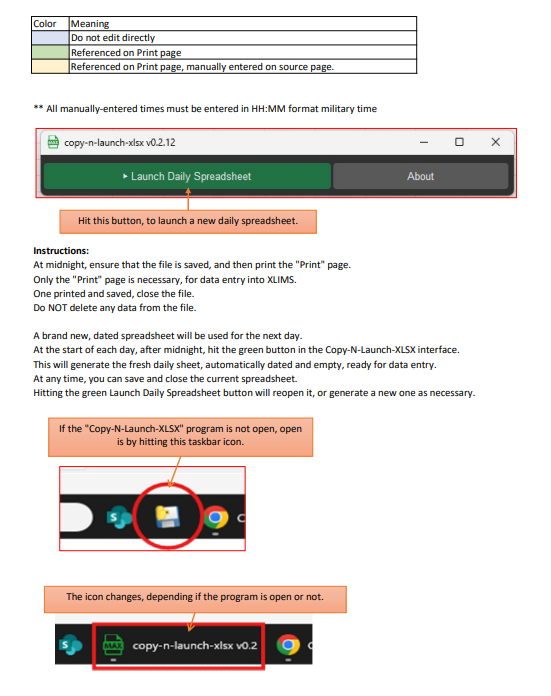
Instructions:
At midnight, ensure that the file is saved, and then print the "Print" page.
Only the "Print" page is necessary, for data entry into XLIMS.
One printed and saved, close the file.
Do NOT delete any data from the file.

A brand new, dated spreadsheet will be used for the next day.
At the start of each day, after midnight, hit the green button in the Copy-N-Launch-XLSX interface.
This will generate the fresh daily sheet, automatically dated and empty, ready for data entry.
At any time, you can save and close the current spreadsheet.
Hitting the green Launch Daily Spreadsheet button will reopen it, or generate a new one as necessary.
Source code
Source code: Repository
1 maintainer

Metadata
1 maintainer
Release files for copy-n-launch-xlsx 0.2.18
For a detailed explanation of source distributions (sdists) and built distributions (wheels), please see the package formats documentation.
Source distribution (sdist)
| File | Size | Uploaded | |
|---|---|---|---|
| copy_n_launch_xlsx-0.2.18.tar.gz | 540.9 kB | Details |
Built distribution (wheel)
| File | Interpreter | ABI | Platform | Reset |
|---|---|---|---|---|
| copy_n_launch_xlsx-0.2.18-py3-none-any.whl | Python 3 | none | any | Details |
Total release size: 1.1 MB
Release files / copy_n_launch_xlsx-0.2.18.tar.gz
| Download URL | copy_n_launch_xlsx-0.2.18.tar.gz |
|---|---|
| Size | 540.9 kB |
| Tags | Source |
|
SHA-256 checksum How to use checksums |
ad72f16d09968763dd38f9e35869119140068d376572075d1980bebb68b4737f
|
|
BLAKE2b-256 checksum How to use checksums |
963c9e4be8c75167680f1dacc3e9a96b00095c9a3a96bc4d2230428d637bd999
|
| Upload date | |
|
Uploaded using Trusted Publishing? What is trusted publishing? |
Yes |
| Uploaded via |
twine/6.1.0 CPython/3.13.12
|
Provenance
Provenance describes where a file came from. On PyPI, provenance is shared via attestations, which provide a verifiable record of the build or publishing details. View details, limitations and caveats.


PyPI Publish Attestation
PyPI verified that this artifact, at this checksum, originated from the publisher listed below.
Signed by GitHub Actions, verified by PyPI on Jul 7, 2026.
Transparency logRelease files / copy_n_launch_xlsx-0.2.18-py3-none-any.whl
| Download URL | copy_n_launch_xlsx-0.2.18-py3-none-any.whl |
|---|---|
| Size | 590.0 kB |
| Tags | Python 3 |
|
SHA-256 checksum How to use checksums |
1c4fd3267b7910d6c49162f096d28e54e781d1bfb1ff05d86db3538350d2ec08
|
|
BLAKE2b-256 checksum How to use checksums |
8592f4cdc3e395c8796d5b3376d0bcf60e9c9cdb623320f24634c38465943899
|
| Upload date | |
|
Uploaded using Trusted Publishing? What is trusted publishing? |
Yes |
| Uploaded via |
twine/6.1.0 CPython/3.13.12
|
Provenance
Provenance describes where a file came from. On PyPI, provenance is shared via attestations, which provide a verifiable record of the build or publishing details. View details, limitations and caveats.
PyPI Publish Attestation
PyPI verified that this artifact, at this checksum, originated from the publisher listed below.
Signed by GitHub Actions, verified by PyPI on Jul 7, 2026.
Transparency log













