
Stable spreadsheet copy, renaming, and dating, for municipal wastewater operator daily data entry.
Verified details
These details have been verified by PyPIProject links
GitHub Statistics
Maintainers

Project description
copy-n-launch-xlsx

The best way to launch this application is to install the CLI using pipx, or to download a release binary.
pipx install copy-n-launch-xlsx
cnlx gui
Download binaries here: Releases

Purpose
This program:
-
Copies a blank spreadsheet file.
-
Renames it, with the date in the filename.
-
Moves the new renamed file to a target folder
In this way, the stable file can be updated in a centralized way. Users can safely launch new daily data entry sheets, without needing to choose a file to launch directly.
Blurb
Spreadsheet templating isn't a new problem.
It's been solved many different ways over the years.
This is just one more solution—built around a very simple workflow that's now used every day by operators at my wastewater treatment plant.
Bring your own spreadsheet.
Click one button.
Get today's dated copy, ready for data entry.
The code is open source (thank you, Memphis taxpayers), and it's been tested on macOS, Windows 11, WSL, and Termux on Android.
XLSX Best Practices
Sheets should use Name Manager variable names and possibly tables, for reference and data aggregation. Variable names allow the cell locations to be adjusted and not referenced.
How To
- Place a spreadsheet named daily_blank.xlsx in the filepath: ~/.copy-n-launch-xlsx/blank/
Blank template:
~/.copy-n-launch-xlsx/blank/daily_blank.xlsx
- Hit the single green button.
Automatically generated files:
~/.copy-n-launch-xlsx/filled/daily-YYYY-MM-DD.xlsx
Helptree
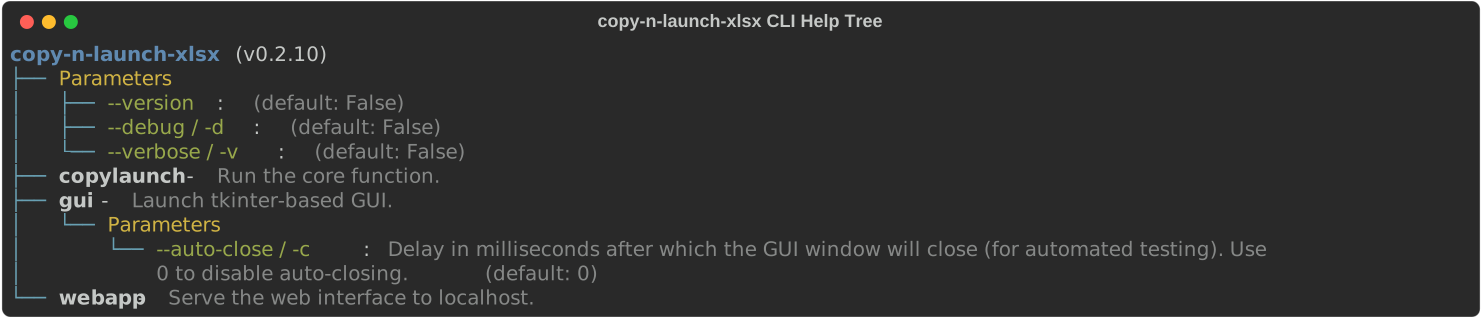
See the copy-n-launch-xlsx Typer CLI structure.
cnlx helptree
- GitHub: https://github.com/City-of-Memphis-Wastewater/typer-helptree
- PyPI: https://pypi.org/project/typer-helptree/
Source code
Source code: Repository
Project details
Verified details
These details have been verified by PyPIProject links
GitHub Statistics
Maintainers
Release history Release notifications | RSS feed


Download files
Download the file for your platform. If you're not sure which to choose, learn more about installing packages.
Source Distribution
Built Distribution
Filter files by name, interpreter, ABI, and platform.
If you're not sure about the file name format, learn more about wheel file names.
Copy a direct link to the current filters
File details
Details for the file copy_n_launch_xlsx-0.2.12.tar.gz.
File metadata
- Download URL: copy_n_launch_xlsx-0.2.12.tar.gz
- Upload date:
- Size: 538.3 kB
- Tags: Source
- Uploaded using Trusted Publishing? Yes
- Uploaded via: twine/6.1.0 CPython/3.13.12
File hashes
| Algorithm | Hash digest | |
|---|---|---|
| SHA256 |
6976c10f52d51934c576aff6d10d80e1fa5a085c5a97ae0a050523ca378adfba
|
|
| MD5 |
fe3a83334b269e26964b1e2335a258d1
|
|
| BLAKE2b-256 |
5ac69ec6d05b8f4693f6927458f092bcb58dbcf63e3706e2b6e2195e592aa7f8
|
Provenance
The following attestation bundles were made for copy_n_launch_xlsx-0.2.12.tar.gz:
Publisher:
publish.yml on City-of-Memphis-Wastewater/copy-n-launch-xlsx
-
Statement:
-
Statement type:
https://in-toto.io/Statement/v1 -
Predicate type:
https://docs.pypi.org/attestations/publish/v1 -
Subject name:
copy_n_launch_xlsx-0.2.12.tar.gz -
Subject digest:
6976c10f52d51934c576aff6d10d80e1fa5a085c5a97ae0a050523ca378adfba - Sigstore transparency entry: 2047919879
- Sigstore integration time:
-
Permalink:
City-of-Memphis-Wastewater/copy-n-launch-xlsx@867d283024a93b6a6993481466c1a3bf938b0e3a -
Branch / Tag:
refs/tags/v0.2.12 - Owner: https://github.com/City-of-Memphis-Wastewater
-
Access:
public
-
Token Issuer:
https://token.actions.githubusercontent.com -
Runner Environment:
github-hosted -
Publication workflow:
publish.yml@867d283024a93b6a6993481466c1a3bf938b0e3a -
Trigger Event:
release
-
Statement type:
File details
Details for the file copy_n_launch_xlsx-0.2.12-py3-none-any.whl.
File metadata
- Download URL: copy_n_launch_xlsx-0.2.12-py3-none-any.whl
- Upload date:
- Size: 586.8 kB
- Tags: Python 3
- Uploaded using Trusted Publishing? Yes
- Uploaded via: twine/6.1.0 CPython/3.13.12
File hashes
| Algorithm | Hash digest | |
|---|---|---|
| SHA256 |
b79f5f69ad61fc21361aa392a2d97527f88096e28016e04db40ec2e10a4c86a1
|
|
| MD5 |
80ba621ca2b0d61a12ab2e7ddddb5545
|
|
| BLAKE2b-256 |
4c4a20ca1272805e6ead0854e533e83c9a040e0fd81e977ac7d5654acec497b1
|
Provenance
The following attestation bundles were made for copy_n_launch_xlsx-0.2.12-py3-none-any.whl:
Publisher:
publish.yml on City-of-Memphis-Wastewater/copy-n-launch-xlsx
-
Statement:
-
Statement type:
https://in-toto.io/Statement/v1 -
Predicate type:
https://docs.pypi.org/attestations/publish/v1 -
Subject name:
copy_n_launch_xlsx-0.2.12-py3-none-any.whl -
Subject digest:
b79f5f69ad61fc21361aa392a2d97527f88096e28016e04db40ec2e10a4c86a1 - Sigstore transparency entry: 2047919884
- Sigstore integration time:
-
Permalink:
City-of-Memphis-Wastewater/copy-n-launch-xlsx@867d283024a93b6a6993481466c1a3bf938b0e3a -
Branch / Tag:
refs/tags/v0.2.12 - Owner: https://github.com/City-of-Memphis-Wastewater
-
Access:
public
-
Token Issuer:
https://token.actions.githubusercontent.com -
Runner Environment:
github-hosted -
Publication workflow:
publish.yml@867d283024a93b6a6993481466c1a3bf938b0e3a -
Trigger Event:
release
-
Statement type:






