
jetson-stats
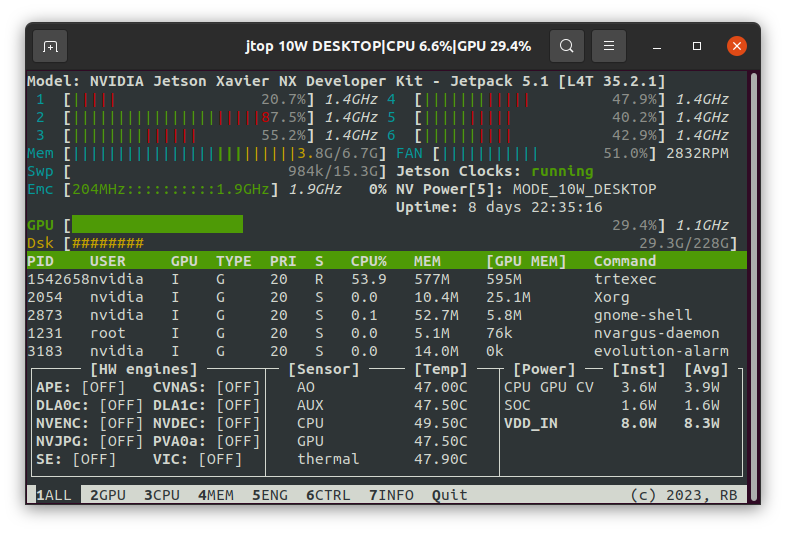
jetson-stats is a package for monitoring and control your NVIDIA Jetson [Orin, Xavier, Nano, TX] series.
jetson-stats is a powerful tool to analyze your board, you can use with a stand alone application with jtop or import in your python script, the main features are:
- Decode hardware, architecture, L4T and NVIDIA Jetpack
- Monitoring, CPU, GPU, Memory, Engines, fan
- Control NVP model, fan speed, jetson_clocks
- Importable in a python script
- Dockerizable in a container
- Do not need super user
- Tested on many different hardware configurations
- Works with all NVIDIA Jetpack
Install
jetson-stats can be installed with pip, but need superuser:
sudo pip3 install -U jetson-stats
Don't forget to logout/login or reboot your board
🚀 That's it! 🚀
Build
To build the package from source: for Cordatus
cd jetson_stats
python3 -m build
python -m twine upload dist/*  # add api token from pypi.org | go to -> pypi-token.txt
Library
You can use jtop such a python library to integrate in your software
from jtop import jtop

with jtop() as jetson:
    # jetson.ok() will provide the proper update frequency
    while jetson.ok():
        # Read tegra stats
        print(jetson.stats)
You can also use jtop with your virualenv!
More information available at advanced usage page.
Docker
You can run directly in Docker jtop, you need only to:
- Install jetson-stats on your host
- Install jetson-stats on your container as well
- Pass to your container
/run/jtop.sock:/run/jtop.sock
You can try running this command
docker run --rm -it -v /run/jtop.sock:/run/jtop.sock rbonghi/jetson_stats:latest
More information available at docker documentation page.
Sponsorship
If your company benefits from this library, please consider 💖 sponsoring its development.
Documentation
jetson-stats has usage and reference documentation at https://rnext.it/jetson_stats, there is also a 🆘 troubleshooting page.
Community
jetson-stats has a community Discord channel for asking questions and collaborating with other contributors. Drop by and say hello 👋
1 maintainer

Metadata
1 maintainer
Release files for cordatus-jtop-service 4.3.2.11
For a detailed explanation of source distributions (sdists) and built distributions (wheels), please see the package formats documentation.
Source distribution (sdist)
| File | Size | Uploaded | |
|---|---|---|---|
| cordatus_jtop_service-4.3.2.11.tar.gz | 121.2 kB | Details |
Built distribution (wheel)
| File | Interpreter | ABI | Platform | Reset |
|---|---|---|---|---|
| cordatus_jtop_service-4.3.2.11-py3-none-any.whl | Python 3 | none | any | Details |
Total release size: 281.9 kB
Release files / cordatus_jtop_service-4.3.2.11.tar.gz
| Download URL | cordatus_jtop_service-4.3.2.11.tar.gz |
|---|---|
| Size | 121.2 kB |
| Tags | Source |
|
SHA-256 checksum How to use checksums |
98d961c940aab04437cd985f58e3617fc49b288e4971b2bc9217b388d8b8a406
|
|
BLAKE2b-256 checksum How to use checksums |
a2f6d9093eb82172f37eaee2441a72b1394ec0423af4154d27d6bc28861f678e
|
| Upload date | |
|
Uploaded using Trusted Publishing? What is trusted publishing? |
No |
| Uploaded via |
twine/6.2.0 CPython/3.10.12
|
Release files / cordatus_jtop_service-4.3.2.11-py3-none-any.whl
| Download URL | cordatus_jtop_service-4.3.2.11-py3-none-any.whl |
|---|---|
| Size | 160.7 kB |
| Tags | Python 3 |
|
SHA-256 checksum How to use checksums |
fd3d6a05b6f55e90a353eb1187035d353db269687c9871217a6de7dae5883bcb
|
|
BLAKE2b-256 checksum How to use checksums |
61ced38d497e2434a1b42d28dc8a1408e684f76ecd980c38476dec50436592ca
|
| Upload date | |
|
Uploaded using Trusted Publishing? What is trusted publishing? |
No |
| Uploaded via |
twine/6.2.0 CPython/3.10.12
|














