
Interactive system-monitor and process viewer for all NVIDIA Jetson [Orin, Xavier, Nano, TX] series - Cordatus Edition

Project description
jetson-stats
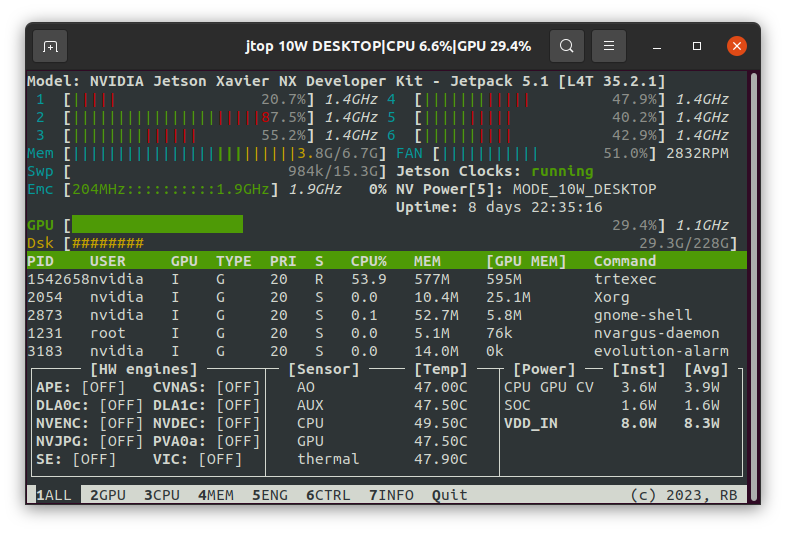













jetson-stats is a package for monitoring and control your NVIDIA Jetson [Orin, Xavier, Nano, TX] series.
jetson-stats is a powerful tool to analyze your board, you can use with a stand alone application with jtop or import in your python script, the main features are:
- Decode hardware, architecture, L4T and NVIDIA Jetpack
- Monitoring, CPU, GPU, Memory, Engines, fan
- Control NVP model, fan speed, jetson_clocks
- Importable in a python script
- Dockerizable in a container
- Do not need super user
- Tested on many different hardware configurations
- Works with all NVIDIA Jetpack
Install
Cordatus JTop Service Edition
This is a custom fork maintained by Cordatus. Install with pip:
pip install cordatus-jtop-service==4.3.2.5
IMPORTANT: After installation, you must run the setup script to install the systemd service:
sudo cordatus-jtop-setup
Don't forget to logout/login or reboot your board for group permissions to take effect
Original jetson-stats
The original jetson-stats can be installed with pip, but need superuser:
sudo pip3 install -U jetson-stats
Don't forget to logout/login or reboot your board
🚀 That's it! 🚀
Run
Start jtop it's pretty simple just write jtop!
jtop
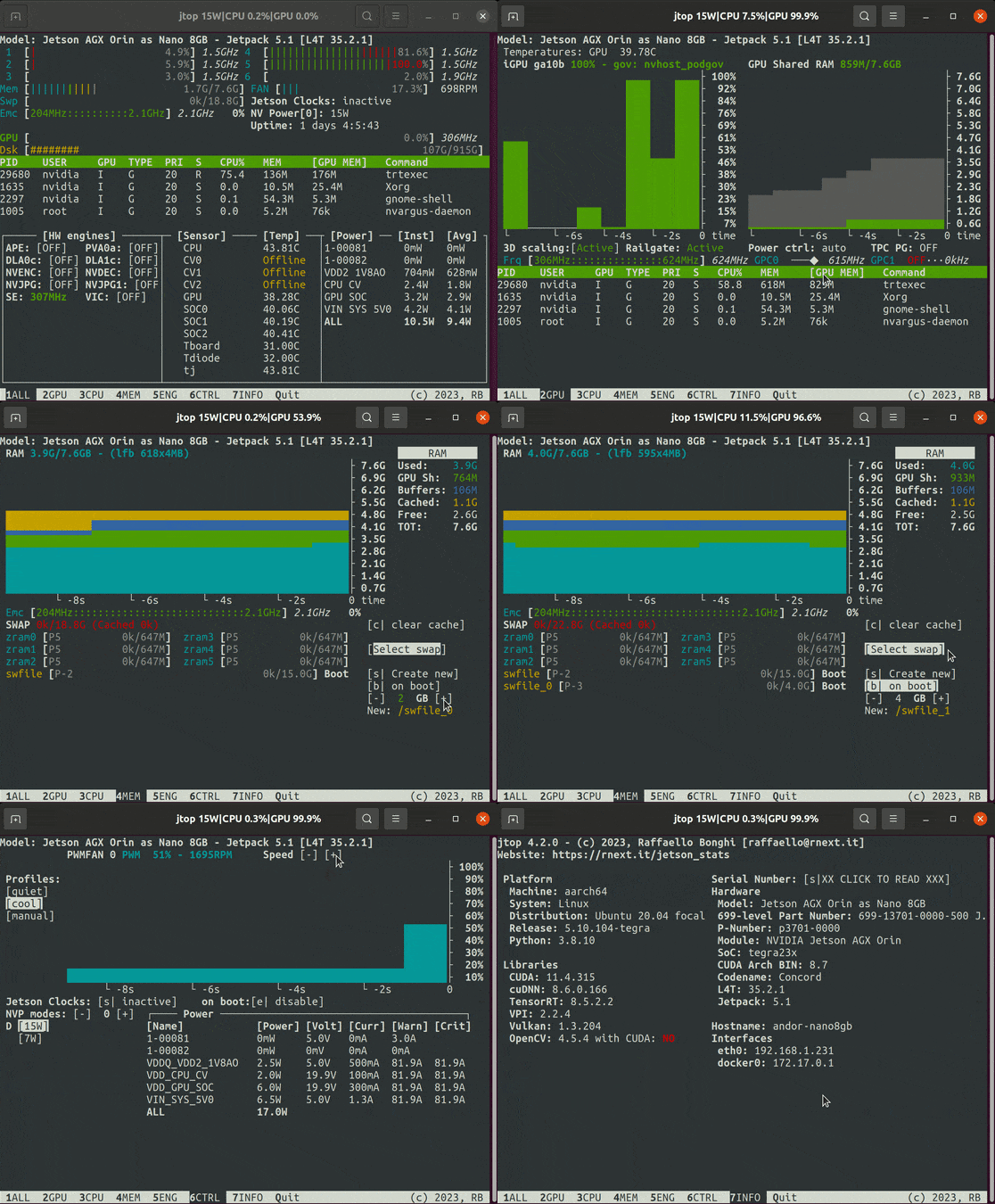
A simple interface will appear on your terminal, more capabilities are documented at jtop page.
Library
You can use jtop such a python library to integrate in your software
from jtop import jtop

with jtop() as jetson:
    # jetson.ok() will provide the proper update frequency
    while jetson.ok():
        # Read tegra stats
        print(jetson.stats)
You can also use jtop with your virualenv!
More information available at advanced usage page.
Docker
You can run directly in Docker jtop, you need only to:
- Install jetson-stats on your host
- Install jetson-stats on your container as well
- Pass to your container
/run/jtop.sock:/run/jtop.sock
You can try running this command
docker run --rm -it -v /run/jtop.sock:/run/jtop.sock rbonghi/jetson_stats:latest
More information available at docker documentation page.
Sponsorship
If your company benefits from this library, please consider 💖 sponsoring its development.
Documentation
jetson-stats has usage and reference documentation at https://rnext.it/jetson_stats, there is also a 🆘 troubleshooting page.
Community
jetson-stats has a community Discord channel for asking questions and collaborating with other contributors. Drop by and say hello 👋
Release history Release notifications | RSS feed


Download files
Download the file for your platform. If you're not sure which to choose, learn more about installing packages.
Source Distribution
Built Distribution
Filter files by name, interpreter, ABI, and platform.
If you're not sure about the file name format, learn more about wheel file names.
Copy a direct link to the current filters
File details
Details for the file cordatus_jtop_service-4.3.2.8.tar.gz.
File metadata
- Download URL: cordatus_jtop_service-4.3.2.8.tar.gz
- Upload date:
- Size: 126.3 kB
- Tags: Source
- Uploaded using Trusted Publishing? No
- Uploaded via: twine/6.2.0 CPython/3.10.12
File hashes
| Algorithm | Hash digest | |
|---|---|---|
| SHA256 |
ed430ba7c54f1d695d814b497560180ec25d27e61d163b0379d6094d9e6ae363
|
|
| MD5 |
f8ee5c7bf2bcbe76816a5f0da62493f9
|
|
| BLAKE2b-256 |
cdca79ae84602ef1d7d506b8509c8ddd5cb2ed7b3a67390087b45f1ac908eb89
|
File details
Details for the file cordatus_jtop_service-4.3.2.8-py3-none-any.whl.
File metadata
- Download URL: cordatus_jtop_service-4.3.2.8-py3-none-any.whl
- Upload date:
- Size: 162.6 kB
- Tags: Python 3
- Uploaded using Trusted Publishing? No
- Uploaded via: twine/6.2.0 CPython/3.10.12
File hashes
| Algorithm | Hash digest | |
|---|---|---|
| SHA256 |
7651386017134a419737acebdbc5dfea887e4faf2f392cf88b7ee79e6e4d147d
|
|
| MD5 |
fb4a189a9bce09f51178050899152542
|
|
| BLAKE2b-256 |
3ec18ea4ad2e79c754864b7f0c9d242623e4b36aed85100c96f8d93161b1a799
|






