
cortecs-py






Lightweight wrapper for the cortecs.ai enabling instant provisioning.
⚡Quickstart
Dynamic provisioning allows you to run LLM-workflows on dedicated compute. The LLM and underlying resources are automatically provisioned for the duration of use, providing maximum cost-efficiency. Once the workflow is complete, the infrastructure is automatically shut down.
This library starts and stops your resources. The logic can be implemented using popular frameworks such as LangChain or crewAI.
- Start your LLM
- Execute (massive batch) jobs
- Shutdown your LLM
from cortecs_py.client import Cortecs
from cortecs_py.integrations.langchain import DedicatedLLM

cortecs = Cortecs()

with DedicatedLLM(client=cortecs, model_name='cortecs/phi-4-FP8-Dynamic') as llm:
    essay = llm.invoke('Write an essay about dynamic provisioning')
    print(essay.content)
Example
Install
pip install cortecs-py
Summarizing documents
First, set up the environment variables. Use your credentials from cortecs.ai.
export OPENAI_API_KEY="<YOUR_CORTECS_API_KEY>"
export CORTECS_CLIENT_ID="<YOUR_ID>"
export CORTECS_CLIENT_SECRET="<YOUR_SECRET>"
This example shows how to use LangChain to configure a simple summarization chain. The llm is dynamically provisioned and the chain is executed in parallel.
from langchain_community.document_loaders import ArxivLoader
from langchain_core.prompts import ChatPromptTemplate

from cortecs_py.client import Cortecs
from cortecs_py.integrations.langchain import DedicatedLLM

cortecs = Cortecs()
loader = ArxivLoader(
    query="reasoning",
    load_max_docs=40,
    get_ful_documents=True,
    doc_content_chars_max=25000,  # ~6.25k tokens, make sure the models supports that context length
    load_all_available_meta=False
)

prompt = ChatPromptTemplate.from_template("{text}\n\n Explain to me like I'm five:")
docs = loader.load()

with DedicatedLLM(client=cortecs, model_name='cortecs/phi-4-FP8-Dynamic') as llm:
    chain = prompt | llm

    print("Processing data batch-wise ...")
    summaries = chain.batch([{"text": doc.page_content} for doc in docs])
    for summary in summaries:
        print(summary.content + '-------\n\n\n')
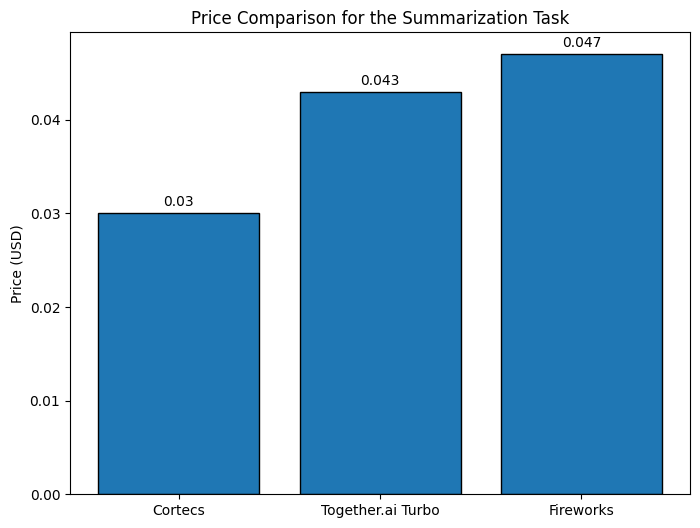
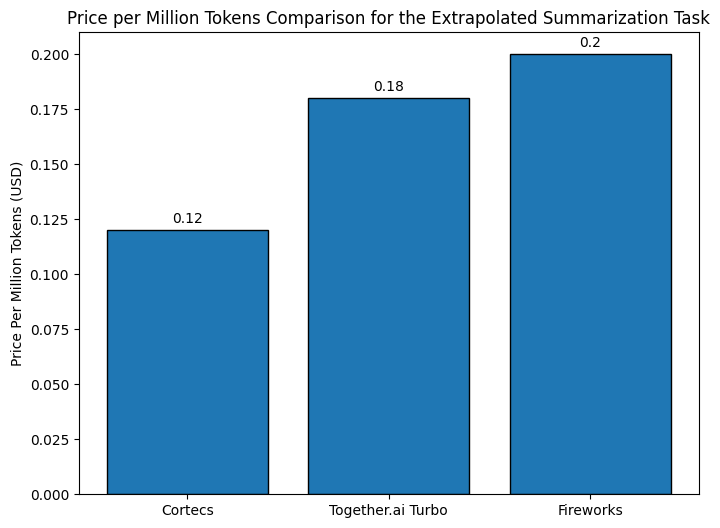
This simple example showcases the power of dynamic provisioning. We summarized 224.2k input tokens into 12.9k output tokens in 55 seconds. The llm can be fully utilized in those 55 seconds enabling better cost efficiency. Comparing to serverless open source model providers we observe the following:
Use Cases
- Low latency -> How to process reddit in realtime
- Multi-agents -> How to use CrewAI without request limits
- Batch processing
- High-security
1 maintainer

Release files for cortecs-py 0.1.2
For a detailed explanation of source distributions (sdists) and built distributions (wheels), please see the package formats documentation.
Source distribution (sdist)
| File | Size | Uploaded | |
|---|---|---|---|
| cortecs_py-0.1.2.tar.gz | 15.5 kB | Details |
Built distribution (wheel)
| File | Interpreter | ABI | Platform | Reset |
|---|---|---|---|---|
| cortecs_py-0.1.2-py3-none-any.whl | Python 3 | none | any | Details |
Total release size: 29.1 kB
Release files / cortecs_py-0.1.2.tar.gz
| Download URL | cortecs_py-0.1.2.tar.gz |
|---|---|
| Size | 15.5 kB |
| Tags | Source |
|
SHA-256 checksum How to use checksums |
270e51358089c6d16cea7f4de1e3d10e8b603804c61eb1e1799e4489e1f579a3
|
|
BLAKE2b-256 checksum How to use checksums |
0c83d75215c8153d5bc341328456fbbda06d3ed66edd6751ee6acc9215f5c299
|
| Upload date | |
|
Uploaded using Trusted Publishing? What is trusted publishing? |
No |
| Uploaded via |
twine/6.1.0 CPython/3.10.16
|
Release files / cortecs_py-0.1.2-py3-none-any.whl
| Download URL | cortecs_py-0.1.2-py3-none-any.whl |
|---|---|
| Size | 13.6 kB |
| Tags | Python 3 |
|
SHA-256 checksum How to use checksums |
9b4cb184c7feb9c48e821b5471d7b2b6c122810c860a3ec79a4a1dab0acc63c3
|
|
BLAKE2b-256 checksum How to use checksums |
a9256f7f58669c9da9acb300b0f6ce98ffb974da936eeefe421644ae4c7d1d46
|
| Upload date | |
|
Uploaded using Trusted Publishing? What is trusted publishing? |
No |
| Uploaded via |
twine/6.1.0 CPython/3.10.16
|














