
CostOpt — Developer-Native LLM Cost Intelligence ⚡

Drop-in wrapper for OpenAI, Anthropic & Gemini clients that adds automatic caching, smart model routing, circuit breaker protection, and a real-time observability dashboard — all 100% local.
Stop waiting for a $500 monthly cloud bill to figure out where your LLM budget went.







📋 Table of Contents
- What is CostOpt?
- 1-Line Integration
- Core Features
- Quickstart Guide
- Dashboard
- Multi-Provider Support
- Framework Integrations
- Configuration
- VS Code Extension
- FAQ
- License
💡 What is CostOpt?
CostOpt is a developer SDK that wraps your existing OpenAI, Anthropic, or Google Gemini client in a single line of code. Once wrapped, every LLM call is automatically:
- ✅ Cached locally — repeat or near-duplicate prompts return in
<2msat$0.00cost - ✅ Routed intelligently — simple tasks automatically rerouted to cheaper models (e.g.
gpt-4o→gpt-4o-mini) - ✅ Protected from runaway loops — circuit breaker trips before silent billing explosions
- ✅ Logged with full cost attribution — every call recorded to SQLite with cost, latency, model used, and file/line location
No cloud, no accounts, no data leaving your machine.
🔌 1-Line Zero-Churn Integration
# ─── BEFORE (Standard OpenAI Client) ────────────────────────────────────────
from openai import OpenAI
client = OpenAI()

# ─── AFTER (With CostOpt — zero other changes needed) ───────────────────────
from openai import OpenAI
from costopt import CostOpt

client = CostOpt(OpenAI())  # 👈 That's it.

# Your API calls are 100% identical — CostOpt intercepts transparently:
response = client.chat.completions.create(
    model="gpt-4o",
    messages=[{"role": "user", "content": "Classify customer feedback"}],
    feature="customer_support"   # optional: tag for cost attribution in dashboard
)
⚡ Core Features
| Feature | Description |
|---|---|
| 🗄️ Local SQLite Cache | Exact + fuzzy (Jaccard/TF-IDF) matching. Cache key includes model, temperature, tools, seed. |
| 🔀 Smart Model Router | Rule-based keyword routing — simple tasks auto-rerouted to cheaper models. |
| 🛡️ Circuit Breaker | Detects >15 calls in 30s from the same file:line and trips CostOptCircuitBreakerError. |
| 🔄 Outage Failover | Auto-retries fallback models on 429/503 (gpt-4o → claude-3-5-sonnet → llama3). |
| 📊 Observability Dashboard | Real-time spend metrics, trace explorer, anomaly detection, and YAML policy viewer. |
| 🔍 VS Code CodeLens | Cost-per-request and call counts shown inline above your code. |
| 🔒 100% Local & Private | Everything stored in SQLite. Zero data leaves your machine. |
🚀 Quickstart Guide
Step 1 — Install Python SDK
pip install costopt
Step 2 — Wrap your LLM client
from openai import OpenAI
from costopt import CostOpt

client = CostOpt(OpenAI())

response = client.chat.completions.create(
    model="gpt-4o",
    messages=[{"role": "user", "content": "Explain quantum mechanics simply"}],
    feature="education"
)
print(response.choices[0].message.content)
Step 3 — Launch the Observability Dashboard
python -m costopt.main dashboard
Open http://localhost:8000 in your browser.
📊 Observability Dashboard
CostOpt comes with a full-featured local dashboard running on FastAPI + vanilla JS.
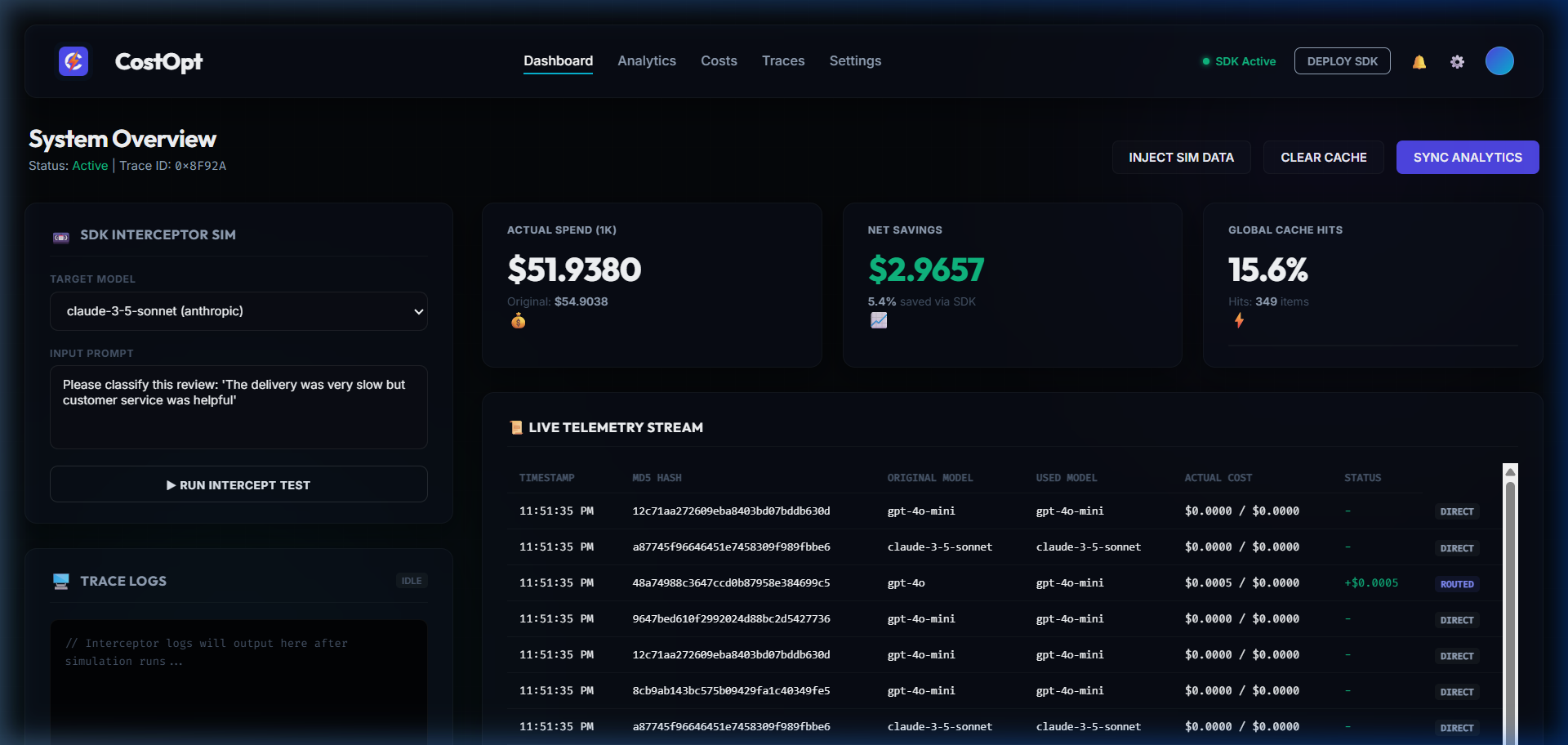
System Overview
Live telemetry stream, SDK route simulator, active YAML policy rules, anomaly detection, and optimization strategies.
Analytics & Performance
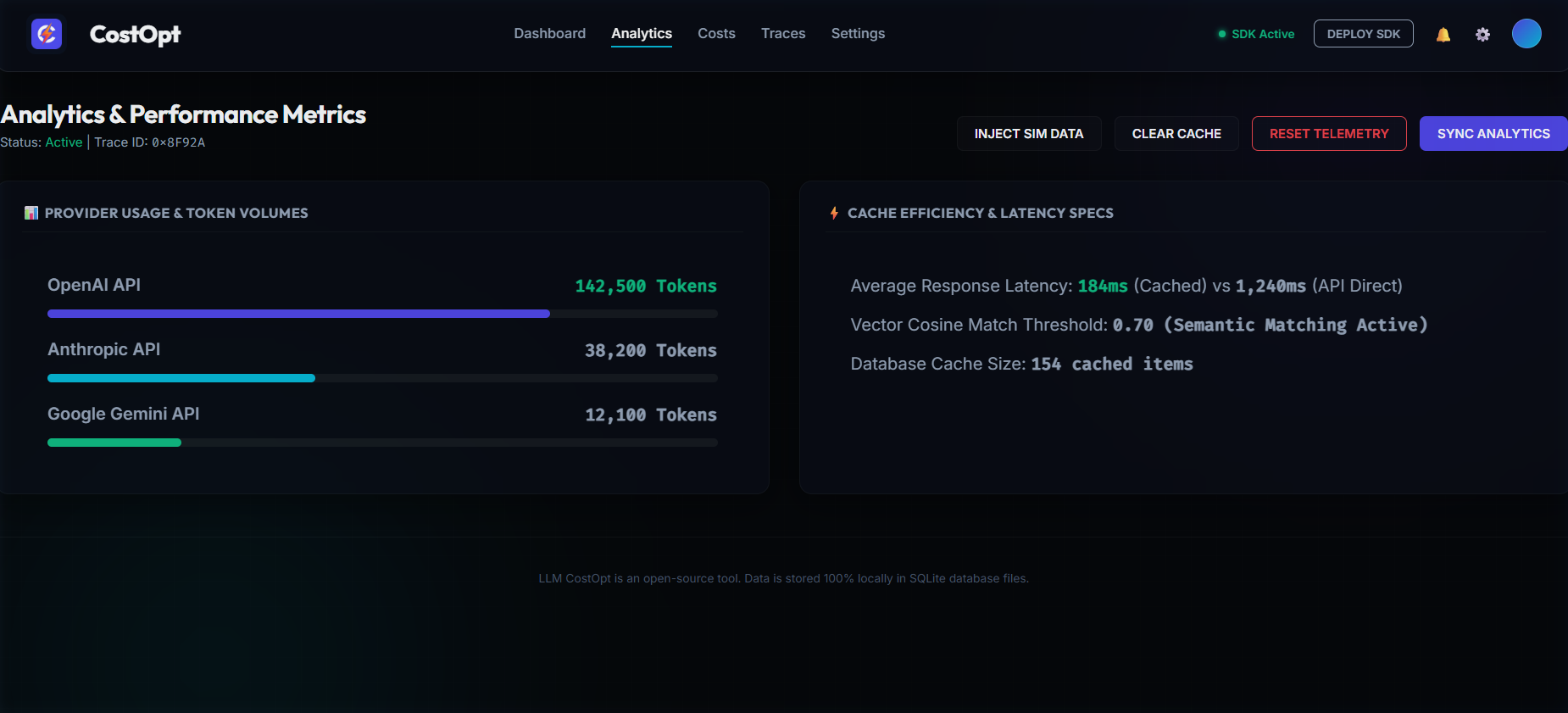
Provider token volumes (OpenAI / Anthropic / Google), cache efficiency metrics, and average latency comparisons (cached vs direct).
Trace Explorer
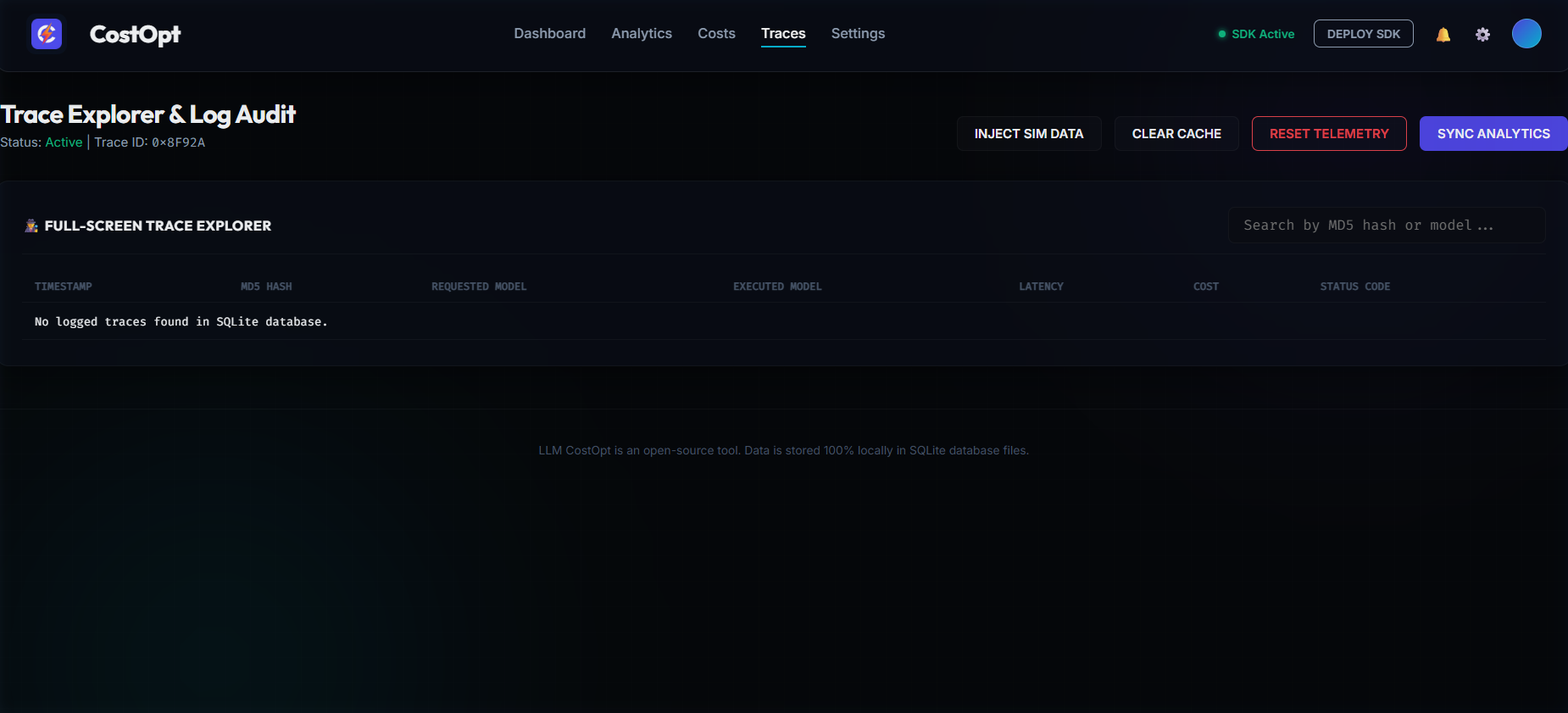
Full-screen trace log with MD5 prompt hash, requested model, executed model (after routing), latency, actual cost, and status code. Searchable by hash or model name.
Settings
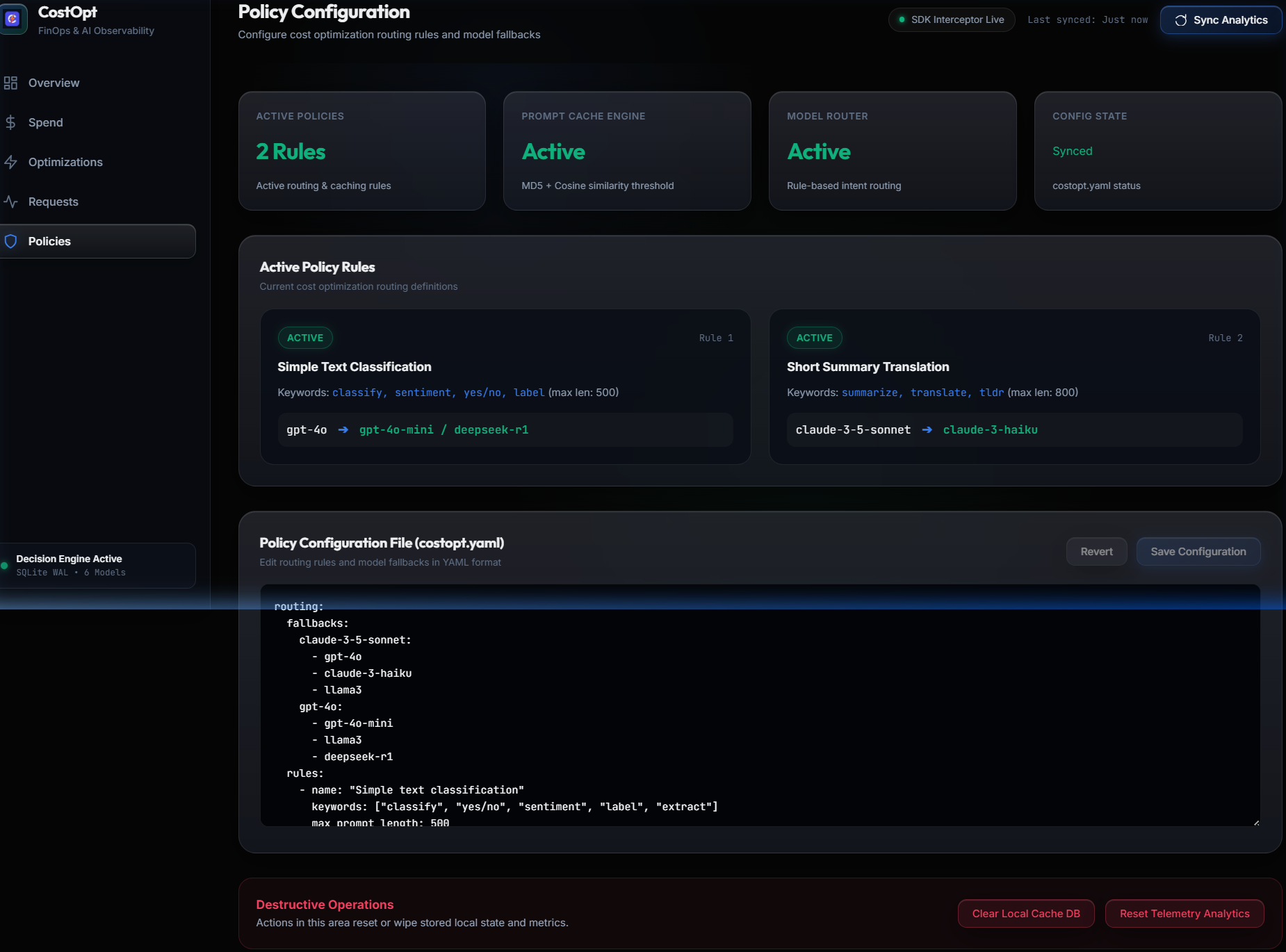
Configure similarity threshold, TTL, budget alerts, and reset telemetry data.
🌐 Multi-Provider Support
CostOpt supports wrapping OpenAI, Anthropic, and Google Gemini clients:
# OpenAI
from openai import OpenAI
from costopt import CostOpt

client = CostOpt(OpenAI(), provider="openai")

# Anthropic
import anthropic
from costopt import CostOpt

client = CostOpt(anthropic.Anthropic(), provider="anthropic")

# Google Gemini (via OpenAI-compatible API)
from openai import OpenAI
from costopt import CostOpt

client = CostOpt(
    OpenAI(api_key="...", base_url="https://generativelanguage.googleapis.com/v1beta/openai/"),
    provider="google"
)
Supported pricing catalogs: OpenAI, Anthropic, Google Gemini, HuggingFace, Ollama (local, $0.00).
📦 Integration with Popular Frameworks
LangChain:
from langchain_openai import ChatOpenAI
from costopt import CostOpt
from openai import OpenAI

llm = ChatOpenAI(client=CostOpt(OpenAI()).client)
LlamaIndex:
from llama_index.llms.openai import OpenAI as LlamaOpenAI
from costopt import CostOpt
from openai import OpenAI

llm = LlamaOpenAI(client=CostOpt(OpenAI()).client)
FastAPI:
from fastapi import FastAPI
from openai import OpenAI
from costopt import CostOpt

app = FastAPI()
ai_client = CostOpt(OpenAI())
🔧 Configuration & Custom Models
CostOpt reads costopt.yaml from your project root for routing rules and fallback chains:
routing:
  fallbacks:
    gpt-4o:
      - gpt-4o-mini
      - claude-3-5-haiku
      - llama3
  rules:
    - name: "Simple classification tasks"
      keywords: ["classify", "yes/no", "sentiment", "label", "extract"]
      route_to: "gpt-4o-mini"
    - name: "Code generation"
      keywords: ["write code", "debug", "function", "implement"]
      route_to: "gpt-4o"
Add custom or local Ollama models by dropping a .yaml into the pricing/providers/ directory:
provider: "ollama"
models:
  llama3:
    input_cost_per_1m: 0.0
    output_cost_per_1m: 0.0
  deepseek-r1:
    input_cost_per_1m: 0.0
    output_cost_per_1m: 0.0
🖥️ VS Code Extension
Install the CostOpt extension from the VS Code Marketplace or Open VSX Registry.
Features:
- 📍 CodeLens Inlines — cost per request, avg tokens, call count directly above
client.chat.completions.create()lines - 💬 Hover Panels — full cost breakdown + MD5 hash + cache status on hover
- 📈 Sidebar Views — Spend Forecast, Feature Attribution, Cost Drift Warnings
- 📌 Status Bar —
CostOpt: $8.42 todaylive in VS Code bottom bar
# After installing, start the background service:
python -m costopt.main dashboard
❓ FAQ
Q: Does CostOpt send my prompts or data to external servers?
No. 100% local. All telemetry, cache, and pricing data is stored in local SQLite files (
costopt_telemetry.db,costopt_cache.db). Zero data leaves your machine.
Q: Does it add latency to my LLM calls?
No. Prompt hashing and cache checks take under 1ms. Telemetry is written asynchronously in a background thread.
Q: What does a cache hit cost?
$0.00. Cached responses are replayed locally in under 2ms without hitting the paid provider API.
Q: Does it work with LangChain / LlamaIndex?
Yes. Pass the wrapped client (
CostOpt(OpenAI()).client) into any framework that accepts a raw OpenAI client object.
Q: What if the VS Code status bar shows CostOpt: Offline?
Start the background service:
python -m costopt.main dashboard
Q: How does fuzzy cache matching work?
CostOpt uses Jaccard similarity + TF-IDF cosine similarity. Set
similarity_thresholdin Settings to enable near-duplicate matching (e.g.0.85= 85% similar prompts return cached response).
Q: How do I reset all telemetry to start fresh?
Click the RESET TELEMETRY button in the dashboard header, or run
DELETE FROM telemetrydirectly oncostopt_telemetry.db.
📄 License
This project is licensed under the MIT License. See LICENSE for details.
Built for developers who want to ship fast and spend smart. 100% open source.
1 maintainer

Download files
Download the file for your platform. If you're not sure which to choose, learn more about installing packages.
Source Distribution
Built Distribution
Filter files by name, interpreter, ABI, and platform.
If you're not sure about the file name format, learn more about wheel file names.
Copy a direct link to the current filters
File details
Details for the file costopt-0.1.3.tar.gz.
File metadata
- Download URL: costopt-0.1.3.tar.gz
- Upload date:
- Size: 50.8 kB
- Tags: Source
- Uploaded using Trusted Publishing? No
- Uploaded via:
twine/7.0.0 CPython/3.14.3
File hashes
| Algorithm | Hash digest | |
|---|---|---|
| SHA256 |
2680f41efd4be9640895b1b8e0691f5a8b22de49292f16f9f4159b78ff5ae5c1
|
|
| MD5 |
98e0ebcaa1c439e92639d388aed76a20
|
|
| BLAKE2b-256 |
6f316c737f641d24ff8fa1aad56a9de9b0c1fc29be9ec16b0a7439d01a771da4
|
File details
Details for the file costopt-0.1.3-py3-none-any.whl.
File metadata
- Download URL: costopt-0.1.3-py3-none-any.whl
- Upload date:
- Size: 34.8 kB
- Tags: Python 3
- Uploaded using Trusted Publishing? No
- Uploaded via:
twine/7.0.0 CPython/3.14.3
File hashes
| Algorithm | Hash digest | |
|---|---|---|
| SHA256 |
8a07b88a86052401819f5db1fbb184103d8376bc01133d85625633fd4b596df1
|
|
| MD5 |
86874f0407a2f8c95fd58f681ab3c2fc
|
|
| BLAKE2b-256 |
4d76cc6baf0c951684f1e9cdca1fc228a3eefde6edc98b3e9b27eef4cdbf6d06
|







