
A terminal-first Competitive Programming Knowledge Base
Verified details
These details have been verified by PyPIProject links
GitHub Statistics
Maintainers

Project description
Competitive Programming Knowledge Base (CPKB)
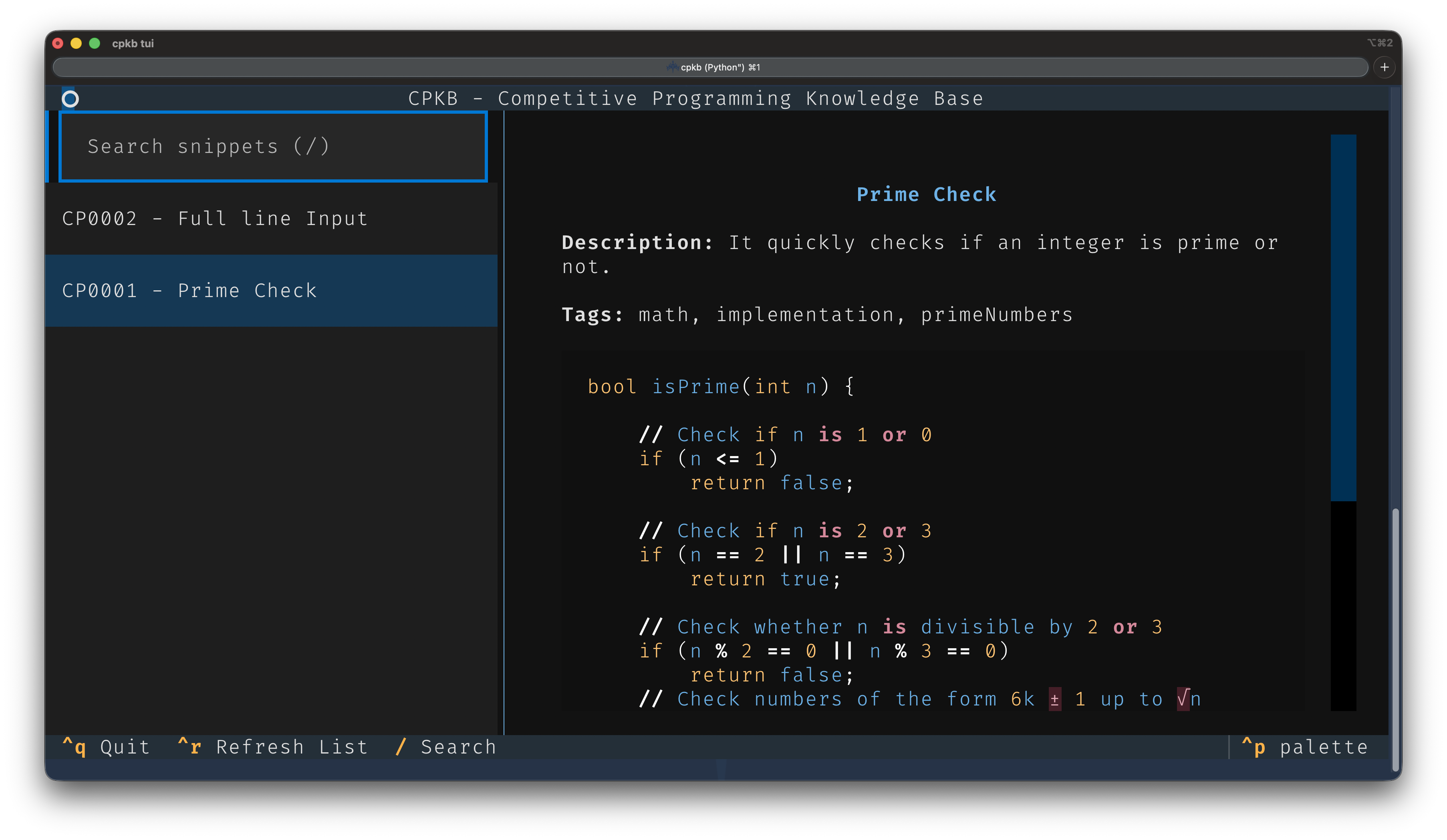
CPKB is a local, terminal-first knowledge base designed to store, search, and track usages of competitive programming snippets, algorithms, and tricks. It uses SQLite for storage, keeping your snippets incredibly fast and perfectly organised.
Version 2.0 Features
- Store snippets: Add code snippets with metadata like title, use case, and tags.
- Search snippets: Full-text search across titles, descriptions, tags, and code.
- Track usage: Record every time you use a snippet in a problem, linking to the file and optionally taking notes.
- Textual TUI: A beautiful terminal UI for browsing and copying your snippets.
- FZF Integration: Fuzzy find snippets directly in the terminal.
- Snippet Insertion: Instantly copy code to the clipboard or append to files.
- Spaced Repetition (SM-2): Revise your knowledge base using the
revisecommand with a true SM-2 spaced-repetition algorithm that tracks ease, interval, and repetitions per snippet. - Password-based Encryption: Encrypt your database at rest with a password (PBKDF2-HMAC-SHA256 key derivation). No keys stored on disk.
- XDG Base Directory compliant: Stores your data safely in
~/.local/share/cpkb.
Installation
Install CPKB with pipx:
pipx install cpkb
Or install it with pip:
python -m pip install cpkb
Homebrew
After the first release is published, macOS and Linux users can install from the project tap:
brew tap Aaravshah2907/cpkb
brew install cpkb
Until the tap is live, the formula template lives in Formula/cpkb.rb.
From Source
git clone https://github.com/Aaravshah2907/cpkb.git
cd cpkb
pip install -e .
Local Development & Testing
If you wish to contribute to the codebase or run the unit tests locally to verify the CLI and TUI functionality, set up a virtual environment and run pytest:
# 1. Create and activate a virtual environment
python3 -m venv venv
source venv/bin/activate  # On Windows use: venv\Scripts\activate

# 2. Install CPKB and test dependencies
python -m pip install -e ".[dev]"

# 3. Run the test suite
pytest
Platform‑specific dependencies
| Platform | Clipboard utility | Fuzzy finder |
|---|---|---|
| macOS | pbcopy (built‑in) |
brew install fzf |
| Linux | xclip or xsel |
sudo apt-get install fzf |
| Windows | clip (built‑in) |
scoop install fzf or choco install fzf |
Usage
Here are the commands available in Version 2.0:
Core V1 Commands
cpkb add: Add a new snippet interactively.cpkb list: List all snippets.cpkb show <id>: Show details, code, and usages of a specific snippet.cpkb search <query>: Search for snippets matching multiple words.cpkb use <id> <file>: Record the usage of a snippet in a specific file.cpkb usages <id>: List all recorded usages for a snippet.cpkb stats: Show basic database statistics.cpkb random: Show a random snippet for review or practice.cpkb edit <id>: Edit a snippet's metadata and code in your default$EDITOR.cpkb edit-usage <id>: Edit a past usage record.cpkb delete <id>: Delete a snippet permanently.cpkb recent: Show the 10 most recently added snippets.cpkb export: Export your entire knowledge base to a single Markdown file.cpkb export-db [--encrypted]: Export your SQLite database, optionally encrypted with a password.cpkb import <file-or-url>: Append snippets from a CPKBdb,json,md, orhtmlexport.cpkb import --defaults: Import bundled C++ STL competitive-programming cheatsheets with specialcp_IDs.cpkb import --list-defaults: Preview the bundled cheatsheets before importing.cpkb backup: Manually trigger a backup of the SQLite database.
New V2 Commands
cpkb tui: Launch the interactive Textual TUI (presscto copy a snippet).cpkb fzf: Interactively fuzzy search snippets usingfzf.cpkb copy <id> [-f <file>]: Instantly copy the snippet's code to your system clipboard (usespbcopyon macOS,xclip/xselon Linux,clipon Windows) or append to a file.cpkb revise: Start a spaced-repetition session — the SM-2 algorithm selects the most overdue snippet, shows the title, then reveals the code. Rate your recall (0–5) to schedule the next review.cpkb srs-stats: Show spaced-repetition statistics (total reviewed, due now, avg ease factor).cpkb encrypt-db: Encrypt the database with a password (PBKDF2 + Fernet). No key files are stored.cpkb decrypt-db: Decrypt the database by entering your password.
Directory Structure
Data is kept completely separate from the code repo. The application automatically creates the required directories on first run:
~/.local/share/cpkb/
├── snippets.db
├── attachments/
├── backups/
├── exports/
├── imports/
└── logs/
Requirements
- Python 3.11+
textualcryptography(forencrypt-db/decrypt-db)fzf(Optional, forcpkb fzf)- A platform clipboard helper:
pbcopyon macOS,xcliporxselon Linux,clipon Windows
License
MIT License.
Project details
Verified details
These details have been verified by PyPIProject links
GitHub Statistics
Maintainers
Release history Release notifications | RSS feed


Download files
Download the file for your platform. If you're not sure which to choose, learn more about installing packages.
Source Distribution
Built Distribution
Filter files by name, interpreter, ABI, and platform.
If you're not sure about the file name format, learn more about wheel file names.
Copy a direct link to the current filters
File details
Details for the file cpkb-2.0.1.tar.gz.
File metadata
- Download URL: cpkb-2.0.1.tar.gz
- Upload date:
- Size: 35.5 kB
- Tags: Source
- Uploaded using Trusted Publishing? Yes
- Uploaded via: twine/6.1.0 CPython/3.13.12
File hashes
| Algorithm | Hash digest | |
|---|---|---|
| SHA256 |
f9cc6cc985d8fcdf857ab4a9d1fdbb97d07d9a5d3824f7a9880064eaf53433d7
|
|
| MD5 |
26f6594bf67449233219e8cb096e20be
|
|
| BLAKE2b-256 |
8edc28e023d71c93daeb2d8c58a41fafa82a40a659a3de120c3d0b86f67af5fe
|
Provenance
The following attestation bundles were made for cpkb-2.0.1.tar.gz:
Publisher:
publish.yml on Aaravshah2907/cpkb
-
Statement:
-
Statement type:
https://in-toto.io/Statement/v1 -
Predicate type:
https://docs.pypi.org/attestations/publish/v1 -
Subject name:
cpkb-2.0.1.tar.gz -
Subject digest:
f9cc6cc985d8fcdf857ab4a9d1fdbb97d07d9a5d3824f7a9880064eaf53433d7 - Sigstore transparency entry: 1975686497
- Sigstore integration time:
-
Permalink:
Aaravshah2907/cpkb@b987e84e9874586601cebe6dd5cbc54c60607bbe -
Branch / Tag:
refs/tags/v2.0.1 - Owner: https://github.com/Aaravshah2907
-
Access:
public
-
Token Issuer:
https://token.actions.githubusercontent.com -
Runner Environment:
github-hosted -
Publication workflow:
publish.yml@b987e84e9874586601cebe6dd5cbc54c60607bbe -
Trigger Event:
push
-
Statement type:
File details
Details for the file cpkb-2.0.1-py3-none-any.whl.
File metadata
- Download URL: cpkb-2.0.1-py3-none-any.whl
- Upload date:
- Size: 30.0 kB
- Tags: Python 3
- Uploaded using Trusted Publishing? Yes
- Uploaded via: twine/6.1.0 CPython/3.13.12
File hashes
| Algorithm | Hash digest | |
|---|---|---|
| SHA256 |
68d6b0a6efd669c0c652bf64b0f08580eedf2b891d0d8e12794b7fcf42da02bd
|
|
| MD5 |
55d826c75a39324ccc65485daf2542ca
|
|
| BLAKE2b-256 |
fff8ffe5bc5dc200b5d12614abcbc86248c7c75a69bb7d679c29f9f7c6591f40
|
Provenance
The following attestation bundles were made for cpkb-2.0.1-py3-none-any.whl:
Publisher:
publish.yml on Aaravshah2907/cpkb
-
Statement:
-
Statement type:
https://in-toto.io/Statement/v1 -
Predicate type:
https://docs.pypi.org/attestations/publish/v1 -
Subject name:
cpkb-2.0.1-py3-none-any.whl -
Subject digest:
68d6b0a6efd669c0c652bf64b0f08580eedf2b891d0d8e12794b7fcf42da02bd - Sigstore transparency entry: 1975686685
- Sigstore integration time:
-
Permalink:
Aaravshah2907/cpkb@b987e84e9874586601cebe6dd5cbc54c60607bbe -
Branch / Tag:
refs/tags/v2.0.1 - Owner: https://github.com/Aaravshah2907
-
Access:
public
-
Token Issuer:
https://token.actions.githubusercontent.com -
Runner Environment:
github-hosted -
Publication workflow:
publish.yml@b987e84e9874586601cebe6dd5cbc54c60607bbe -
Trigger Event:
push
-
Statement type:






