






cr-manager -- the Copyright Header Manager
A tool to automatically add, update, or delete multi-format copyright headers in source files.





Features and Format
- Add: Insert copyright headers for multiple file types.
- Update: Force update or insert headers if missing.
- Check: Verify the presence and correctness of headers.
- Delete: Remove detected copyright headers from files.
- Supports recursive directory traversal and filetype auto-detection or override.
- Supports combined author-info and copyright headers.
- check format details in Supported File Types and Formats
- modify or add new format check: Format Configuration | Modifying an Existing Format | Adding a New Format
| FORMAT | FILETYPE | SUFFIXES |
|---|---|---|
|
pythonshellbashshdockerfile |
.py.sh.dockerfile |
|
jenkinsfilegroovygradlejava |
.groovy.java |
|
ccppc++cxxhhpphxx |
.c.cpp.cxx.hpp.hxx |
How to Contribute
Action Modes
without any action mode specified, the default action is to add copyright headers.
| OPTION | DESCRIPTION |
|---|---|
| Add mode: Automatically adds copyright headers to files (default). | |
--add |
Add mode: Automatically adds copyright headers to files (default). |
--check |
Check mode: Verifies file copyright status (match, mismatch, or not found). |
--delete |
Delete mode: Removes detected copyright headers from files. |
--update |
Update mode: Forces replacement of copyright or adds it if missing. |
Add New Copyright Headers
# single file
cr-manager /path/to/file
# or
cr-manager --add /path/to/file

# files recursively in directories
cr-manager --recursive /path/to/directory
# or
cr-manager --add --recursive /path/to/directory

# add to non-supported suffixes with supplied filetype
# -- e.g. add to .txt files as python files --
cr-manager --filetype python /path/to/file.txt
# or
cr-manager --add --filetype python /path/to/file.txt
Update Existing Copyright Headers
TIP:
--filetype <TYPE>can be used to force a specific filetype for the update action, overriding auto-detection.
# single file
cr-manager --update /path/to/file

# files recursively in directories
cr-manager --update --recursive /path/to/directory
Delete Existing Copyright Headers
TIP:
--filetype <TYPE>can be used to force a specific filetype for the delete action, overriding auto-detection.
# single file
cr-manager --delete /path/to/file

# files recursively in directories
cr-manger --delete --recursive /path/to/directory
Debug Mode
# *add* without modifying files
cr-manager --debug /path/to/file
# or
cr-manager --add --debug /path/to/file

# *update* without modifying files
cr-manager --update --debug /path/to/file

# *delete* without modifying files
cr-manager --delete --debug /path/to/file
Supported File Types and Formats
- check Running as CLI tool
| FILETYPE | SUFFIXES |
|---|---|
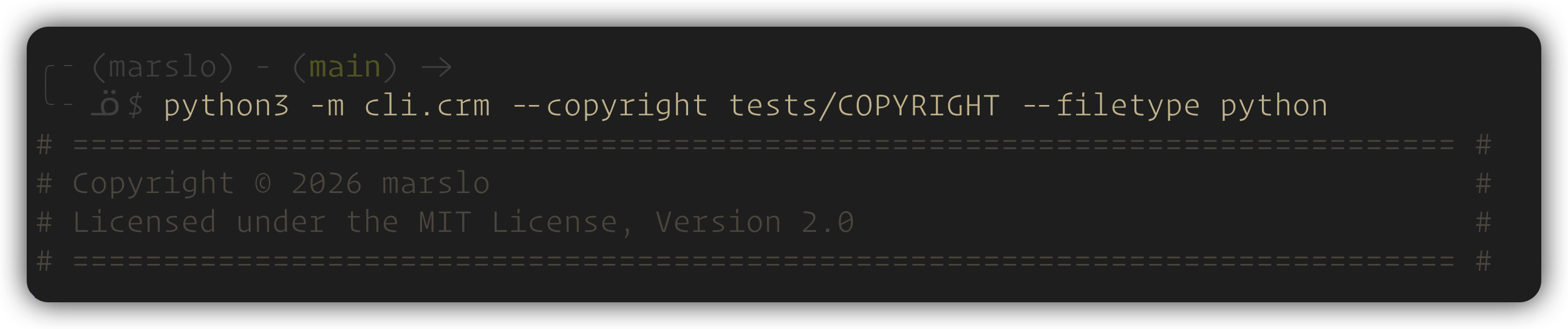
python, shell, bash, sh, dockerfile |
.py, .sh, .dockerfile |
# ============================================================================ #
# Copyright © 2026 marslo                                                      #
# Licensed under the MIT License, Version 2.0                                  #
# ============================================================================ #
| FILETYPE | SUFFIXES |
|---|---|
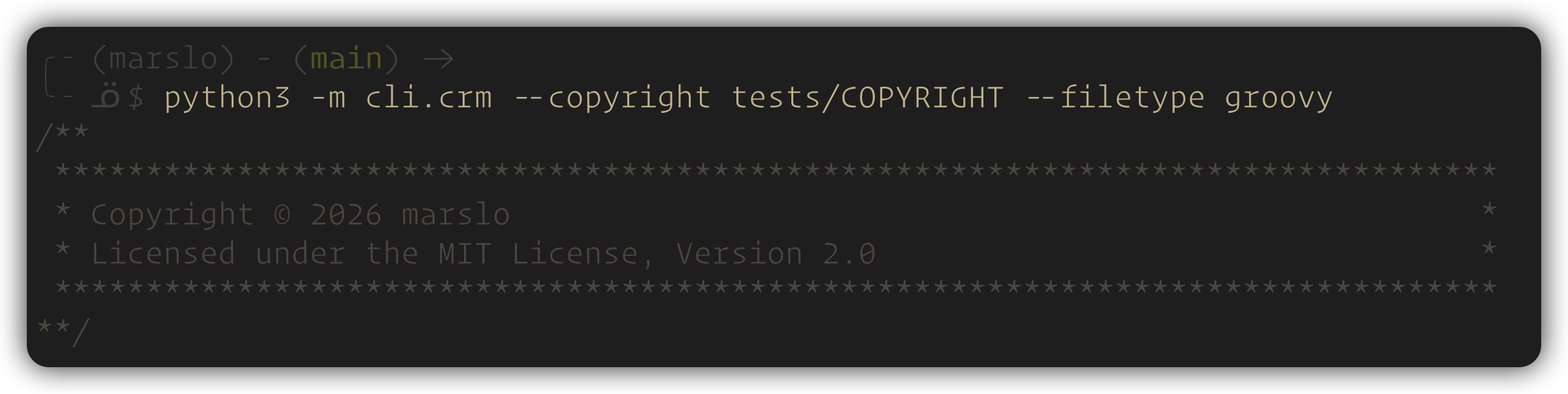
jenkinsfile, groovy, gradle, java |
.groovy, .java |
/**
 *******************************************************************************
 * Copyright © 2026 marslo                                                     *
 * Licensed under the MIT License, Version 2.0                                 *
 *******************************************************************************
**/
| FILETYPE | SUFFIXES |
|---|---|
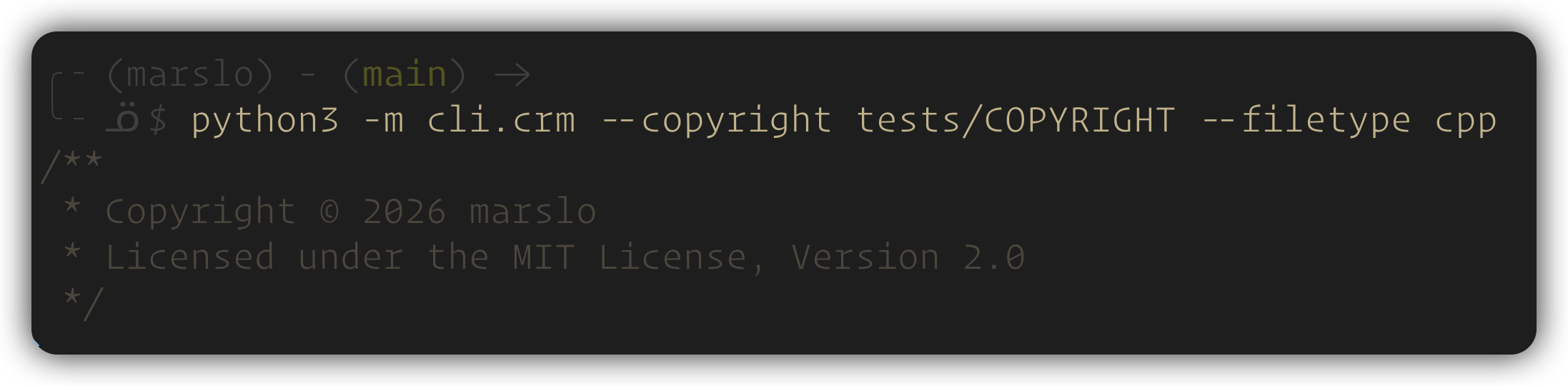
c, cpp, c++, cxx, h, hpp, hxx |
.c, .cpp, .cxx, .h, .hpp, .hxx |
/**
 * Copyright © 2026 marslo
 * Licensed under the MIT License, Version 2.0
 */
Install
binary
- pipx installation ( how to install pipx )
python3 -m pip install pipx python3 -m pipx ensurepath- enable the ansicolor in Windows terminal for better output experience.
reg add HKCU\Console /v VirtualTerminalLevel /t REG_DWORD /d 1
# via pipx
pipx install --force "git+https://github.com/marslo/cr-manager"
# via pip
python3 -m pip install cr-manager

# with binary
VERSION="$(curl -fsSL https://api.github.com/repos/marslo/cr-manager/releases/latest | jq -r .tag_name)"
# -- linux --
curl -fsSL -o cr-manager https://github.com/marslo/cr-manager/releases/download/${VERSION}/cr-manager-linux
# macos
curl -fsSL -o cr-manager https://github.com/marslo/cr-manager/releases/download/${VERSION}/cr-manager-macos
# Windows - running in cmd
> powershell -NoProfile -Command "$v=(Invoke-WebRequest -Uri 'https://api.github.com/repos/marslo/cr-manager/releases/latest' -UseBasicParsing | ConvertFrom-Json).tag_name; Invoke-WebRequest -Uri ('https://github.com/marslo/cr-manager/releases/download/'+$v+'/cr-manager.exe') -OutFile 'cr-manager.exe'; Write-Host ('Downloaded '+$v)"
bash completion
automatically detect the OS and install bash completion to the appropriate directory:
- macos:
$(brew --prefix)/etc/bash_completion.d→$XDG_DATA_HOME/.local/share→~/.bash_completion.d- linux:
$XDG_DATA_HOME/.local/share→~/.bash_completion.d→/usr/share/bash-completion/completions→/etc/bash_completion.d
# macos
cr-manager --install-completion
# or install manually
cr-manager --completion | tee "$(brew --prefix)/etc/bash_completion.d/cr-manager"
# linux user folder
cr-manager --install-completion
# or install manually
cr-manager --completion | tee ~/.bash_completion.d/cr-manager

# linux system folder (requires sudo)
sudo cr-manager --install-completion
# or install manually
cr-manager --completion | sudo tee /etc/bash_completion.d/cr-manager
# uninstall
test -f ~/.bash_completion.d/cr-manager   && rm -rf ~/.bash_completion.d/cr-manager
test -f /etc/bash_completion.d/cr-manager && sudo rm -rf /etc/bash_completion.d/cr-manager
[[ 'Darwin' = "$(uname -s)" ]] && test -f "$(brew --prefix)/etc/bash_completion.d/cr-manager" && rm -rf "$(brew --prefix)/etc/bash_completion.d/cr-manager"
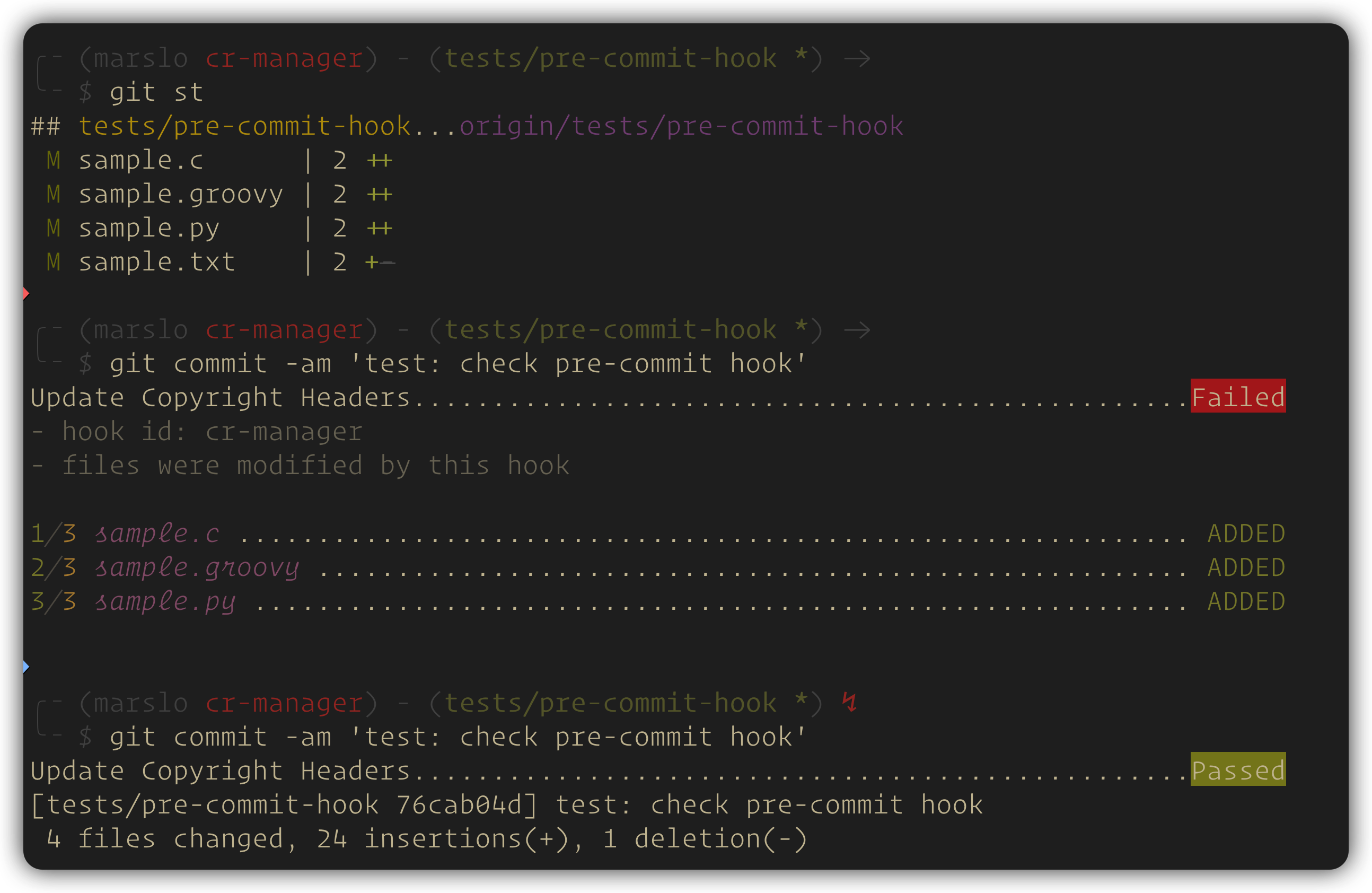
pre-commit hook
# if `COPYRIGHT` file can be found in the root directory of this repository
---
repos:
  - repo: https://github.com/marslo/cr-manager
    rev: v4.0.1
    hooks:
      - id: cr-manager
        args: ["--update"]
# install with git repo
---
repos:
  - repo: https://github.com/marslo/cr-manager
    rev: v4.0.1
    hooks:
      - id: cr-manager
        args: ["--update", "--copyright", "path/to/COPYRIGHT"]
        files: ^(jenkinsfile/|.*\.(groovy|py|sh)$)
# install with local repo + pypi package
---
repos:
  - repo: local
    hooks:
      - id: cr-manager
        name: cr-manager
        language: python
        additional_dependencies: ["cr-manager==4.0.1"]
        entry: cr-manager
        args: ["--update", "--copyright", "COPYRIGHT"]
        files: ^(jenkinsfile/|.*\.(groovy|py|sh)$)
        require_serial: true
IMPORTANT:
require_serial: trueis required for thelocalrepo recipe so pre-commit passes all matched files to a singlecr-managerinvocation. Without it, pre-commit splits the files across multiple concurrent processes and the progress counter restarts per batch (e.g.1/4 … 4/4twice instead of1/8 … 8/8). Therepo:-based recipes inherit this automatically from the hook definition.
# only check the copyright headers without modifying files after commit
---
repos:
  - repo: https://github.com/marslo/cr-manager
    rev: v4.0.1
    hooks:
      - id: cr-manager
        args: ["--check"]
        stages: [post-commit]
Help Message
cr-manager --help
USAGE:
  cr-manager [--add | --check | --delete | --update] [--copyright FILE] [--filetype TYPE] [--recursive]
             [--debug] [--verbose] [--completion] [--install-completion] [--help] [--version]
             FILES ...

A tool to automatically add, update, or delete multi-format copyright headers.

POSITIONAL ARGUMENTS:
  FILES ...                 List of target files or directories to process.

ACTION MODES:
  -a, --add                 Add mode: Adds copyright header to files that are missing it (default).
  -c, --check               Check mode: Verifies file copyright status (match, mismatch, or not found).
  -d, --delete              Delete mode: Removes detected copyright headers from files.
  -u, --update              Update mode: Forces replacement of copyright or adds it if missing.

OPTIONS:
  --copyright FILE          Specify the copyright template file path (default: COPYRIGHT).
  -t, --filetype TYPE       Force override a filetype instead of auto-detection.
                            If provided, displays a formatted preview for that type. Supported: bash, c,
                            c++, cpp, cxx, dockerfile, gradle, groovy, h, hpp, hxx, java, jenkinsfile,
                            python, sh, shell
  -r, --recursive           If FILES includes directories, process their contents recursively.
  --debug                   Debug mode: Preview the result of an action without modifying files.
  --verbose                 Show a detailed processing summary.
  --completion              Print the bash completion script to stdout.
  --install-completion      Install bash completion to the OS-appropriate directory (auto-detected, no
                            root needed by default).
  -h, --help                Show this help message and exit.
  -v, --version             Show program's version number and exit.
1 maintainer

Metadata
1 maintainer
Release files for cr-manager 4.0.1
For a detailed explanation of source distributions (sdists) and built distributions (wheels), please see the package formats documentation.
Source distribution (sdist)
| File | Size | Uploaded | |
|---|---|---|---|
| cr_manager-4.0.1.tar.gz | 25.4 kB | Details |
Built distribution (wheel)
| File | Interpreter | ABI | Platform | Reset |
|---|---|---|---|---|
| cr_manager-4.0.1-py3-none-any.whl | Python 3 | none | any | Details |
Total release size: 51.0 kB
Release files / cr_manager-4.0.1.tar.gz
| Download URL | cr_manager-4.0.1.tar.gz |
|---|---|
| Size | 25.4 kB |
| Tags | Source |
|
SHA-256 checksum How to use checksums |
ee8c7908df5ec3f461745676451a784b5375382f55069c5a2704e5e5bcd7a1e6
|
|
BLAKE2b-256 checksum How to use checksums |
3ae8d816db17cc83bfcb49ee3abcce9ce1ec96b0b5a67b4ef48b5502c3245c2e
|
| Upload date | |
|
Uploaded using Trusted Publishing? What is trusted publishing? |
No |
| Uploaded via |
poetry/2.4.1 CPython/3.14.6 Linux/6.17.0-1020-azure
|
Release files / cr_manager-4.0.1-py3-none-any.whl
| Download URL | cr_manager-4.0.1-py3-none-any.whl |
|---|---|
| Size | 25.6 kB |
| Tags | Python 3 |
|
SHA-256 checksum How to use checksums |
78e45b87aab4968de7441c00518b3b71a719c958084a088673367e929968ede1
|
|
BLAKE2b-256 checksum How to use checksums |
06bd7e4b34171647a86e7955bac87b58cabfa95f20522bf9f34933e43b68a0e5
|
| Upload date | |
|
Uploaded using Trusted Publishing? What is trusted publishing? |
No |
| Uploaded via |
poetry/2.4.1 CPython/3.14.6 Linux/6.17.0-1020-azure
|














