
Convert a dataset of individuals' names, photos, and custom attributes into a PDF of “intro cards” that describe each individual.

Project description





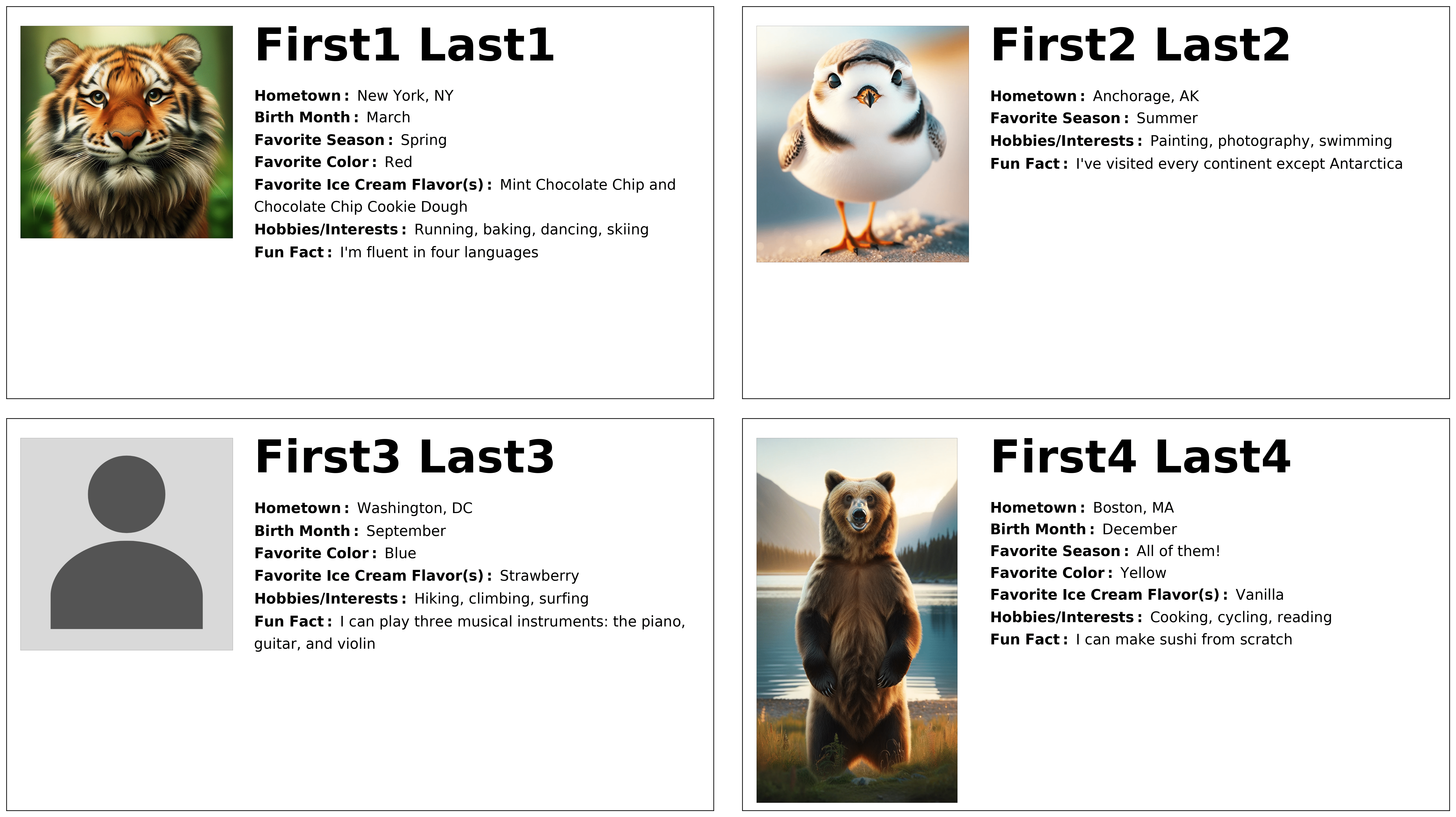
create-intro-cards is a Python package that converts a dataset of individuals' names, photos, and custom attributes into a PDF of “intro cards” that describe each individual—all with a single function call. Each intro card displays a person's name, a photo, and a series of attributes based on custom columns in the dataset.
The input is a Pandas DataFrame, where rows represent individuals and columns their attributes. Columns containing individuals' first names, last names, and paths to photos are required, but the content (and number) of other columns can be freely customized.
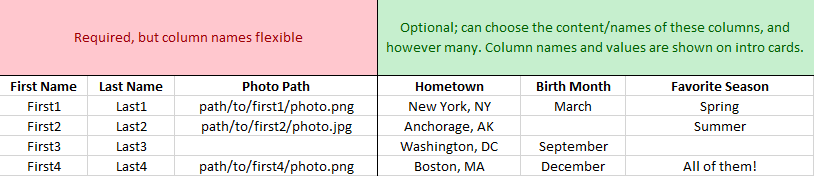
These custom columns are used to generate a series of "column name: attribute value" pairings (e.g., "Hometown: New York, NY") for each individual, which appear below their name on their intro card. If an individual doesn't have a value listed for any custom column, that column's "column name: attribute value" pairing is omitted from their card.
The generated PDF contains all individuals' intro cards, arranged four per page. It's a simple way to transform a dataset of individuals' attributes—collected from sources such as surveys—into a fun, easily shareable visual summary.
Dependencies
- NumPy
- Pandas
- Matplotlib
- Pillow
- ipykernel
For a full list of dependencies—both direct and transitive—please refer to the provided requirements.txt file. The requirements-dev.txt file provides additional dependencies for development—namely Ruff, docformatter, Sphinx, and pypdf.
Installation
With Python 3.11+ installed, run:
pip install create-intro-cards
Usage
The entry point of the package is the function make_pdf, which generates a PDF containing intro cards for all the individuals in the input Pandas DataFrame. The function is passed this DataFrame; the names of the columns in the DataFrame that house first names, last names, and paths to individuals' photos; a path to a default photo to use in the event an individual doesn't have a photo path listed; and a path to the directory in which to store the output.
from create_intro_cards import make_pdf
import pandas as pd

people_data = pd.read_csv("path/to/people/data.csv")

make_pdf(
    people_data,
    "First Name",
    "Last Name",
    "Photo Path",
    "path/to/default/photo.png",
    "path/to/output/dir"
)
The output directory will contain the PDF, PNG images of each page of the PDF, and a log file indicating the names and photo availability statuses of all individuals who had an intro card created. The entire process typically takes only a few minutes or less, depending on the number of individuals, number of custom attributes, photo sizes, and hardware.
make_pdf also provides a host of optional keyword arguments to tweak the default layout of the intro cards, from font sizes and text placement to photo boundaries and more.
make_pdf(
    people_data,
    "First Name",
    "Last Name",
    "Photo Path",
    "path/to/default/photo.png",
    "path/to/output/dir",
    figure_size=(20, 10),
    name_x_coord=0.40,
    desc_font_size=14,
    photo_axes_bounds=(0.01, 0.02, 0.2, 0.92)
)
To see how the different keyword arguments affect the appearance of the intro cards, a utility function called make_pdf_preview is provided. This function, which must be run in a Jupyter environment, displays a mock-up of the first page of the PDF that would otherwise be created if make_pdf were run with the same arguments (minus path_to_output_dir). Because it processes only a subset of the dataset, it runs significantly faster than make_pdf and is ideal for prototyping.
make_pdf_preview(
    people_data,
    "First Name",
    "Last Name",
    "Photo Path",
    "path/to/default/photo.png",
    figure_size=(20, 10),
    name_x_coord=0.40,
    desc_font_size=14,
    photo_axes_bounds=(0.01, 0.02, 0.2, 0.92)
)
Documentation
For full documentation, please see here.


Download files
Download the file for your platform. If you're not sure which to choose, learn more about installing packages.
Source Distribution
Built Distribution
Filter files by name, interpreter, ABI, and platform.
If you're not sure about the file name format, learn more about wheel file names.
Copy a direct link to the current filters
File details
Details for the file create_intro_cards-1.0.5.tar.gz.
File metadata
- Download URL: create_intro_cards-1.0.5.tar.gz
- Upload date:
- Size: 16.6 kB
- Tags: Source
- Uploaded using Trusted Publishing? No
- Uploaded via: twine/6.1.0 CPython/3.13.2
File hashes
| Algorithm | Hash digest | |
|---|---|---|
| SHA256 |
9fc5b37dfab01bb0885848855d3dd8843f135bbb3953a119d5506f26358a49cc
|
|
| MD5 |
4c4152605fe2913f202d894e02f9feaa
|
|
| BLAKE2b-256 |
abcba6b27a15aa0ade1645e59c395c9638b97af9fbe026c8e413cf928bb06c35
|
File details
Details for the file create_intro_cards-1.0.5-py3-none-any.whl.
File metadata
- Download URL: create_intro_cards-1.0.5-py3-none-any.whl
- Upload date:
- Size: 14.6 kB
- Tags: Python 3
- Uploaded using Trusted Publishing? No
- Uploaded via: twine/6.1.0 CPython/3.13.2
File hashes
| Algorithm | Hash digest | |
|---|---|---|
| SHA256 |
d79d7529cfcdc4892b91995cf32689a661cc3e1bec782222e5f56c2632d4d60e
|
|
| MD5 |
c07b5f9fcf008f530522c9025afa7834
|
|
| BLAKE2b-256 |
ad7ae4a08f42c06c6a3b7cebfce44ff9f616edbe9dfecb90f07ce6ddd1814613
|






