
A Markdown-native control plane for AI coding CLIs

Project description
Crewplane
A Markdown-native control plane for AI coding CLIs.






Why Crewplane?
You already have AI coding tools you love. But they can't talk to each other. Claude doesn't know what Codex just wrote. Gemini can't review Claude's output.
Crewplane connects them. Define tasks in a Markdown file, assign each to an AI provider, and Crewplane runs them — in parallel when possible, in sequence when needed. Each tool reads and writes to a shared folder, so downstream tasks can build on upstream results.
No SDKs. No plugins. No vendor lock-in. If your AI tool has a CLI, it works.
Every step is a Markdown file. Inputs, outputs, reviews — all saved to .crewplane/execution-stages/ as readable Markdown. Inspect any step in your editor, diff it in git, or debug with cat. Nothing is a black box.
| vs. Other Frameworks | Crewplane |
|---|---|
| Autonomous loops | Explicit DAG control — define exactly how agents work together, in sequence or in parallel |
| Hidden state | Externalized to markdown — fully auditable |
| Tight SDK coupling | CLI-first — zero provider lock-in |
| Black box debugging | Inspect .crewplane/execution-stages/ at any step |
| Adapter boilerplate | Works with any CLI that reads/writes files |
"Crewplane doesn't try to understand your AI tools. It just gives them a shared workspace and gets out of the way."
⚠️ Security Note:
{{file:path}}templates are restricted to the project root by default. Usesettings.integrations.artifacts.options.allowed_template_pathsfor explicit external-file allowlisting.
Installation
Recommended isolated install:
uv tool install crewplane
crewplane --help
Crewplane can also be installed with the following supported methods:
# pipx
pipx install crewplane

# pip
python -m pip install crewplane

# install script for macOS and Linux
curl -fsSL https://raw.githubusercontent.com/crewplaneai/crewplane/master/install.sh | sh

# Homebrew
brew tap crewplaneai/crewplane && brew install crewplane

# npm wrapper
npm install -g crewplane
For a local checkout:
git clone https://github.com/crewplaneai/crewplane.git
cd crewplane
python -m pip install .
⚠️ Note: Provider CLIs are installed and authenticated separately. Crewplane does not install provider CLIs, does not manage provider credentials, and does not sandbox provider CLI execution.
See the installation guide for update, uninstall, and npm PATH troubleshooting.
First Run
crewplane init
crewplane validate
crewplane run --no-live
crewplane init creates .crewplane/config.yml, a default workflow, and
additional example templates under .crewplane/workflows/example-templates/.
The default run uses deterministic mock output and does not require provider
CLIs, API keys, provider accounts, or config edits. It is scaffolding for
validating the workflow and artifact path, not model output.
Inspect the first run artifacts under .crewplane/execution-stages/ and
.crewplane/execution-results/, then follow
provider setup
when you are ready to run real provider CLIs.
Live Dashboard
For interactive runs, omit --no-live to open Crewplane's compact tmux
dashboard. If you already completed the same mock run, add --force to bypass
duplicate-skip:
crewplane run --force
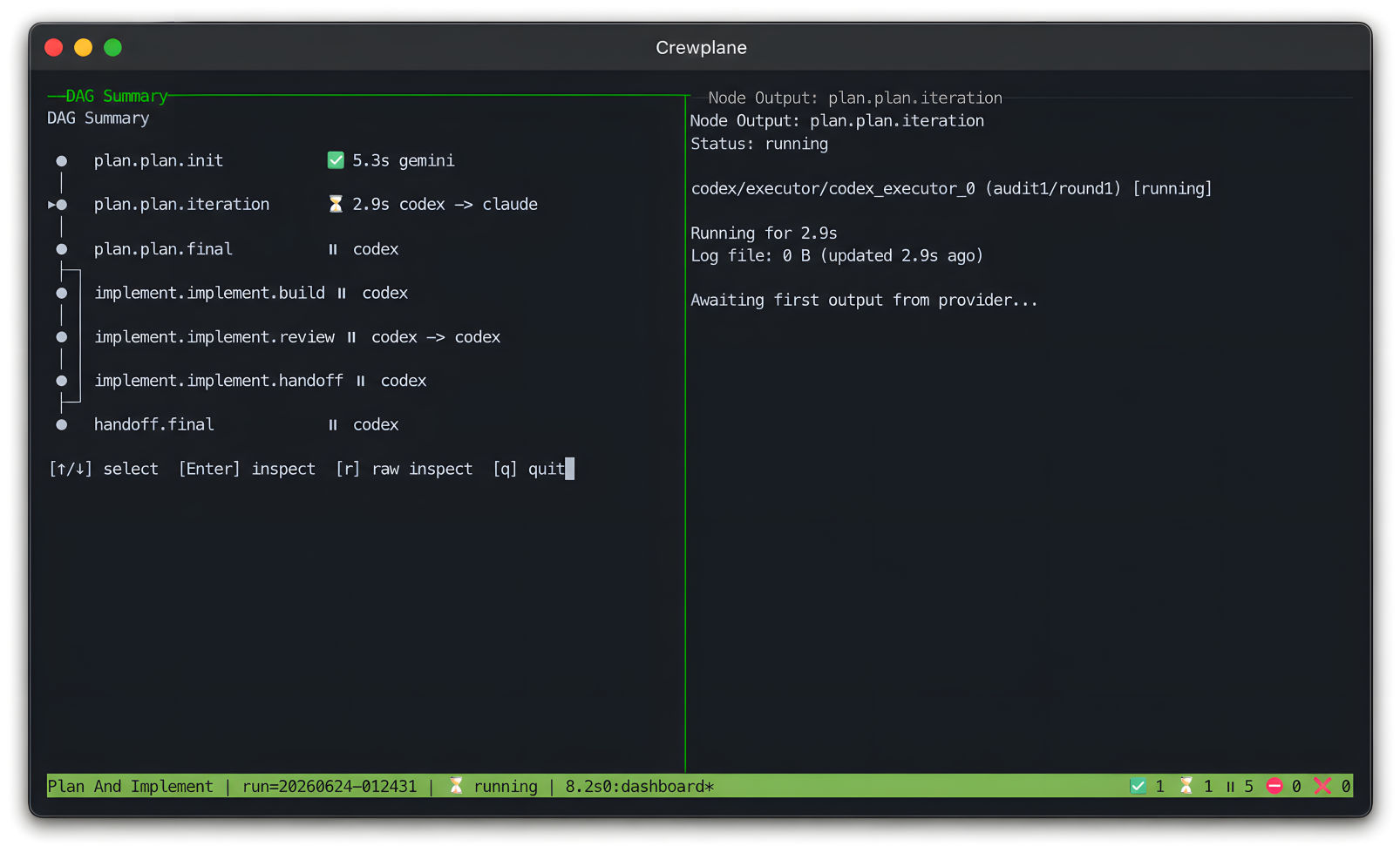
The dashboard shows the workflow DAG, node status, selected provider output,
and live log tails while the same durable artifacts are written under
.crewplane/. It starts only when tmux is available, output is attached to a
terminal, and provider log capture is enabled; otherwise Crewplane warns and
continues with normal execution. See the
observability guide
for dashboard options and log inspection.
Workflow Shape
---
schema_version: "<current>"
name: "Quick Review"
nodes:
  - id: review.project
    mode: parallel
    providers: ["mock"]
---

## review.project
Review the current repository and report the highest-risk issues.
Full workflow authoring docs are in the workflow syntax reference.
Safety Boundary
Crewplane coordinates provider CLIs; it is not a security sandbox. Provider CLIs run with the permissions, approval mode, network access, and filesystem access configured for those tools.
Experimental workspace isolation can move selected provider source-tree work into Git-backed worktrees or writable snapshots, but it is still source-tree isolation only. It does not sandbox provider execution.
{{file:path}} template references are bounded to the project root by default.
External files must be explicitly allowlisted with
settings.integrations.artifacts.options.allowed_template_paths.
Where Next
The default mock run gives you the same workflow machinery used for real provider runs, so you can inspect the shape of the system before connecting external CLIs:
- 🔄 DAG Execution – Run independent nodes in parallel and dependency nodes in sequence
- 🔍 Cross-Review – Agents review each other's outputs with structured verdict detection
- 📝 Task Files – Frontmatter+Markdown (
.task.md) workflows by default - 🔌 Pluggable Providers – Works with any CLI-based AI tool; no API keys or auth managed by Crewplane
- 📁 Project-Local Config – Each project gets its own
.crewplane/directory - 📂 Transparent Artifacts – Every intermediate step and final result saved to disk for full auditability
- 🖥️ Live Dashboard – Optional tmux UI shows DAG progress, node status, and selected provider logs
- 📊 Spend Observability – Run logs capture CLI capture status, provider token-report status, visible lower-bound estimates, and configured cost confidence summaries
- ⚡ Smart Caching – Workflow-signature idempotency skips identical successes and resumes failed or cancelled runs from validated node boundaries
- 🧪 Experimental Workspace Isolation – Opt-in Git-backed worktrees and writable snapshots can isolate provider source-tree edits in ordinary supported Git repositories
When you are ready to configure a project, start with the quickstart and then move into provider setup, examples, and reference material as needed:
- Documentation index
- Installation
- Quickstart
- Setup checklist
- Provider setup
- Examples
- Experimental workspace isolation
- Command reference
- Configuration reference
- Workflow syntax reference
- Artifact reference
- Security and trust
Contributing
If you're interested in contributing to Crewplane, please read our Contributing and local development before submitting a pull request.
Release history Release notifications | RSS feed


Download files
Download the file for your platform. If you're not sure which to choose, learn more about installing packages.
Source Distribution
Built Distribution
Filter files by name, interpreter, ABI, and platform.
If you're not sure about the file name format, learn more about wheel file names.
Copy a direct link to the current filters
File details
Details for the file crewplane-0.1.0a4.tar.gz.
File metadata
- Download URL: crewplane-0.1.0a4.tar.gz
- Upload date:
- Size: 377.8 kB
- Tags: Source
- Uploaded using Trusted Publishing? No
- Uploaded via: twine/6.2.0 CPython/3.14.3
File hashes
| Algorithm | Hash digest | |
|---|---|---|
| SHA256 |
d1939d71045bde3361089305f232bc03fe9179ed82a4c59bc06e74133848e6ce
|
|
| MD5 |
f550eafd7ce2ae88d47f39073b9d0076
|
|
| BLAKE2b-256 |
332f2b2221186300862ee0e0cb3eae1f89fe0e7f223e33b75ada5406ccc0d340
|
File details
Details for the file crewplane-0.1.0a4-py3-none-any.whl.
File metadata
- Download URL: crewplane-0.1.0a4-py3-none-any.whl
- Upload date:
- Size: 581.3 kB
- Tags: Python 3
- Uploaded using Trusted Publishing? No
- Uploaded via: twine/6.2.0 CPython/3.14.3
File hashes
| Algorithm | Hash digest | |
|---|---|---|
| SHA256 |
809d3a9fbe32453c526ad0139d1d38c706e50e9ec2bf20298424e1e0ffb4ac62
|
|
| MD5 |
2d755d54442785d27accb3e0b763c33d
|
|
| BLAKE2b-256 |
62c62fddb33aaaa38c47682b0b2033dfdb4a98c249efba1f7b6a27369b7c7cc1
|






