
A CLI-first control plane for resumable coding-agent workflows

Project description
Crewplane
A control plane for resumable coding-agent workflows.
Define workflows in Markdown, run each stage through Claude Code, Codex, Gemini, Copilot, or any CLI, and keep the run record on disk.





Why Crewplane?
You already have the pieces: repo instructions, skills, MCP servers, provider settings, internal conventions. The agents know how to work. What's missing is the control plane: when to work, in what order, and what to do when something breaks.
Define the DAG in Markdown, assign each stage to Claude Code, Codex, Gemini, Copilot, or any CLI. Crewplane runs exactly the plan you wrote, saves every stage to disk, and picks up where a failed run left off. No SDK, no framework lock-in, no autonomous loop deciding what happens next.
What changes when you add Crewplane
| Agent work today | With Crewplane |
|---|---|
| One long session | Markdown DAG with sequential and parallel stages |
| One provider at a time | Claude Code, Codex, Gemini, Copilot, or any CLI |
| Copy-pasted prompts | Rendered inputs saved under .crewplane/ |
| Terminal scrollback | Outputs, logs, manifests, and final results on disk |
| Start over after failure | Resume from validated stage boundaries |
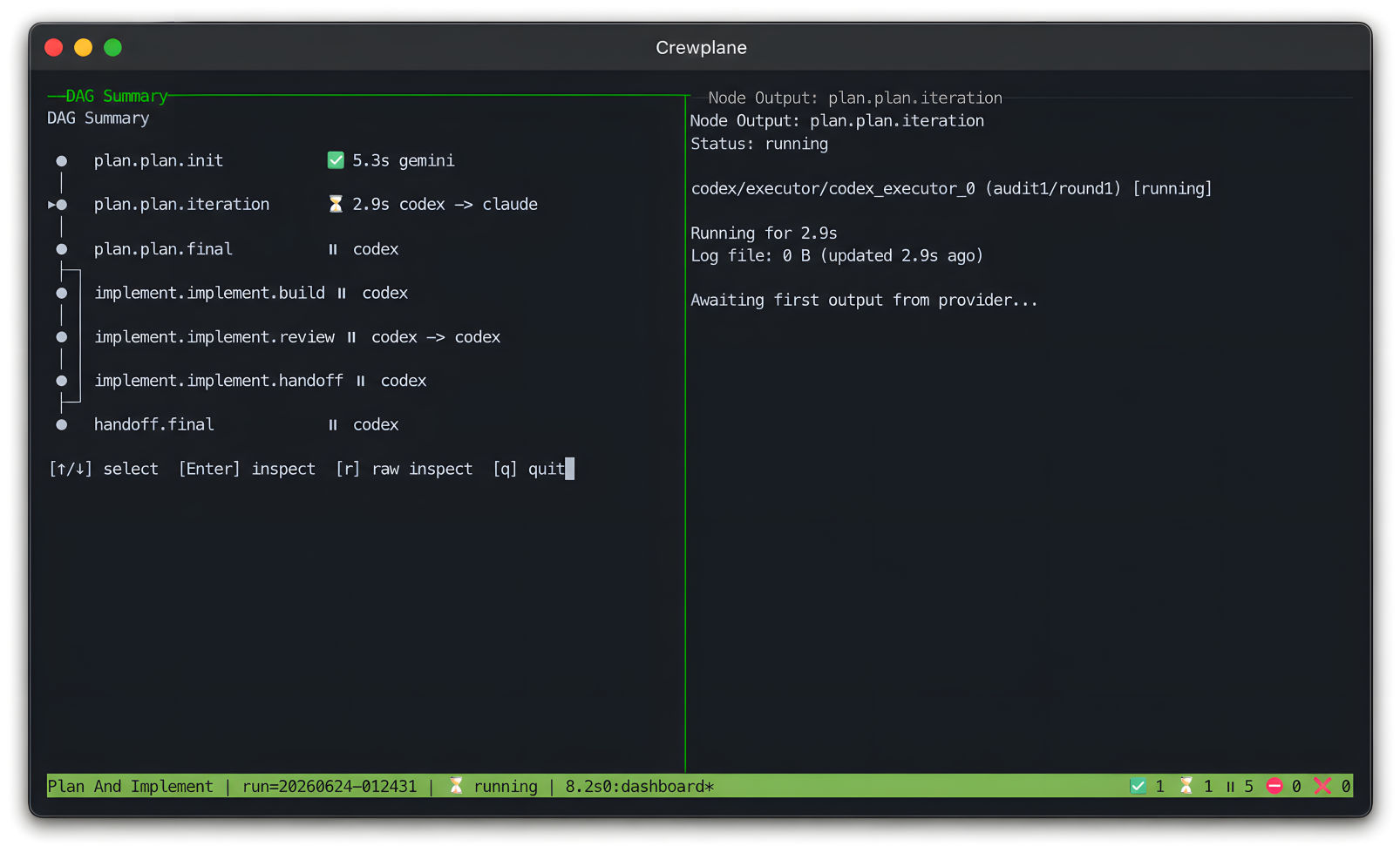
| Hard-to-follow progress | Optional tmux dashboard |
| Edits in the project root | Optional Git-backed worktrees and snapshots |
The result is a run record you can inspect, diff, archive, attach to a review, or delete like any other build output.
CLI-first by design. Crewplane invokes provider CLIs directly instead of wrapping them in a vendor SDK or agent framework. If a tool has a command line, Crewplane can run it.
Where it fits in your stack
┌─────────────────────────────────────────────────┐
│  Your repo: instructions, skills, MCP, config   │  ← agents read this
├─────────────────────────────────────────────────┤
│  Provider CLIs: Claude Code, Codex, Gemini, …   │  ← agents do the work
├─────────────────────────────────────────────────┤
│  Crewplane                                      │  ← sequences, resumes,
│    workflow DAG · stage artifacts · run record  │    records, coordinates
└─────────────────────────────────────────────────┘
When should you just use one agent CLI?
For a quick question, a one-off patch, or exploratory work that fits in a single session — use the provider directly. Crewplane is for the moment agent work becomes a process: multiple stages, provider handoffs, review loops, or runs that need to survive failure and remain auditable.
Installation
Run the following on Mac or Linux to install Crewplane:
uv tool install crewplane
Crewplane can also be installed via the following package managers:
# pip
python -m pip install crewplane

# npm
npm install -g crewplane
⚠️ Note: Crewplane does not install or manage provider CLIs or credentials. Install and authenticate Claude Code, Copilot CLI, etc. separately.
Other install methods (pipx, install script, local checkout) are documented in the installation guide.
First Run (No real agent invocations)
From a project directory:
crewplane init
crewplane validate
crewplane run
crewplane init creates .crewplane/config.yml, a default workflow, and
additional example templates under .crewplane/workflows/example-templates/.
crewplane run then runs the workflow with a deterministic mock provider.
The first run does not require provider CLIs, API keys, or config edits.
When output is attached to a terminal and tmux is available, Crewplane opens
the compact live dashboard for DAG progress, node status, provider output, and
live log tails. If tmux is missing, Crewplane warns and continues without the
dashboard.
Note: install
tmuxviabrew install tmuxon macOS orsudo apt install tmuxon Ubuntu/Debian.
Pass
--no-livewhen you want to omit the live dashboard.
Inspect the artifacts:
- Stage run files:
.crewplane/execution-stages/ - Final results:
.crewplane/execution-results/
After crewplane run, the key files under .crewplane/ look like:
.crewplane/
├── execution-results/                  # final outputs you care about
│   └── <run-key>/
│       ├── review.project-findings.md  # findings from the review node
│       └── review.project-result.md    # final result from the review node
├── execution-stages/                   # per-stage raw artifacts
│   └── <run-key>/
│       ├── preflight/                  # plan, dependency graph, render plans
│       ├── logs/                       # events.ndjson, summary
│       └── review.project/             # per-node rendered input, output, logs
├── workflows/                          # your workflow definitions, preloaded with example workflows
│   └── single-agent-review.task.md
└── config.yml                          # provider wiring and settings
These files are the same shape you will see with real providers: each step has rendered inputs, outputs, logs, manifests, and final results you can inspect or diff with normal tools.
Mock output is scaffolding for validating Crewplane behavior, not model output.
Note: Treat run artifacts like build outputs: useful for debugging and review, but decide separately what, if anything, belongs in version control.
Because the first run already wrote a successful result, a later identical run may print Identical context detected.
That means Crewplane found a previous successful run with the same inputs and reused the saved result instead of running the workflow again.
To start a fresh run, use:
crewplane run --force
Workflow Shape
Workflows are Markdown+frontmatter; for example:
---
schema_version: "1.0"
name: Single Agent Review
description: One deterministic mock review node for the first Crewplane run.
nodes:
  - id: review.project
    mode: parallel
    findings: true
    providers: ["mock"]
---

## review.project
Review the current repository and report the highest-risk issues.
Full workflow authoring docs are in the workflow syntax reference.
Prepare a Real Provider
After the provider-free first run succeeds, use onboarding to prepare one real provider handoff:
crewplane onboarding
Onboarding detects provider CLI names on PATH, lets you choose one provider,
updates unchanged generated defaults, and validates the resulting Crewplane
wiring. It does not start real provider CLIs, authenticate providers, or check
provider account/model readiness.
After onboarding, run the workflow when the selected provider CLI is installed, authenticated, and ready to execute:
crewplane run
If you edited generated files, want multiple providers, or need manual setup, use provider setup.
At this point you have seen the core path: install, run the generated mock workflow, inspect artifacts, and prepare a real provider when ready.
Where Next
The full documentation starts at Documentation.
Just getting started? → follow the First Project Path in the documentation index.
Guided end-to-end tour → check out Guided Tutorial Track.
- It walks through running workflows, inspecting run records, authoring workflows, provider roles, review loops, composition, validation, troubleshooting, and cleanup.
For exact flags, config keys, workflow syntax, and artifact formats, use the Reference section.
Contributing
Interested in contributing? Start with Contributing and local development.
Release history Release notifications | RSS feed


Download files
Download the file for your platform. If you're not sure which to choose, learn more about installing packages.
Source Distribution
Built Distribution
Filter files by name, interpreter, ABI, and platform.
If you're not sure about the file name format, learn more about wheel file names.
Copy a direct link to the current filters
File details
Details for the file crewplane-0.1.1.tar.gz.
File metadata
- Download URL: crewplane-0.1.1.tar.gz
- Upload date:
- Size: 389.6 kB
- Tags: Source
- Uploaded using Trusted Publishing? No
- Uploaded via: twine/6.2.0 CPython/3.13.2
File hashes
| Algorithm | Hash digest | |
|---|---|---|
| SHA256 |
2140b8adabf79c8d7f74f8affcfb2537801e2879046e9b7fab7b91280312eea1
|
|
| MD5 |
f73b92de3be5784348e3c8646fc304d2
|
|
| BLAKE2b-256 |
ad51f22755ba744ca8ac6cb6032ed519dd4b86dea6e7e7827ecc4c304aec27c2
|
File details
Details for the file crewplane-0.1.1-py3-none-any.whl.
File metadata
- Download URL: crewplane-0.1.1-py3-none-any.whl
- Upload date:
- Size: 600.1 kB
- Tags: Python 3
- Uploaded using Trusted Publishing? No
- Uploaded via: twine/6.2.0 CPython/3.13.2
File hashes
| Algorithm | Hash digest | |
|---|---|---|
| SHA256 |
be9127c5deb6b54a74662f3c1df319bcc55bbbb790366b7d024fd3d138e21ac2
|
|
| MD5 |
a52eb6a72f73bbea89964d30ff2ec4ee
|
|
| BLAKE2b-256 |
6f17a685f8893ef931982db4250939dae8eda37b3f85f4cac1056c7d377a9122
|






