
crypto-terminal
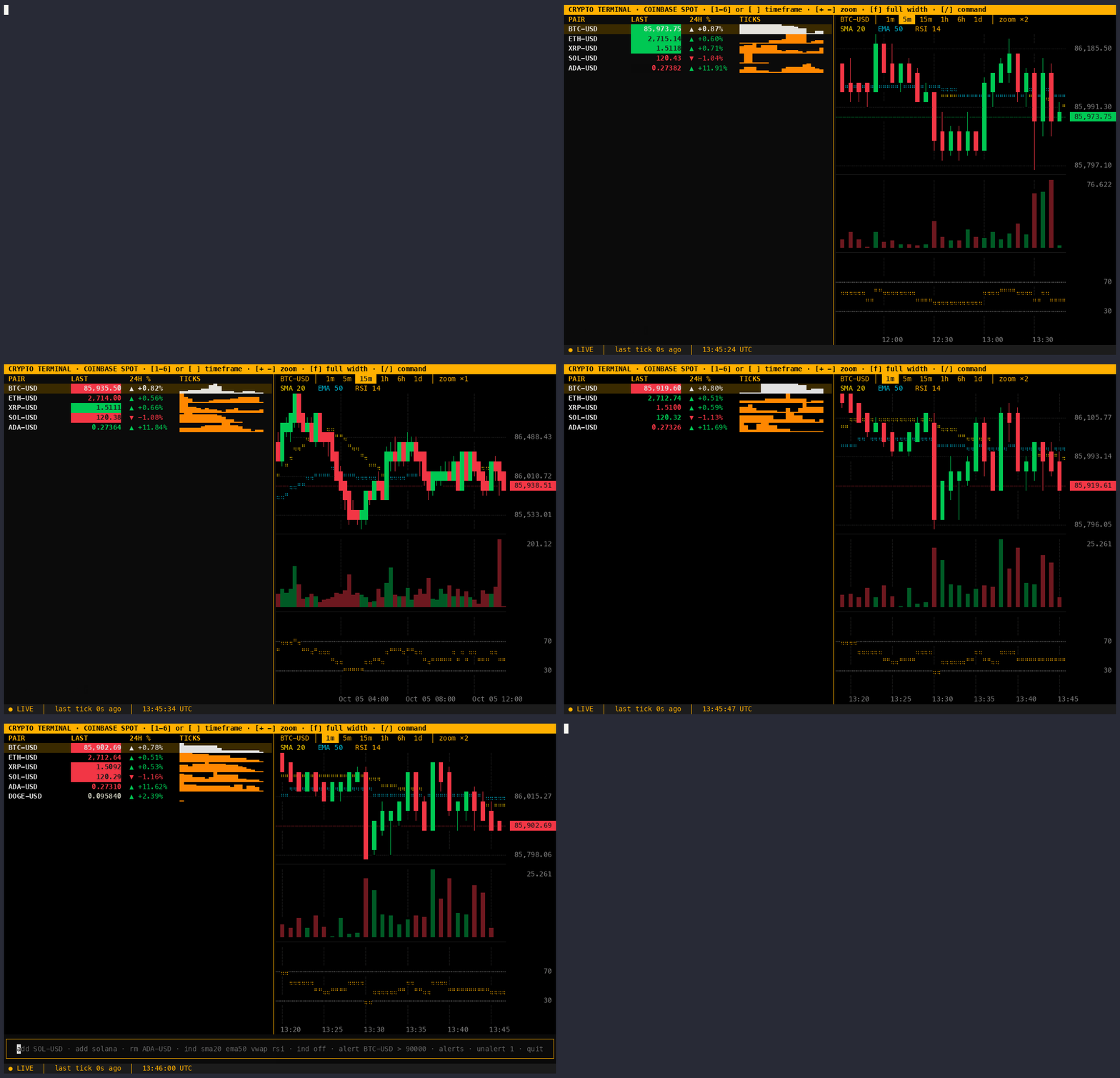
A free, Bloomberg-style crypto terminal that runs in your shell. Live spot prices stream straight from the Coinbase Exchange public websocket: no API key, no account, no polling. Candlestick charts with a live last bar, a live order book and trade tape, the same pair on Kraken, Binance, Bybit and OKX, perpetual futures context (funding, open interest, liquidations), indicators, search across every Coinbase pair, and alerts for fast moves, wide spreads, big orders, volume spikes, funding and liquidations that can run in the background and push to your phone.



Install
Requires Python 3.10+.
pipx install crypto-terminal
crypto-terminal
Or pip install crypto-terminal into any virtualenv.
Features
-
Live watchlist: last price, 24h change, and a sparkline of recent ticks. Prices flash green/red on every up/down tick.
-
Candlestick chart for the highlighted pair, with volume underneath. Six timeframes (1m to 1d candles) in a strip above the chart, three zoom levels, and
fto switch between split, chart-only and watchlist-only views. The last candle follows the live price and a new one opens at each candle boundary. Wick tips (highs and lows) are drawn to half a character row and bodies are solid whole rows, so candles never break in any terminal; the highest high and lowest low fill the panel exactly, and each axis label is the exact price of its grid line. Missing candles leave a gap rather than squashing time. A dashed line and tag mark the last price. -
Order book for the highlighted pair: the best bids and asks with size and a depth bar (cumulative size from the best price out), and the real spread in price and basis points. Prices are grouped so walls are visible: each pair opens at the step nearest 1 basis point of its price ($10 for BTC at ~$82k), and
gcycles coarser up to 0.5% of the price, then back to ungrouped. Grouped asks round up and bids round down, so a level never shows a better price than is really on offer. A size too small for the column reads<0.0001, never0. If the connection drops or goes quiet, the book is hidden (not shown stale) until a fresh snapshot arrives. -
Trade tape: every trade as it prints, green when the buyer crossed the spread, red when the seller did. A bar on top shows the share of the last minute's volume that was bought. Trades in the same second, side and price are combined into one line with a count (
×3); lines bigger than 98% of recent ones are highlighted. Trade ids are sequential, so a trade that never arrived shows as1 missedinstead of silently vanishing.bhides or shows the book and tape; on terminals narrower than 140 columns they start hidden. -
Other exchanges (
x): the highlighted pair's best bid and ask on Kraken, Binance, Bybit and OKX next to Coinbase, and how far each one's mid price sits from Coinbase's, in basis points. This is the view no exchange's own screen gives you: where the pair is cheaper or dearer right now, and whether Coinbase buyers are paying a premium. Binance, Bybit and OKX price USD pairs in USDT (marked ₮), a stablecoin that drifts a little above or below $1. Their prices are converted to USD at Coinbase's live USDT-USD price before comparing, and the rate is shown; compared directly, a 0.1% USDT drift would show as a 10 bp premium that isn't there. Until the rate arrives, those rows show prices but no comparison. A pair an exchange doesn't list saysnot listed. A dropped connection shows its status, never its last prices. Connections open only while the panel is showing, for the highlighted pair only. -
Perps (
d): what the futures market is doing to the highlighted pair, from Binance and Bybit's public USDT perpetual futures feeds. A perpetual future ("perp") is a futures contract with no expiry, and it is where most crypto leverage sits, so it often explains a spot move that a spot screen can't.- funding: every few hours, longs pay shorts (positive rate) or shorts pay longs (negative) to keep the perp's price near spot.
+0.0100%every 8h is the usual resting level; a rate well above that means a crowded long. The rate is the one that will be charged at the next funding time, as it stands now, and the panel shows that time and the interval (8h for most pairs, 4h or 1h for some), because a 4h rate is not comparable with an 8h one. - premium bp: the perp's mark price against the exchange's own spot index, in basis points. The perp is a separate market, so its price is never shown as if it were spot.
- OI and OI Δ15m: open interest, the contracts open in the base coin (each long/short pair counted once), and its change over the last 15 minutes. Rising with the price means new money coming in; falling means positions closing. Since June 2026 Bybit's
openInterestfield counts both sides, twice Binance's basis; the panel uses itssingleOpenInterestso the two columns compare. The change needs 15 minutes of samples (taken once a minute) before it shows. - liquidations: positions the exchange closed by force, newest first, in USDT, from when the panel opened (they're not backfilled). A closed long is a forced sell (red), a closed short a forced buy (green). Binance sends at most one per pair per second, so its tape is a lower bound; Bybit gives the position's bankruptcy price rather than the fill price, so its amounts are close but not exact.
BTC-USDmaps to theBTCUSDTperp; pairs quoted in EUR or BTC sayno USDT perp, and a coin with no perp saysnot listed(some small coins trade only as 1000-coin contracts, such as Binance's1000SHIBUSDT, which aren't matched). Like the other panels, a dropped connection shows its status, never its last numbers. - funding: every few hours, longs pay shorts (positive rate) or shorts pay longs (negative) to keep the perp's price near spot.
-
Indicators: SMA 20, EMA 50 and VWAP (resets at the UTC day) over the candles, RSI 14 in its own panel.
-
Coin search:
add solanalists every online Solana pair (USD, USDC, USDT, EUR, GBP and BTC quotes first). Exact pairs likeadd SOL-BTCadd directly. Sub-cent and BTC-quoted prices keep 5 significant figures. -
Alerts: on a price level or a percentage move (these fire once), or watch alerts that stay armed:
- fast move:
move 2% 15mfires when the price is 2% above the lowest or below the highest of the last 15 minutes. - wide spread:
spread 5bpfires when the gap between the best bid and ask passes 5 basis points of the price (liquidity drying up). - big order:
print 500kfires when one taker order is worth 500,000 or more in the quote currency. Its fills are added up, so a sweep through many price levels counts as the one order it was, and fires once. - volume spike:
volume 3xfires when the last minute traded 3x the average minute of the 15 before. It needs 16 minutes of unbroken trades first; if a trade is missed (trade ids are sequential), it starts counting again rather than compare against a baseline that's too low. - funding:
funding 0.05%fires when the perp funding rate on Binance or Bybit reaches +0.05% or −0.05%, and says which exchange. - liquidation:
liq 1mfires when one liquidation on Binance or Bybit is worth 1,000,000 USDT or more. Each is checked on its own, never added up.
Watch alerts fire when their condition becomes true (not on every tick while it stays true), at most once a minute each; anything held back is counted in the next message. An alert rings the terminal bell, shows a toast, sends a desktop notification (macOS, or Linux with
notify-send) and, if set up, a push to your phone. Pairs with an alert carry a 🔔. - fast move:
-
Status line: connection state, time since the last tick, UTC clock. Shows
STALEafter 10s without data and reconnects automatically with exponential backoff.
Default pairs: BTC-USD, ETH-USD, XRP-USD, SOL-USD, ADA-USD.
How live is it?
Measured on the five default pairs over 60s:
| Quiet (Sunday) | Busy | |
|---|---|---|
| Price updates | ~5.5 / s | ~12 / s |
| Bandwidth | ~0.02 Mbps | ~0.04 Mbps |
The order book adds one connection for the highlighted pair only: a ~1.1 MB snapshot when you select BTC-USD, then ~18 updates/s at ~0.03 Mbps (measured over 60s on a Friday night). It opens 0.3s after the selection settles, so scrolling through the watchlist doesn't download a book for every pair, and it closes while the book is hidden.
Coinbase pushes an update on every trade (bursts are batched); nothing is polled. A heartbeat arrives every second, so a dead connection is spotted and replaced within seconds. The chart redraws at most four times a second.
Keys
| Key | Action |
|---|---|
↑ ↓ |
Select pair (chart follows) |
1 – 6 |
Candles: 1m, 5m, 15m, 1h, 6h, 1d |
[ ] |
Shorter / longer candles |
+ - |
Zoom: 4, 2 or 1 columns per candle |
f |
Cycle the view: split → chart only → watchlist only (the watchlist is only as wide as its columns; alone, its sparkline stretches to fill the width) |
b |
Hide / show the order book and trade tape (in watchlist-only view, adds it beside the watchlist) |
g |
Group book prices more coarsely (wraps back to ungrouped) |
x |
Show / hide the pair on other exchanges (above the book) |
d |
Show / hide perps: funding, premium, open interest, liquidations (above the book) |
/ or : |
Open command bar (esc closes it) |
ctrl+q |
Quit |
Commands
| Command | Effect |
|---|---|
add SOL-USD |
Add a pair |
add sol / add solana |
Search by symbol or name: pick with ↑ ↓, enter adds, esc cancels |
rm ADA-USD |
Remove a pair |
ind sma20 ema50 vwap rsi |
Toggle indicators (any subset) |
ind off |
Clear all indicators |
alert BTC-USD > 90000 |
Alert when the price reaches 90,000 or more (< for at or below) |
alert BTC-USD move 5% |
Alert on a ±5% move from the current price |
alert BTC-USD move 2% 15m |
Watch for a 2% move within any 15 minutes (1m to 4h) |
alert BTC-USD spread 5bp |
Watch for the spread passing 5 basis points |
alert BTC-USD print 500k |
Watch for one order worth 500,000 USD or more (k, m suffixes) |
alert BTC-USD volume 3x |
Watch for a minute with 3x the normal volume |
alert BTC-USD funding 0.05% |
Watch for perp funding at ±0.05% or beyond on Binance or Bybit |
alert BTC-USD liq 1m |
Watch for one liquidation worth 1,000,000 USDT or more (k, m suffixes) |
alerts |
List alerts with their numbers |
unalert 2 |
Remove alert 2 |
push mytopic |
Also send alerts to your phone through ntfy (push off stops, push shows the setting) |
quit |
Exit |
Price and one-shot move alerts fire once and are then removed; watch alerts (marked ↻ in alerts) stay until you remove them. The watchlist, indicators, alerts and push setting are saved in ~/.config/crypto-terminal/ (or $XDG_CONFIG_HOME/crypto-terminal/).
Alerts in the background
crypto-terminal watch
Checks your alerts with no screen: on a laptop left open, or a small server. It reads the same alerts as the terminal and picks up changes within seconds, so set alerts in the terminal and let watch look after them. While it runs, the terminal shows alerts checked by watch and leaves the checking to it, so nothing fires twice. It connects only for the pairs that have alerts (and streams trades only for big-order and volume alerts, and perps only for funding and liquidation alerts).
Each alert prints one line to stdout, so crypto-terminal watch >> ~/crypto-alerts.log keeps a history. Ctrl-C or kill stops it cleanly.
Push to your phone: install the free ntfy app, subscribe to a topic, then run push <topic> in the terminal (it sends a test). Anyone who knows a topic name on ntfy.sh can read it, so pick a long random one (push crypto-7f3k9q2m), or run your own server: push https://ntfy.example.com/alerts.
From source
git clone https://github.com/owen-alderson/crypto-terminal.git
cd crypto-terminal
python3 -m venv .venv
source .venv/bin/activate
pip install -r requirements.txt
python -m crypto_terminal
Architecture
crypto_terminal/
  feed.py        websocket client: subscribes to ticker + heartbeat, validates each message,
                 reconnects with exponential backoff (1s → 30s); 30s of silence = dead socket
  history.py     REST: candles, the product list for search, the live-candle update
  indicators.py  SMA, EMA, RSI, VWAP as pure functions
  alerts.py      alert rules, the watcher (windows, cooldowns, warm-up), desktop + ntfy notifications
  watch.py       `crypto-terminal watch`: alerts with no screen
  venues.py      Kraken, Binance, Bybit, OKX best bid/ask feeds; USDT → USD conversion
  derivs.py      Binance + Bybit perp feeds: funding, premium, open interest, liquidations
  chart.py       the chart as a pure function: candles in, text lines out; wick tips exact to half a row, solid whole-row bodies
  theme.py       the colour palette
  widgets.py     PriceTable (watchlist), ChartPane (draws chart.py's lines), PairPicker (search results)
  app.py         Textual app: layout, command parsing, saved config, status line
tests/           pytest: parsing, indicators against reference values, search, alerts, reconnect
                 against a local websocket server, headless UI tests with Textual's Pilot (no internet)
The feed, the chart fetch and the product list run as Textual async workers. Changing the watchlist restarts the feed worker, and a new chart request cancels the previous one so a slow response can't draw the wrong pair.
Tests
pytest
History
This repo started as a Streamlit + CoinGecko portfolio dashboard that polled every 60s. That version is preserved at the v1-streamlit tag (git checkout v1-streamlit).
License
MIT, see LICENSE. Provided as is, with no warranty: this is a market-data viewer, not financial advice.
1 maintainer

Metadata
1 maintainer
Release files for crypto-terminal 2.4.1
For a detailed explanation of source distributions (sdists) and built distributions (wheels), please see the package formats documentation.
Source distribution (sdist)
| File | Size | Uploaded | |
|---|---|---|---|
| crypto_terminal-2.4.1.tar.gz | 3.4 MB | Details |
Built distribution (wheel)
| File | Interpreter | ABI | Platform | Reset |
|---|---|---|---|---|
| crypto_terminal-2.4.1-py3-none-any.whl | Python 3 | none | any | Details |
Total release size: 3.5 MB
Release files / crypto_terminal-2.4.1.tar.gz
| Download URL | crypto_terminal-2.4.1.tar.gz |
|---|---|
| Size | 3.4 MB |
| Tags | Source |
|
SHA-256 checksum How to use checksums |
e3f2425f854c8ae9eec5167cb5fbb2c6060eab88a036f94d8078b2d6f1ab5cff
|
|
BLAKE2b-256 checksum How to use checksums |
1a023787ceebd261676fde00aa2e69f2ef2fd516dbc5545107e6f45a49617b9b
|
| Upload date | |
|
Uploaded using Trusted Publishing? What is trusted publishing? |
Yes |
| Uploaded via |
twine/7.0.0 CPython/3.13.14
|
Provenance
Provenance describes where a file came from. On PyPI, provenance is shared via attestations, which provide a verifiable record of the build or publishing details. View details, limitations and caveats.


PyPI Publish Attestation
PyPI verified that this artifact, at this checksum, originated from the publisher listed below.
Signed by GitHub Actions, verified by PyPI on Oct 15, 2026.
Transparency logRelease files / crypto_terminal-2.4.1-py3-none-any.whl
| Download URL | crypto_terminal-2.4.1-py3-none-any.whl |
|---|---|
| Size | 53.5 kB |
| Tags | Python 3 |
|
SHA-256 checksum How to use checksums |
a4d9ab9bfd2499398970894e47c264d876a600964b3e7f2a1b5ffdd2e18fe4dc
|
|
BLAKE2b-256 checksum How to use checksums |
ce766f0694082c2470dbfa439cece11b3bfc89468dacdeb55094dc3d9372ed46
|
| Upload date | |
|
Uploaded using Trusted Publishing? What is trusted publishing? |
Yes |
| Uploaded via |
twine/7.0.0 CPython/3.13.14
|
Provenance
Provenance describes where a file came from. On PyPI, provenance is shared via attestations, which provide a verifiable record of the build or publishing details. View details, limitations and caveats.
PyPI Publish Attestation
PyPI verified that this artifact, at this checksum, originated from the publisher listed below.
Signed by GitHub Actions, verified by PyPI on Oct 15, 2026.
Transparency log













