
ctf-flightdeck
A terminal harness for playing CTFs with AI agents, where you run the loop.
flightdeck pulls the board, runs your own no-model solvers first, starts agent lanes in parallel, and submits flags, while you watch every lane on one console and step in when one goes the wrong way: a hint, a redirect, a fork, a kill, or taking over its shell yourself.
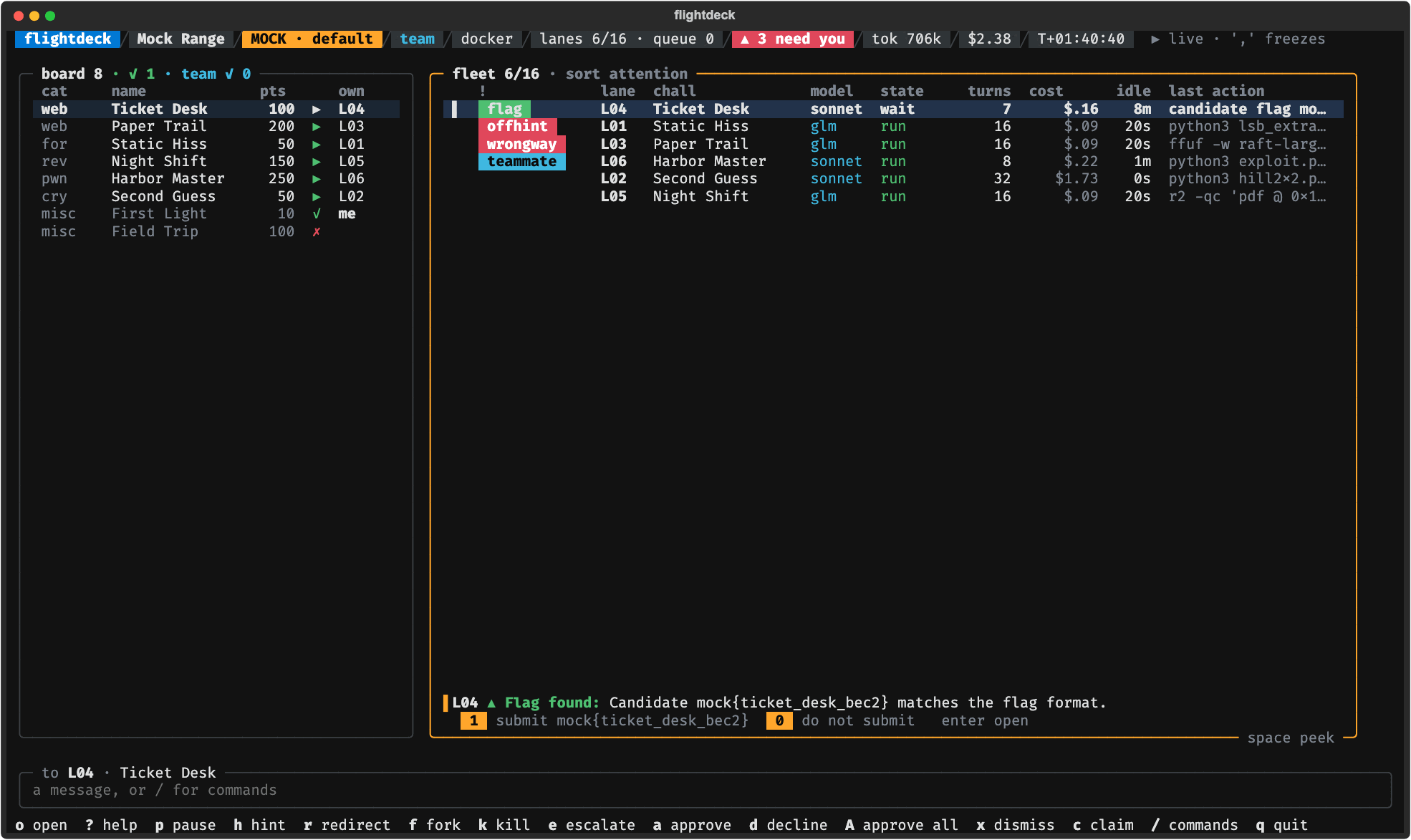
The fleet view, from flightdeck mock: scripted lanes on invented challenges. More in the
screenshot gallery.
Bring what you have: an API key (Anthropic, OpenRouter, OpenAI or a local model server), a coding-agent CLI (Claude Code, Codex), a folder of solver scripts.
Status: v0.2.0 (alpha). The console, agent lanes, your L1 solvers, CTFd events, team mode, alerts, practice scoring, post-flight reports and a light model per small job are built. Next: Autopilot, which runs an event end to end while you are away. See the roadmap and the changelog.
Try it with no setup
uvx ctf-flightdeck mock # nothing installed, nothing spent: the console on scripted data
Once flightdeck is installed, the same console is flightdeck mock:
flightdeck mock                      # the default scenario: every alert, then a 43-challenge wave
flightdeck mock --scenario wave      # also: sstv, overthinking, web, team, flag
flightdeck mock --screenshot DIR     # headless: SVGs of the key moments
The mock uses no model and no network. Every challenge, teammate and flag in it is invented.
space freezes its clock and . steps it; the other keys are the real console's
(The console).
Quickstart
Needs Python 3.12+ on macOS or Linux (Windows through WSL), and Docker for the safest setup.
pipx install ctf-flightdeck   # or: uv tool install ctf-flightdeck   (from a clone: uv tool install .)
flightdeck init               # a few questions (provider, models, Docker or host); writes your config
# put your key in ~/.config/ctf-flightdeck/keys.env (chmod 600): init names the variable
flightdeck image build        # once, for Docker lanes: pulls Debian and common tools (about 700 MB)
flightdeck doctor             # checks your setup and says how to fix each problem
flightdeck practice           # 14 small practice challenges: spends tokens on your model API
practice and play spend money on your model API. Each lane waits for your approval at 400,000
tokens or $2 (token_cap and dollar_cap under [lanes] in your config, with an alert at 80%),
four lanes run at a time by default, and nothing caps a whole run. With
init --provider anthropic every lane starts on Claude Haiku 5.5 ($0.10 / $0.50 per million input
/ output tokens). It moves up to Sonnet or Opus 5.5, at 20 to 40 times that, only when you
escalate it. A model on your own machine costs nothing (init writes no dollar cap for Ollama or
an MLX server), and flightdeck mock spends nothing.
flightdeck on its own says what to do next on your machine. flightdeck doctor checks Python,
the config, the key variables, a local model server and its models, the light model, Docker, the
lane image and your terminal's size. Before the console opens, play and practice ask the model
API whether it takes your key and serves every model in your ladder, and stop with what to fix if
not. ctfdeck and ctf-flightdeck are other names for the flightdeck command.
Docker or host
init asks where lanes run. A lane is one agent working one challenge, with a shell of its
own, and the question is where that shell is.
Docker is the default (runtime = "docker" under [lanes]). Each lane runs in its own
container of the lane image, with only that lane's copy of the challenge in it, and your L1
solvers run in containers too. flightdeck image build builds the image once, and
flightdeck image dockerfile prints what it builds. A lane of flightdeck's own loop gets no
network unless its challenge has a live instance it may reach: a web origin, or a TCP service like
nc host port (tcp://host:port in the challenge's urls). Under an event whose instance policy
is confirm, the lane asks you first. It then gets Docker's bridge network, which reaches any
host, not only the instance: there is no per-host allowlist yet. A coding-agent lane (--agent)
is always on that network, for its CLI's API.
--host (or runtime = "host") runs lane commands as you, on this machine. A lane can read
your files, your keys file and flightdeck's own environment, and send what it reads to its model's
API, which nothing can take back. flightdeck says so before every host run. A lane's commands get
an environment built from an allowlist, with no keys in it, and the run log, the console,
transcripts, reports and writeup drafts show a key's name but not its value. That is cleanup, not
a fence: use Docker, a disposable VM, or a separate key with a low limit.
A coding-agent CLI holds its own credential, and the commands it runs can read it, in Docker too: give it a key you can revoke, with a low spending limit. Practise in Docker: on the host, a lane can read the practice set's reference solutions in a clone of this repository.
Words used here
- Board: a folder of challenge folders, each with a
challenge.jsonand its handout files (Boards). With CTFd, flightdeck pulls one into a folder. - Lane: one agent working one challenge: a model conversation with its own shell, in a
container (or on this machine with
--host).max_lanesrun at once (4 by default); the rest queue. - Ladder: your models, weakest first (
[models] ladder). Lanes start on the first. Escalate (e) restarts a lane on the next one, with a summary of what it did. - Fork (
f): a second lane on the same challenge. Take over (t): the lane's shell is yours; exit it to hand the lane back. - Caps: per lane,
token_capanddollar_capunder[lanes]. An alert comes at 80%, and at 100% the lane waits for you. - L1: your own no-model solvers, which run before a lane's first model call. They come as a pack of engines, each with a manifest saying which challenges it fits (Solvers).
- Light model: an optional small model for small jobs (by default, the hint judge). Off by default.
- Lane image: the Docker image lanes run in,
ctf-flightdeck-lane:1.flightdeck image buildbuilds it once. - Event profile (
event.toml): what an event's rules allow, and a policy for each stage:auto,confirm,manualoroff. - Run folder: where a run's event log, transcripts and reports go
(
~/.local/share/ctf-flightdeck/runs/).
Models and keys
Your config names the environment variable that holds each key, never the key; flightdeck reads
it from your environment, else from the keys file, ~/.config/ctf-flightdeck/keys.env, which
must be readable by you only:
mkdir -p ~/.config/ctf-flightdeck && touch ~/.config/ctf-flightdeck/keys.env && chmod 600 ~/.config/ctf-flightdeck/keys.env
# then add one line per key, such as ANTHROPIC_API_KEY=... (and OPENROUTER_API_KEY=... on a line of its own)
With an Anthropic key, flightdeck init --provider anthropic writes Claude Haiku, Sonnet and
Opus 5.5 with their list prices, so the dollar caps work from the start. If OPENROUTER_API_KEY
is set too, it offers OpenRouter as the fallback for a lane whose calls to Anthropic keep
failing. OpenRouter, OpenAI, Ollama, an MLX server or any OpenAI-compatible API work as well.
For Ollama or an MLX server, init suggests a model, and for any server on your machine it lets
a lane wait up to 10 minutes for a reply of up to 8192 tokens, since a local model can take
minutes to answer. More on keys,
and the fallback, what happens when a model declines, fast mode, time and reply limits, and
prices: Model APIs.
Which models fit your machine? flightdeck models looks at it (chip, memory, NVIDIA GPUs, and
the model servers running on it; it contacts nothing but 127.0.0.1) and lists, for lanes and for
the light model, the models that fit and why: open-weight models on your machine first where
they run well, then model APIs. flightdeck models qwen3.5-9b prints how to get one and the
config lines that use it. For another machine, describe it: flightdeck models --memory 16 --apple (a 16 GB Apple Silicon Mac) or --memory 32 --gpu-memory 12 (a PC with a 12 GB NVIDIA
GPU). It recommends; it never changes your config. How the models did:
Models.
The light model
A few small jobs can use a small model, set in [light]. By default there is none, and
flightdeck's own rules do these jobs. The first job is the hint judge: when a lane seems to ignore
what its description hints at, the alert shows at once, and the light model checks the lane's
steps; if it says the lane is using the technique after all, the alert comes down. [light] jobs
can add three more: route (a challenge's category where the board names none, and the kind of
specialist it suits), recon (a first look at the handout for the lane's opening brief) and
flagcheck (a check of a flag before it goes out without you under auto submit; it can only hold
a flag for you, never submit one).
Recommended: an open-weight model on your own machine, served by Ollama or an MLX server. No provider's safety classifier stands between it and security work, and it costs nothing. Measure one before you switch it on:
flightdeck eval-local --engine openai --base-url http://127.0.0.1:11434/v1 --model <model>   # scores it beside the rules, job by job
flightdeck init --light ollama --light-model <model>   # a new config; for yours, edit [light] (`flightdeck models ID` prints the lines)
init --light ollama (or mlx) writes engine = "openai" with that server's address: both
serve the OpenAI-compatible API. A Claude model or a Strands Decider server can be the light model
too, and one job can have an engine of its own; flightdeck config --example shows every setting.
eval-local says first how many calls it will make to a paid API.
The light model never holds anything up. When it refuses, fails, times out or answers outside the options, the rules' answer stands, and the run says so once. A refused request is never sent on to another model or provider: you see the refusal and decide. Which models to try, and how each did at each job: Models.
The console
The console raises an alert when a lane spends big on a low-value challenge, ignores what the description hints at, heads the wrong way on web, loops or stalls. Lanes that need you sort first, and the line under the list says why and numbers the answers: one key answers.
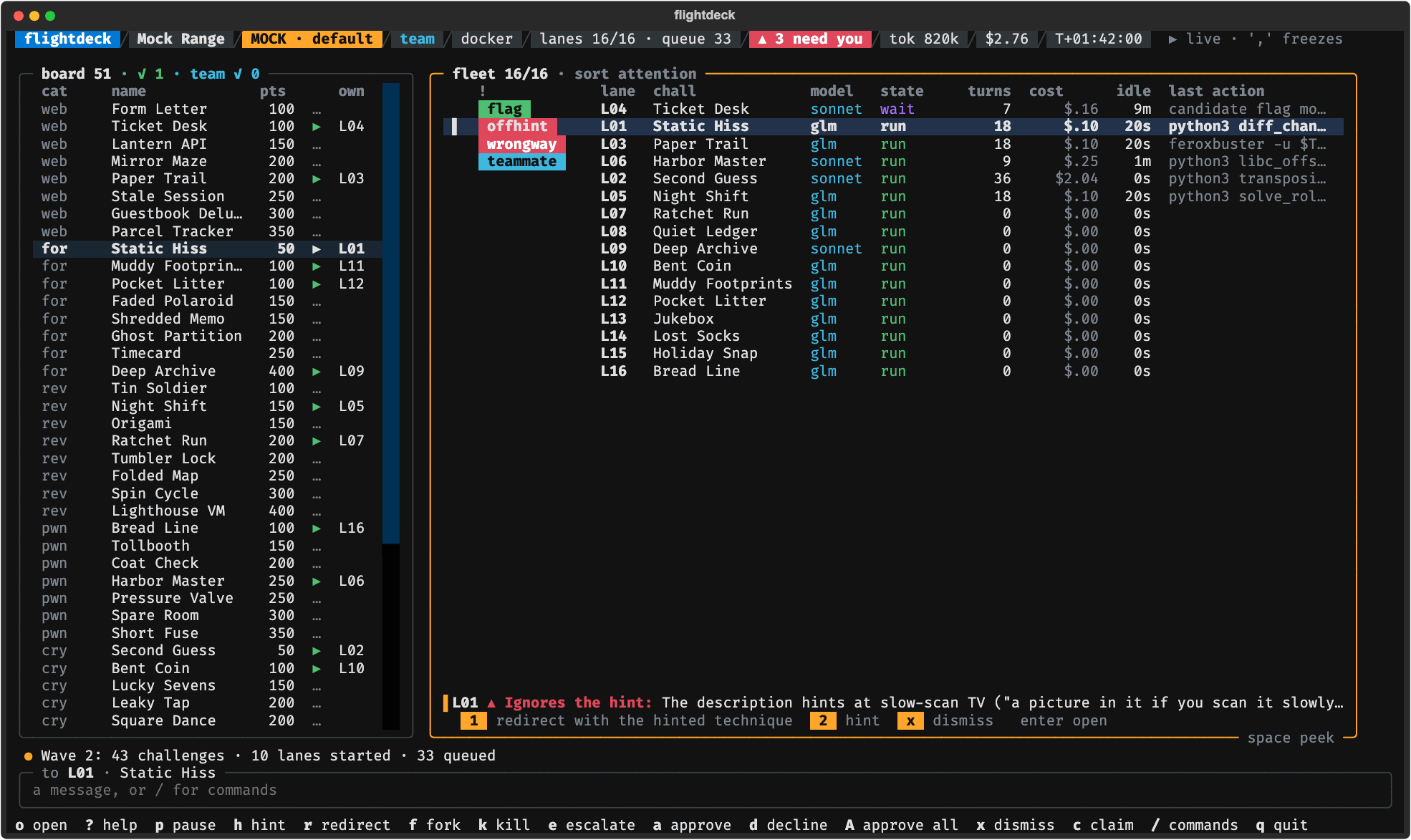
An alert with its quick answers, from flightdeck mock (invented challenges).
Enter opens a lane full screen: its transcript, the files it changed with diffs, and a chat
box (plain text is a message to the lane; /redirect, /approve, /diff and the rest are
commands; esc goes back).
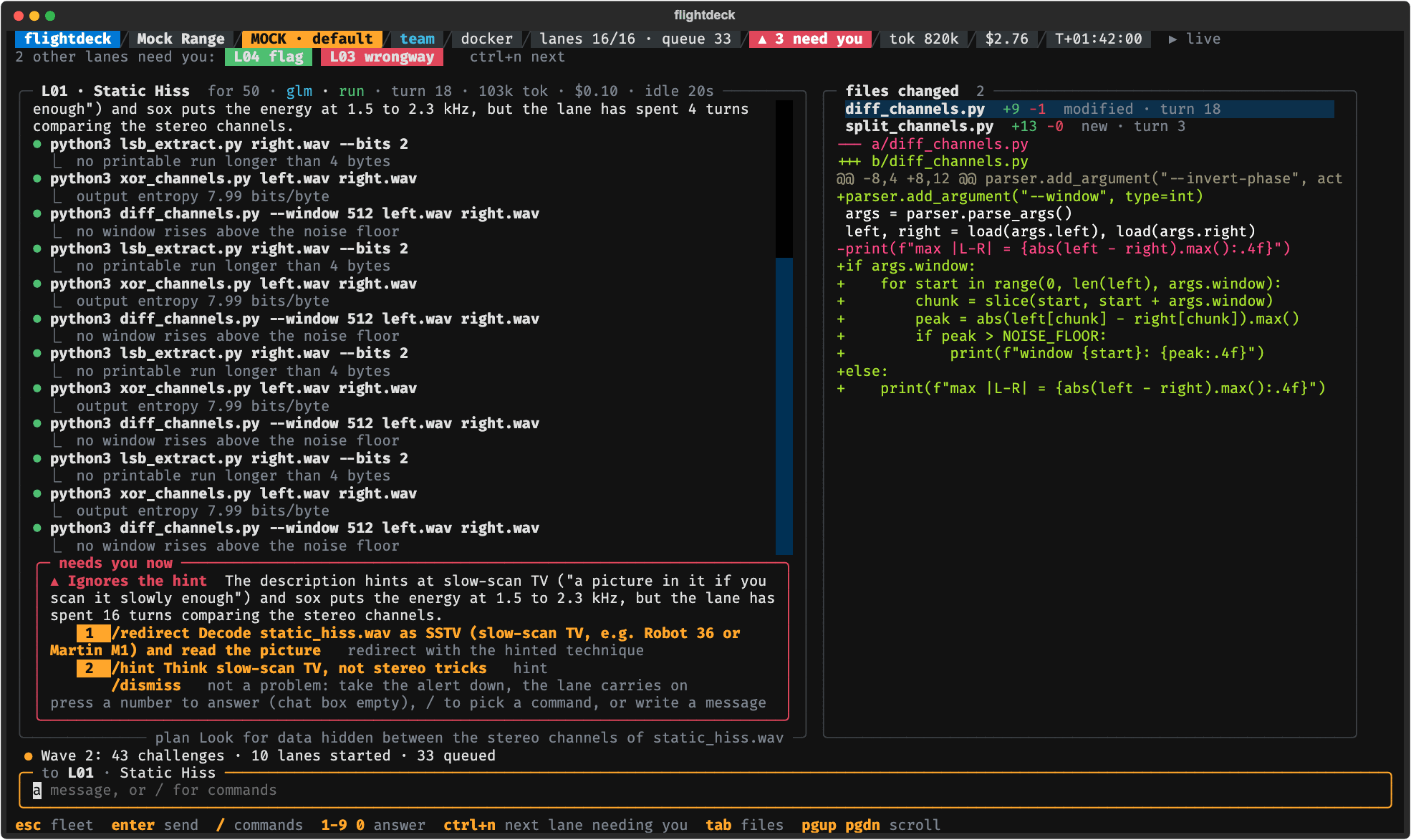
A lane full screen, from flightdeck mock (invented challenges).
t takes over a lane's shell (its container in Docker): exit it to hand the lane back, and the
lane hears what you changed. The shell starts clean: it reads no startup file, and with --host
its HOME is a new folder only you can read, outside the workspace, so nothing the lane wrote runs
before you type. e escalates a lane to the next model in your ladder with a summary of what it
did, and f forks it.
When a model API failure would hit every lane (a refused key, an unknown model, no credits), the
queue is held and the header says why. Once you have fixed it, /unhold starts the queued lanes
(a key or model id changed in your config needs a new run).
q asks first while lanes are open, and a run cannot be resumed.
The fleet's keys act on the selected lane: p pause, h hint, r redirect, f fork, k kill,
e escalate, t take over, a approve, d decline, 1-9/0 quick answers, c claim
(team), / commands, s sort, ? help (every key and command), q quit; Enter opens the
lane full screen. The whole design is in the
console spec.
Play a board
flightdeck play ~/ctf/some-board --max-lanes 4
A board is a folder of challenge folders, each with its handout files and a challenge.json
like this one from the practice set:
{"name": "Crab Walk", "category": "crypto", "points": 50, "solves": 312,
 "description": "…", "files": ["postcard.txt"], "id": "crab-walk"}
The whole format, with answers files and live instances, is in Boards.
Lanes start on the lowest-point challenges first (most solves first among equals); the rest
queue. Every lane is a model conversation, capped per lane by [lanes] token_cap and
dollar_cap (400,000 tokens and $2 by default; an alert at 80%, your approval at 100%).
A flag a lane finds waits for you: a or 1 submits it, d or 0 declines. On a folder board
flightdeck checks a flag against the board's answers.sha256.json when it has one. Without one
it cannot check: submit the flag on the platform yourself, then press a if it was accepted or
d if not. With --event, a sends it to CTFd (when the event's submit stage is manual or
off, you submit it and answer a or d).
Under auto submit (submit = "auto", or play --submit auto) a flag the model submits goes at
once, unless it is written in the challenge's own description or handout files (often a decoy):
that one still waits for you. A flag found wrong is never asked about again.
Some platforms limit the tries at a challenge's flag (CTFd's "max attempts"). Every flag for such
a challenge waits for your approval, under auto submit too, and the approval says how many tries
are left. To let auto submit spend those tries without you, the last one included, set
submit_limited = "auto" under [lanes]; a wrong flag can then use up the tries for your whole
team. flightdeck says so when a run starts.
Every run writes a run folder with an append-only events.jsonl and each lane's transcript; a
board with answers (like the practice set) ends with a scorecard. If flightdeck itself is killed
(kill -9, a power loss), what its lanes started can keep running: the next play or practice
removes it and says what it removed, flightdeck doctor lists it and flightdeck doctor --clean
removes it.
Your solvers first (L1)
Point flightdeck at a folder of your no-model solvers and each of flightdeck's own lanes runs the ones that fit its challenge before its first model call, so a solve can cost no tokens at all.
flightdeck l1 import ~/ctf/solvers        # manifests for a folder of plain scripts (the scripts are never changed)
flightdeck l1 list ~/ctf/solvers          # every engine in the pack, with its routes
flightdeck l1 route ~/ctf/solvers ~/ctf/some-board/crab-walk   # which engines a challenge reaches, and why (or why not)
flightdeck l1 run ~/ctf/solvers ~/ctf/some-board/crab-walk     # run them now: on this machine, as you, with no container
flightdeck play ~/ctf/some-board --pack ~/ctf/solvers          # or set [l1] pack in your config
l1 import takes a .py file with an if __name__ == "__main__": block, or any executable
script with a #! line, and routes it by its folder's name (crypto/, forensics/) and the
words of its file name. To write a manifest yourself, or an engine that reports its evidence:
Solvers.
A flag an engine returns as its result waits for your approval, or under auto submit goes to the
platform at once; a flag that is only a match in what an engine printed (a plain script that
l1 import took in, say) always waits for you. When lanes run in Docker, so do your solvers: each
in a container of the lane image, your pack mounted read-only, with no network unless the
live-instance policy is auto and the challenge has an instance. With --host they run on this
machine, as you.
Events and teams
Write down what the event's rules allow, check it, and play by it:
flightdeck preflight --example > event.toml      # then edit it from the event's rules
flightdeck preflight event.toml                   # what flightdeck will do at each stage, and any problem
export CTFD_TOKEN=...                             # the variable event.toml names (never the token itself)
flightdeck play ~/ctf/event-board --event event.toml
flightdeck talks to CTFd. For any other platform, make a folder board (platform = "manual" in
event.toml) and submit flags by hand.
With a CTFd event, flightdeck pulls the board into that folder (and, with pull = "auto", adds
new waves as they appear), submits the flags you approve through CTFd and follows your team's
solves. A slow CTFd never holds up the console: lanes carry on while their flags are on their way
(the fleet shows sending). A challenge whose tries CTFd counts always waits for you, under
auto too, and each approval says how many tries are left. flightdeck ctfd pull URL FOLDER
pulls a CTFd board without playing it; it exits with status 1 when some challenges could not be
pulled.
Each stage (pull, L1, agents, submit, live instance) has a policy in the event profile: auto,
confirm (you say yes first; for agents and L1, starting play is that yes), manual or off,
never looser than the rules. With agents manual or off, play does not start. Under confirm
for live instances, a lane asks before it may reach its challenge's instance and has no network
until you allow it. The profile, key by key:
Boards.
Team mode shares claims, live-box holds and solves through a folder your teammates sync (a network
drive, Syncthing): flightdeck team init DIR once, then play --team-dir DIR. Your lanes never
work a challenge a teammate solved. --handle NAME sets your name in the team folder (by default,
your login name), and flightdeck team status DIR shows what the folder holds and which files
flightdeck ignores there.
Coding-agent lanes
--agent claude (or codex) runs lanes as that coding-agent CLI, on any board or event, behind
the same controls. Each uses its own models ([agents] in your config: claude defaults to
sonnet, then opus; codex needs a ladder) and its own credential, never your [api] key.
- claude takes
ANTHROPIC_API_KEY(the Anthropic API, billed per token) orCLAUDE_CODE_OAUTH_TOKEN(your Claude subscription;claude setup-tokenmakes one). - codex takes
CODEX_API_KEYor, on the host only, a savedcodex login.
Put the credential in your keys file or your environment; --agent-auth picks one when both are
set. In Docker the lane image needs the CLI, and the image flightdeck image build makes has
neither: build an image FROM ctf-flightdeck-lane:1 that installs it and set [lanes] image to
it, or play with --host. flightdeck doctor --agent claude checks the CLI, its credential and
the lane image.
A coding-agent lane is always on Docker's bridge network, for its CLI's API, so an event whose
instance policy is not auto refuses agent lanes. They do not run your L1 pack. A CLI says what a
turn cost only when the turn ends, so its lane's cost ends in … until then; codex reports no
cost at all, so give its models a [prices."<model>"] table for their lanes to show dollars.
After a run
flightdeck report RUN_DIR      # where lanes stalled, which interventions helped, cost per solve
flightdeck writeups RUN_DIR    # a writeup draft per solved challenge (--redact hides the flags)
flightdeck score RUN_DIR       # the run scored against the board's answers
flightdeck gaps RUN_DIR        # the challenges your L1 solvers did not solve, and why
flightdeck build gap CHALLENGE_DIR --pack ~/ctf/solvers   # a new engine stub with a test that must pass
flightdeck build check ~/ctf/solvers                       # run the pack's tests: which engines pass
When a run ends, play prints its run folder with the report, writeups and gaps commands for it
(and score, when the board has answers), ready to paste. writeups --polish MODEL has MODEL tidy
the prose through the API in your config: it spends tokens, and never sees the run's flags,
commands or outputs.
Transcripts, the run log, reports and writeup drafts replace the value of anything shaped like a
credential with [redacted], with or without --redact: an upper-case NAME=value naming a
key, token, secret, password, cookie or auth; Authorization, Proxy-Authorization and Cookie
headers; well-known key prefixes (the full rule is in the
architecture).
Anything else stays, lower-case names included (a password is everyday CTF content), so read a
draft before you share it.
Configuration and files
flightdeck init writes ~/.config/ctf-flightdeck/config.toml (or the file $FLIGHTDECK_CONFIG
names). flightdeck config checks it, and flightdeck config --example prints every key with
its default. Keys come from your environment, else from ~/.config/ctf-flightdeck/keys.env (or
the file $FLIGHTDECK_KEYS names). Each run writes a folder under
~/.local/share/ctf-flightdeck/runs/ ([run] dir, or --run-dir). flightdeck keeps notes of its
own in ~/.local/state/ctf-flightdeck/ (or under $XDG_STATE_HOME). l1 import writes manifests
into FOLDER/.flightdeck/generated/.
To remove flightdeck: pipx uninstall ctf-flightdeck (or uv tool uninstall ctf-flightdeck),
docker image rm ctf-flightdeck-lane:1, and delete those folders.
Optional extras
ctf-flightdeck[build]: pytest, forflightdeck build check.ctf-flightdeck[cactus]: Cactus Needle, a small on-device model that can be the light model (engine = "cactus"). flightdeck's own measurement found it unfit for the light jobs (Models), so measure it withflightdeck eval-local --engine cactusbefore you use it. Its telemetry is turned off, and nothing uses it unless you ask.
Docs
Using flightdeck: Model APIs · Models · Boards · Solvers · Practice set · Screenshots · Changelog · Security
How it is built: Vision · Architecture · Console spec · Decisions · Roadmap · Contributing
License
MIT. See LICENSE.
1 maintainer

Metadata
1 maintainer
Release files for ctf-flightdeck 0.2.0
For a detailed explanation of source distributions (sdists) and built distributions (wheels), please see the package formats documentation.
Source distribution (sdist)
| File | Size | Uploaded | Provenance | Actions |
|---|---|---|---|---|
| ctf_flightdeck-0.2.0.tar.gz | 735.1 kB | With provenance | Details for ctf_flightdeck-0.2.0.tar.gz |
Built distribution (wheel)
| File | Interpreter | ABI | Platform | Actions Reset |
|---|---|---|---|---|
| ctf_flightdeck-0.2.0-py3-none-any.whl | Python 3 | none | any | Details for ctf_flightdeck-0.2.0-py3-none-any.whl |
Total release size: 1.5 MB
Release files / ctf_flightdeck-0.2.0.tar.gz
| Download URL | ctf_flightdeck-0.2.0.tar.gz |
|---|---|
| Size | 735.1 kB |
| Tags | Source |
|
SHA-256 checksum How to use checksums |
39c0c463e7e710ffa9a71cdf22eabce92c4506c74bf3780d8ec3f4dff60c5f05
|
|
BLAKE2b-256 checksum How to use checksums |
254e4f67ebdea7aab29dd0de22b81640ba42d0f2d912daed63b1ef5d0dcf7325
|
| Upload date | |
|
Uploaded using Trusted Publishing? What is trusted publishing? |
Yes |
| Uploaded via |
twine/7.0.0 CPython/3.13.16
|
Provenance
Provenance describes where a file came from. On PyPI, provenance is shared via attestations, which provide a verifiable record of the build or publishing details. View details, limitations and caveats.


PyPI Publish Attestation
PyPI verified that this artifact, at this checksum, originated from the publisher listed below.
Signed by GitHub Actions, verified by PyPI on Nov 12, 2026.
Transparency logRelease files / ctf_flightdeck-0.2.0-py3-none-any.whl
| Download URL | ctf_flightdeck-0.2.0-py3-none-any.whl |
|---|---|
| Size | 787.3 kB |
| Tags | Python 3 |
|
SHA-256 checksum How to use checksums |
7fab09481a9b8571c71872f71b428de6197510b875c237e1a5108d9dbc54df1a
|
|
BLAKE2b-256 checksum How to use checksums |
af3be6ff4db2f163674a613c49fec7a9d3b8c3db98d6706dacb4050ed344fe3b
|
| Upload date | |
|
Uploaded using Trusted Publishing? What is trusted publishing? |
Yes |
| Uploaded via |
twine/7.0.0 CPython/3.13.16
|
Provenance
Provenance describes where a file came from. On PyPI, provenance is shared via attestations, which provide a verifiable record of the build or publishing details. View details, limitations and caveats.
PyPI Publish Attestation
PyPI verified that this artifact, at this checksum, originated from the publisher listed below.
Signed by GitHub Actions, verified by PyPI on Nov 12, 2026.
Transparency logSecurity for ctf-flightdeck 0.2.0
Provenance
Provenance describes where a file came from. On PyPI, provenance is shared via attestations, which provide a verifiable record of the build or publishing details. View details, limitations and caveats.
Full provenance
Both files in this release have been uploaded with provenance metadata.
Attestation for ctf_flightdeck-0.2.0.tar.gz
PyPI Publish Attestation
PyPI verified that this artifact, at this checksum, originated from the publisher listed below.
Signed by GitHub Actions, verified by PyPI on Nov 12, 2026.
Transparency logA note on package security
PyPI is a repository for distributing packages, not a service for auditing them. While third-party security researchers and our staff do their best to detect and remove malicious packages, PyPI cannot guarantee the quality, security or suitability of any given package.
To learn more about protecting yourself from malicious actors, visit our package security documentation.














