
ctf-flightdeck
Play CTFs with a fleet of AI agents, and stay the pilot.
One terminal console: every challenge, every agent, every flag. You step in with one key.





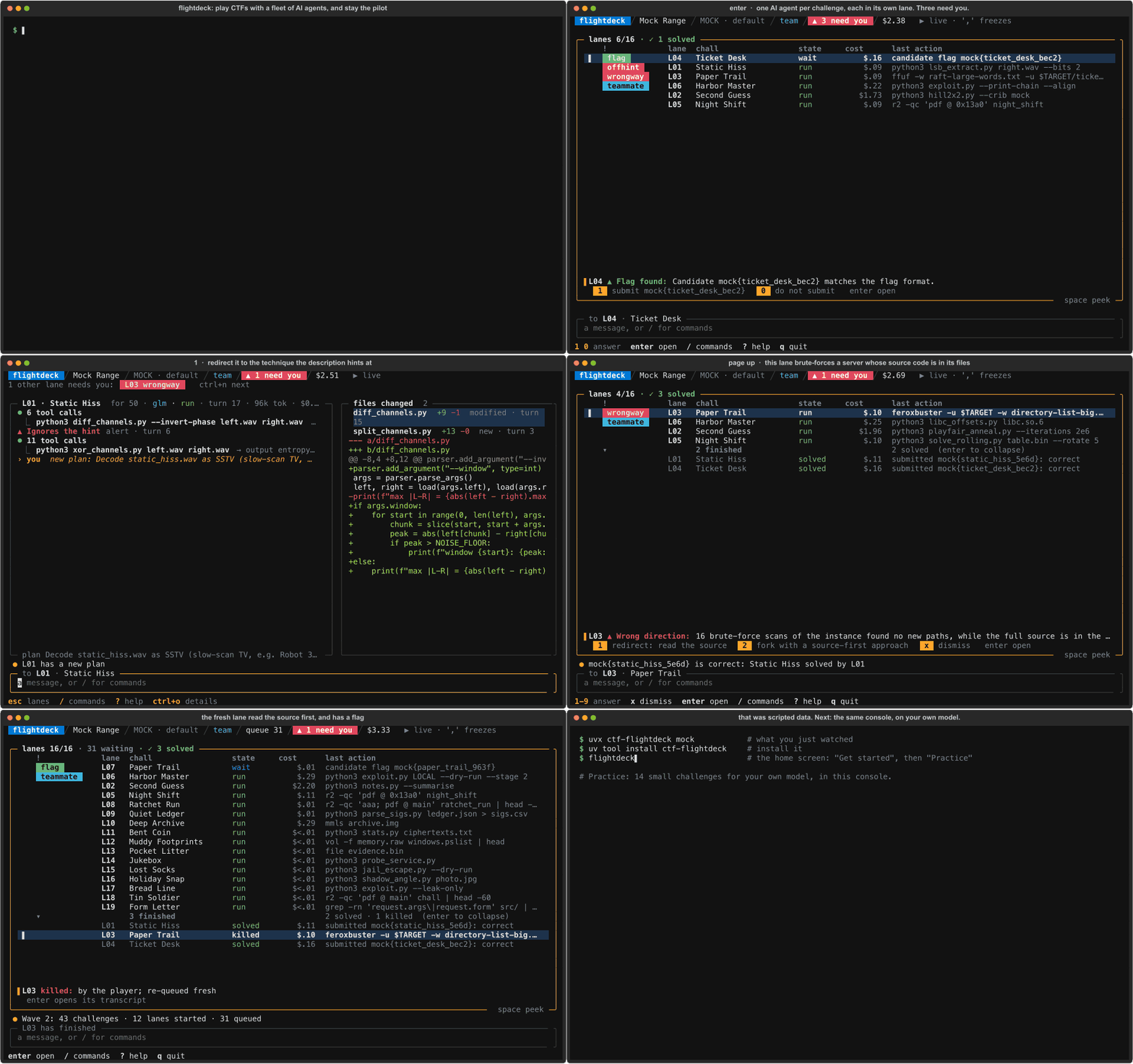
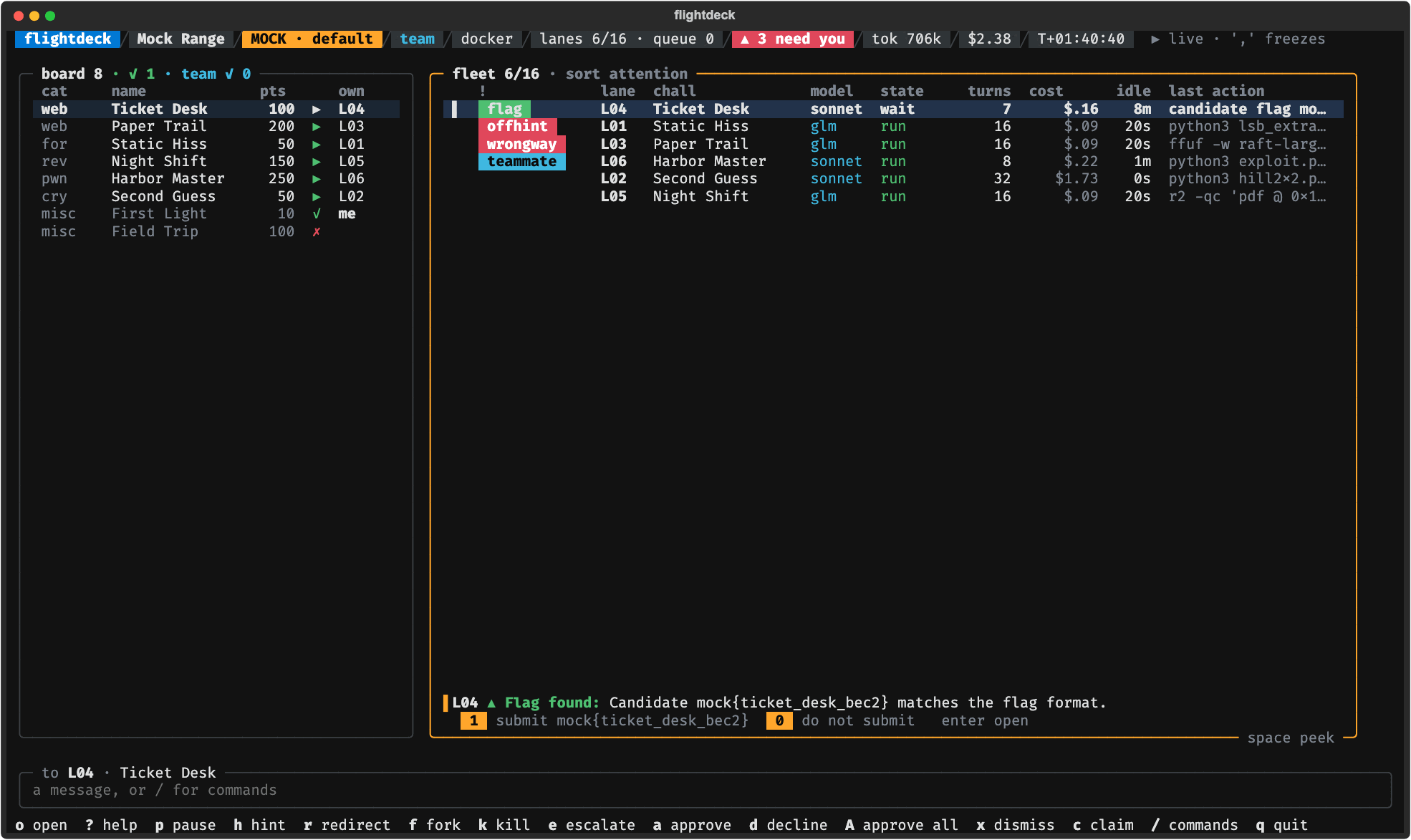
Try it in ten seconds
uvx ctf-flightdeck mock
That opens flightdeck's screen, the console, on scripted data: no install, no API key, no network,
nothing spent. uvx comes with uv, which
brings its own Python. (No uv? pipx run ctf-flightdeck mock does the same.)
What it is
flightdeck is a terminal program for playing capture-the-flag (CTF) events with AI agents. It pulls the board (the event's list of challenges), runs your own solver scripts first (the ones that need no model), starts an AI agent on each challenge in parallel, and submits the flags you approve. Each agent works in its own lane, and you watch them all on one screen. When a lane loops, stalls, overspends or ignores the hint in its challenge's description, the console tells you, and one key sends a hint, redirects it, starts a second lane beside it, kills it, moves it to a stronger model or hands you its shell.
- Bring what you have. An API key (Anthropic, OpenRouter, OpenAI), a free model on your own machine (Ollama, MLX), a coding-agent CLI (Claude Code, Codex), a folder of solver scripts.
- Built for CTFs. It knows points, solves, categories, 40 challenges released at once, teammates, the servers an event runs for a challenge (live instances), flag formats and counted tries. It plays events on CTFd (a common CTF platform) and plain folders of challenges.
- Plays by the event's rules. Every stage (pull, solvers, agents, submit, live instances) is
auto,confirm,manualoroff, checked before anything runs. - Safe by default. Each lane runs in its own Docker container with no network, or, when its challenge has a live instance, a network that reaches that instance and nothing else. Challenge text is treated as hostile data, never as instructions. Each lane has a cap on the model tokens and on the dollars it may spend.
- Hands-on or hands-off. Steer every lane yourself, or engage Autopilot: it runs the event by rule while you are away, inside a budget you set, never looser than the event's rules, and hands back when something needs a human. Runs can go headless, with a status file and a webhook that pings you.
- Learns from each run. A report of where lanes stalled and which interventions helped, writeup drafts, and the list of challenges your solvers missed.
Status: v0.5.0 (alpha) is the newest release. On GitHub this page follows the code, which can be ahead of that release: the changelog lists what is "Unreleased", and the roadmap what comes next.
Quickstart
You need uv on macOS or Linux (Windows through WSL), and something for the agents to think with: an API key for a model API (Anthropic, OpenRouter or OpenAI) with credit on it, or a model on your own machine (Ollama, MLX). Docker, running, is recommended: each agent then works in a container of its own.
uvx ctf-flightdeck mock          # the demo from above: the console, before you set anything up
uv tool install ctf-flightdeck   # installs the flightdeck command (uv brings the Python it needs)
flightdeck                       # open the home screen, and choose "Get started"
Get started is a form on the home screen: your model API, its API key (typed out of sight and
kept in a file only you can read), the models (it offers some for every API) and Docker or host.
ctrl+s saves it. The home screen then offers what comes next, first choice first:
- Build the lane image, when your lanes run in Docker and it is not built yet: once, about 830 MB. It is what each agent's container has inside.
- Practice: 14 small practice challenges on your model. This spends money on your model API unless the model runs on your machine; each lane stops and asks you at $2 or 400,000 model tokens by default.
The setup form came after 0.4.0 (flightdeck --version says which you have). On 0.4.0, "Get
started" asks the same at the prompt and goes on to set up an event: for the practice set, run
the four commands under "The same by command" below instead.
The console opens on a welcome screen that says what you are looking at and names the three keys
to begin with: Enter to open a lane to watch it and talk to it, a to approve a flag an agent
found, and ? for every key, any time.
From then on flightdeck is all you type. Its home screen resumes an event you played before,
starts a new one (a form: the event's name, its site, your access token for it, its VPN file),
and has the practice set and the demo. Stuck? flightdeck doctor checks your setup and says how
to fix each problem.
Other ways to install. pipx install ctf-flightdeck works as well (it needs Python 3.12+),
and Debian and Ubuntu have a .deb:
Install and first run.
Already installed? uv tool upgrade ctf-flightdeck (or pipx upgrade ctf-flightdeck) gets the
newest release; flightdeck --version says which you have. Your config and API keys stay as they
are.
The same by command
For a script or a habit, each step has a command of its own:
flightdeck init          # the setup form's questions, at the prompt; your API key is pasted hidden
flightdeck image build   # once, for Docker lanes (about 830 MB)
flightdeck doctor        # checks everything; its last line says what to fix, or what to run next
flightdeck practice      # the 14 practice challenges, on your model
And for an event:
flightdeck start                                                    # set up an event and play it
flightdeck play ~/ctf/example-ctf                                   # an event you set up before
flightdeck play ~/ctf/example-ctf --autopilot --budget-dollars 20   # Autopilot, inside a run budget
flightdeck play ~/ctf/some-board                                    # or any folder of challenges
--autopilot needs Docker lanes and a run budget. A model on your own machine has no price, so
give its budget in tokens (--budget-tokens). Autopilot loosens no rule: where event.toml says
confirm, flags and live instances still wait for you
(Autopilot).
Optional, once you have played: flightdeck pack install adds flightdeck's solver pack: some 800
solvers that need no model and run first on every challenge. Installing it takes uv and git.
Everything else is in the player's guide: the words flightdeck uses, models and API keys, every key the console takes, boards, your own solvers, events and teams, coding-agent lanes, Autopilot, headless runs, reports.
The console
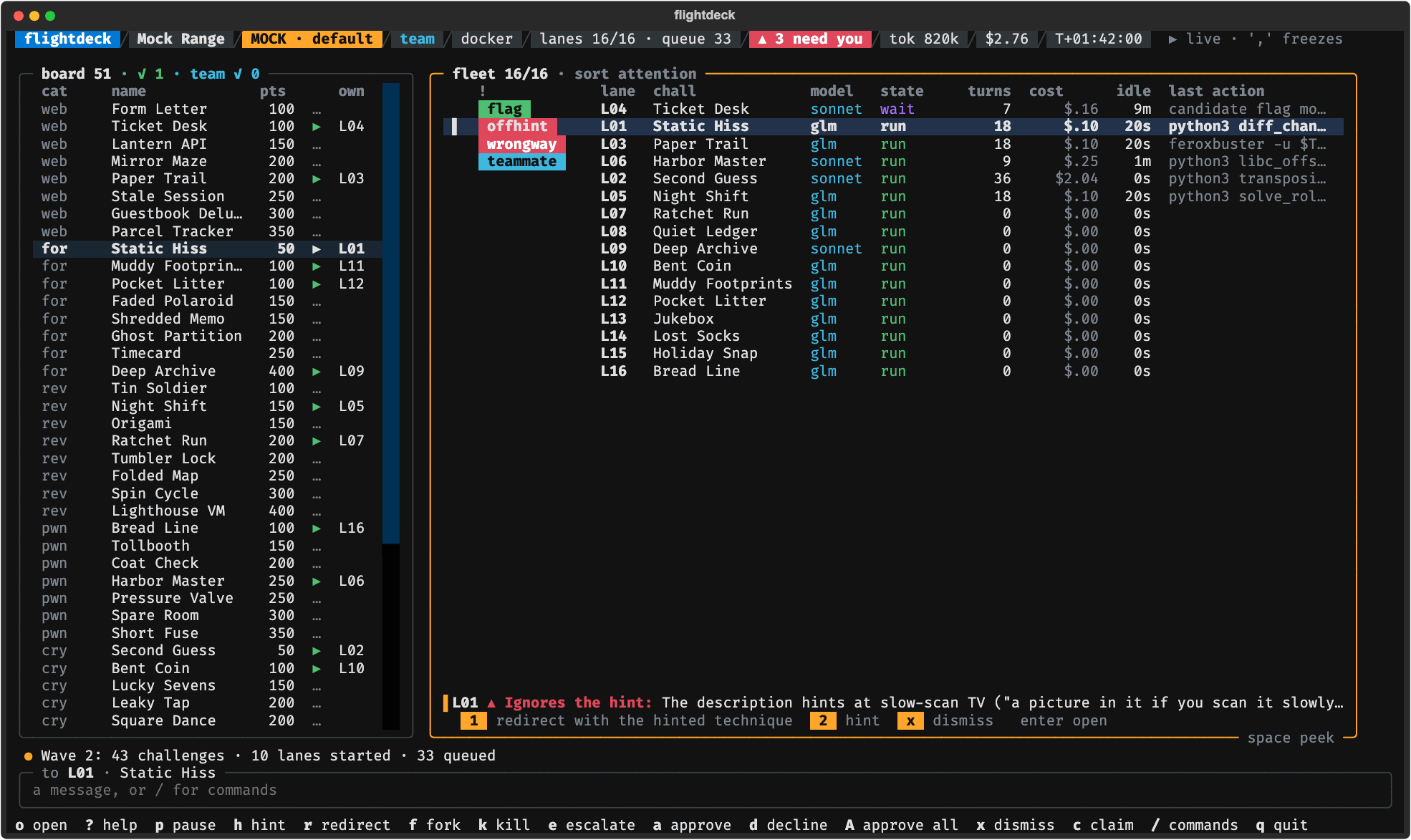
Lanes that need you sort first, and the line under the list says why and numbers the answers.
h hint, r redirect, f fork, k kill, e escalate to the next model, t take over the
lane's shell, a approve a flag, Enter for one lane full screen, ? for every key. The
console opens in a simple layout: one list of lanes and the keys that apply now. /layout deck
shows the whole dashboard, as pictured here, and /theme changes the colours. More pictures in
the
screenshot gallery.
Your data stays yours
flightdeck has no telemetry, no analytics, no account, no update check and no server of its own. Nothing about you or your runs is sent to this project, ever.
It talks only to what you point it at:
- The model API in your config. A lane's challenge and its work go to the model you chose, as with any AI tool. Choose a model on your own machine (Ollama, MLX) and nothing leaves it.
- The CTF platform in your event profile, to pull the board and submit the flags you approve.
- A webhook of your own, only if you set one up for notifications. It gets a short message (a lane needs you, a flag was accepted) and never a flag.
Your API keys and access tokens stay in your environment or a file only you can read, never in
the config, and logs, transcripts and reports replace anything shaped like a credential. Runs are written to a folder
on your machine. Sharing a result is something you do by hand: flightdeck share prints a
summary and you decide where to paste it. A coding-agent CLI you plug in (Claude Code, Codex)
follows its own maker's policy. Details:
Security.
Leaderboard
Events flightdeck has flown in, where the team finished, and how hands-on the players were: the leaderboard. Played an event with it? Add your flight and your GitHub name goes on the board.
Help make it better
Three ways, and the first needs no code:
- Play and share what you ran. This is the most useful thing you can do. After any run
(the practice set counts),
flightdeck share latestprints a flight card: your models, your setup, solves, time, cost and how often you stepped in, with no flags and no challenge text. Post it. Enough cards tell everyone which model is fastest, cheapest and best for which kind of challenge, on which hardware. - Build. Fix a bug, add a feature, improve a doc. Good first issues are small and well described, and CONTRIBUTING.md gets you set up in five commands.
- Sponsor. flightdeck is free and MIT-licensed. Measuring models costs real API money, and sponsorship pays for it: sponsor on GitHub.
A star helps other players find it.
For AI agents
If you are an AI agent reading this for a user:
- What this is: a Python CLI (
flightdeck, PyPI packagectf-flightdeck) that runs AI agents on CTF challenges under a human's control. - Safe to run without asking:
uvx ctf-flightdeck mock --screenshot DIR(headless, writes SVGs),flightdeck --help,flightdeck doctor,flightdeck config --example,flightdeck models. - Ask your user first:
flightdeck practiceandflightdeck playspend money on a model API, andplay --eventtalks to a live CTF platform under that event's rules. - Machine-readable map of the docs: llms.txt.
- Working on the code: read AGENTS.md first. It is short and its rules are strict.
Docs
Using flightdeck: Player's guide · Model APIs · Models · Boards · Solvers · Plugins · Practice set · Screenshots · Leaderboard · Changelog · Security
How it is built: Vision · Architecture · Console spec · Decisions · Roadmap · Contributing
License
MIT. See LICENSE.
1 maintainer

Metadata
1 maintainer
Release files for ctf-flightdeck 0.5.0
For a detailed explanation of source distributions (sdists) and built distributions (wheels), please see the package formats documentation.
Source distribution (sdist)
| File | Size | Uploaded | Provenance | Actions |
|---|---|---|---|---|
| ctf_flightdeck-0.5.0.tar.gz | 1.1 MB | With provenance | Details for ctf_flightdeck-0.5.0.tar.gz |
Built distribution (wheel)
| File | Interpreter | ABI | Platform | Actions Reset |
|---|---|---|---|---|
| ctf_flightdeck-0.5.0-py3-none-any.whl | Python 3 | none | any | Details for ctf_flightdeck-0.5.0-py3-none-any.whl |
Total release size: 2.3 MB
Release files / ctf_flightdeck-0.5.0.tar.gz
| Download URL | ctf_flightdeck-0.5.0.tar.gz |
|---|---|
| Size | 1.1 MB |
| Tags | Source |
|
SHA-256 checksum How to use checksums |
7265e28b5825f4f84feb65727552cb94b19325fd8ee1386c60722ea0f7f66cc3
|
|
BLAKE2b-256 checksum How to use checksums |
c157fc7549afc5320ca2d95b9ee72c191885643b2c6ec213cb470954d3120174
|
| Upload date | |
|
Uploaded using Trusted Publishing? What is trusted publishing? |
Yes |
| Uploaded via |
twine/7.0.0 CPython/3.13.16
|
Provenance
Provenance describes where a file came from. On PyPI, provenance is shared via attestations, which provide a verifiable record of the build or publishing details. View details, limitations and caveats.


PyPI Publish Attestation
PyPI verified that this artifact, at this checksum, originated from the publisher listed below.
Signed by GitHub Actions, verified by PyPI on Nov 16, 2026.
Transparency logRelease files / ctf_flightdeck-0.5.0-py3-none-any.whl
| Download URL | ctf_flightdeck-0.5.0-py3-none-any.whl |
|---|---|
| Size | 1.2 MB |
| Tags | Python 3 |
|
SHA-256 checksum How to use checksums |
879eef744b15f3f5d2be79aea107755a6b8e4c10a5e9c0f797bee37192c5d7fe
|
|
BLAKE2b-256 checksum How to use checksums |
cf91ea36cf9a574f8fbd977979c76da06f8c308aa13a10b7b8efc603fec542d1
|
| Upload date | |
|
Uploaded using Trusted Publishing? What is trusted publishing? |
Yes |
| Uploaded via |
twine/7.0.0 CPython/3.13.16
|
Provenance
Provenance describes where a file came from. On PyPI, provenance is shared via attestations, which provide a verifiable record of the build or publishing details. View details, limitations and caveats.
PyPI Publish Attestation
PyPI verified that this artifact, at this checksum, originated from the publisher listed below.
Signed by GitHub Actions, verified by PyPI on Nov 16, 2026.
Transparency logSecurity for ctf-flightdeck 0.5.0
Provenance
Provenance describes where a file came from. On PyPI, provenance is shared via attestations, which provide a verifiable record of the build or publishing details. View details, limitations and caveats.
Full provenance
Both files in this release have been uploaded with provenance metadata.
Attestation for ctf_flightdeck-0.5.0.tar.gz
PyPI Publish Attestation
PyPI verified that this artifact, at this checksum, originated from the publisher listed below.
Signed by GitHub Actions, verified by PyPI on Nov 16, 2026.
Transparency logA note on package security
PyPI is a repository for distributing packages, not a service for auditing them. While third-party security researchers and our staff do their best to detect and remove malicious packages, PyPI cannot guarantee the quality, security or suitability of any given package.
To learn more about protecting yourself from malicious actors, visit our package security documentation.














