
Code knowledge graph for Claude Code. Build a relationship graph of your Python codebase and query it during coding sessions.

Project description
ctxgraph-code
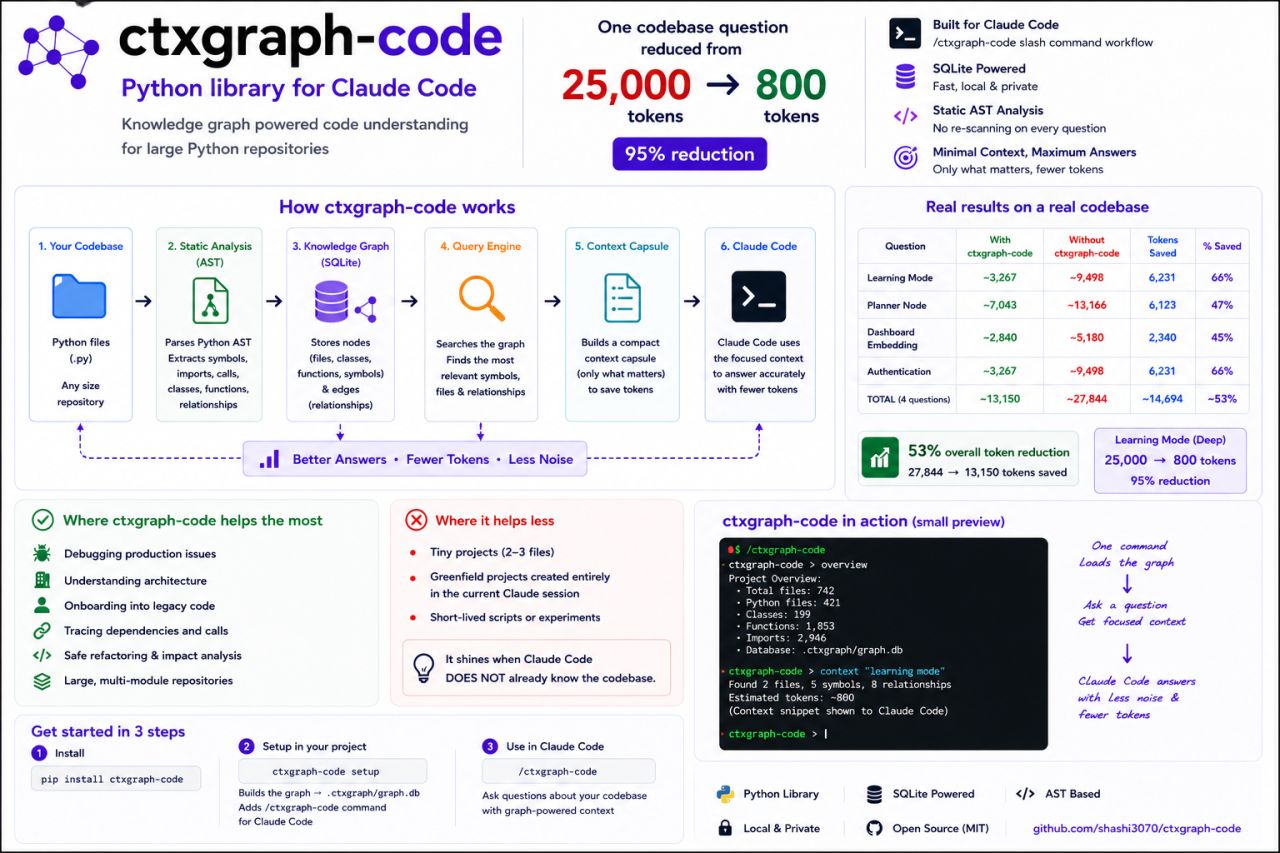
How do we give AI the right context without sending the entire codebase every time?
ctxgraph-code answers that question. Instead of dumping files into the context window, it builds a relationship graph of your codebase using static AST analysis, stores it in a local SQLite database, and retrieves only the relevant symbols and dependencies when Claude Code needs to understand your code.
Result: One codebase question drops from ~25,000 tokens to ~800 tokens — a 95% reduction in context usage. A full 30-question benchmark showed 90% fewer tokens than traditional file reading, and 16% fewer than graph-based alternatives.
pip install ctxgraph-code
# For multi-language support (C, Go, Rust, JS, TS, Java, etc.):
pip install 'ctxgraph-code[full]'
cd my-project
ctxgraph-code setup
Then in Claude Code, type /ctxgraph-code and Claude will use the graph.
Why?
Claude Code already reads files, searches code, and understands syntax. But it can't see relationships between files without manual exploration:
- What does this file import?
- What depends on this function?
- Where is this class defined?
- What calls this API endpoint?
These questions require running multiple grep commands or reading dependency chains file by file. ctxgraph-code pre-computes all of this via static AST analysis and stores it in a queryable SQLite graph — so Claude can answer relationship questions in one command.
Quick Start
# Install (add [full] for multi-language support)
pip install 'ctxgraph-code[full]'

# Navigate to your project
cd my-project

# One-command setup: init + build + configure Claude Code
ctxgraph-code setup

# Open Claude Code and type:
#   /ctxgraph-code
How It Works (At a Glance)
Your Codebase
     │
     ▼
1. Static AST Analysis ──► Extract imports, classes, functions, calls, relationships
     │
     ▼
2. Knowledge Graph ──► Store everything in local SQLite (files, symbols, edges)
     │
     ▼
3. Query Engine ──► Search graph by relevance, expand to neighbors via BFS
     │
     ▼
4. Context Retrieval ──► Only the relevant snippets, not whole files
     │
     ▼
5. Claude Code ──► Receives focused context → Better answers, fewer tokens, less noise
No huge graph-building prompts sent to the LLM. The graph is built locally with Python's AST parser — zero LLM calls, zero API costs.
Commands
setup (recommended)
ctxgraph-code setup
Interactive walkthrough — prompts for:
- File extensions to scan (
.py,.js,.ts, etc.) - Exclude patterns (folders like
tests/, globs like*.generated.py)
Does everything in one step:
- Creates
.ctxgraph/config.tomlwith your chosen extensions and excludes - Installs the
/ctxgraph-codeslash command globally (works in every Claude Code session) - Builds the knowledge graph from all matching files — shows live per-graph progress:
Building 5 graphs with 8 workers...
  ✔ src/ (42 files, 156 nodes, 34 edges, 0.8s)
  ✔ api/ (18 files, 73 nodes, 12 edges, 0.4s)
  ✔ tests/ (31 files, 89 nodes, 0 edges, 0.6s)
Built all 5 graphs in 2.1s
Non-interactive mode:
ctxgraph-code setup --extensions .py,.js,.ts --exclude tests/,examples/
ctxgraph-code setup -y                                 # all defaults
Options:
--project-slash— install slash command in project's.claude/instead of globally--background/-b— launch build in background and exit immediately (check withbuild-status)--jobs/-j— number of parallel workers (default: CPU count)--incremental/-i— only rebuild files that changed since last build--verbose/-v— show per-file progress--no-summary— skip docstring extraction for faster builds
init
ctxgraph-code init
Creates the .ctxgraph/ directory with a default config.toml.
subgraph
ctxgraph-code subgraph "add pagination to the users endpoint"
Extracts a focused subgraph relevant to a task description — returns matching nodes, their relationships, and inline source code in a single compact response. Saves 1-2 tool calls by combining graph search, dependency resolution, and file reading.
--max-nodes/-n— max nodes in subgraph (default: 10)
diff
ctxgraph-code diff
ctxgraph-code diff --ref main
Compares the graph with the filesystem. Shows files that have been added, removed, or changed since the graph was built. Use --ref for a git-aware diff against a branch. Essential for knowing when to run ctxgraph-code build --incremental.
mermaid
ctxgraph-code mermaid classDiagram
ctxgraph-code mermaid flowchart --output diagram.md
Exports the graph as a Mermaid diagram for embedding in documentation or PRs. Supported types: classDiagram, flowchart, sequence.
--output/-o— save to file instead of stdout--max-nodes/-n— maximum nodes in diagram (default: 50)
build
ctxgraph-code build
ctxgraph-code build --extensions .py,.js,.ts
ctxgraph-code build --exclude tests/ --exclude *.generated.py
Scans all matching files in the project, runs AST analysis. Extensions are read from config (.py by default, or whatever was set in setup).
By default, builds a separate graph per top-level directory (e.g., src/, api/, tests/) in parallel. This keeps each graph small and fast to query. Use --dir <name> on query commands to select one, or let it auto-detect from file paths.
--all/-a— build a single combined graph instead of per-directory--jobs/-j— number of parallel workers (default: CPU count)--incremental/-i— only rebuild files that changed since last build--verbose/-v— show per-file progress--no-summary— skip docstring extraction for faster builds
Shows live per-graph progress as each completes:
Building 5 graphs with 8 workers...
  ✔ src/ (42 files, 156 nodes, 34 edges, 0.8s)
  ✔ api/ (18 files, 73 nodes, 12 edges, 0.4s)
  ✔ tests/ (31 files, 89 nodes, 0 edges, 0.6s)
Built all 5 graphs in 2.1s
Stores graphs in .ctxgraph/graphs/<dir>.db (per-directory) or .ctxgraph/graph.db (combined).
The graph is a static snapshot. If code changes, run
ctxgraph-code buildagain to refresh. Use--incrementalto only reprocess changed files.
query
ctxgraph-code query "user authentication"
ctxgraph-code query "database connection" --max 20
ctxgraph-code query "api routes" --dir src
Searches the graph by relevance scoring (name matches > summary matches > path matches) and expands to neighboring nodes via BFS up to depth 2. Use --dir to scope to a specific per-directory graph.
deps
ctxgraph-code deps src/api/routes.py
Shows all relationships for a file: imports, imported-by, function calls, class definitions. Auto-detects the per-directory graph from the file path.
usedby
ctxgraph-code usedby src/utils/helpers.py
Shows every file that imports or calls something in the given file. Useful to understand ripple effects before making changes.
overview
ctxgraph-code overview
ctxgraph-code overview --dir src
Prints the project structure: every file with its summary and top-level symbols. Use --dir to scope to a per-directory graph.
symbols
ctxgraph-code symbols src/main.py
Lists all classes and functions defined in a file, with line numbers and docstring summaries.
context
ctxgraph-code context "add pagination to the users endpoint"
Generates a focused context summary: relevant files, their symbols, and dependency/call edges between them. This is the closest equivalent to ctxgraph's capsule format.
view
ctxgraph-code view                 # generates interactive D3.js HTML and opens browser
ctxgraph-code view --no-open       # generate HTML without opening browser
ctxgraph-code view --tree          # show text tree instead (useful in terminal)
ctxgraph-code view --output graph.html  # save to custom path
Opens an interactive D3.js force-directed graph in the browser. Drag nodes, zoom/pan, search by name, filter by type (File/Class/Function). Hover to highlight connected nodes and see summaries.
The HTML is self-contained (loads D3.js from CDN) and saved to .ctxgraph/graph.html.
Use --tree for a terminal-friendly text view of the directory hierarchy with symbols and edges.
info
ctxgraph-code info
ctxgraph-code info --dir src
Shows graph statistics: node/edge counts, type distribution, build time.
install-slash
ctxgraph-code install-slash
ctxgraph-code install-slash --project-slash   # project-local instead of global
Install or update the /ctxgraph-code slash command for Claude Code. By default installs globally so it works in every Claude Code session. Use --project-slash to install in the project's .claude/commands/ directory instead.
build-status
ctxgraph-code build-status
Check whether a background build (ctxgraph-code setup --background or ctxgraph-code build) completed, failed, or is still running. Shows PID and start time for in-progress builds.
probe
ctxgraph-code probe "database connection pool"
ctxgraph-code probe "user authentication" --max 3
Searches the graph for relevant nodes and reads the actual source code inline. Claude gets paths + source in one command, saving 1–2 tool calls. Shows the first N lines of matched files with automatic syntax highlighting per language.
--max/-m— max files to probe (default: 5)--context/-c— lines to show per file (default: 40, use 0 for full file)
install-hooks
ctxgraph-code install-hooks
ctxgraph-code install-hooks --local
Installs a PreToolUse hook in .claude/settings.json (global) or .claude/settings.local.json (project-local). On every Bash|Glob|Grep tool call, Claude Code automatically runs ctxgraph-code hook-check and injects graph context into the conversation — letting it know the graph exists, key files, and whether anything is stale.
Also prompted during ctxgraph-code setup.
uninstall-hooks
ctxgraph-code uninstall-hooks
Removes the PreToolUse hooks installed by install-hooks.
How It Works
Python files  ──AST──>  Import/Symbol/Call analysis  ──>  SQLite graph.db
                                                               │
Claude Code  ──/ctxgraph-code──>  CLI query/deps/overview  <───┘
-
Build phase:
ctxgraph-code buildscans every matching file. Python files are analyzed with Python'sastmodule (fast, rich analysis with docstrings). All other languages (C, C++, JavaScript, TypeScript, Go, Rust, Java, Ruby, and more) are analyzed with tree-sitter viatree-sitter-language-pack. The result is a graph of nodes (files, functions, classes, structs, imports, calls) and edges (imports, defines, calls) stored in SQLite. -
Query phase: In Claude Code, the
/ctxgraph-codeslash command injects instructions into the conversation. Claude then runsctxgraph-codecommands as shell commands to query the graph. Claude reads the text output and reasons about it alongside its own file-reading capabilities.
What's in the graph
| Node type | Example ID | Stored |
|---|---|---|
file |
file:src/api/routes.py |
Name, path, size, summary |
function |
func:src/models.py::get_user |
Name, path, parent, summary, line number |
class |
class:src/api/routes.py::UserAPI |
Name, path, parent file, summary, line number |
struct |
struct:src/types.c::Point |
Name, path, parent file, line number |
interface |
interface:src/types.ts::IUser |
Name, path, parent file, line number |
trait |
trait:src/main.rs::Drawable |
Name, path, parent file, line number |
import |
import:src/main.c::stdio.h |
Import path, parent file |
call |
call:src/index.js::parse |
Function name, parent file, line number |
| Edge relation | Meaning |
|---|---|
imports |
File A imports file B (or a symbol from it) |
defines |
A file/class defines a class/function |
extends |
Class A extends class B |
calls |
Function A calls function B |
includes |
C/C++ file includes a header |
Edge weights: imports=1.0, defines=1.0, extends=0.8, calls=0.7, includes=0.6
Tamper Detection
Every build stores SHA256 content hashes for every analyzed file in the graph metadata. On every query, ctxgraph-code re-reads the file content, recomputes the hash, and compares:
- No match → tamper warning shown at the bottom of every command output
- PreToolUse hook also warns inside Claude Code before any search/grep tool runs
- Use
ctxgraph-code build --incrementalto refresh only tampered files
This catches the common case where you edit a file after building the graph and Claude would otherwise see stale data.
Query relevance scoring
- Tokenize query (lowercase, split on word boundaries, remove stopwords)
- For each matching node: name match → +2.0 per token, text match → +0.5 per occurrence
- Multiply by
0.5 + importance(files=0.5, classes=0.6, functions=0.5) - BFS expansion: neighbor nodes get
0.1 × number_of_matched_neighbors - Return top-N results sorted by score
Performance
ctxgraph-code includes several optimizations for large codebases:
| Optimization | Details |
|---|---|
| Multi-language | Uses Python ast for .py (fast + docstrings) and tree-sitter for 25+ languages (C, C++, JS, TS, Go, Rust, Java, Ruby, Kotlin, Swift, and more) |
| Parallel builds | Per-directory graphs build concurrently via ThreadPoolExecutor |
| Multiprocessing | Combined graphs split files across CPU cores via multiprocessing.Pool |
--jobs |
Control parallelism level (default: CPU count) |
| Incremental builds | --incremental caches file mtimes, only reprocesses changed files |
| Trivial file skip | _quick_scan() pre-checks all files (Python and non-Python) — skips full parse for files with no code |
follow_symlinks config |
Respects follow_symlinks = false setting to avoid duplicate/broken symlinks |
max_file_size_mb config |
Skips files exceeding the configured size limit before reading |
| Live build progress | Per-graph status + timing as each completes during parallel builds |
| Cached excludes | lru_cache on should_exclude() during os.walk |
| Batch SQLite inserts | executemany instead of per-row INSERT statements |
--no-summary |
Skips docstring extraction (fastest rebuilds) |
--background |
Detach build process and continue working immediately |
| Tamper detection | SHA256 content hashes per file; warns on tampered data in every command output |
| PreToolUse hook | Claude Code auto-injects graph context before Bash/Glob/Grep, saving 1-3 exploratory tool calls |
Benchmark Results
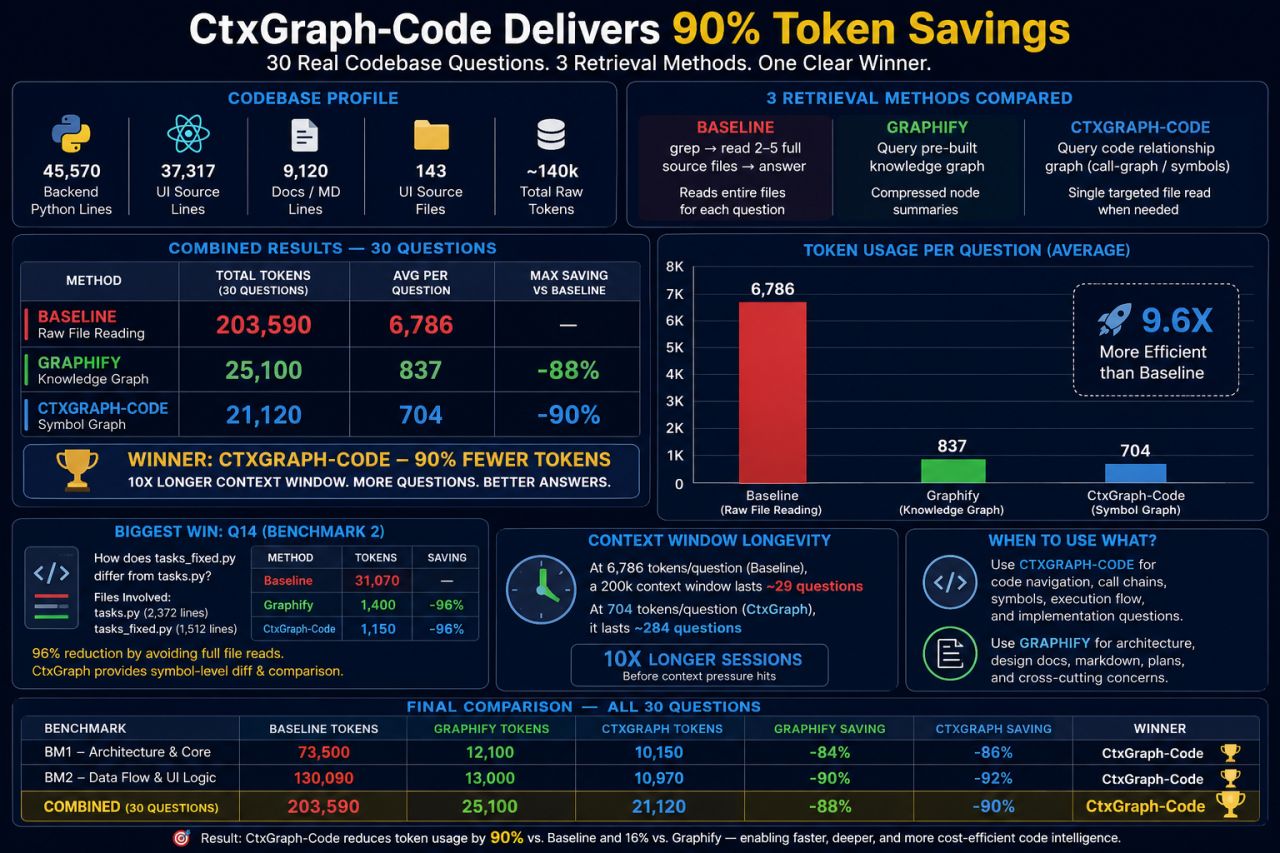
Real-world benchmarks against a production Python/UI codebase. Three approaches compared across 30 code understanding questions.
Repository Profile
| Metric | Value |
|---|---|
| Backend Python LOC | 45,570 |
| UI Source LOC | 37,317 |
| Documentation LOC | 9,120 |
| Source Files | 143 |
| Raw Tokens | ~140,000 |
Three Retrieval Methods Compared
| Approach | How It Works |
|---|---|
| Baseline (File Reading) | grep → read entire files → answer. Every question repeatedly loads large source files. |
| Graphify (Knowledge Graph) | Build full graph → compressed node summaries → answer. Incurs large upfront graph-building cost. |
| CtxGraph-Code (Symbol Graph) | Local AST → SQLite symbol graph → retrieve only relevant files → answer. Only targeted files opened. |
Combined Results (30 Questions)
| Approach | Total Tokens | Avg/Question | Reduction |
|---|---|---|---|
| Baseline (File Reading) | 203,590 | 6,786 | — |
| Graphify | 25,100 | 837 | 88% |
| CtxGraph-Code | 21,120 | 704 | 90% |
CtxGraph-Code is 9.6× more efficient than reading raw files, and uses 16% fewer tokens than Graphify.
Per-Suite Breakdown
| Suite | Baseline | Graphify | CtxGraph-Code | Winner |
|---|---|---|---|---|
| BM1: Architecture | 73,500 | 12,100 | 10,150 | CtxGraph-Code |
| BM2: Data Flow & UI Logic | 130,090 | 13,000 | 10,970 | CtxGraph-Code |
| Combined | 203,590 | 25,100 | 21,120 | CtxGraph-Code |
Biggest Win: File Comparison
Question: "How does tasks_fixed.py differ from tasks.py?"
tasks.py: 2,372 linestasks_fixed.py: 1,512 lines
| Approach | Tokens |
|---|---|
| Baseline | 31,070 |
| Graphify | 1,400 |
| CtxGraph-Code | 1,150 (96% savings) |
Instead of reading both files completely, CtxGraph-Code compares symbols and retrieves only relevant differences.
Context Window Longevity
With a 200K token context window:
| Approach | Tokens/Question | Questions Before Exhaustion |
|---|---|---|
| Baseline | 6,786 | ~29 |
| Graphify | 837 | ~239 |
| CtxGraph-Code | 704 | ~284 (10× longer sessions) |
Graphify vs CtxGraph-Code: Detailed Comparison
| Metric | Graphify | CtxGraph-Code |
|---|---|---|
| Build approach | Full knowledge graph first | Local symbol graph via AST + SQLite |
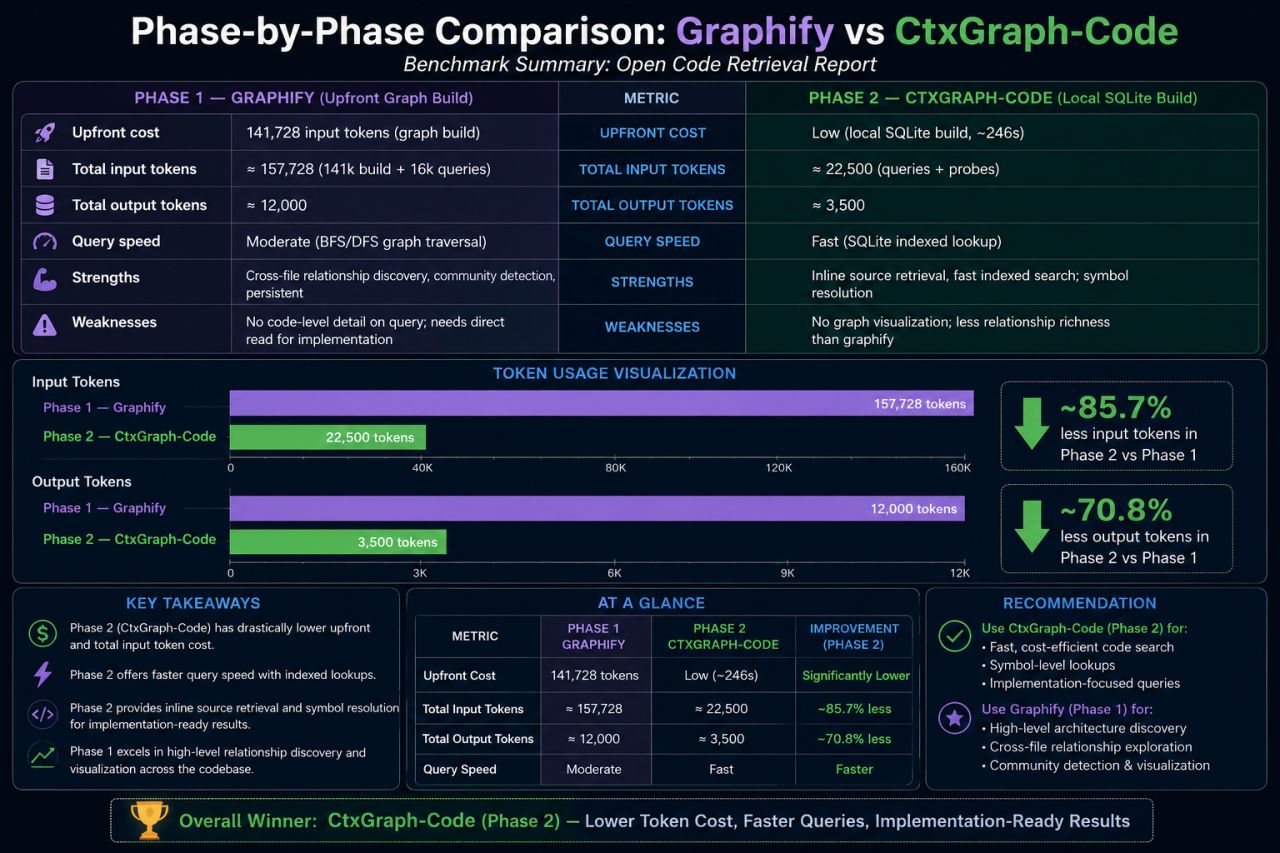
| Upfront LLM cost | ~141,728 input tokens | ~0 tokens (local AST parse, ~246s) |
| Total input tokens | ~157,728 | ~22,500 (85.7% fewer) |
| Output tokens | ~12,000 | ~3,500 (70.8% fewer) |
| Query speed | Moderate (BFS/DFS traversal) | Fast (SQLite indexed lookup) |
| Strengths | Architecture visualization, community detection, cross-file relationship discovery | Inline source retrieval, indexed search, symbol resolution, implementation-focused answers |
| Weaknesses | No implementation snippets; often requires opening source files after | Less visualization; relationship discovery less deep |
| Best for | Architecture discovery, planning, cross-cutting concerns | Code navigation, execution flow, symbol lookup, implementation questions |
Bottom line: Use CtxGraph-Code for fast code search and implementation answers. Use Graphify when you need architecture visualization and cross-file relationship discovery.
Real-World Example Results
| Question | Without | With CtxGraph-Code | Savings |
|---|---|---|---|
| Learning Mode | 9,498 | 3,267 | 66% |
| Planner Node | 13,166 | 7,043 | 47% |
| Dashboard Embedding | 5,180 | 2,840 | 45% |
| Authentication | 9,498 | 3,267 | 66% |
| Deep Learning Mode | 25,000 | 800 | 95% |
| Overall (30 questions) | 203,590 | 21,120 | 90% |
Using with Claude Code
After ctxgraph-code setup, the /ctxgraph-code slash command is installed globally by default — it works in every Claude Code session. Claude sees:
# ctxgraph-code: Code Relationship Graph

**First time in this project?** Tell the user to run `ctxgraph-code setup`.
**Graph needs refresh?** Tell the user to run `ctxgraph-code build`.
**Available graphs:** src api tests

**Commands:**
- `ctxgraph-code query "terms"` -- Find relevant files, classes, and functions
- `ctxgraph-code probe "question"` -- Search graph and read matching source inline
- `ctxgraph-code deps <path>` -- Show what a file imports and what calls it
- `ctxgraph-code usedby <path>` -- Show what depends on a file
- `ctxgraph-code overview --dir <name>` -- Show project structure for a specific graph
- `ctxgraph-code symbols <path>` -- List classes/functions defined in a file
- `ctxgraph-code context "task"` -- Generate a focused context summary
- `ctxgraph-code subgraph "task"` -- Focused subgraph with inline source
- `ctxgraph-code diff` -- Files changed since build
- `ctxgraph-code mermaid --type classDiagram` -- Export as Mermaid diagram
- `ctxgraph-code view --dir <name>` -- Visualize a graph interactively
Claude then uses these commands as needed during the conversation.
Example workflow
You: "Add rate limiting to the user API endpoints"
Claude does:
ctxgraph-code query "user api endpoint rate limit"→ finds relevant filesctxgraph-code deps src/api/users.py→ sees what it imports and what calls it- Reads actual source via built-in
readtool - Writes the rate-limiting code, knowing the full dependency context
Configuration
Configure via .ctxgraph/config.toml (created interactively by setup or manually):
[graph]
# File extensions to scan
extensions = [".py", ".js", ".ts"]
# Exclude patterns beyond built-in defaults
exclude = ["tests/", "examples/"]
# Follow symlinks when scanning
follow_symlinks = false
# Skip files larger than this (MB)
max_file_size_mb = 5
Built-in default exclusion patterns (always applied): __pycache__, *.pyc, .git, node_modules, venv, .venv, dist, build, *.egg-info, .pytest_cache, .mypy_cache, .ruff_cache, .tox, migrations, *.min.js, *.min.css.
Where It Helps
ctxgraph-code delivers the most value when working with existing codebases built over months or years:
| Helps Most | Helps Less |
|---|---|
| 🐛 Debugging production issues | Tiny projects (2–3 files) |
| 🏗 Understanding architecture | Throwaway scripts |
| 🔍 Tracing dependencies | Greenfield projects created entirely in the same Claude session |
| 🔄 Safe refactoring | Short experiments |
| 📚 Onboarding into large existing codebases | |
| 🧩 Multi-module repositories |
The biggest gains come when AI needs to understand existing code written over months or years, not when starting from scratch.
Differences from ctxgraph
ctxgraph-code is a focused subset of ctxgraph designed specifically for Claude Code.
| Feature | ctxgraph | ctxgraph-code |
|---|---|---|
| CLI commands | 9+ | 20 (init, build, query, deps, usedby, overview, symbols, context, subgraph, diff, mermaid, setup, view, info, install-slash, build-status, probe, install-hooks, uninstall-hooks, version) |
| LLM integration | Built-in (Ollama, Claude, OpenAI, Azure) | None (delegates to Claude Code) |
| Chat sessions | Yes | No |
| Visualizer | D3.js HTML + SVG | D3.js HTML (view opens in browser, --tree for text) |
| Skills system | Yes (customizable skill TOML files) | No |
| MCP server | Yes | No |
| Token savings | Yes (capsule DSL compression) | No |
| Dependency | mcp optional, anyio optional |
typer, rich only |
| Claude integration | MCP protocol (Claude Desktop) | Slash command (Claude Code) |
| Windows compatibility | Blocked by pywintypes.dll with mcp≥1.27.2 |
No issues |
Requirements
- Python 3.10+
- A Claude Code subscription (for the
/ctxgraph-codeslash command — the graph itself works standalone) - For multi-language analysis (C, Go, Rust, JS, TS, Java, etc.):
pip install 'ctxgraph-code[full]'to install tree-sitter support
License
MIT
Release history Release notifications | RSS feed


Download files
Download the file for your platform. If you're not sure which to choose, learn more about installing packages.
Source Distribution
Built Distribution
Filter files by name, interpreter, ABI, and platform.
If you're not sure about the file name format, learn more about wheel file names.
Copy a direct link to the current filters
File details
Details for the file ctxgraph_code-0.6.2.tar.gz.
File metadata
- Download URL: ctxgraph_code-0.6.2.tar.gz
- Upload date:
- Size: 56.1 kB
- Tags: Source
- Uploaded using Trusted Publishing? No
- Uploaded via: twine/6.2.0 CPython/3.11.3
File hashes
| Algorithm | Hash digest | |
|---|---|---|
| SHA256 |
f5ca92d8efcda0ced82d4814c3e9d28e8d5b9e94013b4b9ab1b2348a2f780ce5
|
|
| MD5 |
007851e6621e197eeb6ed8f59ff25de8
|
|
| BLAKE2b-256 |
38be2bfd2c94fdc287e065ff8783768e556685fea22eda64b6787514a330cb05
|
File details
Details for the file ctxgraph_code-0.6.2-py3-none-any.whl.
File metadata
- Download URL: ctxgraph_code-0.6.2-py3-none-any.whl
- Upload date:
- Size: 53.4 kB
- Tags: Python 3
- Uploaded using Trusted Publishing? No
- Uploaded via: twine/6.2.0 CPython/3.11.3
File hashes
| Algorithm | Hash digest | |
|---|---|---|
| SHA256 |
54a937227efeb13a6c07c8caefcdb10ad21f2b2a3ac133fc1b040239c11ad407
|
|
| MD5 |
ae0887280e44167d2505b99d93d1ea66
|
|
| BLAKE2b-256 |
51904db0f8233f10b67439d6489d247bcbdaf6dd7cd92535fb6f3b815dda4580
|






