
Local memory infrastructure for AI agents
Isolated vaults. Typed memory. Agent-autonomous. Human-observable.




Installation • Quick Start • Examples • Documentation • API Reference
What is CtxVault?
Most agent frameworks treat memory as an afterthought: a shared vector store where isolation depends on configuration staying correct and everything, facts and procedures alike, gets embedded into the same undifferentiated index. The agent cannot tell what it knows from how it should act.
CtxVault is built around a different primitive. Memory is organized into vaults: self-contained, directory-backed units with explicit types. A semantic vault holds documents and a vector index, queryable by meaning: the agent's semantic memory. A skill vault holds skills that shape how the agent behaves: its procedural memory. An episodic vault holds statements with a validity window, so the agent can tell what still holds from what used to: its episodic memory. Isolation is structural, the topology is defined explicitly (one vault per agent, a shared knowledge base, private skills for a specific role, or any combination), with access control that determines exactly which agents can reach which vault.
The result is a memory layer that behaves like real infrastructure: typed, composable, observable, persistent and entirely local.
Core Principles
Typed memory: semantic, procedural and episodic
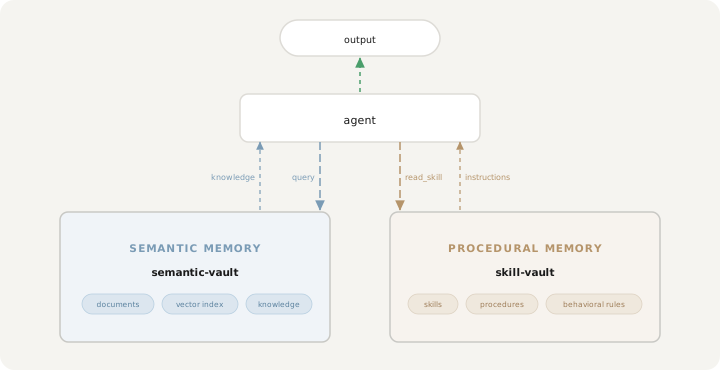
Classical cognitive architectures, from ACT-R (Anderson et al., 2004) to CoALA (Sumers et al., 2024), separate an agent's long-term memory into distinct modules: semantic memory for world knowledge, and procedural memory for skills and behavioral rules. Most agent frameworks ignore this distinction and store everything in a single vector index.
In CtxVault, the separation is structural. A semantic vault holds documents, indexes them into a vector store, and supports retrieval by meaning: it is the agent's knowledge base. A skill vault holds natural-language procedures with explicit names and descriptions, the agent's behavioral repertoire. An episodic vault holds individual statements that have a lifetime: what happened, when, and whether it still holds. The agent queries the first to know what, reads the second to know how, and consults the third to know when.
Episodic memory is the one an agent needs to stay coherent across sessions, and the one a vector index handles worst: similarity cannot tell a fact from the fact that replaced it. So episodes are stored bi-temporally: each one records the window in which it is true in the world (valid_from / valid_to) and the window in which the vault believed it (recorded_at / invalidated_at). Correcting a statement closes the old one exactly where its successor opens, in a single transaction, and links the two. Nothing is deleted: valid_at reconstructs what was true at any past moment, known_at reconstructs what the agent had learned by then, and the supersession chain explains how a belief got where it is.
Retrieval in an episodic vault is structured first, by entity, validity and source, because that is what most questions to an episodic memory actually are. Semantic similarity is an optional second path that only switches on when the vault is created with an embedding model, so episodic memory costs nothing to anyone who does not want vectors.
All three vault types share the same infrastructure primitives: public or restricted, local or global, composable in any topology. The difference is what they store and how the agent uses it.
Structural isolation and access control
Isolation enforced through prompt logic or metadata schemas is fragile: it grows harder to reason about as systems scale, and fails silently when it breaks.
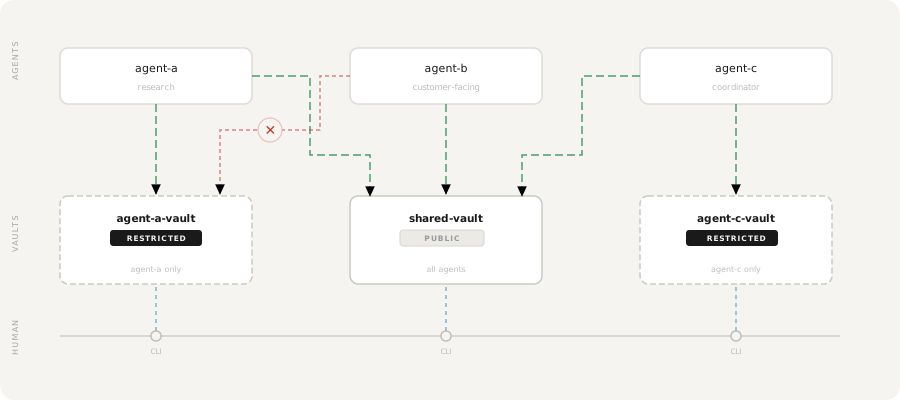
In CtxVault, each vault is an independent index. Agents have no shared retrieval path unless one is explicitly defined. Vaults can be declared restricted, with access granted to specific agents directly through the CLI. The boundary is part of the architecture, not a rule written in a config file that someone might later get wrong.
Found 3 vaults

> agent-a-vault [RESTRICTED]
  path:    ~/.ctxvault/vaults/agent-a-vault
  agents:  agent-a

> shared-vault [PUBLIC]
  path:    ~/.ctxvault/vaults/shared-vault

> agent-c-vault [RESTRICTED]
  path:    ~/.ctxvault/vaults/agent-c-vault
  agents:  agent-c
Persistent memory across sessions
Agents lose all context when a session ends. CtxVault gives them a knowledge base that persists across conversations, queryable by meaning rather than exact match. Context written in one session is retrievable days later using semantically related language.
What persists for months rather than days also has to change. An episodic vault keeps that kind of memory: facts are superseded instead of overwritten, so a correction closes the old statement and opens the new one without losing either, and retrieval returns what holds today unless asked for a past instant.
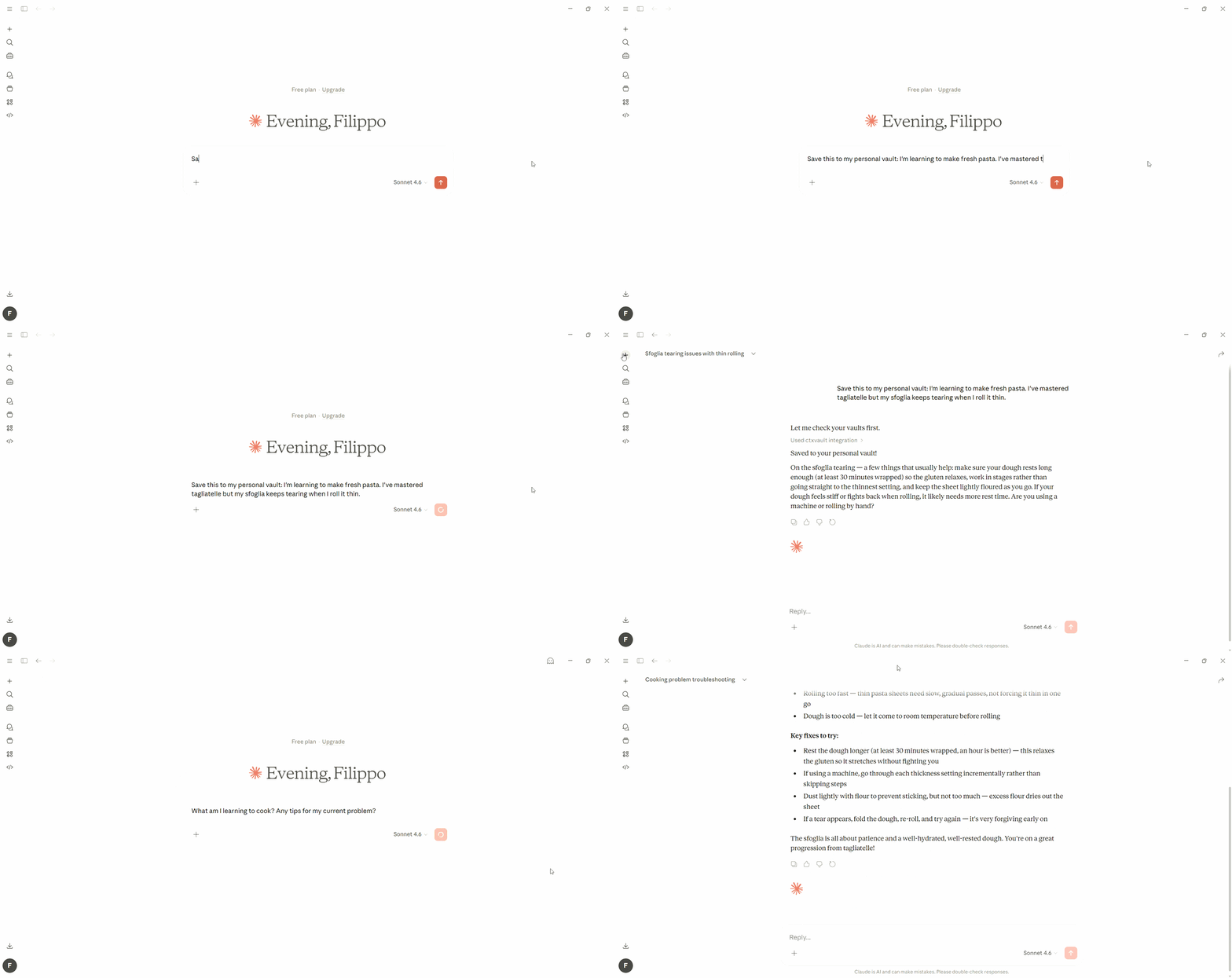
Persistent memory across sessions, shown with Claude Desktop, works with any MCP-compatible client.
Observable and human-controllable
When agents write to memory autonomously, visibility into what they write is not a debugging feature: it is the foundation of a trustworthy system.
Every vault is a plain directory on your machine. You can read it, edit it, and query it directly through the CLI at any point, independent of what any agent is doing. You also contribute to the same memory layer directly: drop documents into a vault, index with one command, and the agent queries that knowledge alongside what it has written on its own.
# Inspect what your agent has written in the vault
ctxvault docs my-vault

# Query its knowledge base directly
ctxvault query my-vault "what decisions were made last week?"

# Add your own documents and index them
ctxvault index my-vault

# On an episodic vault, read the statements instead
ctxvault episodes my-vault --all
Local-first
No cloud, no telemetry, no external services. Vaults are plain directories on your machine, the storage layer is entirely local. What you connect to that knowledge base is your choice.
Integration Modes
CtxVault exposes the same vault layer through three interfaces. Use whichever fits your context, or combine them freely.
CLI: Human-facing. Monitor vaults, inspect agent-written content, add your own documents, query knowledge bases directly.
HTTP API: Programmatic integration. Connect LangChain, LangGraph, or any custom pipeline to vaults via REST. Full CRUD, semantic search, and agent write support.
MCP server: For autonomous agents. Give any MCP-compatible client direct vault access with no integration code required. The agent handles list_vaults, query, write, and list_docs on its own, and on an episodic vault it records and corrects facts with write_episode, query_episodes, supersede_episode and invalidate_episode.
CtxVault vs Alternatives
| CtxVault | ChromaDB + custom | LangChain Memory | Mem0 | |
|---|---|---|---|---|
| Vault isolation | ✓ | ✗ (you build it) | ✗ | ✗ |
| Access control | ✓ | ✗ (you build it) | ✗ | ✗ |
| Typed memory (semantic + procedural + episodic) | ✓ | ✗ | ✗ | ✗ |
| Bi-temporal memory (supersede, time travel) | ✓ | ✗ (you build it) | ✗ | Partial |
| Agent-written memory | ✓ | ✗ (you build it) | Partial | Partial |
| Human CLI observability | ✓ | ✗ | ✗ | ✗ |
| Local-first | ✓ | ✓ | ✓ | ✓ (self-hosted) |
| MCP server | ✓ | ✗ (you build it) | ✗ | ✓ (hosted) |
Examples
Six scenarios, each with full code and setup instructions.
| Example | What it shows | |
|---|---|---|
| 🟢 | Personal Research Assistant | Single vault, single agent. Semantic RAG over PDF, MD, TXT, DOCX with source attribution. ~100 lines. |
| 🔴 | Multi-Agent Isolation | Two agents, two vaults. Each agent has no retrieval path to the other's vault: isolation enforced at the infrastructure layer, not through metadata filtering. ~200 lines. |
| 🔵 | Persistent Memory Agent | An agent that recalls context across sessions using semantic queries. "financial constraints" retrieves "cut cloud costs by 15%" written three days prior. |
| 🟡 | Composed Topology | Three agents, five vaults: private, shared between a subset, and public. A tiered support system where access boundaries reflect organizational boundaries. |
| 🟣 | Procedural Memory Agent | One agent, two vault types, semantic and skill, integrated via MCP. Retrieves knowledge for what to say and skills for how to say it. |
| 🟠 | Episodic Memory Agent | One account followed across six months. Facts are superseded instead of overwritten, so the briefing uses only what holds today while April is still reconstructable. |
Installation
Requirements: Python 3.10+
From PyPI
pip install ctxvault
From source (uv, recommended)
git clone https://github.com/Filippo-Venturini/ctxvault
cd ctxvault
uv sync            # creates .venv and installs all dependencies
uv run ctxvault    # run the CLI
From source (pip)
git clone https://github.com/Filippo-Venturini/ctxvault
cd ctxvault
python -m venv .venv && source .venv/bin/activate  # Windows: .venv\Scripts\activate
pip install -e .
Quick Start
Both CLI and API follow the same workflow: create a vault → add documents → index → query. Episodic vaults skip the middle two steps and record statements one at a time instead. Choose CLI for manual use, API for programmatic integration.
CLI Usage
# 1. Initialize a vault (run from your project root)
ctxvault init my-vault

# 2. Add your documents to the vault folder
# Default location: .ctxvault/vaults/my-vault/
# Drop your .txt, .md, .pdf or .docx files there

# 3. Index documents
ctxvault index my-vault

# 4. Query semantically
ctxvault query my-vault "transformer architecture"

# 5. List indexed documents
ctxvault docs my-vault

# 6. List all your vaults
ctxvault vaults

# For a machine-wide vault available everywhere
ctxvault init my-vault --global
An episodic vault follows a different workflow: there are no files to index, statements are written one at a time and corrected as they change.
# 1. Initialize an episodic vault
ctxvault init account-memory --type episodic

# 2. Record a statement, open ended until something closes it
ctxvault write-episode account-memory "Sarah Klein is the main contact" -e "Sarah Klein" --salience 0.9

# 3. Retrieve what currently holds
ctxvault episodes account-memory --entity "Sarah Klein"

# 4. Correct it when reality changes, keeping both versions linked
ctxvault supersede account-memory <episode_id> "Marco Rossi is the main contact"

# 5. Ask what was true at a past instant
ctxvault episodes account-memory --valid-at 2026-04-10T00:00:00+00:00

# 6. Follow how a statement changed over time
ctxvault episode account-memory <episode_id> --history
Agent Integration
Give your agent persistent semantic memory in minutes. Start the server:
uvicorn ctxvault.api.app:app
Then write, store, and recall context across sessions:
import requests
from langchain_openai import ChatOpenAI

API = "http://127.0.0.1:8000/ctxvault"

# 1. Create a vault
requests.post(f"{API}/init", json={"vault_name": "agent-memory"})

# 2. Agent writes what it learns to memory
requests.post(f"{API}/write", json={
    "vault_name": "agent-memory",
    "filename": "session_monday.md",
    "content": "Discussed Q2 budget: need to cut cloud costs by 15%. "
               "Competitor pricing is 20% lower than ours."
})

# 3. Days later: query with completely different words
results = requests.post(f"{API}/query", json={
    "vault_name": "agent-memory",
    "query": "financial constraints from last week",  # ← never mentioned in the doc
    "top_k": 3
}).json()["results"]

# 4. Ground your LLM in retrieved memory
context = "\n".join(r["text"] for r in results)
answer = ChatOpenAI().invoke(f"Context:\n{context}\n\nQ: What are our cost targets?")
print(answer.content)
# → "You mentioned a 15% cloud cost reduction target, with competitor pricing 20% lower."
Any LLM works: swap
ChatOpenAIfor Ollama, Anthropic, or any provider. Ready to go further? See the examples for full RAG pipelines and multi-agent architectures, or browse the API Reference and the interactive docs athttp://127.0.0.1:8000/docs.
MCP Integration (Claude Desktop, Cursor, and any MCP-compatible client)
Give any MCP-compatible AI client direct access to your vaults, no code required. The agent handles list_vaults, query, write, and list_docs autonomously, and on an episodic vault it also records and corrects facts with write_episode, query_episodes, supersede_episode and invalidate_episode.
Install:
uv tool install ctxvault
Add to your mcp.json (Claude Desktop: %APPDATA%\Claude\claude_desktop_config.json; macOS: ~/Library/Application Support/Claude/claude_desktop_config.json):
{
  "mcpServers": {
    "ctxvault": {
      "command": "ctxvault-mcp"
    }
  }
}
Restart your client. The agent can now query your existing vaults, write new context, and list available knowledge, all locally and all under your control.
Restricted vaults: if you are integrating programmatically and need to access a restricted vault, pass the agent name at startup:
{
  "mcpServers": {
    "ctxvault": {
      "command": "ctxvault-mcp",
      "args": ["--agent", "my-agent"]
    }
  }
}
The --agent argument is optional and only required for restricted vaults.
Documentation
CLI Commands
All commands require a vault name. Default vault location: ~/.ctxvault/vaults/<name>/
init
Initialize a new vault. Vaults are public by default: any agent can access them.
Pass --restricted to create a restricted vault, accessible only to explicitly
attached agents. Pass --type skill to create a skill vault for procedural memory, or
--type episodic for a bi-temporal store of statements, instead of the default
semantic vault.
ctxvault init <name> [--type <type>] [--path <path>] [--global] [--restricted] [--embedding-model <model>]
Arguments:
<name>- Vault name (required)--type <type>- Vault type:semantic,skillorepisodic(optional, default:semantic)--path <path>- Custom vault location (optional, default:~/.ctxvault/vaults/<name>)--global- Create a global vault in ~/.ctxvault, available from anywhere on the machine--restricted- Create vault as restricted (optional, default: public)--embedding-model <model>- sentence-transformers model for this vault (optional). The model is pinned at init time and used for all indexing and querying on the vault. Semantic vaults default toall-MiniLM-L6-v2; episodic vaults have no vectors at all unless a model is set, and fall back to structured retrieval and keyword scoring. Not supported on skill vaults.
Example:
ctxvault init my-vault                          # semantic vault (default)
ctxvault init my-vault --type skill             # skill vault for procedural memory
ctxvault init my-vault --type episodic          # episodic vault for statements over time
ctxvault init my-vault --global --type skill    # global skill vault
ctxvault init my-vault --restricted
ctxvault init my-vault --embedding-model all-mpnet-base-v2   # custom embedding model
attach
Attach an agent to a vault, granting it access. If the vault is public, attaching an agent automatically makes it restricted: only explicitly attached agents will be able to access it from that point on.
ctxvault attach <vault> <agent>
Arguments:
<vault>- Vault name (required)<agent>- Agent name (required)
Example:
ctxvault attach my-vault my-agent
detach
Remove an agent's access from a restricted vault.
ctxvault detach <vault> <agent>
Arguments:
<vault>- Vault name (required)<agent>- Agent name (required)
Example:
ctxvault detach my-vault my-agent
publish
Make a restricted vault public, removing all access restrictions and granting access to any agent.
ctxvault publish <vault>
Arguments:
<vault>- Vault name (required)
Example:
ctxvault publish my-vault
index
Index a vault. On a semantic vault, this parses documents, generates embeddings, and stores them in the vector index. On a skill vault, this scans all .md files, reads their frontmatter, and rebuilds the skill index. Episodic vaults have no files to index and reject the command.
ctxvault index <vault> [--path <path>]
Arguments:
<vault>- Vault name (required)--path <path>- Specific file or directory to index (optional, default: entire vault)
Example:
ctxvault index my-vault
ctxvault index my-vault --path docs/papers/
query
Perform semantic search on a semantic vault.
ctxvault query <vault> <text> [--limit <n>]
Arguments:
<vault>- Vault name (required)<text>- Search query (required)--limit <n>,-n <n>- Number of chunks to return (optional, default:5)
Example:
ctxvault query my-vault "attention mechanisms"
ctxvault query my-vault "attention mechanisms" --limit 20
docs
List all indexed documents in a semantic vault.
ctxvault docs <vault>
Arguments:
<vault>- Vault name (required)
Example:
ctxvault docs my-vault
Found 2 documents in 'my-vault'

  1. paper.pdf
     .pdf · 12 chunks

  2. notes.md
     .md · 3 chunks
skills
List all indexed skills in a skill vault.
ctxvault skills <vault>
Arguments:
<vault>- Vault name (required, must be a skill vault)
Example:
ctxvault skills comms-skills
Found 3 skills in 'comms-skills'

  1. Weekly Engineering Update
     Type: Skill (.md) · Last Mod: 2026-03-15T10:30:00
     Description: How to write the weekly engineering status update for stakeholders

  2. Company Newsletter Contribution
     Type: Skill (.md) · Last Mod: 2026-03-15T10:30:00
     Description: How to write an engineering section for the monthly company newsletter

  3. FAQ Response
     Type: Skill (.md) · Last Mod: 2026-03-15T10:30:00
     Description: How to write answers to frequently asked questions from employees
skill
Read a specific skill from a skill vault, displaying its name, description, metadata, and full instructions.
ctxvault skill <vault> <skill_name>
Arguments:
<vault>- Vault name (required, must be a skill vault)<skill_name>- Skill name as defined in the frontmatter (required)
Example:
ctxvault skill comms-skills "Weekly Engineering Update"
----------------------------------------------------------------------------------------------------
SKILL: Weekly Engineering Update
Description: How to write the weekly engineering status update for stakeholders
----------------------------------------------------------------------------------------------------

You are writing the weekly engineering update...

## Required structure
...

## Hard rules
- Never exceed 250 words.
- Never start with a greeting.
write-episode
Record a statement in an episodic vault. The episode is open-ended unless a
--valid-to is given: it holds from now until something closes it.
ctxvault write-episode <vault> <content> [--entity <name>]... [--source <who>] [--salience <0-1>] [--confidence <0-1>] [--occurred-at <iso>] [--valid-from <iso>] [--valid-to <iso>]
Arguments:
<vault>- Vault name (required)<content>- The statement to record (required)--entity <name>,-e <name>- An entity the statement is about; repeatable, and the main way episodes get looked up later--source <who>- Who or what reported it--salience <0-1>- How much this matters (optional, default:0.5)--confidence <0-1>- How sure the writer is (optional, default:1.0)--occurred-at <iso>- When the event happened, if it differs from when validity starts--valid-from <iso>/--valid-to <iso>- Explicit validity window
Example:
ctxvault write-episode memories "Anna studies literature in Bologna" -e Anna --source conversation --salience 0.8
episodes
Query an episodic vault. By default only statements that still hold are returned, ranked by recency, or by relevance when a query text is given.
ctxvault episodes <vault> [text] [--entity <name>]... [--valid-at <iso>] [--known-at <iso>] [--all] [--order-by <mode>] [--limit <n>] [--stats]
Arguments:
<vault>- Vault name (required)[text]- Optional query text; ranks results by similarity, or by keyword overlap on a vault without an embedding model--entity <name>,-e <name>- Only episodes about this entity; repeatable--source <who>- Only episodes from this source--valid-at <iso>- What was true in the world at that instant--known-at <iso>- What the vault had already recorded by that instant--all- Include closed episodes--order-by <mode>-relevance,recency,salienceorcomposite(a blend of the three)--limit <n>,-n <n>- Maximum results (optional, default:10)--stats- Print counts instead of episodes
Example:
ctxvault episodes memories --entity Anna
ctxvault episodes memories --entity Anna --valid-at 2026-05-01T00:00:00+00:00   # what was true in May
ctxvault episodes memories "university" --order-by composite
ctxvault episodes memories --stats
episode
Read a single episode, or the whole chain of versions it belongs to.
ctxvault episode <vault> <episode_id> [--history]
Arguments:
<vault>- Vault name (required)<episode_id>- Episode id (required)--history- Print every version of the statement, oldest first
Example:
ctxvault episode memories 6f1c... --history
invalidate
Close an episode: the statement stops holding, but is never deleted and stays
reachable with --all, --valid-at or --history.
ctxvault invalidate <vault> <episode_id> [--valid-to <iso>] [--reason <text>]
Arguments:
<vault>- Vault name (required)<episode_id>- Episode id (required)--valid-to <iso>- When it stopped holding (optional, default: now). Learning late that something ended in the past is the normal case--reason <text>- Why it was closed; stored in the episode metadata
Example:
ctxvault invalidate memories 6f1c... --valid-to 2026-07-12T00:00:00+00:00 --reason "the dog died"
supersede
Replace an episode with a corrected version. The old statement closes exactly where the new one opens, in one transaction, and the two stay linked.
ctxvault supersede <vault> <episode_id> <content> [--entity <name>]... [--source <who>] [--salience <0-1>] [--valid-from <iso>]
Arguments:
<vault>- Vault name (required)<episode_id>- Episode being replaced (required)<content>- The corrected statement (required)--entity <name>,-e <name>- Entities of the new statement; repeatable. Defaults to the superseded episode's entities--source <who>- Who reported the correction--salience <0-1>- Defaults to the superseded episode's salience--valid-from <iso>- The boundary between the two versions (optional, default: now)
Example:
ctxvault supersede memories 6f1c... "Anna studies literature in Milan" -e Anna --valid-from 2026-09-01T00:00:00+00:00
delete
Remove documents from a vault or delete the vault entirely.
ctxvault delete <vault> [--path <path>] [--purge]
Arguments:
<vault>- Vault name (required)--path <path>- File or directory path to delete, relative to the vault root (optional, deletes all documents if omitted)--purge- Permanently delete the vault, all its documents and indexes (cannot be used together with--path)
Examples:
ctxvault delete my-vault                        # removes all documents and indexes
ctxvault delete my-vault --path paper.pdf       # removes a specific document
ctxvault delete my-vault --purge                # removes the vault entirely
reindex
Re-index documents in a semantic vault.
ctxvault reindex <vault> [--path <path>]
Arguments:
<vault>- Vault name (required)--path <path>- Specific file or directory to re-index (optional, default: entire vault)
Example:
ctxvault reindex my-vault
ctxvault reindex my-vault --path docs/
vaults
List all vaults with their paths, types, and access configuration.
ctxvault vaults
Example:
ctxvault vaults
Found 3 vaults (1 local, 2 global)

── local ──────────────────────────
  project-vault       [SEMANTIC] [PUBLIC]
  path:               /my-project/.ctxvault/vaults/project-vault

── global ─────────────────────────
  atlas-vault         [SEMANTIC] [RESTRICTED]  agents: atlas-agent
  path:               ~/.ctxvault/vaults/atlas-vault

  comms-skills        [SKILL]    [PUBLIC]
  path:               ~/.ctxvault/vaults/comms-skills

  account-memory      [EPISODIC] [PUBLIC]
  path:               ~/.ctxvault/vaults/account-memory
Vault management:
- By default,
ctxvault initcreates a local vault pinned to the current directory, similar to howgit initworks. A.ctxvault/folder is created in the current directory containingconfig.jsonand the vault data. Commitconfig.jsonto make the setup portable and reproducible across machines. - Use
--pathto store vault data in a custom location. The.ctxvault/config folder always stays in the current directory regardless of--path. - Use
--globalfor machine-wide vaults stored in~/.ctxvault, accessible from anywhere without being tied to a project. - Config lookup: CtxVault searches for a local config from the current directory upward,
then falls back to
~/.ctxvault. This means you can run any command from anywhere inside a project and it will find your local vaults automatically. - Global vaults are always visible alongside local ones. If a local and global vault share the same name, the local one takes precedence.
Access control:
- Vaults are public by default: any agent can access them
init --restrictedorattachmake a vault restricted- Once restricted, only explicitly attached agents can access it
publishreverts a restricted vault to public- Access is enforced server-side on every request, not in application code
Vault types:
- CtxVault supports three vault types, reflecting the distinction between semantic, procedural and episodic memory
- A semantic vault (
--type semantic, default) stores documents and a vector index for retrieval by meaning - A skill vault (
--type skill) stores natural-language procedures that shape agent behavior - An episodic vault (
--type episodic) stores statements with a validity window, superseded rather than overwritten when they change - All three types support the same access control and topology primitives
| Command | Semantic vault | Skill vault | Episodic vault |
|---|---|---|---|
init |
✓ | ✓ | ✓ |
index |
✓ | ✓ | ✗ |
query |
✓ | ✗ | ✗ |
docs |
✓ | ✗ | ✗ |
skills |
✗ | ✓ | ✗ |
skill |
✗ | ✓ | ✗ |
write-episode |
✗ | ✗ | ✓ |
episodes |
✗ | ✗ | ✓ |
episode |
✗ | ✗ | ✓ |
invalidate |
✗ | ✗ | ✓ |
supersede |
✗ | ✗ | ✓ |
reindex |
✓ | ✗ | ✗ |
delete |
✓ | ✗ | ✗ |
vaults |
✓ | ✓ | ✓ |
attach |
✓ | ✓ | ✓ |
detach |
✓ | ✓ | ✓ |
publish |
✓ | ✓ | ✓ |
An episodic vault holds rows rather than files, so the file oriented commands do not apply to it: there is nothing to index, reindex or delete on disk.
Skills are .md files with YAML frontmatter defining the skill's name and description, followed by the instructions in markdown. You can create them manually or let an agent write them via the API or MCP server.
---
name: Weekly Engineering Update
description: How to write the weekly engineering status update for stakeholders
---

You are writing the weekly engineering update...

## Required structure
...

## Hard rules
- Never exceed 250 words.
- Never start with a greeting.
Drop the file into a skill vault and run ctxvault index <vault> and the skill is immediately available to any agent that queries the vault.
API Reference
Base URL: http://127.0.0.1:8000/ctxvault
Semantic vault endpoints:
| Endpoint | Method | Description |
|---|---|---|
/query |
POST | Semantic search on a semantic vault |
/docs |
GET | List indexed documents in a semantic vault |
/docs/write |
POST | Write and index a new document |
/delete |
DELETE | Remove document from a semantic vault |
/reindex |
PUT | Re-index documents in a semantic vault |
Skill vault endpoints:
| Endpoint | Method | Description |
|---|---|---|
/skills |
GET | List available skills in a skill vault |
/skill |
GET | Read a skill's instructions |
/skills/write |
POST | Write a new skill to a skill vault |
Episodic vault endpoints:
| Endpoint | Method | Description |
|---|---|---|
/episodes/write |
POST | Record an episode |
/episodes/query |
POST | Retrieve episodes by entity, validity, source and ranking |
/episodes |
GET | Episode counts for a vault |
/episodes/{episode_id} |
GET | Read a single episode |
/episodes/{episode_id}/history |
GET | Read the supersession chain |
/episodes/{episode_id}/invalidate |
POST | Close an episode |
/episodes/{episode_id}/supersede |
POST | Replace an episode with a corrected one |
Shared endpoints:
| Endpoint | Method | Description |
|---|---|---|
/index |
PUT | Index entire vault or specific path |
/vaults |
GET | List all initialized vaults |
Agent authorization:
Requests to restricted vaults require the X-CtxVault-Agent header. The value must match an agent name attached to that vault via ctxvault attach. Requests without the header, or with an unrecognized agent name, return 403.
X-CtxVault-Agent: my-agent
requests.post("http://127.0.0.1:8000/ctxvault/query",
    headers={"X-CtxVault-Agent": "my-agent"},
    json={"vault_name": "my-vault", "query": "attention mechanisms", "top_k": 3}
)
Requests to public vaults do not require the header. /index and /vaults never require it.
Interactive documentation: Start the server and visit http://127.0.0.1:8000/docs
Roadmap
- CLI MVP
- FastAPI server
- Multi-vault support
- Agent write API
- MCP server support
- Access control
- Typed memory (semantic + procedural vaults)
- Episodic memory (bi-temporal statements, supersession, time travel)
- Graph-backed semantic memory
- File watcher / auto-sync
- Context pruning
Contributing
Contributions welcome! Please check the issues for open tasks.
Development setup:
git clone https://github.com/Filippo-Venturini/ctxvault
cd ctxvault

# With uv (recommended)
uv sync --extra dev
uv run pytest

# With pip
python -m venv .venv && source .venv/bin/activate  # Windows: .venv\Scripts\activate
pip install -e ".[dev]"
pytest
Citation
If you use CtxVault in your research or project, please cite:
@software{ctxvault2026,
  author = {Filippo Venturini},
  title = {CtxVault: Local Semantic Knowledge Vault for AI Agents},
  year = {2026},
  url = {https://github.com/Filippo-Venturini/ctxvault}
}
License
MIT License - see LICENSE for details.
Security

Acknowledgments
Built with ChromaDB, LangChain and FastAPI.
1 maintainer

Metadata
1 maintainer
Release files for ctxvault 0.8.0
For a detailed explanation of source distributions (sdists) and built distributions (wheels), please see the package formats documentation.
Source distribution (sdist)
| File | Size | Uploaded | |
|---|---|---|---|
| ctxvault-0.8.0.tar.gz | 79.0 kB | Details |
Built distribution (wheel)
| File | Interpreter | ABI | Platform | Reset |
|---|---|---|---|---|
| ctxvault-0.8.0-py3-none-any.whl | Python 3 | none | any | Details |
Total release size: 138.0 kB
Release files / ctxvault-0.8.0.tar.gz
| Download URL | ctxvault-0.8.0.tar.gz |
|---|---|
| Size | 79.0 kB |
| Tags | Source |
|
SHA-256 checksum How to use checksums |
d98d800f48a0ccc12a6824cdd9c0eb970dc06f97cd5daa9dd93a33ab6a3d4418
|
|
BLAKE2b-256 checksum How to use checksums |
c986fa9f2bae6d2207313b704f35189ee732bd762c6d082a54fb5961de5fb344
|
| Upload date | |
|
Uploaded using Trusted Publishing? What is trusted publishing? |
No |
| Uploaded via |
twine/7.0.0 CPython/3.11.16
|
Release files / ctxvault-0.8.0-py3-none-any.whl
| Download URL | ctxvault-0.8.0-py3-none-any.whl |
|---|---|
| Size | 58.9 kB |
| Tags | Python 3 |
|
SHA-256 checksum How to use checksums |
917c6d3d449b376806a44b0b027eaa311c1832044da3b038b04e085dce739cfd
|
|
BLAKE2b-256 checksum How to use checksums |
7861be6a2020d18b3525ac90553cbf4cfd07d400a71fa8a9d3625e3f75259f33
|
| Upload date | |
|
Uploaded using Trusted Publishing? What is trusted publishing? |
No |
| Uploaded via |
twine/7.0.0 CPython/3.11.16
|














