
Cubemap Splitter
Python library to split up single file cubemaps into multiple block images.
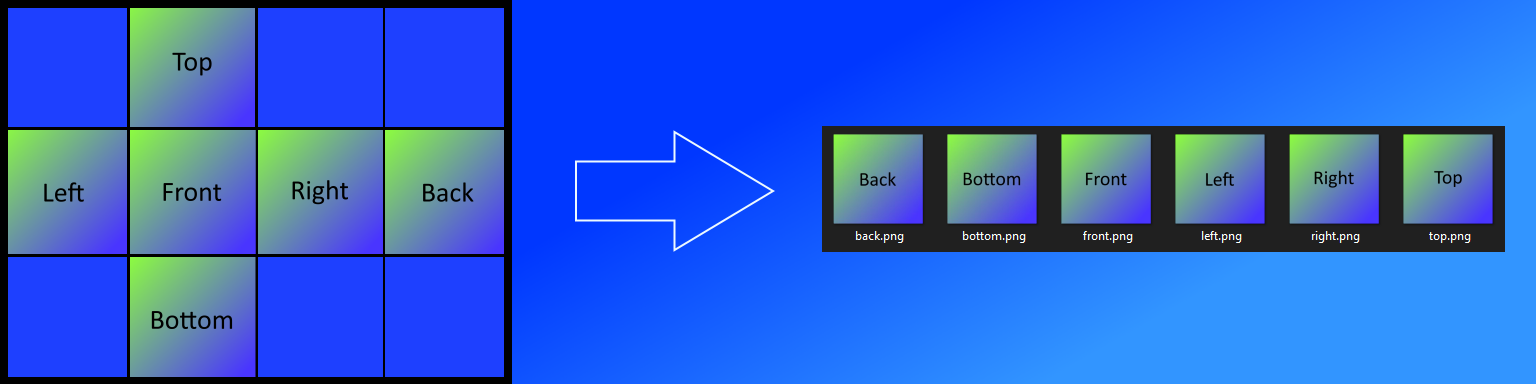
Cubemap images are typically implemented as a single image. Some applications and game engines require multiple images when setting up a cubemap. This library takes the single image and writes subset block images (top, bottom, left, right, front, back) for a variety of formats.
Installation
pip install cubemap-splitter
Numpy 1.19.4 & 64bit Python
Numpy version 1.19.3 will install alongside the package if it is not currently installed. There is a bug with 64bit Python and Numpy 1.19.4:
- https://github.com/opencv/opencv/issues/8139
- https://developercommunity.visualstudio.com/content/problem/1207405/fmod-after-an-update-to-windows-2004-is-causing-a.html
If you have Numpy 1.19.4 installed you will have to downgrade to 1.19.3. This is not an issue on 32bit Python.
Usage
from cubemap_splitter import split_cubemap

# Automatically determine format and create new directory with images at original image location
split_cubemap("C:\\Users\\paulb\\Desktop\\cubemap_formats\\cubemap.png")

# Specify format and write to user defined directory
split_cubemap("C:\\Users\\paulb\\Desktop\\cubemap_formats\\cubemap.png", format_type=1, output_directory="c:/users/paulb/new_splits")
Supported Formats
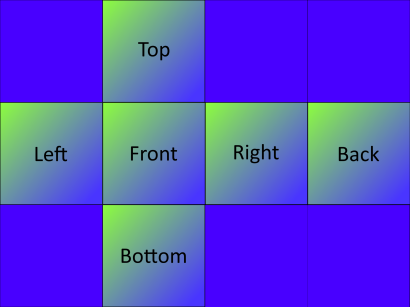
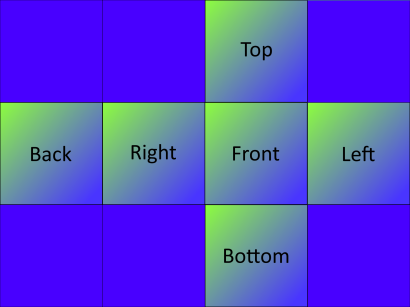
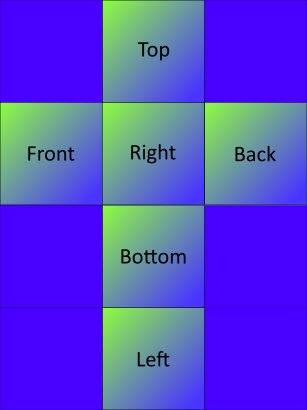
The following formats are supported. Note that the format_type = "auto" default argument will likely suffice. If the split images look incorrect, you can manually specify the format:
-
format_type = 1
-
format_type = 2
-
format_type = 3
-
format_type = 4
-
format_type = 5


Release History
- 0.1.1
- Initial Release
Meta
Paul Burgess: paulburgess1357@gmail.com
Distributed under the MIT license. See LICENSE for more information.
https://github.com/paulburgess1357/Cubemap-Splitter/blob/master/LICENSE
1 maintainer

Metadata
1 maintainer
Release files for cubemap-splitter 0.1.1
For a detailed explanation of source distributions (sdists) and built distributions (wheels), please see the package formats documentation.
Source distribution (sdist)
| File | Size | Uploaded | |
|---|---|---|---|
| cubemap_splitter-0.1.1.tar.gz | 9.2 kB | Details |
Built distribution (wheel)
| File | Interpreter | ABI | Platform | Reset |
|---|---|---|---|---|
| cubemap_splitter-0.1.1-py3-none-any.whl | Python 3 | none | any | Details |
Total release size: 19.4 kB
Release files / cubemap_splitter-0.1.1.tar.gz
| Download URL | cubemap_splitter-0.1.1.tar.gz |
|---|---|
| Size | 9.2 kB |
| Tags | Source |
|
SHA-256 checksum How to use checksums |
0050496476949ab0acf566ead0036a82c5d7e80741f379509232a284fdbf7810
|
|
BLAKE2b-256 checksum How to use checksums |
85751e5ab823c8e4e749c63a61c5c05d2baddb01e3dc026d05cec1815da99005
|
| Upload date | |
|
Uploaded using Trusted Publishing? What is trusted publishing? |
No |
| Uploaded via |
twine/3.2.0 pkginfo/1.6.1 requests/2.25.0 setuptools/49.2.1 requests-toolbelt/0.9.1 tqdm/4.54.1 CPython/3.9.1
|
Release files / cubemap_splitter-0.1.1-py3-none-any.whl
| Download URL | cubemap_splitter-0.1.1-py3-none-any.whl |
|---|---|
| Size | 10.2 kB |
| Tags | Python 3 |
|
SHA-256 checksum How to use checksums |
2fc702620ec1383209e0a7ee654e317db95c2ce51101009b6700d81809d68f6f
|
|
BLAKE2b-256 checksum How to use checksums |
23526cfc0e8df60f95ad9040680cb8e52cd52ee490367ed528e0c385b1c60a1a
|
| Upload date | |
|
Uploaded using Trusted Publishing? What is trusted publishing? |
No |
| Uploaded via |
twine/3.2.0 pkginfo/1.6.1 requests/2.25.0 setuptools/49.2.1 requests-toolbelt/0.9.1 tqdm/4.54.1 CPython/3.9.1
|














