
Python library for automatically splitting and writing cubemap subset images

Project description
Cubemap Splitter
Python library to split up single file cubemaps into multiple block images.
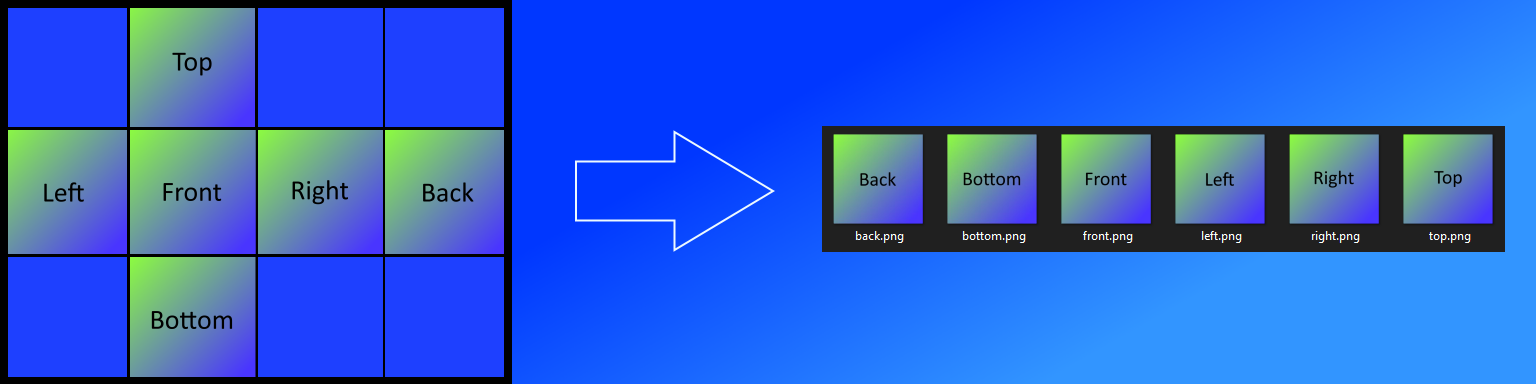
Cubemap images are typically implemented as a single image. Some applications and game engines require multiple images when setting up a cubemap. This library takes the single image and writes subset block images (top, bottom, left, right, front, back) for a variety of formats.
Installation
pip install cubemap_splitter
Numpy 1.19.4 & 64bit Python
Numpy version 1.19.3 will install alongside the package if it is not currently installed. There is a bug with 64bit Python and Numpy 1.19.4:
- https://github.com/opencv/opencv/issues/8139
- https://developercommunity.visualstudio.com/content/problem/1207405/fmod-after-an-update-to-windows-2004-is-causing-a.html
If you have Numpy 1.19.4 installed you will have to downgrade to 1.19.3. This is not an issue on 32bit Python.
Usage
from cubemap_splitter import split_cubemap

# Automatically determine format and create new directory with images at original image location
split_cubemap("C:\\Users\\paulb\\Desktop\\cubemap_formats\\cubemap.png")

# Specify format and write to user defined directory
split_cubemap("C:\\Users\\paulb\\Desktop\\cubemap_formats\\cubemap.png", format_type=1, output_directory="c:/users/paulb/new_splits")
Supported Formats
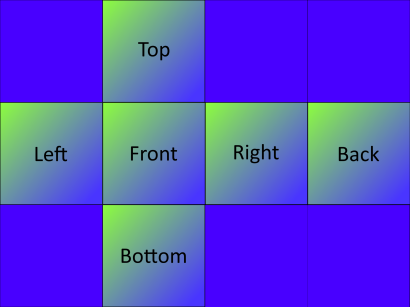
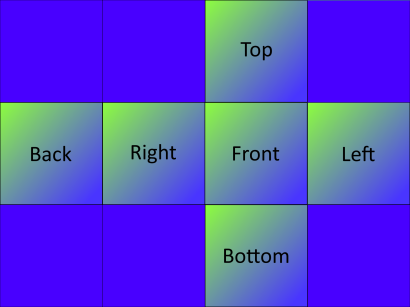
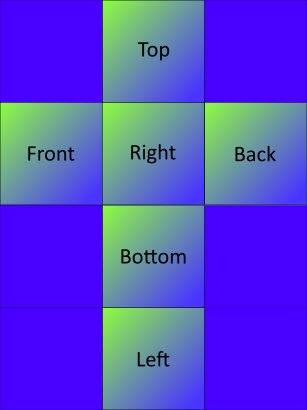
The following formats are supported. Note that the format_type = "auto" default argument will likely suffice. If the split images look incorrect, you can manually specify the format:
-
format_type = 1
-
format_type = 2
-
format_type = 3
-
format_type = 4
-
format_type = 5


Release History
- 0.1.0
- Initial Release
Meta
Paul Burgess: paulburgess1357@gmail.com
Distributed under the MIT license. See LICENSE for more information.
https://github.com/paulburgess1357/Cubemap-Splitter/blob/master/LICENSE
Release history Release notifications | RSS feed


Download files
Download the file for your platform. If you're not sure which to choose, learn more about installing packages.
Source Distribution
Built Distribution
Filter files by name, interpreter, ABI, and platform.
If you're not sure about the file name format, learn more about wheel file names.
Copy a direct link to the current filters
File details
Details for the file cubemap_splitter-0.1.0.tar.gz.
File metadata
- Download URL: cubemap_splitter-0.1.0.tar.gz
- Upload date:
- Size: 9.1 kB
- Tags: Source
- Uploaded using Trusted Publishing? No
- Uploaded via: twine/3.2.0 pkginfo/1.6.1 requests/2.25.0 setuptools/49.2.1 requests-toolbelt/0.9.1 tqdm/4.54.1 CPython/3.9.1
File hashes
| Algorithm | Hash digest | |
|---|---|---|
| SHA256 |
f12e3acca9d4c0fd2121c6f73289c3b846f38ccfb968100e33d66eb1a5aae74f
|
|
| MD5 |
f1f0f2e62f2dc70d225b28b632aea5ac
|
|
| BLAKE2b-256 |
233478a46a9b65838b0a77222cba576d63cf316f94c4b6ec9efcc1cffdfe62be
|
File details
Details for the file cubemap_splitter-0.1.0-py3-none-any.whl.
File metadata
- Download URL: cubemap_splitter-0.1.0-py3-none-any.whl
- Upload date:
- Size: 10.2 kB
- Tags: Python 3
- Uploaded using Trusted Publishing? No
- Uploaded via: twine/3.2.0 pkginfo/1.6.1 requests/2.25.0 setuptools/49.2.1 requests-toolbelt/0.9.1 tqdm/4.54.1 CPython/3.9.1
File hashes
| Algorithm | Hash digest | |
|---|---|---|
| SHA256 |
a80a19decdf4550b1568b8ee7f82c54ec66f60e3dd90fd3739a5a0349074ef9f
|
|
| MD5 |
f70dc961de518d3a90049515a6f70f3e
|
|
| BLAKE2b-256 |
5dde4cb01e1647216b4421e522945646ed309d68746a66b64e032578e2d8970b
|






