
Simple simulator for investors
Verified details
These details have been verified by PyPIProject links
GitHub Statistics
Maintainers

Project description
🔄 cvxsimulator






A simple yet powerful simulator for investment strategies and portfolio backtesting.
Given a universe of $m$ assets we are given prices for each of them at time $t_1, t_2, \ldots t_n$, e.g. we operate using an $n \times m$ matrix where each column corresponds to a particular asset.
In a backtest we iterate in time (e.g. row by row) through the matrix and allocate positions to all or some of the assets. This tool helps to simplify the accounting. It keeps track of the available cash, the profits achieved, etc.
📥 Installation
Install cvxsimulator via pip:
pip install cvxsimulator
📊 Creating Portfolios
The simulator is completely agnostic to the trading policy/strategy. Our approach follows a rather common pattern:
We demonstrate these steps with simple example policies. They are never good strategies, but are always valid ones.
Create the builder object
The user defines a builder object by loading prices and initializing the amount of cash used in an experiment:
import pandas as pd
from cvx.simulator import Builder

prices = pd.read_csv("prices.csv", index_col=0, parse_dates=True, header=0)
b = Builder(prices=prices, initial_aum=1e6)
Prices have to be valid, there may be NaNs only at the beginning and the end of each column in the frame. There can be no NaNs hiding in the middle of any time series.
It is also possible to specify a model for trading costs. The builder helps to fill up the frame of positions. Only once done we construct the actual portfolio.
Loop through time
We have overloaded the __iter__ and __setitem__ methods to create a custom loop.
Let's start with a first strategy. Each day we choose two names from the
universe at random.
Buy one (say 0.1 of your portfolio wealth) and short one the same amount.
import numpy as np

for t, state in b:
    # pick two assets at random
    pair = np.random.choice(state.assets, 2, replace=False)
    # compute the pair
    units = pd.Series(index=state.assets, data=0.0)
    units[pair] = [state.nav, -state.nav] / state.prices[pair].values
    # update the position
    b.position = 0.1 * units
    # Do not apply trading costs
    b.aum = state.aum
Here t is the growing list of timestamps, e.g. in the first iteration t is $t1$, in the second iteration it will be $t1, t2$ etc.
A lot of magic is hidden in the state variable. The state gives access to the currently available cash, the current prices and the current valuation of all holdings.
Here's a slightly more realistic loop. Given a set of $4$ assets we want to implement the popular $1/n$ strategy.
for t, state in b:
    # each day we invest a quarter of the capital in the assets
    b.position = 0.25 * state.nav / state.prices
    b.aum = state.aum
Note that we update the position at the last element in the t list using a series of actual units rather than weights or cashpositions. The builder class also exposes setters for such alternative conventions.
for t, state in b:
    # each day we invest a quarter of the capital in the assets
    b.weights = np.ones(4)*0.25
    b.aum = state.aum
Build the portfolio
Once finished it is possible to build the portfolio object:
portfolio = b.build()
📈 Analytics
The portfolio object supports further analysis and exposes a number of properties, e.g.:
portfolio.nav  # Net Asset Value
portfolio.cash  # Cash position
portfolio.equity  # Equity value
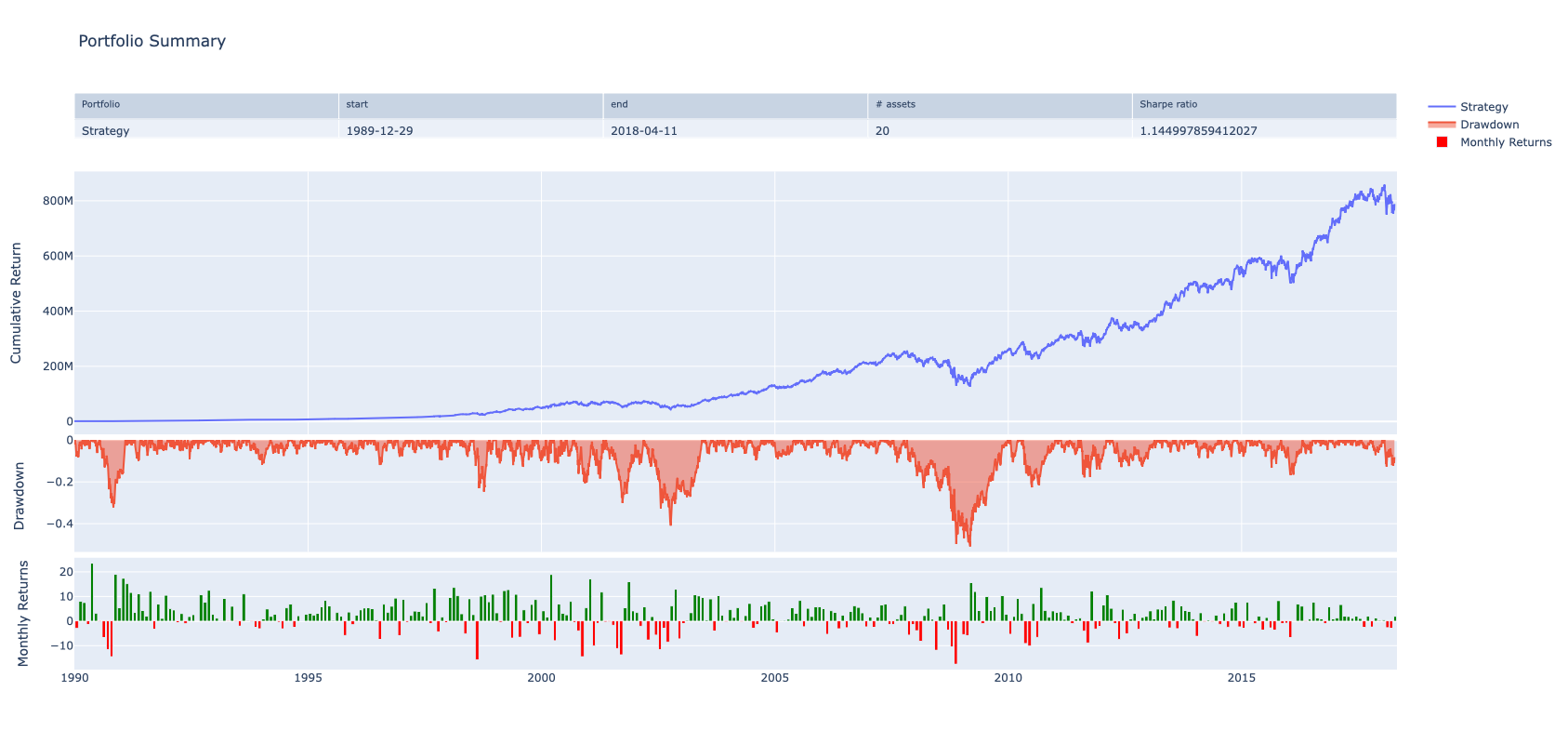
It is possible to generate a snapshot of the portfolio:
portfolio.snapshot()
🛠️ Development
UV Package Manager
Start with:
make install
This will install uv and create the virtual environment defined in pyproject.toml and locked in uv.lock.
Marimo Notebooks
We install marimo on the fly within the aforementioned virtual environment. Execute:
make marimo
This will install and start marimo for interactive notebook development.
📚 Documentation
- Full documentation is available at cvxgrp.org/simulator/book
- API reference can be found in the documentation
- Example notebooks are included in the repository under the
bookdirectory
🤝 Contributing
Contributions are welcome! Here's how you can contribute:
- Fork the repository
- Create a feature branch:
git checkout -b feature-name - Commit your changes:
git commit -m 'Add some feature' - Push to the branch:
git push origin feature-name - Open a pull request
Please make sure to update tests as appropriate and follow the code style of the project.
📄 License
This project is licensed under the Apache License 2.0 - see the LICENSE file for details.
Copyright 2023 Stanford University Convex Optimization Group
Project details
Verified details
These details have been verified by PyPIProject links
GitHub Statistics
Maintainers
Release history Release notifications | RSS feed


Download files
Download the file for your platform. If you're not sure which to choose, learn more about installing packages.
Source Distribution
Built Distribution
Filter files by name, interpreter, ABI, and platform.
If you're not sure about the file name format, learn more about wheel file names.
Copy a direct link to the current filters
File details
Details for the file cvxsimulator-1.3.13.tar.gz.
File metadata
- Download URL: cvxsimulator-1.3.13.tar.gz
- Upload date:
- Size: 7.4 MB
- Tags: Source
- Uploaded using Trusted Publishing? Yes
- Uploaded via: twine/6.1.0 CPython/3.12.9
File hashes
| Algorithm | Hash digest | |
|---|---|---|
| SHA256 |
35c46f9cb36cf4571fdd7ed9f2682cbc15c86e5a855801fa270dfd469fc54a27
|
|
| MD5 |
b5ee8ba293a92b00e9905df0180a180d
|
|
| BLAKE2b-256 |
7967eeaef19e82eca75ae63a10cc765aa96124dcaf00fdf8e56f3f25e709da55
|
Provenance
The following attestation bundles were made for cvxsimulator-1.3.13.tar.gz:
Publisher:
release.yml on cvxgrp/simulator
-
Statement:
-
Statement type:
https://in-toto.io/Statement/v1 -
Predicate type:
https://docs.pypi.org/attestations/publish/v1 -
Subject name:
cvxsimulator-1.3.13.tar.gz -
Subject digest:
35c46f9cb36cf4571fdd7ed9f2682cbc15c86e5a855801fa270dfd469fc54a27 - Sigstore transparency entry: 224581481
- Sigstore integration time:
-
Permalink:
cvxgrp/simulator@e6f59c8760424091ec0031ce32debbf95085a6d3 -
Branch / Tag:
refs/heads/main - Owner: https://github.com/cvxgrp
-
Access:
public
-
Token Issuer:
https://token.actions.githubusercontent.com -
Runner Environment:
github-hosted -
Publication workflow:
release.yml@e6f59c8760424091ec0031ce32debbf95085a6d3 -
Trigger Event:
workflow_dispatch
-
Statement type:
File details
Details for the file cvxsimulator-1.3.13-py3-none-any.whl.
File metadata
- Download URL: cvxsimulator-1.3.13-py3-none-any.whl
- Upload date:
- Size: 23.3 kB
- Tags: Python 3
- Uploaded using Trusted Publishing? Yes
- Uploaded via: twine/6.1.0 CPython/3.12.9
File hashes
| Algorithm | Hash digest | |
|---|---|---|
| SHA256 |
8d0c918e608d3e32b768f37159e7b9f0236fac19c4a4bf2a2e8318ef4f496500
|
|
| MD5 |
33452e02f54d6f293497c2eeeeb008fa
|
|
| BLAKE2b-256 |
27f842569bb23b03ff94e1f19a6b865e16f5bb6c6137139ee2118650e32e3472
|
Provenance
The following attestation bundles were made for cvxsimulator-1.3.13-py3-none-any.whl:
Publisher:
release.yml on cvxgrp/simulator
-
Statement:
-
Statement type:
https://in-toto.io/Statement/v1 -
Predicate type:
https://docs.pypi.org/attestations/publish/v1 -
Subject name:
cvxsimulator-1.3.13-py3-none-any.whl -
Subject digest:
8d0c918e608d3e32b768f37159e7b9f0236fac19c4a4bf2a2e8318ef4f496500 - Sigstore transparency entry: 224581492
- Sigstore integration time:
-
Permalink:
cvxgrp/simulator@e6f59c8760424091ec0031ce32debbf95085a6d3 -
Branch / Tag:
refs/heads/main - Owner: https://github.com/cvxgrp
-
Access:
public
-
Token Issuer:
https://token.actions.githubusercontent.com -
Runner Environment:
github-hosted -
Publication workflow:
release.yml@e6f59c8760424091ec0031ce32debbf95085a6d3 -
Trigger Event:
workflow_dispatch
-
Statement type:






