
Tools to simplify reading and CZI (Carl Zeiss Image) meta and pixel data

Project description
czitools






This repository provides a collection of tools to simplify reading CZI (Carl Zeiss Image) pixel and metadata in Python. It is available as a Python Package on PyPi
Installation
To install czitools (core functionality) use:
pip install czitools
To install the package with all optional dependencies use::
pip install czitools[all]
Local Installation
Local installation for developing etc.:
pip install -e .
Local installation (full functionality):
pip install -e ".[all]"
Supported Operating Systems
Currently this only works on:
- Linux
- Windows
MacOS is not supported yet out of the box, but if one installs pylibCZIrw wheels for MacOS manually the package should work (not tested).
Thanks to the community for providing MacOS wheels for pylibCZIrw, which makes it possible to read and write CZI files on MacOS.
Reading the metadata
Please check use_metadata_tools.py for some examples.
from czitools.metadata_tools.czi_metadata import CziMetadata, writexml
from czitools.metadata_tools.dimension import CziDimensions
from czitools.metadata_tools.boundingbox import CziBoundingBox
from czitools.metadata_tools.channel import CziChannelInfo
from czitools.metadata_tools.scaling import CziScaling
from czitools.metadata_tools.sample import CziSampleInfo
from czitools.metadata_tools.objective import CziObjectives
from czitools.metadata_tools.microscope import CziMicroscope
from czitools.metadata_tools.add_metadata import CziAddMetaData
from czitools.metadata_tools.detector import CziDetector
from czitools.read_tools import read_tools

try:
    import napari
    from napari.utils.colormaps import Colormap

    show_napari = True
except ImportError:
    print("Napari not installed, skipping napari import")
    show_napari = False

# get the metadata_tools at once as one big class
mdata = CziMetadata(filepath)

# get only specific metadata_tools
czi_dimensions = CziDimensions(filepath)
print("SizeS: ", czi_dimensions.SizeS)
print("SizeT: ", czi_dimensions.SizeT)
print("SizeZ: ", czi_dimensions.SizeZ)
print("SizeC: ", czi_dimensions.SizeC)
print("SizeY: ", czi_dimensions.SizeY)
print("SizeX: ", czi_dimensions.SizeX)

# try to write XML to file
xmlfile = writexml(filepath)

# get info about the channels
czi_channels = CziChannelInfo(filepath)

# get the complete metadata_tools from the CZI as one big object
czimd_complete = get_metadata_as_object(filepath)

# get an object containing only the dimension information
czi_scale = CziScaling(filepath)

# get an object containing information about the sample
czi_sample = CziSampleInfo(filepath)

# get info about the objective, the microscope and the detectors
czi_objectives = CziObjectives(filepath)
czi_detectors = CziDetector(filepath)
czi_microscope = CziMicroscope(filepath)

# get info about the sample carrier
czi_sample = CziSampleInfo(filepath)

# get additional metainformation
czi_addmd = CziAddMetaData(filepath)

# get the complete data about the bounding boxes
czi_bbox = CziBoundingBox(filepath)
Reading CZI pixel data
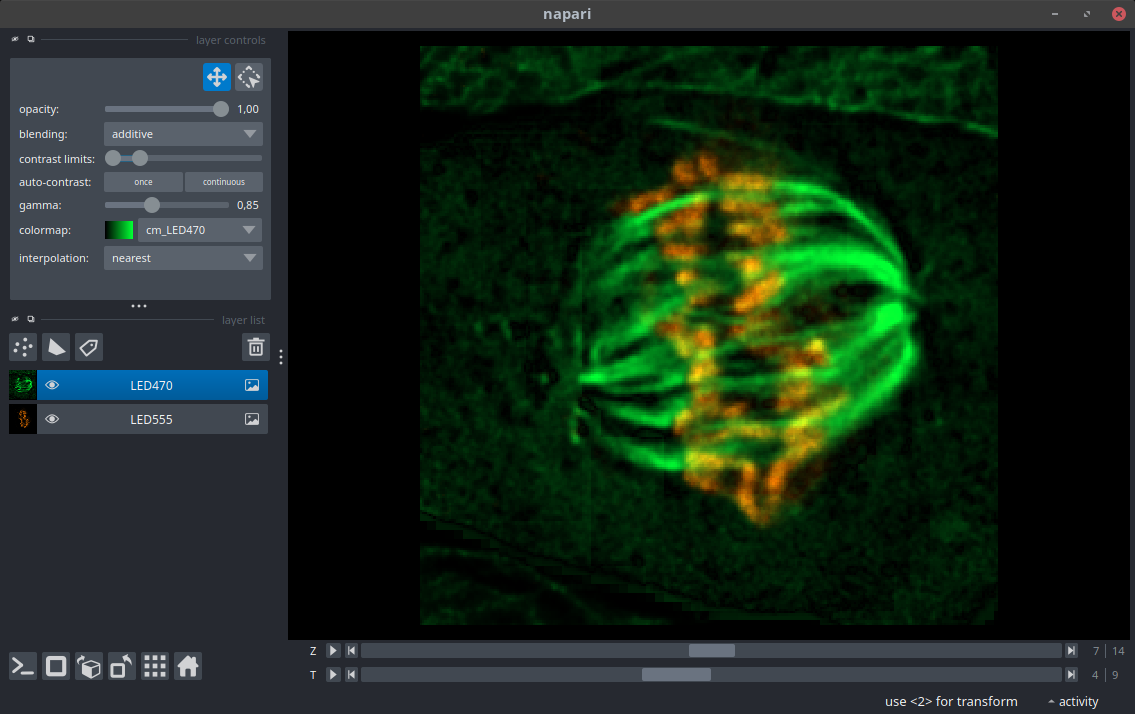
While the pylibCZIrw is focussing on reading individual planes it is also helpful to read CZI pixel data as a STCZYX(A) stack. Please check use_read_tools.py for some examples.
# return a dask or numpy array with dimension order STCZYX(A)
array6d, mdata = read_tools.read_6darray(filepath, use_xarray=True)

if show_napari:

    # show in napari (requires napari to be installed!)
    viewer = napari.Viewer()

    # loop over all channels
    for ch in range(0, array6d.sizes["C"]):

        # extract channel subarray
        sub_array = array6d.sel(C=ch)

        # get the scaling factors for that channel and adapt Z-axis scaling
        scalefactors = [1.0] * len(sub_array.shape)
        scalefactors[sub_array.get_axis_num("Z")] = mdata.scale.ratio["zx_sf"]

        # remove the last scaling factor in case of an RGB image
        if "A" in sub_array.dims:
            # remove the A axis from the scaling factors
            scalefactors.pop(sub_array.get_axis_num("A"))

        # get colors and channel name
        chname = mdata.channelinfo.names[ch]

        # inside the CZI metadata_tools colors are defined as ARGB hexstring
        rgb = "#" + mdata.channelinfo.colors[ch][3:]
        ncmap = Colormap(["#000000", rgb], name="cm_" + chname)

        # add the channel to the viewer
        viewer.add_image(
            sub_array,
            name=chname,
            colormap=ncmap,
            blending="additive",
            scale=scalefactors,
            gamma=0.85,
        )

        # set the axis labels based on the dimensions
        viewer.dims.axis_labels = sub_array.dims

    napari.run()
Reading Scene Stacks (read_stacks)
read_stacks supports scene-wise reading with optional stacking:
from czitools.read_tools import read_tools

result, dims, num_stacks = read_tools.read_stacks(
    filepath,
    use_dask=True,
    use_xarray=True,
    stack_scenes=True,
)
Important return behavior:
stack_scenes=False: always returns a list (one array per scene)stack_scenes=Trueand shapes match: returns one stacked array (withSdim)stack_scenes=Trueand shapes differ: returns a list (with warning)
If you prefer strict return contracts for typed code:
read_tools.read_stacks_list(...)always returns a listread_tools.read_stacks_stacked(...)requires stacked output and raisesValueErrorwhen scenes cannot be stacked
Napari Display Helpers
For robust display in Napari (including string channel labels and list-of-stacks results), use the helpers from czitools.utils.napari_tools.
Single array:
from czitools.utils.napari_tools import display_xarray_in_napari

subset_planes = array6d.attrs.get("subset_planes", {})
display_xarray_in_napari(array6d, mdata, subset_planes)
List of stacks (works even if scenes have different shapes):
from czitools.utils.napari_tools import display_xarray_list_in_napari

display_xarray_list_in_napari(result_list, mdata)
Tip: if you only want one stack from a list, select it first:
idx = 0
subset_planes = result_list[idx].attrs.get("subset_planes", {})
display_xarray_in_napari(result_list[idx], mdata, subset_planes)
NDV Viewer Helpers
For NDV visualization workflows, czitools provides small helpers to generate channel LUTs and axis scales directly from CZI metadata:
from czitools.metadata_tools.czi_metadata import CziMetadata
from czitools.utils.ndv_tools import create_luts_ndv, create_scales_ndv

mdata = CziMetadata(filepath)
luts = create_luts_ndv(mdata)
scales = create_scales_ndv(mdata)
These helpers are used by demo/scripts/use_ndv.py and keep color/scale conversion logic in one place.
Colab Notebooks
Read CZI metadata
The basic usage can be inferred from this sample notebook:

Read CZI pixeldata
The basic usage can be inferred from this sample notebook:
Write OME-ZARR from 5D CZI image data
The basic usage can be inferred from this sample notebook:
Write CZI using ZSTD compression
The basic usage can be inferred from this sample notebook:
Show planetable of a CZI image as surface
The basic usage can be inferred from this sample notebook:
Read a CZI and segment using Voronoi-Otsu provided by PyClesperanto GPU processing
The basic usage can be inferred from this sample notebook:
Remarks
⚠️ Important: Using czitools with Napari on Linux
If you use Napari on Linux and need get_planetable() or read_tiles():
📖 Linux + Napari + Planetable Guide ⭐ READ THIS
The Solution: Sequential Execution Pattern
Extract planetable BEFORE starting Napari to avoid threading conflicts:
# Step 1: Get planetable FIRST (before Napari)
from czitools.utils.planetable import get_planetable
df, _ = get_planetable("file.czi")

# Step 2: Load image (thread-safe)
from czitools.read_tools import read_tools
array, _ = read_tools.read_6darray("file.czi", use_dask=True)

# Step 3: NOW start Napari (safe - no conflicts!)
import napari
viewer = napari.Viewer()
viewer.add_image(array)
napari.run()
✅ Full planetable functionality on Linux
✅ No crashes
✅ No performance loss
Alternative: Safe Mode (simpler, but no planetable/tiles):
import os
os.environ["CZITOOLS_DISABLE_AICSPYLIBCZI"] = "1"

from czitools.read_tools import read_tools
# Use read_6darray() instead of read_tiles()
array, mdata = read_tools.read_6darray("file.czi", use_dask=True)
Why? aicspylibczi has threading conflicts with PyQt on Linux.
Solution: Extract planetable before PyQt event loop starts (sequential execution).
📄 Documentation:
- Linux + Napari + Planetable Guide - Complete examples
- Threading Considerations - Technical details
- Quick Fix Guide - Emergency fixes
See demo/scripts/napari_with_process_isolation.py for complete examples and docs/threading_considerations.md for detailed information.
Release history Release notifications | RSS feed


Download files
Download the file for your platform. If you're not sure which to choose, learn more about installing packages.
Source Distribution
Built Distribution
Filter files by name, interpreter, ABI, and platform.
If you're not sure about the file name format, learn more about wheel file names.
Copy a direct link to the current filters
File details
Details for the file czitools-0.14.0.tar.gz.
File metadata
- Download URL: czitools-0.14.0.tar.gz
- Upload date:
- Size: 78.4 kB
- Tags: Source
- Uploaded using Trusted Publishing? No
- Uploaded via: twine/6.1.0 CPython/3.13.7
File hashes
| Algorithm | Hash digest | |
|---|---|---|
| SHA256 |
f6e8f5e113bbc91757ac20f4218f9a28331e1c9fbedb0b4cf6b94fc73f209915
|
|
| MD5 |
985beb05ed477c739b69bc0eab238638
|
|
| BLAKE2b-256 |
ae9e2891071532a475a9fc10a126afa08c846ed41d875fdb81c22766367f2794
|
File details
Details for the file czitools-0.14.0-py3-none-any.whl.
File metadata
- Download URL: czitools-0.14.0-py3-none-any.whl
- Upload date:
- Size: 85.8 kB
- Tags: Python 3
- Uploaded using Trusted Publishing? No
- Uploaded via: twine/6.1.0 CPython/3.13.7
File hashes
| Algorithm | Hash digest | |
|---|---|---|
| SHA256 |
49be3c2f5397736771be95442663d0eed8b07e59bf3446042df2ef4c907edb70
|
|
| MD5 |
95c5ac4a13a867f35bdbe34d84461036
|
|
| BLAKE2b-256 |
1f25f41ac1561d525329f1beb8f60e1be6de2cca555b22722e9b677c31e53b77
|






