
czitools






This repository provides tools for reading CZI (Carl Zeiss Image) pixel data and metadata in Python, interpreting CZI well plates as an HCS Plate → Well → Field model, and converting CZI data to OME-Zarr. It is available as a Python package on PyPI.
For full documentation see sebi06.github.io/czitools.
Installation
Basic Installation
Install the core package from PyPI:
pip install czitools
Optional Features
Install with additional functionality using optional extras:
# OME-Zarr export (conversion + validation)
pip install "czitools[omezarr]"

# OME-Zarr export with GUI converter application
pip install "czitools[omezarr-gui]"

# HCS plate analysis and visualization
pip install "czitools[analysis]"

# Everything (all optional dependencies)
pip install "czitools[all]"
Development Installation
For development or to get the latest unreleased features:
# Clone the repository
git clone https://github.com/sebi06/czitools.git
cd czitools

# Install in editable mode with all extras
pip install -e ".[all]"
Conda/Pixi Development Environment
The cloned repository includes both a conda environment file and a Pixi workspace:
# Create the provided conda environment
conda env create -f env_czitools.yml
conda activate czitools
python -m pip install -e ".[all]"

# Or install the locked Pixi workspace (Windows and Linux)
pixi install
For more details see the Installation docs.
Quick Start
from czitools.metadata_tools import CziMetadata
from czitools.read_tools import read_6darray, read_stacks_list

# Read metadata without loading pixels.
mdata = CziMetadata("path/to/file.czi")
print(mdata.image_required.SizeS)
print(mdata.image_required.SizeC)
print(mdata.scale_required.X)
print(mdata.scene_shape_is_consistent)  # True when all scenes can be stacked

# scene_shape_tolerance (default=1) controls the maximum allowed pixel
# difference in width or height between scenes before they are considered
# inconsistent. A value of 1 absorbs the ±1-pixel rounding that commonly
# occurs with HCS plate coordinates and allows those scenes to be stacked.
mdata_plate = CziMetadata("path/to/plate.czi", scene_shape_tolerance=1)

# Read regular, equal-sized scenes eagerly as a labelled STCZYX(A) array.
array6d, mdata = read_6darray("path/to/file.czi", use_xarray=True)

# For HCS plate files whose scenes differ by ±1 pixel due to coordinate
# rounding, pass scene_stack_tolerance=1 so read_stacks crops them to a
# common shape and stacks them into one array (default=0, strict equality).
from czitools.read_tools import read_stacks
stacked, dims, n, mdata = read_stacks(
    "path/to/plate.czi",
    use_dask=True,
    use_xarray=True,
    stack_scenes=True,
    scene_stack_tolerance=1,
)

# For irregular scenes, keep genuinely lazy reads as a list.
scenes, dims, scene_count, mdata = read_stacks_list(
    "path/to/file.czi",
    use_dask=True,
    use_xarray=True,
)
first_plane = scenes[0].isel(T=0, C=0, Z=0).compute()
Image dimension sizes (SizeS, SizeT, SizeC, SizeZ, SizeY, SizeX,
and optional dimensions) describe the full-resolution data physically stored
in CZI subblocks. They do not use numeric XML Size* declarations. This is
important for split acquisitions, where every child file can retain XML for
the complete acquisition while storing only a subset of the global scene
indices. Use mdata.stored_scene_indices to inspect those physical S keys.
read_6darray(..., use_dask=True) also provides genuinely lazy pixel access
when the CZI has equal-sized scenes and consistent pixel types.
Both eager and lazy reads use each scene's full-resolution, non-pyramid
bounding rectangle, so rounded pyramid coverage cannot pad or change the
regular STCZYX(A) shape.
read_stacks(..., use_dask=True) groups up to 64 planes per task by default to
reduce file-open and scheduler overhead. Set lazy_read_strategy="plane" for
the finest-grained random access, or tune the group with planes_per_chunk.
For gigapixel CZIs (single planes over ~256 MB uncompressed) read_stacks
automatically activates spatial Y/X tiling: each dask chunk becomes one
ROI-based read via pylibCZIrw, so viewers such as napari only load the tiles
that intersect the visible viewport instead of full planes. Tune the tile edge
with tile_size (default 4096) or the trigger threshold with
chunk_memory_limit. Small planes keep the fast whole-plane path.
For interactive viewers that need a multiscale pyramid (napari's
add_image(..., multiscale=True), gigapixel whole-slide display, etc.) use
read_stacks_multiscale:
from czitools.read_tools import get_pyramid_zooms, read_stacks_multiscale

# Inspect the stored pyramid without reading pixels.
print(get_pyramid_zooms("path/to/large.czi"))
# -> [1.0, 0.5, 0.25, 0.125, 0.0625]   (standard 2x pyramid)

# One lazy dask array per level, ready for napari.
levels, infos, dims, num_stacks, mdata = read_stacks_multiscale(
    "path/to/large.czi",
    max_coarse_edge=8192,   # force coarser synthetic levels if needed
)
Levels detected on disk are served directly from their subblocks (no
resampling). If the coarsest stored level is still larger than
max_coarse_edge on any edge, additional coarser levels are synthesized
via libCZI's C++ downsampler so the top of the pyramid always fits in one
GPU texture.
For detailed usage examples see the Usage docs.
Features
CZI Well Plates and OME-Zarr HCS
from czitools.export_tools import convert_czi2hcs_ngff, validate_ome_zarr
from czitools.metadata_tools import CziMetadata
from czitools.read_tools import read_field

filepath = "path/to/plate.czi"
mdata = CziMetadata(filepath)

if mdata.hcs is None:
    raise ValueError(mdata.hcs_status.reason)

well = mdata.hcs.get_well("B04")
field, _ = read_field(filepath, well="B04", field=0)

# Requires: pip install "czitools[omezarr]"
output = convert_czi2hcs_ngff(filepath, overwrite=True)
assert validate_ome_zarr(output)
Well names accept forms such as B4, b04, and B/4. Field indices are
zero-based within a well. The OME-Zarr converter writes the HCS hierarchy
plate → well → field image → multiscale level.
convert_czi2hcs_ngff() writes OME-NGFF v0.5 by default and supports v0.6
when requested. OME-NGFF v0.6 HCS output requires ngff-zarr>=0.47.0; the
validator selects the image or HCS reader from the store layout and declared
version.
HCS Plate Inspection CLI
Use czi_hcs_check to inspect CZI well-plate metadata from the command line
with colorized output. The inspector displays all
full-resolution, subblock-derived dimension sizes and, by default, limits the
HCS hierarchy to fields physically stored in the selected file:
# Inspect dimensions and HCS fields physically stored in this file
czi_hcs_check -f plate.czi

# Inspect a specific well
czi_hcs_check -f plate.czi --well B4

# Omit the well summary table while retaining plate, sample, and field details
czi_hcs_check -f plate.czi --no-well-table

# Show the complete acquisition model declared by the CZI XML
czi_hcs_check -f plate.czi --show-declared

# Get help
czi_hcs_check --help
Use --no-well-table for large plates when the per-well summary would make
the terminal output unnecessarily long. --show-declared is useful for split
acquisitions when you want the planned plate layout rather than only the
payload of the current file.
Or use the utility functions in Python:
from czitools.utils import print_hcs_plate_info, print_sample_metadata, print_well_fields
from czitools.metadata_tools import CziMetadata

mdata = CziMetadata("plate.czi")

# Print plate hierarchy with well summary
print_hcs_plate_info(mdata)

# Print sample metadata and scene details
print_sample_metadata(mdata)

# Print field information for a specific well
print_well_fields(mdata, well_name="B4")
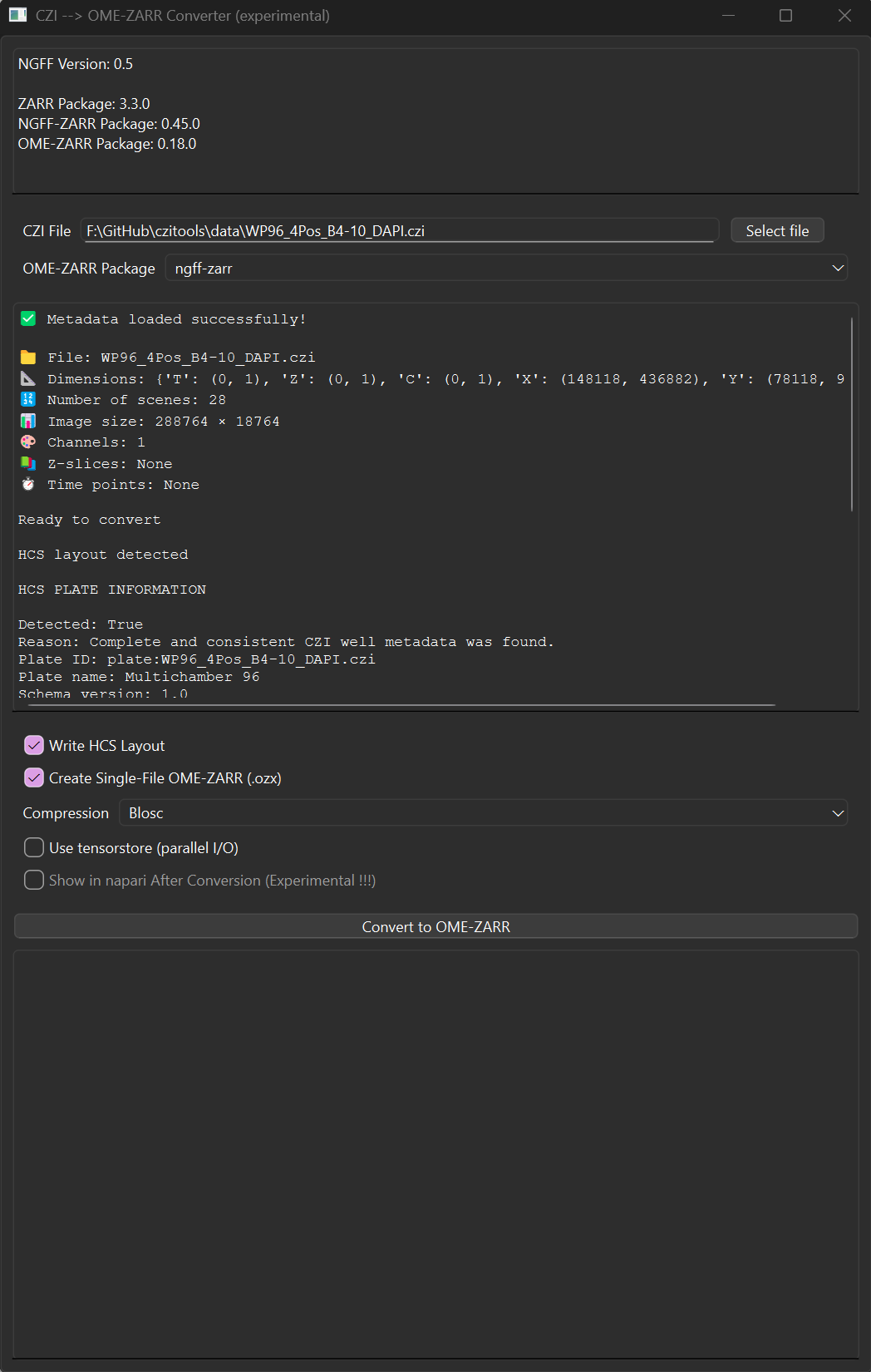
OME-Zarr Converter GUI
The experimental converter GUI exports individual CZI images and HCS plates
using either ome-zarr-py or ngff-zarr. All conversions use Zarr v3. The GUI
loads the selected file's metadata automatically and enables Write HCS
layout when a plate layout is detected. For multi-scene, non-HCS files, the
Scene ID selector appears directly below the HCS option. A single Create
Single-File OME-ZARR (.ozx) checkbox selects archive output for both HCS and
non-HCS conversions. Additional controls configure compression and optional
napari viewing. The ngff-zarr backend uses zarrista automatically. The
metadata preview shows the detected dimensions and scenes before conversion,
while the log panel reports progress.
Install and launch it with:
pip install "czitools[omezarr-gui]"
czitools-omezarr-gui
From the repository's Pixi environment, use the equivalent task:
pixi run omezarr-gui
See the usage documentation for the workflow and Python/napari integration examples.
Analysis Tools
The analysis_tools package provides image processing and HCS plate analysis utilities:
from czitools.analysis_tools import ArrayProcessor, process_hcs_omezarr, create_well_plate_heatmap

# Process 2D images with filters and object detection
proc = ArrayProcessor(image_2d)
filtered = proc.apply_gaussian_filter(sigma=2)
binary = ArrayProcessor(filtered).apply_threshold(value=100)
labelled, count, props = ArrayProcessor(binary).label_objects(
    min_size=50,
    measure_params=True,
)

# Analyze HCS OME-Zarr plates
results = process_hcs_omezarr("plate.ome.zarr", channel2analyze=0)

# Visualize results as heatmap
fig = create_well_plate_heatmap(results, num_rows=8, num_cols=12)
Requires: pip install "czitools[analysis]"
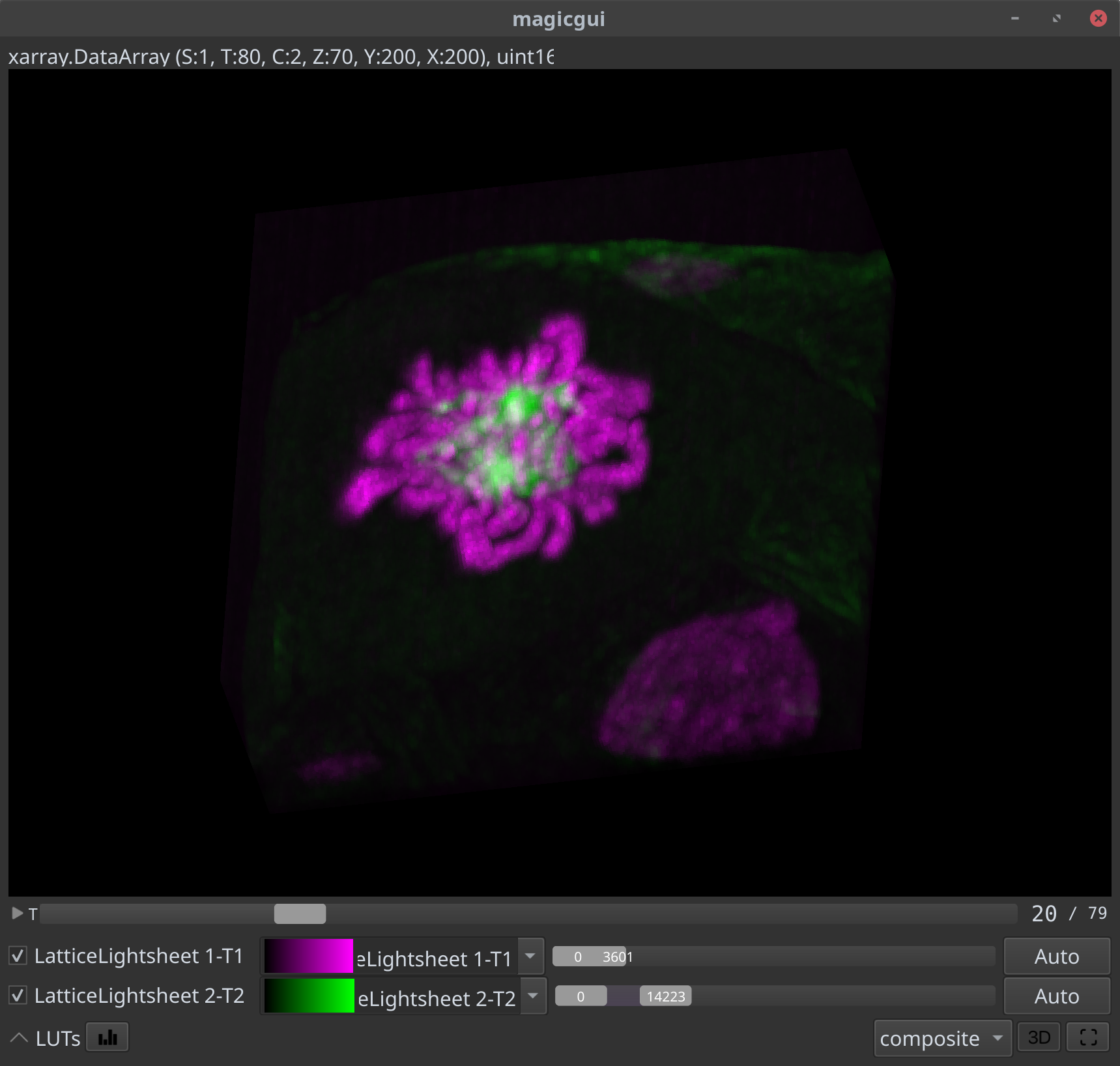
CZI inside NDV
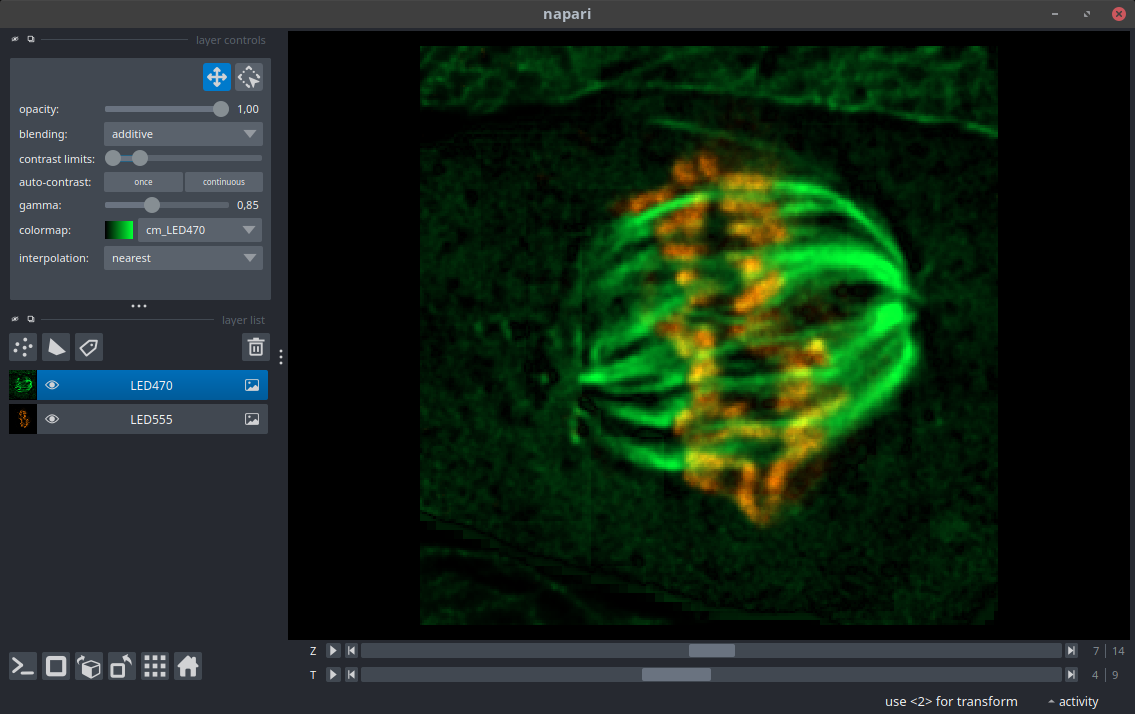
CZI inside Napari
Colab Notebooks
| Topic | Link |
|---|---|
| General usage czitools |  |
| Read CZI metadata | |
| Read CZI pixel data | |
| Read CZI well-plate data | |
| Process OME-Zarr HCS plate | |
| Show planetable as surface | |
| Segment with Voronoi-Otsu | |
Contributing
The Pixi workspace is the recommended development setup on Windows and Linux. After cloning the repository, install the locked environment and run the local quality checks:
pixi install
pixi run lint
pixi run test-no-net
Please keep changes focused, add or update tests for behavioral changes, and open an issue before starting a large API or dependency change.
1 maintainer

Metadata
1 maintainer
Release files for czitools 0.26.0
For a detailed explanation of source distributions (sdists) and built distributions (wheels), please see the package formats documentation.
Source distribution (sdist)
| File | Size | Uploaded | |
|---|---|---|---|
| czitools-0.26.0.tar.gz | 27.4 MB | Details |
Built distribution (wheel)
| File | Interpreter | ABI | Platform | Reset |
|---|---|---|---|---|
| czitools-0.26.0-py3-none-any.whl | Python 3 | none | any | Details |
Total release size: 27.6 MB
Release files / czitools-0.26.0.tar.gz
| Download URL | czitools-0.26.0.tar.gz |
|---|---|
| Size | 27.4 MB |
| Tags | Source |
|
SHA-256 checksum How to use checksums |
2f85b9cf8fb8cf87e0881e403f1f5103080f1bce585e0650098c5c7db65e1903
|
|
BLAKE2b-256 checksum How to use checksums |
894583f0fe589bdb59516e4109c9e54fbb71377b746e75c25821b19a200efc11
|
| Upload date | |
|
Uploaded using Trusted Publishing? What is trusted publishing? |
No |
| Uploaded via |
twine/7.0.0 CPython/3.13.14
|
Release files / czitools-0.26.0-py3-none-any.whl
| Download URL | czitools-0.26.0-py3-none-any.whl |
|---|---|
| Size | 173.9 kB |
| Tags | Python 3 |
|
SHA-256 checksum How to use checksums |
8055420846a5c91e4056b5cc5b3a95ab64a7780646db9ffb9cc5a1e5d70f8f76
|
|
BLAKE2b-256 checksum How to use checksums |
f034d9bb090333b419c4486b8c9e3b003b239aa2e4cc4a623bfee1ab088013ba
|
| Upload date | |
|
Uploaded using Trusted Publishing? What is trusted publishing? |
No |
| Uploaded via |
twine/7.0.0 CPython/3.13.14
|














