
DAO AI: A modular, multi-agent orchestration framework for complex AI workflows. Supports agent handoff, tool integration, and dynamic configuration via YAML.
Verified details
These details have been verified by PyPIProject links
GitHub Statistics
Maintainers

Project description
DAO: Declarative Agent Orchestration


Production-grade AI agents defined in YAML, powered by LangGraph, deployed on Databricks.
DAO is an infrastructure-as-code framework for building, deploying, and managing multi-agent AI systems. Instead of writing boilerplate Python code to wire up agents, tools, and orchestration, you define everything declaratively in YAML configuration files.
# Define an agent in 10 lines of YAML
agents:
  product_expert:
    name: product_expert
    model: *claude_sonnet
    tools:
      - *vector_search_tool
      - *genie_tool
    prompt: |
      You are a product expert. Answer questions about inventory and pricing.
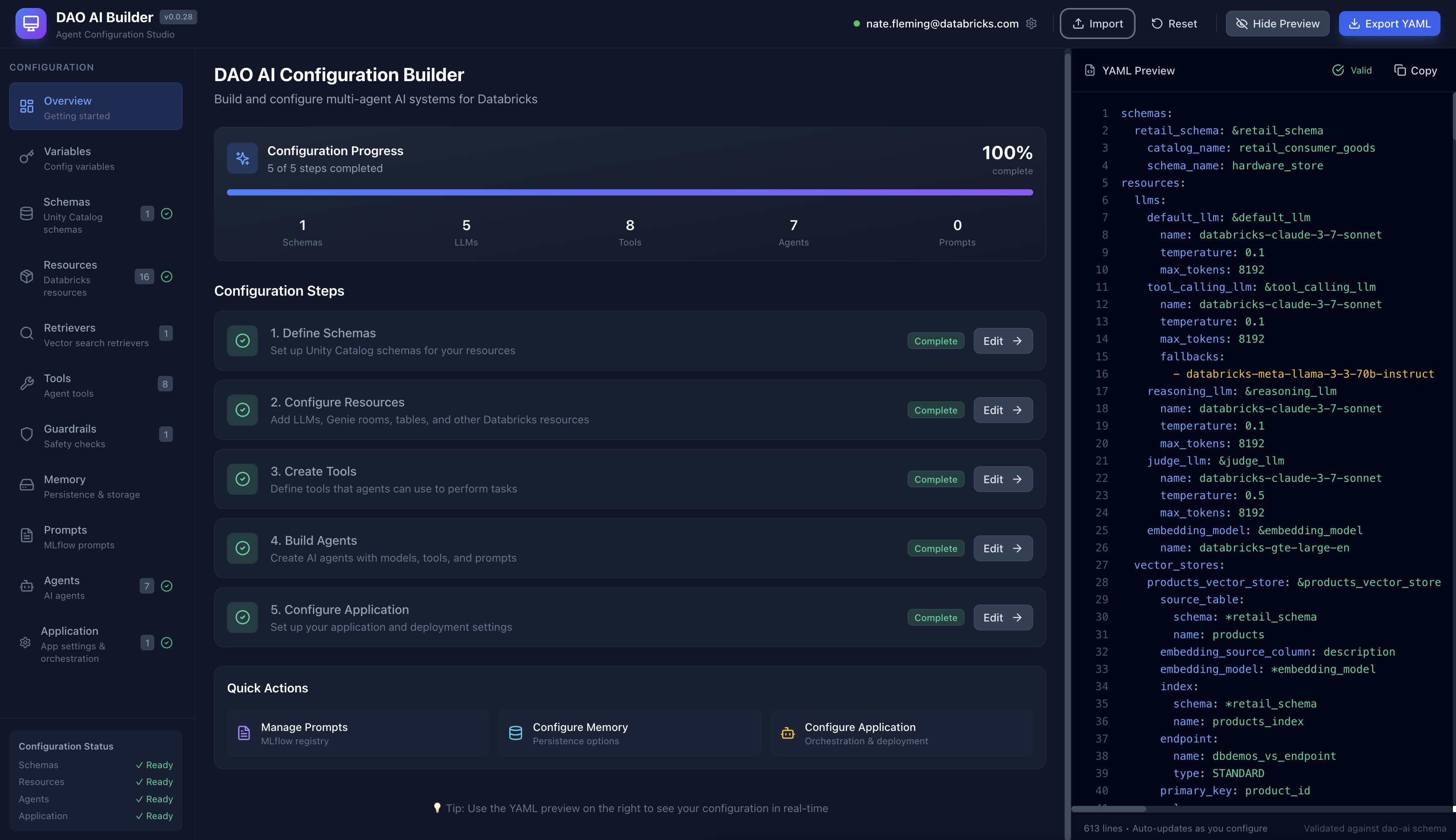
🎨 Visual Configuration Studio
Prefer a visual interface? Check out DAO AI Builder — a React-based web application that provides a graphical interface for creating and editing DAO configurations. Perfect for:
- Exploring DAO's capabilities through an intuitive UI
- Learning the configuration structure with guided forms
- Building agents visually without writing YAML manually
- Importing and editing existing configurations
DAO AI Builder generates valid YAML configurations that work seamlessly with this framework. Use whichever workflow suits you best — visual builder or direct YAML editing.
📚 Table of Contents
- Why DAO?
- Comparing Databricks AI Agent Platforms
- Architecture
- Key Capabilities
- 1. Multi-Tool Support
- 2. On-Behalf-Of User Support
- 3. Advanced Caching (Genie Queries)
- 4. Vector Search Reranking
- 5. Human-in-the-Loop Approvals
- 6. Memory & State Persistence
- 7. MLflow Prompt Registry Integration
- 8. Automated Prompt Optimization
- 9. Guardrails & Response Quality Middleware
- 10. Conversation Summarization
- 11. Structured Output (Response Format)
- 12. Custom Input & Custom Output Support
- 13. Hook System
- Quick Start
- Configuration Reference
- Example Configurations
- CLI Reference
- Python API
- Project Structure
- Common Questions
- Contributing
- License
Why DAO?
For Newcomers to AI Agents
What is an AI Agent? Think of an AI agent as an intelligent assistant that can actually do things, not just chat. Here's the difference:
- Chatbot: "The temperature in San Francisco is 65°F" (just talks)
- AI Agent: Checks weather APIs, searches your calendar, books a restaurant, and sends you a reminder (takes action)
An AI agent can:
- Reason about what steps are needed to accomplish a goal
- Use tools like databases, APIs, and search engines to gather information
- Make decisions about which actions to take next
- Coordinate with other specialized agents to handle complex requests
Real-world example: "Find products that are low on stock and email the warehouse manager"
- A chatbot would say: "You should check inventory and contact the warehouse manager"
- An AI agent would: Query the database, identify low-stock items, compose an email with the list, and send it
What is Databricks? Databricks is a cloud platform where companies store and analyze their data. Think of it as a combination of:
- Data warehouse (where your business data lives)
- AI/ML platform (where you train and deploy models)
- Governance layer (controlling who can access what data)
Databricks provides several tools that DAO integrates with:
- Unity Catalog: Your organization's data catalog with security and permissions
- Model Serving: Turns AI models into APIs that applications can call
- Vector Search: Finds relevant information using semantic similarity (understanding meaning, not just keywords)
- Genie: Lets people ask questions in plain English and automatically generates SQL queries
- MLflow: Tracks experiments, versions models, and manages deployments
Why DAO? DAO brings all these Databricks capabilities together into a unified framework for building AI agent systems. Instead of writing hundreds of lines of Python code to connect everything, you describe what you want in a YAML configuration file, and DAO handles the wiring for you.
Think of it as:
- Traditional approach: Building with LEGO bricks one by one (writing Python code)
- DAO approach: Using a blueprint that tells you exactly how to assemble the pieces (YAML configuration)
Comparing Databricks AI Agent Platforms
Databricks offers three complementary approaches to building AI agents. Each is powerful and purpose-built for different use cases, teams, and workflows.
| Aspect | DAO (This Framework) | Databricks Agent Bricks | Kasal |
|---|---|---|---|
| Interface | YAML configuration files | Visual GUI (AI Playground) | Visual workflow designer (drag-and-drop canvas) |
| Workflow | Code-first, Git-native | UI-driven, wizard-based | Visual flowchart design with real-time monitoring |
| Target Users | ML Engineers, Platform Teams, DevOps | Data Analysts, Citizen Developers, Business Users | Business analysts, workflow designers, operations teams |
| Learning Curve | Moderate (requires YAML/config knowledge) | Low (guided wizards and templates) | Low (visual drag-and-drop, no coding required) |
| Underlying Engine | LangGraph (state graph orchestration) | Databricks-managed agent runtime | CrewAI (role-based agent collaboration) |
| Orchestration | Multi-agent patterns (Supervisor, Swarm) | Multi-agent Supervisor | CrewAI sequential/hierarchical processes |
| Agent Philosophy | State-driven workflows with graph execution | Automated optimization and template-based | Role-based agents with defined tasks and goals |
| Tool Support | Python, Factory, UC Functions, MCP, Agent Endpoints, Genie | UC Functions, MCP, Genie, Agent Endpoints | Genie, Custom APIs, UC Functions, Data connectors |
| Advanced Caching | LRU + Semantic caching (Genie SQL caching) | Standard platform caching | Standard platform caching |
| Memory/State | PostgreSQL, Lakebase, In-Memory, Custom backends | Built-in ephemeral state per conversation | Built-in conversation state (entity memory with limitations) |
| Middleware/Hooks | Assert/Suggest/Refine, Custom lifecycle hooks, Guardrails | None (optimization via automated tuning) | None (workflow-level control via UI) |
| Deployment | Databricks Asset Bundles, MLflow, CI/CD pipelines | One-click deployment to Model Serving | Databricks Marketplace or deploy from source |
| Version Control | Full Git integration, code review, branches | Workspace-based (not Git-native) | Source-based (Git available if deployed from source) |
| Customization | Unlimited (Python code, custom tools) | Template-based workflows | Workflow-level customization via visual designer |
| Configuration | Declarative YAML, infrastructure-as-code | Visual configuration in UI | Visual workflow canvas with property panels |
| Monitoring | MLflow tracking, custom logging | Built-in evaluation dashboard | Real-time execution tracking with detailed logs |
| Evaluation | Custom evaluation frameworks | Automated benchmarking and optimization | Visual execution traces and performance insights |
| Best For | Production multi-agent systems with complex requirements | Rapid prototyping and automated optimization | Visual workflow design and operational monitoring |
When to Use DAO
✅ Code-first workflow — You prefer infrastructure-as-code with full Git integration, code reviews, and CI/CD pipelines
✅ Advanced caching — You need LRU + semantic caching for Genie queries to optimize costs at scale
✅ Custom middleware — You require assertion/validation logic, custom lifecycle hooks, or human-in-the-loop workflows
✅ Custom tools — You're building proprietary Python tools or integrating with internal systems beyond standard integrations
✅ Swarm orchestration — You need peer-to-peer agent handoffs (not just top-down supervisor routing)
✅ Stateful memory — You require persistent conversation state in PostgreSQL, Lakebase, or custom backends
✅ Configuration reuse — You want to maintain YAML templates, share them across teams, and version them in Git
✅ Regulated environments — You need deterministic, auditable, and reproducible configurations for compliance
✅ Complex state management — Your workflows require sophisticated state graphs with conditional branching and loops
When to Use Agent Bricks
✅ Rapid prototyping — You want to build and test an agent in minutes using guided wizards
✅ No-code/low-code — You prefer GUI-based configuration over writing YAML or designing workflows
✅ Automated optimization — You want the platform to automatically tune prompts, models, and benchmarks for you
✅ Business user access — Non-technical stakeholders (analysts, product managers) need to build or modify agents
✅ Getting started — You're new to AI agents and want pre-built templates (Information Extraction, Knowledge Assistant, Custom LLM)
✅ Standard use cases — Your needs are met by UC Functions, MCP servers, Genie, and agent endpoints
✅ Multi-agent supervisor — You need top-down orchestration with a supervisor routing to specialists
✅ Quality optimization — You want automated benchmarking and continuous improvement based on feedback
When to Use Kasal
✅ Visual workflow design — You want to see and design agent interactions as a flowchart diagram
✅ Operational monitoring — You need real-time visibility into agent execution with detailed logs and traces
✅ Role-based agents — Your use case fits the CrewAI model of agents with specific roles, goals, and tasks
✅ Business process automation — You're automating workflows where agents collaborate sequentially or hierarchically
✅ Data analysis pipelines — You need agents to query, analyze, and visualize data with clear execution paths
✅ Content generation workflows — Your agents collaborate on research, writing, and content creation tasks
✅ Team visibility — Operations teams need to monitor and understand what agents are doing in real-time
✅ Quick deployment — You want to deploy from Databricks Marketplace with minimal setup
✅ Drag-and-drop simplicity — You prefer designing workflows visually rather than writing configuration files
Using All Three Together
Many teams use multiple approaches in their workflow, playing to each platform's strengths:
Progressive Sophistication Path
- Design in Kasal → Visually prototype workflows and validate agent collaboration patterns
- Optimize in Agent Bricks → Take validated use cases and let Agent Bricks auto-tune them
- Productionize in DAO → For complex systems needing advanced features, rebuild in DAO with full control
Hybrid Architecture Patterns
Pattern 1: Division by Audience
- Kasal: Operations teams design and monitor customer support workflows
- Agent Bricks: Data analysts create optimized information extraction agents
- DAO: ML engineers build the underlying orchestration layer with custom tools
Pattern 2: Composition via Endpoints
- Agent Bricks: Creates a Knowledge Assistant for HR policies (optimized automatically)
- Kasal: Designs a visual workflow for employee onboarding that calls the HR agent
- DAO: Orchestrates enterprise-wide employee support with custom payroll tools, approval workflows, and the agents from both platforms
Pattern 3: Development Lifecycle
- Week 1: Rapid prototype in Agent Bricks to validate business value
- Week 2: Redesign workflow visually in Kasal for team review and monitoring
- Week 3: Productionize in DAO with advanced caching, middleware, and CI/CD
Real-World Example: Customer Support System
┌─────────────────────────────────────────────────────────┐
│                    DAO (Orchestration Layer)             │
│  • Advanced caching for FAQ queries                     │
│  • Custom middleware for compliance checking            │
│  • Swarm pattern for complex issue routing              │
└─────────────┬───────────────────────────┬───────────────┘
              │                           │
              ▼                           ▼
┌──────────────────────────┐   ┌──────────────────────────┐
│   Agent Bricks Agents    │   │    Kasal Workflows       │
│  • Product Info Agent    │   │  • Escalation Process    │
│    (auto-optimized)      │   │  • Order Tracking Flow   │
│  • Returns Policy Agent  │   │    (visual monitoring)   │
│    (benchmarked)         │   │                          │
└──────────────────────────┘   └──────────────────────────┘
Interoperability
All three platforms can call each other via agent endpoints:
- Deploy any agent to Databricks Model Serving
- Reference it as a tool using the
factorytool type withcreate_agent_endpoint_tool - Compose complex systems across platform boundaries
Example:
# In DAO configuration
resources:
  llms:
    external_agent: &external_agent
      name: agent-bricks-hr-assistant  # Agent Bricks endpoint name

tools:
  hr_assistant:
    function:
      type: factory
      name: dao_ai.tools.create_agent_endpoint_tool
      args:
        llm: *external_agent
        name: hr_assistant
        description: "HR assistant built in Agent Bricks"

  workflow_monitor:
    function:
      type: factory
      name: dao_ai.tools.create_agent_endpoint_tool
      args:
        llm:
          name: kasal-workflow-monitor  # Kasal endpoint name
        name: workflow_monitor
        description: "Workflow monitor built in Kasal"
Architecture
How It Works (Simple Explanation)
Think of DAO as a three-layer cake:
1. Your Configuration (Top Layer) 🎂
You write a YAML file describing what you want: which AI models, what data to access, what tools agents can use.
2. DAO Framework (Middle Layer) 🔧
DAO reads your YAML and automatically wires everything together using LangGraph (a workflow engine for AI agents).
3. Databricks Platform (Bottom Layer) ☁️
Your deployed agent runs on Databricks, accessing Unity Catalog data, calling AI models, and using other Databricks services.
Technical Architecture Diagram
For developers and architects, here's the detailed view:
┌─────────────────────────────────────────────────────────────────────────────┐
│                            YAML Configuration                               │
│  ┌─────────┐  ┌─────────┐  ┌─────────┐  ┌─────────┐  ┌─────────────────┐   │
│  │ Schemas │  │ Resources│  │  Tools  │  │ Agents  │  │  Orchestration  │   │
│  └─────────┘  └─────────┘  └─────────┘  └─────────┘  └─────────────────┘   │
└─────────────────────────────────────────────────────────────────────────────┘
                                    │
                                    ▼
┌─────────────────────────────────────────────────────────────────────────────┐
│                          DAO Framework (Python)                             │
│  ┌─────────────┐  ┌─────────────┐  ┌─────────────┐  ┌─────────────────┐    │
│  │   Config    │  │    Graph    │  │    Nodes    │  │   Tool Factory  │    │
│  │  Loader     │  │   Builder   │  │   Factory   │  │                 │    │
│  └─────────────┘  └─────────────┘  └─────────────┘  └─────────────────┘    │
└─────────────────────────────────────────────────────────────────────────────┘
                                    │
                                    ▼
┌─────────────────────────────────────────────────────────────────────────────┐
│                         LangGraph Runtime                                   │
│  ┌─────────────────────────────────────────────────────────────────────┐   │
│  │                     Compiled State Graph                             │   │
│  │   ┌─────────┐    ┌─────────────┐    ┌─────────────────────────┐    │   │
│  │   │ Message │───▶│ Supervisor/ │───▶│    Specialized Agents    │    │   │
│  │   │  Hook   │    │   Swarm     │    │  (Product, Orders, DIY)  │    │   │
│  │   └─────────┘    └─────────────┘    └─────────────────────────┘    │   │
│  └─────────────────────────────────────────────────────────────────────┘   │
└─────────────────────────────────────────────────────────────────────────────┘
                                    │
                                    ▼
┌─────────────────────────────────────────────────────────────────────────────┐
│                        Databricks Platform                                  │
│  ┌─────────┐  ┌─────────────┐  ┌─────────────┐  ┌──────────┐  ┌─────────┐ │
│  │  Model  │  │    Unity    │  │   Vector    │  │  Genie   │  │ MLflow  │ │
│  │ Serving │  │   Catalog   │  │   Search    │  │  Spaces  │  │         │ │
│  └─────────┘  └─────────────┘  └─────────────┘  └──────────┘  └─────────┘ │
└─────────────────────────────────────────────────────────────────────────────┘
Orchestration Patterns
When you have multiple specialized agents, you need to decide how they work together. DAO supports two patterns:
Think of it like a company:
- Supervisor Pattern = Traditional hierarchy (manager assigns tasks to specialists)
- Swarm Pattern = Collaborative team (specialists hand off work to each other)
DAO supports both approaches for multi-agent coordination:
1. Supervisor Pattern
Best for: Clear separation of responsibilities with centralized control
A central "supervisor" agent reads each user request and decides which specialist agent should handle it. Think of it like a call center manager routing calls to different departments.
Example use case: Hardware store assistant
- User asks about product availability → Routes to Product Agent
- User asks about order status → Routes to Orders Agent
- User asks for DIY advice → Routes to DIY Agent
Configuration:
orchestration:
  supervisor:
    model: *router_llm
    prompt: |
      Route queries to the appropriate specialist agent based on the content.
                    ┌─────────────┐
                    │  Supervisor │
                    └──────┬──────┘
           ┌───────────────┼───────────────┐
           ▼               ▼               ▼
    ┌─────────────┐ ┌─────────────┐ ┌─────────────┐
    │   Product   │ │   Orders    │ │     DIY     │
    │    Agent    │ │    Agent    │ │    Agent    │
    └─────────────┘ └─────────────┘ └─────────────┘
2. Swarm Pattern
Best for: Complex, multi-step workflows where agents need to collaborate
Agents work more autonomously and can directly hand off tasks to each other. Think of it like a team of specialists who know when to involve their colleagues.
Example use case: Complex customer inquiry
- User: "I need a drill for a home project, do we have any in stock, and can you suggest how to use it?"
- Product Agent checks inventory → Finds drill in stock → Hands off to DIY Agent
- DIY Agent provides usage instructions → Done
No central supervisor needed — agents decide collaboratively.
Configuration:
orchestration:
  swarm:
    model: *default_llm
    default_agent: *general_agent    # Where to start
    handoffs:
      product_agent: [orders_agent, diy_agent]  # Product agent can hand off to these
      orders_agent: [product_agent]             # Orders agent can hand off to Product
    ┌─────────────┐     handoff     ┌─────────────┐
    │   Product   │◄───────────────▶│   Orders    │
    │    Agent    │                 │    Agent    │
    └──────┬──────┘                 └──────┬──────┘
           │          handoff              │
           └──────────────┬────────────────┘
                          ▼
                   ┌─────────────┐
                   │     DIY     │
                   │    Agent    │
                   └─────────────┘
Key Capabilities
These are the powerful features that make DAO production-ready. Don't worry if some seem complex — you can start simple and add these capabilities as you need them.
1. Multi-Tool Support
What are tools? Tools are actions an agent can perform — like querying a database, calling an API, or running custom code.
DAO supports four types of tools, each suited for different use cases:
| Tool Type | Use Case | Example |
|---|---|---|
| Python | Custom business logic | dao_ai.tools.current_time_tool |
| Factory | Complex initialization with config | create_vector_search_tool(retriever=...), create_agent_endpoint_tool(llm=...) |
| Unity Catalog | Governed SQL functions | catalog.schema.find_product_by_sku |
| MCP | External services via Model Context Protocol | GitHub, Slack, custom APIs |
tools:
  # Python function - direct import
  time_tool:
    function:
      type: python
      name: dao_ai.tools.current_time_tool

  # Factory - initialized with config
  search_tool:
    function:
      type: factory
      name: dao_ai.tools.create_vector_search_tool
      args:
        retriever: *products_retriever

  # Unity Catalog - governed SQL function
  sku_lookup:
    function:
      type: unity_catalog
      name: find_product_by_sku
      schema: *retail_schema

  # MCP - external service integration
  github_mcp:
    function:
      type: mcp
      transport: streamable_http
      connection: *github_connection
2. On-Behalf-Of User Support
What is this? Many Databricks resources (like SQL warehouses, Genie spaces, and LLMs) can operate "on behalf of" the end user, using their permissions instead of the agent's service account credentials.
Why this matters:
- Security: Users can only access data they're authorized to see
- Compliance: Audit logs show the actual user who made the request, not a service account
- Governance: Unity Catalog permissions are enforced at the user level
- Flexibility: No need to grant broad permissions to a service account
How it works: When on_behalf_of_user: true is set, the resource inherits the calling user's identity and permissions from the API request.
Supported resources:
resources:
  # LLMs - use caller's permissions for model access
  llms:
    claude: &claude
      name: databricks-claude-3-7-sonnet
      on_behalf_of_user: true      # Inherits caller's model access

  # Warehouses - execute SQL as the calling user
  warehouses:
    analytics: &analytics_warehouse
      warehouse_id: abc123def456
      on_behalf_of_user: true      # Queries run with user's data permissions

  # Genie - natural language queries with user's context
  genie_rooms:
    sales_genie: &sales_genie
      space_id: xyz789
      on_behalf_of_user: true      # Genie uses caller's data access
Real-world example:
Your agent helps employees query HR data. With on_behalf_of_user: true:
- Managers can see their team's salary data
- Individual contributors can only see their own data
- HR admins can see all data
The same agent code enforces different permissions for each user automatically.
Important notes:
- The calling application must pass the user's identity in the API request
- The user must have the necessary permissions on the underlying resources
- Not all Databricks resources support on-behalf-of functionality
3. Advanced Caching (Genie Queries)
Why caching matters: When users ask similar questions repeatedly, you don't want to pay for the same AI processing over and over. Caching stores results so you can reuse them.
What makes DAO's caching special: Instead of just storing old answers (which become stale), DAO stores the SQL query that Genie generated. When a similar question comes in, DAO re-runs the SQL to get fresh data without calling the expensive Genie API again.
💰 Cost savings: If users frequently ask "What's our inventory?", the first query costs $X (Genie API call). Subsequent similar queries cost only pennies (just running SQL).
DAO provides two-tier caching for Genie natural language queries, dramatically reducing costs and latency:
genie_tool:
  function:
    type: factory
    name: dao_ai.tools.create_genie_tool
    args:
      genie_room: *retail_genie_room

      # L1: Fast O(1) exact match lookup
      lru_cache_parameters:
        warehouse: *warehouse
        capacity: 1000                   # Max cached queries (default: 1000)
        time_to_live_seconds: 86400      # 1 day (default), use -1 or None for never expire

      # L2: Semantic similarity search via pg_vector
      semantic_cache_parameters:
        database: *postgres_db
        warehouse: *warehouse
        embedding_model: *embedding_model  # Default: databricks-gte-large-en
        similarity_threshold: 0.85         # 0.0-1.0 (default: 0.85), higher = stricter
        time_to_live_seconds: 86400        # 1 day (default), use -1 or None for never expire
        table_name: genie_semantic_cache   # Optional, default: genie_semantic_cache
Cache Architecture
┌─────────────────────────────────────────────────────────────────────────────┐
│                           Two-Tier Cache Flow                                │
├─────────────────────────────────────────────────────────────────────────────┤
│                                                                              │
│   Question: "What products are low on stock?"                               │
│                          │                                                   │
│                          ▼                                                   │
│   ┌──────────────────────────────────────┐                                  │
│   │     L1: LRU Cache (In-Memory)        │  ◄── O(1) exact string match     │
│   │     • Capacity: 1000 entries         │      Fastest lookup              │
│   │     • Hash-based lookup              │                                  │
│   └──────────────────────────────────────┘                                  │
│              │ Miss                                                          │
│              ▼                                                               │
│   ┌──────────────────────────────────────┐                                  │
│   │  L2: Semantic Cache (PostgreSQL)     │  ◄── Vector similarity search    │
│   │     • pg_vector embeddings           │      Catches rephrased questions │
│   │     • Conversation context aware     │      Handles pronouns/references │
│   │     • L2 distance similarity         │                                  │
│   │     • Partitioned by Genie space ID  │                                  │
│   └──────────────────────────────────────┘                                  │
│              │ Miss                                                          │
│              ▼                                                               │
│   ┌──────────────────────────────────────┐                                  │
│   │       Genie API                       │  ◄── Natural language to SQL    │
│   │       (Expensive call)                │                                  │
│   └──────────────────────────────────────┘                                  │
│              │                                                               │
│              ▼                                                               │
│   ┌──────────────────────────────────────┐                                  │
│   │    Execute SQL via Warehouse         │  ◄── Always fresh data!         │
│   └──────────────────────────────────────┘                                  │
│                                                                              │
└─────────────────────────────────────────────────────────────────────────────┘
LRU Cache (L1)
The LRU (Least Recently Used) Cache provides instant lookups for exact question matches:
| Parameter | Default | Description |
|---|---|---|
capacity |
1000 | Maximum number of cached queries |
time_to_live_seconds |
86400 | Cache entry lifetime (-1 = never expire) |
warehouse |
Required | Databricks warehouse for SQL execution |
Best for: Repeated exact queries, chatbot interactions, dashboard refreshes
Semantic Cache (L2)
The Semantic Cache uses PostgreSQL with pg_vector to find similar questions even when worded differently. It includes conversation context awareness to improve matching in multi-turn conversations:
| Parameter | Default | Description |
|---|---|---|
similarity_threshold |
0.85 | Minimum similarity for cache hit (0.0-1.0) |
time_to_live_seconds |
86400 | Cache entry lifetime (-1 = never expire) |
embedding_model |
databricks-gte-large-en |
Model for generating question embeddings |
database |
Required | PostgreSQL with pg_vector extension |
warehouse |
Required | Databricks warehouse for SQL execution |
table_name |
genie_semantic_cache |
Table name for cache storage |
context_window_size |
3 | Number of previous conversation turns to include |
context_similarity_threshold |
0.80 | Minimum similarity for conversation context |
Best for: Catching rephrased questions like:
- "What's our inventory status?" ≈ "Show me stock levels"
- "Top selling products this month" ≈ "Best sellers in December"
Conversation Context Awareness:
The semantic cache tracks conversation history to resolve ambiguous references:
- User: "Show me products with low stock"
- User: "What about them in the warehouse?" ← Uses context to understand "them" = low stock products
This works by embedding both the current question and recent conversation turns, then computing a weighted similarity score. This dramatically improves cache hits in multi-turn conversations where users naturally use pronouns and references.
Cache Behavior
-
SQL Caching, Not Results: The cache stores the generated SQL query, not the query results. On a cache hit, the SQL is re-executed against your warehouse, ensuring data freshness.
-
Conversation-Aware Matching: The semantic cache uses a rolling window of recent conversation turns to provide context for similarity matching. This helps resolve pronouns and references like "them", "that", or "the same products" by considering what was discussed previously.
-
Refresh on Hit: When a semantic cache entry is found but expired:
- The expired entry is deleted
- A cache miss is returned
- Genie generates fresh SQL
- The new SQL is cached
-
Multi-Instance Aware: Each LRU cache is per-instance (in Model Serving, each replica has its own). The semantic cache is shared across all instances via PostgreSQL.
-
Space ID Partitioning: Cache entries are isolated per Genie space, preventing cross-space cache pollution.
4. Vector Search Reranking
The problem: Vector search (semantic similarity) is fast but sometimes returns loosely related results. It's like a librarian who quickly grabs 50 books that might be relevant.
The solution: Reranking is like having an expert review those 50 books and pick the best 5 that actually answer your question.
Benefits:
- ✅ More accurate search results
- ✅ Better user experience (relevant answers)
- ✅ No external API calls (runs locally with FlashRank)
DAO supports two-stage retrieval with FlashRank reranking to improve search relevance without external API calls:
retrievers:
  products_retriever: &products_retriever
    vector_store: *products_vector_store
    columns: [product_id, name, description, price]
    search_parameters:
      num_results: 50        # Retrieve more candidates
      query_type: ANN
    rerank:
      model: ms-marco-MiniLM-L-12-v2   # Local cross-encoder model
      top_n: 5                          # Return top 5 after reranking
How It Works
┌─────────────────────────────────────────────────────────────────────────────┐
│                        Two-Stage Retrieval Flow                              │
├─────────────────────────────────────────────────────────────────────────────┤
│                                                                              │
│   Query: "heavy duty outdoor extension cord"                                │
│                          │                                                   │
│                          ▼                                                   │
│   ┌──────────────────────────────────────┐                                  │
│   │   Stage 1: Vector Similarity Search  │  ◄── Fast, approximate matching  │
│   │   • Returns 50 candidates            │      Uses embedding similarity   │
│   │   • Milliseconds latency             │                                  │
│   └──────────────────────────────────────┘                                  │
│              │                                                               │
│              ▼ 50 documents                                                  │
│   ┌──────────────────────────────────────┐                                  │
│   │     Stage 2: Cross-Encoder Rerank    │  ◄── Precise relevance scoring   │
│   │     • FlashRank (local, no API)      │      Query-document interaction  │
│   │     • Returns top 5 most relevant    │                                  │
│   └──────────────────────────────────────┘                                  │
│              │                                                               │
│              ▼ 5 documents (reordered by relevance)                         │
│                                                                              │
└─────────────────────────────────────────────────────────────────────────────┘
Why Reranking?
| Approach | Pros | Cons |
|---|---|---|
| Vector Search Only | Fast, scalable | Embedding similarity ≠ relevance |
| Reranking | More accurate relevance | Slightly higher latency |
| Both (Two-Stage) | Best of both worlds | Optimal quality/speed tradeoff |
Vector embeddings capture semantic similarity but may rank loosely related documents highly. Cross-encoder reranking evaluates query-document pairs directly, dramatically improving result quality for the final user.
Available Models
| Model | Speed | Quality | Use Case |
|---|---|---|---|
ms-marco-TinyBERT-L-2-v2 |
⚡⚡⚡ Fastest | Good | High-throughput, latency-sensitive |
ms-marco-MiniLM-L-6-v2 |
⚡⚡ Fast | Better | Balanced performance |
ms-marco-MiniLM-L-12-v2 |
⚡ Moderate | Best | Default, recommended |
rank-T5-flan |
Slower | Excellent | Maximum accuracy |
Configuration Options
rerank:
  model: ms-marco-MiniLM-L-12-v2    # FlashRank model name
  top_n: 10                          # Documents to return (default: all)
  cache_dir: /tmp/flashrank_cache    # Model weights cache location
  columns: [description, name]       # Columns for Databricks Reranker (optional)
Note: Model weights are downloaded automatically on first use (~20MB for MiniLM-L-12-v2).
5. Human-in-the-Loop Approvals
Why this matters: Some actions are too important to automate completely. For example, you might want human approval before an agent:
- Deletes data
- Sends external communications
- Places large orders
- Modifies production systems
How it works: Add a simple configuration to any tool, and the agent will pause and ask for human approval before executing it.
Add approval gates to sensitive tool calls without changing tool code:
tools:
  dangerous_operation:
    function:
      type: python
      name: my_package.dangerous_function
      human_in_the_loop:
        review_prompt: "This operation will modify production data. Approve?"
6. Memory & State Persistence
What is memory? Your agent needs to remember past conversations. When a user asks "What about size XL?" the agent should remember they were talking about shirts.
Memory backend options:
- In-Memory: Fast but temporary (resets when agent restarts). Good for testing and development.
- PostgreSQL: Persistent relational storage (survives restarts). Good for production systems requiring conversation history and user preferences.
- Lakebase: Databricks-native persistence layer built on Delta Lake. Good for production deployments that want to stay within the Databricks ecosystem.
Why Lakebase?
- Native Databricks integration - No external database required
- Built on Delta Lake - ACID transactions, time travel, scalability
- Unified governance - Same Unity Catalog permissions as your data
- Cost-effective - Uses existing Databricks storage and compute
Configure conversation memory with in-memory, PostgreSQL, or Lakebase backends:
memory:
  # Option 1: PostgreSQL (external database)
  checkpointer:
    name: conversation_checkpointer
    type: postgres
    database: *postgres_db

  store:
    name: user_preferences_store
    type: postgres
    database: *postgres_db
    embedding_model: *embedding_model

# Option 2: Lakebase (Databricks-native)
memory:
  checkpointer:
    name: conversation_checkpointer
    type: lakebase
    schema: *my_schema              # Unity Catalog schema
    table_name: agent_checkpoints   # Delta table for conversation state

  store:
    name: user_preferences_store
    type: lakebase
    schema: *my_schema
    table_name: agent_store         # Delta table for key-value storage
    embedding_model: *embedding_model
Choosing a backend:
- In-Memory: Development and testing only
- PostgreSQL: When you need external database features or already have PostgreSQL infrastructure
- Lakebase: When you want Databricks-native persistence with Unity Catalog governance
7. MLflow Prompt Registry Integration
The problem: Prompts (instructions you give to AI models) need constant refinement. Hardcoding them in YAML means every change requires redeployment.
The solution: Store prompts in MLflow's Prompt Registry. Now prompt engineers can:
- Update prompts without touching code
- Version prompts (v1, v2, v3...)
- A/B test different prompts
- Roll back to previous versions if needed
Real-world example:
Your marketing team wants to make the agent's tone more friendly. With the prompt registry, they update it in MLflow, and the agent uses the new prompt immediately — no code deployment required.
Store and version prompts externally, enabling prompt engineers to iterate without code changes:
prompts:
  product_expert_prompt:
    schema: *retail_schema
    name: product_expert_prompt
    alias: production  # or version: 3
    default_template: |
      You are a product expert...
    tags:
      team: retail
      environment: production

agents:
  product_expert:
    prompt: *product_expert_prompt  # Loaded from MLflow registry
8. Automated Prompt Optimization
What is this? Instead of manually tweaking prompts through trial and error, DAO can automatically test variations and find the best one.
How it works: Using GEPA (Generative Evolution of Prompts and Agents):
- You provide a training dataset with example questions
- DAO generates multiple prompt variations
- Each variation is tested against your examples
- The best-performing prompt is selected
Think of it like: A/B testing for AI prompts, but automated.
Use GEPA (Generative Evolution of Prompts and Agents) to automatically improve prompts:
optimizations:
  prompt_optimizations:
    optimize_diy_prompt:
      prompt: *diy_prompt
      agent: *diy_agent
      dataset: *training_dataset
      reflection_model: "openai:/gpt-4"
      num_candidates: 5
9. Guardrails & Response Quality Middleware
What are guardrails? Safety and quality controls that validate agent responses before they reach users. Think of them as quality assurance checkpoints.
Why this matters: AI models can sometimes generate responses that are:
- Inappropriate or unsafe
- Too long or too short
- Missing required information (like citations)
- In the wrong format or tone
- Off-topic or irrelevant
- Containing sensitive keywords that should be blocked
DAO provides two complementary middleware systems for response quality control:
A. Guardrail Middleware (Content Safety & Quality)
GuardrailMiddleware uses LLM-as-judge to evaluate responses against custom criteria, with automatic retry and improvement loops.
Use cases:
- Professional tone validation
- Completeness checks (did the agent fully answer the question?)
- Accuracy verification
- Brand voice consistency
- Custom business rules
How it works:
- Agent generates a response
- LLM judge evaluates against your criteria (prompt-based)
- If fails: Provides feedback and asks agent to try again
- If passes: Response goes to user
- After max retries: Falls back or raises error
agents:
  customer_service_agent:
    model: *default_llm
    guardrails:
      # Professional tone check
      - name: professional_tone
        model: *judge_llm
        prompt: *professional_tone_prompt  # From MLflow Prompt Registry
        num_retries: 3

      # Completeness validation
      - name: completeness_check
        model: *judge_llm
        prompt: |
          Does the response fully address the user's question?
          Score 1 if yes, 0 if no. Explain your reasoning.
        num_retries: 2
Additional guardrail types:
# Content Filter - Deterministic keyword blocking
guardrails:
  - name: sensitive_content_filter
    type: content_filter
    blocked_keywords:
      - password
      - credit_card
      - ssn
    case_sensitive: false
    on_failure: fallback
    fallback_message: "I cannot provide that information."

# Safety Guardrail - Model-based safety evaluation
guardrails:
  - name: safety_check
    type: safety
    model: *safety_model
    categories:
      - violence
      - hate_speech
      - self_harm
    threshold: 0.7           # Sensitivity threshold
    num_retries: 1
Real-world example:
Your customer service agent must maintain a professional tone and never discuss competitor products:
agents:
  support_agent:
    guardrails:
      - name: professional_tone
        model: *judge_llm
        prompt: *professional_tone_prompt
        num_retries: 3

      - name: no_competitors
        type: content_filter
        blocked_keywords: [competitor_a, competitor_b, competitor_c]
        on_failure: fallback
        fallback_message: "I can only discuss our own products and services."
B. DSPy-Style Assertion Middleware (Programmatic Validation)
Assertion middleware provides programmatic, code-based validation inspired by DSPy's assertion mechanisms. Best for deterministic checks and custom logic.
| Middleware | Behavior | Use Case |
|---|---|---|
| AssertMiddleware | Hard constraint - retries until satisfied or fails | Required output formats, mandatory citations, length constraints |
| SuggestMiddleware | Soft constraint - logs feedback, optional single retry | Style preferences, quality suggestions, optional improvements |
| RefineMiddleware | Iterative improvement - generates N attempts, selects best | Optimizing response quality, A/B testing variations |
# Configure via middleware in agents
agents:
  research_agent:
    middleware:
      # Hard constraint: Must include citations
      - type: assert
        constraint: has_citations
        max_retries: 3
        on_failure: fallback
        fallback_message: "Unable to provide cited response."

      # Soft suggestion: Prefer concise responses
      - type: suggest
        constraint: length_under_500
        allow_one_retry: true
Programmatic usage:
from dao_ai.middleware.assertions import (
    create_assert_middleware,
    create_suggest_middleware,
    create_refine_middleware,
    LengthConstraint,
    KeywordConstraint,
)

# Hard constraint: response must be between 100-500 chars
assert_middleware = create_assert_middleware(
    constraint=LengthConstraint(min_length=100, max_length=500),
    max_retries=3,
    on_failure="fallback",
)

# Soft constraint: suggest professional tone
suggest_middleware = create_suggest_middleware(
    constraint=lambda response, ctx: "professional" in response.lower(),
    allow_one_retry=True,
)

# Iterative refinement: generate 3 attempts, pick best
def quality_score(response: str, ctx: dict) -> float:
    # Score based on length, keywords, structure
    score = 0.0
    if 100 <= len(response) <= 500:
        score += 0.5
    if "please" in response.lower() or "thank you" in response.lower():
        score += 0.3
    if response.endswith(".") or response.endswith("!"):
        score += 0.2
    return score

refine_middleware = create_refine_middleware(
    reward_fn=quality_score,
    threshold=0.8,
    max_iterations=3,
)
When to Use Which?
| Use Case | Recommended Middleware |
|---|---|
| Tone/style validation | GuardrailMiddleware (LLM judge) |
| Safety checks | SafetyGuardrailMiddleware |
| Keyword blocking | ContentFilterMiddleware |
| Length constraints | AssertMiddleware (deterministic) |
| Citation requirements | AssertMiddleware or GuardrailMiddleware |
| Custom business logic | AssertMiddleware (programmable) |
| Quality optimization | RefineMiddleware (generates multiple attempts) |
| Soft suggestions | SuggestMiddleware |
Best practice: Combine both approaches:
- ContentFilter for fast, deterministic blocking
- AssertMiddleware for programmatic constraints
- GuardrailMiddleware for nuanced, LLM-based evaluation
agents:
  production_agent:
    middleware:
      # Layer 1: Fast keyword blocking
      - type: content_filter
        blocked_keywords: [password, ssn]

      # Layer 2: Deterministic length check
      - type: assert
        constraint: length_range
        min_length: 50
        max_length: 1000

      # Layer 3: LLM-based quality evaluation
      - type: guardrail
        name: professional_tone
        model: *judge_llm
        prompt: *professional_tone_prompt
10. Conversation Summarization
The problem: AI models have a maximum amount of text they can process (the "context window"). Long conversations eventually exceed this limit.
The solution: When conversations get too long, DAO automatically:
- Summarizes the older parts of the conversation
- Keeps recent messages as-is (for accuracy)
- Continues the conversation with the condensed history
Example:
After 20 messages about product recommendations, the agent summarizes: "User is looking for power tools, prefers cordless, budget around $200." This summary replaces the old messages, freeing up space for the conversation to continue.
Automatically summarize long conversation histories to stay within context limits:
chat_history:
  max_tokens: 4096                    # Max tokens for summarized history
  max_tokens_before_summary: 8000     # Trigger summarization at this threshold
  max_messages_before_summary: 20     # Or trigger at this message count
The LoggingSummarizationMiddleware provides detailed observability:
INFO | Summarization: BEFORE 25 messages (~12500 tokens) → AFTER 3 messages (~2100 tokens) | Reduced by ~10400 tokens
11. Structured Output (Response Format)
What is this? A way to force your agent to return data in a specific JSON structure, making responses machine-readable and predictable.
Why it matters:
- Data extraction: Extract structured information (product details, contact info) from text
- API integration: Return data that other systems can consume directly
- Form filling: Populate forms or databases automatically
- Consistent parsing: No need to write brittle text parsing code
How it works: Define a schema (Pydantic model, dataclass, or JSON schema) and the agent will return data matching that structure.
agents:
  contact_extractor:
    name: contact_extractor
    model: *default_llm
    prompt: |
      Extract contact information from the user's message.
    response_format:
      response_schema: |
        {
          "type": "object",
          "properties": {
            "name": {"type": "string"},
            "email": {"type": "string"},
            "phone": {"type": ["string", "null"]}
          },
          "required": ["name", "email"]
        }
      use_tool: true  # Use function calling strategy (recommended for Databricks)
Real-world example:
User: "John Doe, john.doe@example.com, (555) 123-4567"
Agent returns:
{
  "name": "John Doe",
  "email": "john.doe@example.com",
  "phone": "(555) 123-4567"
}
Options:
response_schema: Can be a JSON schema string, Pydantic model type, or fully qualified class nameuse_tool:true(function calling),false(native), ornull(auto-detect)
See config/examples/structured_output.yaml for a complete example.
12. Custom Input & Custom Output Support
What is this? A flexible system for passing custom configuration values to your agents and receiving enriched output with runtime state.
Why it matters:
- Pass context to prompts: Any key in
configurablebecomes available as a template variable in your prompts - Personalize responses: Use
user_id,store_num, or any custom field to tailor agent behavior - Track conversations: Maintain state across multiple interactions with
thread_id/conversation_id - Capture runtime state: Output includes accumulated state like Genie conversation IDs, cache hits, and more
- Debug production issues: Full context visibility for troubleshooting
Key concepts:
configurable: Custom key-value pairs passed to your agent (available in prompt templates)thread_id/conversation_id: Identifies a specific conversation threaduser_id: Identifies who's asking questionssession: Runtime state that accumulates during the conversation (returned in output)
DAO uses a structured format for passing custom inputs and returning enriched outputs:
# Input format
custom_inputs = {
    "configurable": {
        "thread_id": "uuid-123",        # LangGraph thread ID
        "conversation_id": "uuid-123",  # Databricks-style (takes precedence)
        "user_id": "user@example.com",
        "store_num": "12345",
    },
    "session": {
        # Accumulated runtime state (optional in input)
    }
}

# Output format includes session state
custom_outputs = {
    "configurable": {
        "thread_id": "uuid-123",
        "conversation_id": "uuid-123",
        "user_id": "user@example.com",
    },
    "session": {
        "genie": {
            "spaces": {
                "space_abc": {
                    "conversation_id": "genie-conv-456",
                    "cache_hit": True,
                    "follow_up_questions": ["What about pricing?"]
                }
            }
        }
    }
}
Using configurable values in prompts:
Any key in the configurable dictionary becomes available as a template variable in your agent prompts:
agents:
  personalized_agent:
    prompt: |
      You are a helpful assistant for {user_id}.
      Store location: {store_num}

      Provide personalized recommendations based on the user's context.
When invoked with the custom_inputs above, the prompt automatically populates:
{user_id}→"user@example.com"{store_num}→"12345"
Key features:
conversation_idandthread_idare interchangeable (conversation_id takes precedence)- If neither is provided, a UUID is auto-generated
user_idis normalized (dots replaced with underscores for memory namespaces)- All
configurablekeys are available as prompt template variables sessionstate is automatically maintained and returned incustom_outputs- Backward compatible with legacy flat custom_inputs format
13. Hook System
What are hooks? Hooks let you run custom code at specific moments in your agent's lifecycle — like "before starting" or "when shutting down".
Common use cases:
- Warm up caches on startup
- Initialize database connections
- Clean up resources on shutdown
- Load configuration or credentials
For per-message logic (logging requests, checking permissions, etc.), use middleware instead. Middleware provides much more flexibility and control over the agent execution flow.
Inject custom logic at key points in the agent lifecycle:
app:
  # Run on startup
  initialization_hooks:
    - my_package.hooks.setup_connections
    - my_package.hooks.warmup_caches

  # Run on shutdown
  shutdown_hooks:
    - my_package.hooks.cleanup_resources

agents:
  my_agent:
    # For per-agent logic, use middleware
    middleware:
      - my_package.middleware.log_requests
      - my_package.middleware.check_permissions
Quick Start
Choose Your Path
Path 1: Visual Interface → Use DAO AI Builder for a graphical, point-and-click experience
Path 2: Code/Config → Follow the instructions below to work with YAML files directly
Both paths produce the same result — choose what's comfortable for you!
Prerequisites
Before you begin, you'll need:
- Python 3.11 or newer installed on your computer (download here)
- A Databricks workspace (ask your IT team or see Databricks docs)
- Access to Unity Catalog (your organization's data catalog)
- Model Serving enabled (for deploying AI agents)
- Optional: Vector Search, Genie (for advanced features)
Not sure if you have access? Your Databricks administrator can grant you permissions.
Installation
Option 1: For developers familiar with Git
# Clone this repository
git clone <repo-url>
cd dao-ai

# Create an isolated Python environment
uv venv
source .venv/bin/activate  # On Windows: .venv\Scripts\activate

# Install DAO and its dependencies
make install
Option 2: For those new to development
- Download this project as a ZIP file (click the green "Code" button on GitHub → Download ZIP)
- Extract the ZIP file to a folder on your computer
- Open a terminal/command prompt and navigate to that folder
- Run these commands:
# On Mac/Linux:
python3 -m venv .venv
source .venv/bin/activate
pip install -e .

# On Windows:
python -m venv .venv
.venv\Scripts\activate
pip install -e .
Verification: Run dao-ai --version to confirm the installation succeeded.
Your First Agent
Let's build a simple AI assistant in 4 steps. This agent will use a language model from Databricks to answer questions.
Step 1: Create a configuration file
Create a new file called config/my_agent.yaml and paste this content:
schemas:
  my_schema: &my_schema
    catalog_name: my_catalog        # Replace with your Unity Catalog name
    schema_name: my_schema          # Replace with your schema name

resources:
  llms:
    default_llm: &default_llm
      name: databricks-meta-llama-3-3-70b-instruct  # The AI model to use

agents:
  assistant: &assistant
    name: assistant
    model: *default_llm
    prompt: |
      You are a helpful assistant.

app:
  name: my_first_agent
  registered_model:
    schema: *my_schema
    name: my_first_agent
  agents:
    - *assistant
  orchestration:
    swarm:
      model: *default_llm
💡 What's happening here?
schemas: Points to your Unity Catalog location (where the agent will be registered)resources: Defines the AI model (Llama 3.3 70B in this case)agents: Describes your assistant agent and its behaviorapp: Configures how the agent is deployed and orchestrated
Step 2: Validate your configuration
This checks for errors in your YAML file:
dao-ai validate -c config/my_agent.yaml
You should see: ✅ Configuration is valid!
Step 3: Visualize the agent workflow (optional)
Generate a diagram showing how your agent works:
dao-ai graph -c config/my_agent.yaml -o my_agent.png
This creates my_agent.png — open it to see a visual representation of your agent.
Step 4: Deploy to Databricks
Option A: Using Python (programmatic deployment)
from dao_ai.config import AppConfig

# Load your configuration
config = AppConfig.from_file("config/my_agent.yaml")

# Package the agent as an MLflow model
config.create_agent()

# Deploy to Databricks Model Serving
config.deploy_agent()
Option B: Using the CLI (one command)
dao-ai bundle --deploy --run -c config/my_agent.yaml
This single command:
- Validates your configuration
- Packages the agent
- Deploys it to Databricks
- Creates a serving endpoint
Step 5: Interact with your agent
Once deployed, you can chat with your agent using Python:
from mlflow.deployments import get_deploy_client

# Connect to your Databricks workspace
client = get_deploy_client("databricks")

# Send a message to your agent
response = client.predict(
    endpoint="my_first_agent",
    inputs={
        "messages": [{"role": "user", "content": "Hello! What can you help me with?"}],
        "configurable": {
            "thread_id": "1",           # Conversation ID
            "user_id": "demo_user"      # User identifier
        }
    }
)

# Print the agent's response
print(response["message"]["content"])
🎉 Congratulations! You've built and deployed your first AI agent with DAO.
Next steps:
- Explore the
config/examples/folder for more advanced configurations - Try the DAO AI Builder visual interface
- Add tools to your agent (database access, APIs, Vector Search)
- Set up multi-agent orchestration (Supervisor or Swarm patterns)
Configuration Reference
Full Configuration Structure
# Schema definitions for Unity Catalog
schemas:
  my_schema: &my_schema
    catalog_name: string
    schema_name: string

# Reusable variables (secrets, env vars)
variables:
  api_key: &api_key
    options:
      - env: MY_API_KEY
      - scope: my_scope
        secret: api_key

# Infrastructure resources
resources:
  llms:
    model_name: &model_name
      name: string              # Databricks endpoint name
      temperature: float        # 0.0 - 2.0
      max_tokens: int
      fallbacks: [string]       # Fallback model names
      on_behalf_of_user: bool   # Use caller's permissions

  vector_stores:
    store_name: &store_name
      endpoint:
        name: string
        type: STANDARD | OPTIMIZED_STORAGE
      index:
        schema: *my_schema
        name: string
      source_table:
        schema: *my_schema
        name: string
      embedding_model: *embedding_model
      embedding_source_column: string
      columns: [string]

  databases:
    postgres_db: &postgres_db
      instance_name: string
      client_id: *api_key       # OAuth credentials
      client_secret: *secret
      workspace_host: string

  warehouses:
    warehouse: &warehouse
      warehouse_id: string
      on_behalf_of_user: bool

  genie_rooms:
    genie: &genie
      space_id: string

# Retriever configurations
retrievers:
  retriever_name: &retriever_name
    vector_store: *store_name
    columns: [string]
    search_parameters:
      num_results: int
      query_type: ANN | HYBRID

# Tool definitions
tools:
  tool_name: &tool_name
    name: string
    function:
      type: python | factory | unity_catalog | mcp
      name: string              # Import path or UC function name
      args: {}                  # For factory tools
      schema: *my_schema        # For UC tools
      human_in_the_loop:        # Optional approval gate
        review_prompt: string

# Agent definitions
agents:
  agent_name: &agent_name
    name: string
    description: string
    model: *model_name
    tools: [*tool_name]
    guardrails: [*guardrail_ref]
    prompt: string | *prompt_ref
    handoff_prompt: string      # For swarm routing
    middleware: [*middleware_ref]
    response_format: *response_format_ref | string | null

# Prompt definitions (MLflow registry)
prompts:
  prompt_name: &prompt_name
    schema: *my_schema
    name: string
    alias: string | null        # e.g., "production"
    version: int | null
    default_template: string
    tags: {}

# Response format (structured output)
response_formats:
  format_name: &format_name
    response_schema: string | type   # JSON schema string or type reference
    use_tool: bool | null             # null=auto, true=ToolStrategy, false=ProviderStrategy

# Memory configuration
memory: &memory
  checkpointer:
    name: string
    type: memory | postgres | lakebase
    database: *postgres_db      # For postgres
    schema: *my_schema           # For lakebase
    table_name: string           # For lakebase
  store:
    name: string
    type: memory | postgres | lakebase
    database: *postgres_db       # For postgres
    schema: *my_schema            # For lakebase
    table_name: string            # For lakebase
    embedding_model: *embedding_model

# Application configuration
app:
  name: string
  description: string
  log_level: DEBUG | INFO | WARNING | ERROR

  registered_model:
    schema: *my_schema
    name: string

  endpoint_name: string

  agents: [*agent_name]

  orchestration:
    supervisor:                 # OR swarm, not both
      model: *model_name
      prompt: string
    swarm:
      model: *model_name
      default_agent: *agent_name
      handoffs:
        agent_a: [agent_b, agent_c]
    memory: *memory

  initialization_hooks: [string]
  shutdown_hooks: [string]

  permissions:
    - principals: [users]
      entitlements: [CAN_QUERY]

  environment_vars:
    KEY: "{{secrets/scope/secret}}"
Example Configurations
The config/examples/ directory contains ready-to-use configurations:
| Example | Description |
|---|---|
minimal.yaml |
Simplest possible agent configuration |
genie.yaml |
Natural language to SQL with Genie |
genie_with_lru_cache.yaml |
Genie with LRU caching |
genie_with_semantic_cache.yaml |
Genie with two-tier caching |
conversation_summarization.yaml |
Long conversation summarization with PostgreSQL persistence |
structured_output.yaml |
NEW Structured output / response format with JSON schema |
human_in_the_loop.yaml |
Tool approval workflows |
mcp.yaml |
External service integration via MCP |
prompt_optimization.yaml |
Automated prompt tuning with GEPA |
prompt_registry.yaml |
MLflow prompt registry integration |
vector_search_with_reranking.yaml |
RAG with reranking |
deep_research.yaml |
Multi-step research agent |
slack.yaml |
Slack integration |
reservations.yaml |
Restaurant reservation system |
CLI Reference
# Validate configuration
dao-ai validate -c config/my_config.yaml

# Generate JSON schema for IDE support
dao-ai schema > schemas/model_config_schema.json

# Visualize agent workflow
dao-ai graph -c config/my_config.yaml -o workflow.png

# Deploy with Databricks Asset Bundles
dao-ai bundle --deploy --run -c config/my_config.yaml --profile DEFAULT

# Interactive chat with agent
dao-ai chat -c config/my_config.yaml

# Verbose output (-v through -vvvv)
dao-ai -vvvv validate -c config/my_config.yaml
Python API
from dao_ai.config import AppConfig

# Load configuration
config = AppConfig.from_file("config/my_config.yaml")

# Access components
agents = config.find_agents()
tools = config.find_tools()
vector_stores = config.resources.vector_stores

# Create infrastructure
for name, vs in vector_stores.items():
    vs.create()

# Package and deploy
config.create_agent(
    additional_pip_reqs=["custom-package==1.0.0"],
    additional_code_paths=["./my_modules"]
)
config.deploy_agent()

# Visualize
config.display_graph()
config.save_image("docs/architecture.png")
Project Structure
dao-ai/
├── src/dao_ai/
│   ├── config.py          # Pydantic configuration models
│   ├── graph.py           # LangGraph workflow builder
│   ├── nodes.py           # Agent node factories
│   ├── state.py           # State management
│   ├── optimization.py    # GEPA-based prompt optimization
│   ├── tools/             # Tool implementations
│   │   ├── genie.py       # Genie tool with caching
│   │   ├── mcp.py         # MCP integrations
│   │   ├── vector_search.py
│   │   └── ...
│   ├── middleware/        # Agent middleware
│   │   ├── assertions.py  # Assert, Suggest, Refine middleware
│   │   ├── summarization.py # Conversation summarization
│   │   ├── guardrails.py  # Content filtering and safety
│   │   └── ...
│   ├── orchestration/     # Multi-agent orchestration
│   │   ├── supervisor.py  # Supervisor pattern
│   │   ├── swarm.py       # Swarm pattern
│   │   └── ...
│   ├── genie/
│   │   └── cache/         # LRU and Semantic cache
│   ├── memory/            # Checkpointer and store
│   └── hooks/             # Lifecycle hooks
├── config/
│   ├── examples/          # Example configurations
│   └── hardware_store/    # Reference implementation
├── tests/                 # Test suite
└── schemas/               # JSON schemas for validation
Common Questions
How is this different from LangChain/LangGraph directly?
DAO is built on top of LangChain and LangGraph. Instead of writing Python code to configure agents, you use YAML files. Think of it as:
- LangChain/LangGraph: The engine
- DAO: The blueprint system that configures the engine
Benefits:
- ✅ No Python coding required (just YAML)
- ✅ Configurations are easier to review and version control
- ✅ Databricks-specific integrations work out-of-the-box
- ✅ Reusable patterns across your organization
Do I need to learn Python?
For basic usage: No. You only need to write YAML configuration files.
For advanced usage: Some Python knowledge helps if you want to:
- Create custom tools
- Write middleware hooks
- Build complex business logic
Most users stick to YAML and use pre-built tools.
Can I test locally before deploying?
Yes! DAO includes a local testing mode:
from dao_ai.config import AppConfig

config = AppConfig.from_file("config/my_agent.yaml")
agent = config.as_runnable()

# Test locally
response = agent.invoke({
    "messages": [{"role": "user", "content": "Test question"}]
})
print(response)
What's the learning curve?
If you're new to AI agents: 1-2 weeks to understand concepts and build your first agent
If you know LangChain: 1-2 days to translate your knowledge to YAML configs
If you're a business user: Consider starting with DAO AI Builder (visual interface)
How do I get help?
- Check the
config/examples/directory for working examples - Review this README for detailed explanations
- Read the Configuration Reference section
- Open an issue on GitHub
Contributing
- Fork the repository
- Create a feature branch
- Make your changes
- Run tests:
make test - Format code:
make format - Submit a pull request
License
This project is licensed under the MIT License - see the LICENSE file for details.
Project details
Verified details
These details have been verified by PyPIProject links
GitHub Statistics
Maintainers
Release history Release notifications | RSS feed


Download files
Download the file for your platform. If you're not sure which to choose, learn more about installing packages.
Source Distribution
Built Distribution
Filter files by name, interpreter, ABI, and platform.
If you're not sure about the file name format, learn more about wheel file names.
Copy a direct link to the current filters
File details
Details for the file dao_ai-0.1.1.tar.gz.
File metadata
- Download URL: dao_ai-0.1.1.tar.gz
- Upload date:
- Size: 18.4 MB
- Tags: Source
- Uploaded using Trusted Publishing? Yes
- Uploaded via: twine/6.1.0 CPython/3.13.7
File hashes
| Algorithm | Hash digest | |
|---|---|---|
| SHA256 |
4d8bf608f7a8a6fae635fd88a406c9037c414b187e945b37c7760a222970ae51
|
|
| MD5 |
91d5399338c5d39c0e7ec3e9ff70cc07
|
|
| BLAKE2b-256 |
5313e47748722a3662de206cff71ebd64969f5845bace229e2e2c60062a07f2c
|
Provenance
The following attestation bundles were made for dao_ai-0.1.1.tar.gz:
Publisher:
publish-to-pypi.yaml on natefleming/dao-ai
-
Statement:
-
Statement type:
https://in-toto.io/Statement/v1 -
Predicate type:
https://docs.pypi.org/attestations/publish/v1 -
Subject name:
dao_ai-0.1.1.tar.gz -
Subject digest:
4d8bf608f7a8a6fae635fd88a406c9037c414b187e945b37c7760a222970ae51 - Sigstore transparency entry: 780979069
- Sigstore integration time:
-
Permalink:
natefleming/dao-ai@e6034f285d9511e022a1139b8460b731e255169f -
Branch / Tag:
refs/tags/v0.1.1 - Owner: https://github.com/natefleming
-
Access:
public
-
Token Issuer:
https://token.actions.githubusercontent.com -
Runner Environment:
github-hosted -
Publication workflow:
publish-to-pypi.yaml@e6034f285d9511e022a1139b8460b731e255169f -
Trigger Event:
push
-
Statement type:
File details
Details for the file dao_ai-0.1.1-py3-none-any.whl.
File metadata
- Download URL: dao_ai-0.1.1-py3-none-any.whl
- Upload date:
- Size: 181.1 kB
- Tags: Python 3
- Uploaded using Trusted Publishing? Yes
- Uploaded via: twine/6.1.0 CPython/3.13.7
File hashes
| Algorithm | Hash digest | |
|---|---|---|
| SHA256 |
4dae30a3f76e1ba94c7021d12f6a8fbd3c7199112ebfe251635e75a306570ca7
|
|
| MD5 |
5edbed22e4619cae618e8285aed3453c
|
|
| BLAKE2b-256 |
33707d20e7ad352d4aaacf9251f215c9e85cb9066902c8b0263e8fec6e3e50bf
|
Provenance
The following attestation bundles were made for dao_ai-0.1.1-py3-none-any.whl:
Publisher:
publish-to-pypi.yaml on natefleming/dao-ai
-
Statement:
-
Statement type:
https://in-toto.io/Statement/v1 -
Predicate type:
https://docs.pypi.org/attestations/publish/v1 -
Subject name:
dao_ai-0.1.1-py3-none-any.whl -
Subject digest:
4dae30a3f76e1ba94c7021d12f6a8fbd3c7199112ebfe251635e75a306570ca7 - Sigstore transparency entry: 780979072
- Sigstore integration time:
-
Permalink:
natefleming/dao-ai@e6034f285d9511e022a1139b8460b731e255169f -
Branch / Tag:
refs/tags/v0.1.1 - Owner: https://github.com/natefleming
-
Access:
public
-
Token Issuer:
https://token.actions.githubusercontent.com -
Runner Environment:
github-hosted -
Publication workflow:
publish-to-pypi.yaml@e6034f285d9511e022a1139b8460b731e255169f -
Trigger Event:
push
-
Statement type:






