
DAO AI: A modular, multi-agent orchestration framework for complex AI workflows. Supports agent handoff, tool integration, and dynamic configuration via YAML.

Project description
DAO: Declarative Agent Orchestration


Production-grade AI agents defined in YAML, powered by LangGraph, deployed on Databricks.
DAO is an infrastructure-as-code framework for building, deploying, and managing multi-agent AI systems. Instead of writing boilerplate Python code to wire up agents, tools, and orchestration, you define everything declaratively in YAML configuration files.
# Define an agent in 10 lines of YAML
agents:
  product_expert:
    name: product_expert
    model: *claude_sonnet
    tools:
      - *vector_search_tool
      - *genie_tool
    prompt: |
      You are a product expert. Answer questions about inventory and pricing.
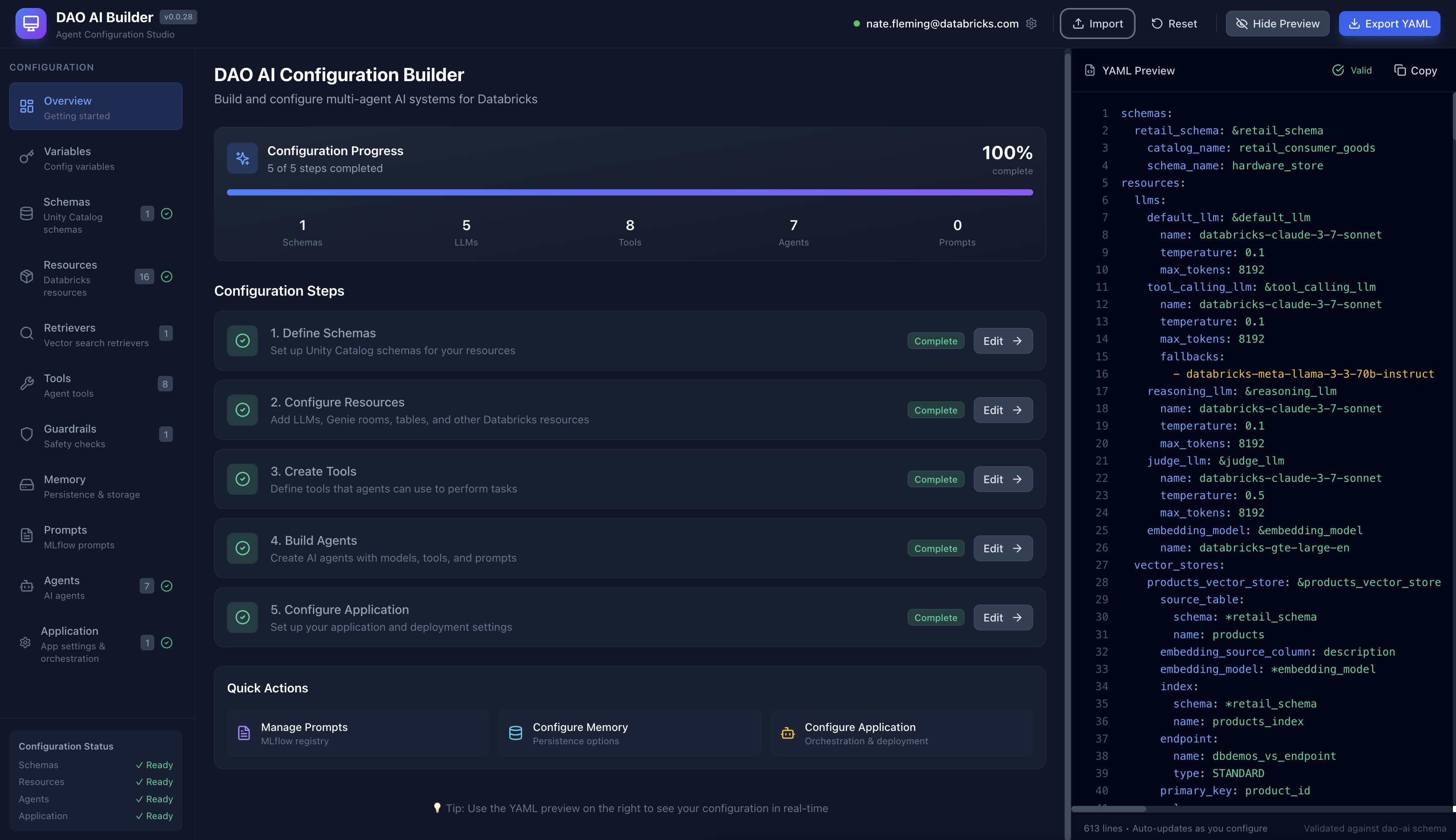
🎨 Visual Configuration Studio
Prefer a visual interface? Check out DAO AI Builder — a React-based web application that provides a graphical interface for creating and editing DAO configurations. Perfect for:
- Exploring DAO's capabilities through an intuitive UI
- Learning the configuration structure with guided forms
- Building agents visually without writing YAML manually
- Importing and editing existing configurations
DAO AI Builder generates valid YAML configurations that work seamlessly with this framework. Use whichever workflow suits you best — visual builder or direct YAML editing.
📚 Documentation
Getting Started
- Why DAO? - Learn what DAO is and how it compares to other platforms
- Quick Start - Build and deploy your first agent in minutes
- Architecture - Understand how DAO works under the hood
Core Concepts
- Key Capabilities - Explore 14 powerful features for production agents
- Configuration Reference - Complete YAML configuration guide
- Examples - Ready-to-use example configurations
Reference
- CLI Reference - Command-line interface documentation
- Python API - Programmatic usage and customization
- FAQ - Frequently asked questions
Contributing
- Contributing Guide - How to contribute to DAO
Quick Start
Prerequisites
Before you begin, you'll need:
- Python 3.11 or newer installed on your computer (download here)
- A Databricks workspace (ask your IT team or see Databricks docs)
- Access to Unity Catalog (your organization's data catalog)
- Model Serving enabled (for deploying AI agents)
- Optional: Vector Search, Genie (for advanced features)
Not sure if you have access? Your Databricks administrator can grant you permissions.
Installation
Option 1: Install from PyPI (Recommended)
The simplest way to get started:
# Install directly from PyPI
pip install dao-ai
Option 2: For developers familiar with Git
# Clone this repository
git clone <repo-url>
cd dao-ai

# Create an isolated Python environment
uv venv
source .venv/bin/activate  # On Windows: .venv\Scripts\activate

# Install DAO and its dependencies
make install
Option 3: For those new to development
- Download this project as a ZIP file (click the green "Code" button on GitHub → Download ZIP)
- Extract the ZIP file to a folder on your computer
- Open a terminal/command prompt and navigate to that folder
- Run these commands:
# On Mac/Linux:
python3 -m venv .venv
source .venv/bin/activate
pip install -e .

# On Windows:
python -m venv .venv
.venv\Scripts\activate
pip install -e .
Verification: Run dao-ai --version to confirm the installation succeeded.
Your First Agent
Let's build a simple AI assistant in 4 steps. This agent will use a language model from Databricks to answer questions.
Step 1: Create a configuration file
Create a new file called config/my_agent.yaml and paste this content:
schemas:
  my_schema: &my_schema
    catalog_name: my_catalog        # Replace with your Unity Catalog name
    schema_name: my_schema          # Replace with your schema name

resources:
  llms:
    default_llm: &default_llm
      name: databricks-meta-llama-3-3-70b-instruct  # The AI model to use

agents:
  assistant: &assistant
    name: assistant
    model: *default_llm
    prompt: |
      You are a helpful assistant.

app:
  name: my_first_agent
  registered_model:
    schema: *my_schema
    name: my_first_agent
  agents:
    - *assistant
  orchestration:
    swarm:
      model: *default_llm
💡 What's happening here?
schemas: Points to your Unity Catalog location (where the agent will be registered)resources: Defines the AI model (Llama 3.3 70B in this case)agents: Describes your assistant agent and its behaviorapp: Configures how the agent is deployed and orchestrated
Step 2: Validate your configuration
This checks for errors in your YAML file:
dao-ai validate -c config/my_agent.yaml
You should see: ✅ Configuration is valid!
Step 3: Visualize the agent workflow (optional)
Generate a diagram showing how your agent works:
dao-ai graph -c config/my_agent.yaml -o my_agent.png
This creates my_agent.png — open it to see a visual representation of your agent.
Step 4: Deploy to Databricks
Option A: Using Python (programmatic deployment)
from dao_ai.config import AppConfig

# Load your configuration
config = AppConfig.from_file("config/my_agent.yaml")

# Package the agent as an MLflow model
config.create_agent()

# Deploy to Databricks Model Serving
config.deploy_agent()
Option B: Using the CLI (one command)
dao-ai bundle --deploy --run -c config/my_agent.yaml
This single command:
- Validates your configuration
- Packages the agent
- Deploys it to Databricks
- Creates a serving endpoint
Step 5: Interact with your agent
Once deployed, you can chat with your agent using Python:
from mlflow.deployments import get_deploy_client

# Connect to your Databricks workspace
client = get_deploy_client("databricks")

# Send a message to your agent
response = client.predict(
    endpoint="my_first_agent",
    inputs={
        "messages": [{"role": "user", "content": "Hello! What can you help me with?"}],
        "configurable": {
            "thread_id": "1",           # Conversation ID
            "user_id": "demo_user"      # User identifier
        }
    }
)

# Print the agent's response
print(response["message"]["content"])
🎉 Congratulations! You've built and deployed your first AI agent with DAO.
Next steps:
- Explore the
config/examples/folder for more advanced configurations - Try the DAO AI Builder visual interface
- Learn about Key Capabilities to add advanced features
- Read the Architecture documentation to understand how it works
Key Features at a Glance
DAO provides powerful capabilities for building production-ready AI agents:
| Feature | Description |
|---|---|
| Multi-Tool Support | Python functions, Unity Catalog, MCP, Agent Endpoints |
| On-Behalf-Of User | Per-user permissions and governance |
| Advanced Caching | Two-tier (LRU + Semantic) caching for cost optimization |
| Vector Search Reranking | Improve RAG quality with FlashRank |
| Human-in-the-Loop | Approval workflows for sensitive operations |
| Memory & Persistence | PostgreSQL, Lakebase, or in-memory state |
| Prompt Registry | Version and manage prompts in MLflow |
| Prompt Optimization | Automated tuning with GEPA (Generative Evolution of Prompts and Agents) |
| Guardrails | Content filters, safety checks, validation |
| Middleware | Input validation, logging, performance monitoring, audit trails |
| Conversation Summarization | Handle long conversations automatically |
| Structured Output | JSON schema for predictable responses |
| Custom I/O | Flexible input/output with runtime state |
| Hook System | Lifecycle hooks for initialization and cleanup |
👉 Learn more: Key Capabilities Documentation
Architecture Overview
graph TB
    subgraph yaml["YAML Configuration"]
        direction LR
        schemas[Schemas] ~~~ resources[Resources] ~~~ tools[Tools] ~~~ agents[Agents] ~~~ orchestration[Orchestration]
    end

    subgraph dao["DAO Framework (Python)"]
        direction LR
        config[Config<br/>Loader] ~~~ graph_builder[Graph<br/>Builder] ~~~ nodes[Nodes<br/>Factory] ~~~ tool_factory[Tool<br/>Factory]
    end

    subgraph langgraph["LangGraph Runtime"]
        direction LR
        msg_hook[Message<br/>Hook] --> supervisor[Supervisor/<br/>Swarm] --> specialized[Specialized<br/>Agents]
    end

    subgraph databricks["Databricks Platform"]
        direction LR
        model_serving[Model<br/>Serving] ~~~ unity_catalog[Unity<br/>Catalog] ~~~ vector_search[Vector<br/>Search] ~~~ genie_spaces[Genie<br/>Spaces] ~~~ mlflow[MLflow]
    end

    yaml ==> dao
    dao ==> langgraph
    langgraph ==> databricks

    style yaml fill:#1B5162,stroke:#618794,stroke-width:3px,color:#fff
    style dao fill:#FFAB00,stroke:#7D5319,stroke-width:3px,color:#1B3139
    style langgraph fill:#618794,stroke:#143D4A,stroke-width:3px,color:#fff
    style databricks fill:#00875C,stroke:#095A35,stroke-width:3px,color:#fff
👉 Learn more: Architecture Documentation
Example Configurations
The config/examples/ directory contains ready-to-use configurations organized in a progressive learning path:
01_getting_started/minimal.yaml- Simplest possible agent02_tools/vector_search_with_reranking.yaml- RAG with improved accuracy04_genie/genie_semantic_cache.yaml- NL-to-SQL with two-tier caching05_memory/conversation_summarization.yaml- Long conversation handling06_on_behalf_of_user/obo_basic.yaml- User-level access control07_human_in_the_loop/human_in_the_loop.yaml- Approval workflows
And many more! Follow the numbered path or jump to what you need. See the full guide in Examples Documentation.
CLI Quick Reference
# Validate configuration
dao-ai validate -c config/my_config.yaml

# Generate JSON schema for IDE support
dao-ai schema > schemas/model_config_schema.json

# Visualize agent workflow
dao-ai graph -c config/my_config.yaml -o workflow.png

# Deploy with Databricks Asset Bundles
dao-ai bundle --deploy --run -c config/my_config.yaml

# Interactive chat with agent
dao-ai chat -c config/my_config.yaml
👉 Learn more: CLI Reference Documentation
Community & Support
- Documentation: docs/
- Examples: config/examples/
- Issues: GitHub Issues
- Discussions: GitHub Discussions
Contributing
We welcome contributions! See the Contributing Guide for details on:
- Setting up your development environment
- Code style and testing guidelines
- How to submit pull requests
- Project structure overview
License
This project is licensed under the MIT License - see the LICENSE file for details.
Release history Release notifications | RSS feed


Download files
Download the file for your platform. If you're not sure which to choose, learn more about installing packages.
Source Distribution
Built Distribution
Filter files by name, interpreter, ABI, and platform.
If you're not sure about the file name format, learn more about wheel file names.
Copy a direct link to the current filters
File details
Details for the file dao_ai-0.1.3.tar.gz.
File metadata
- Download URL: dao_ai-0.1.3.tar.gz
- Upload date:
- Size: 18.4 MB
- Tags: Source
- Uploaded using Trusted Publishing? No
- Uploaded via: twine/6.2.0 CPython/3.14.2
File hashes
| Algorithm | Hash digest | |
|---|---|---|
| SHA256 |
5df248fd912eb8c88820536bbd170eff02afe5571925b033f3a3ad3ec0d05675
|
|
| MD5 |
bbed7197b7c36b2ff1baa851db130d65
|
|
| BLAKE2b-256 |
2445ec4fd7a6a0a2dd093f878f1ee33dbb95413aa2c094bde96b1cee583f1d63
|
File details
Details for the file dao_ai-0.1.3-py3-none-any.whl.
File metadata
- Download URL: dao_ai-0.1.3-py3-none-any.whl
- Upload date:
- Size: 174.4 kB
- Tags: Python 3
- Uploaded using Trusted Publishing? No
- Uploaded via: twine/6.2.0 CPython/3.14.2
File hashes
| Algorithm | Hash digest | |
|---|---|---|
| SHA256 |
4829f0892f848304215fb6c61227cb43b4695dd810c908d7ff60f5848410c008
|
|
| MD5 |
3fabd9d4196dafe4b6adc7ea498ca070
|
|
| BLAKE2b-256 |
c55cf7a2506e9513de6f52fd126f88b9caf7ddc11d0a1cb1fb2c189409fc842f
|






