
python-dashio




python-dashio - Create beautiful mobile dashboards for your python project. The python-dashio library allows easy setup of controls such as Dials, Text Boxes, Charts, Graphs, and Notifications. You can define the look and layout of the controls on your phone from your python code. Connect to your phone over TCP on your local network, or from anywhere through the Dash server (dash.dashio.io), which also sends notifications, stores data and lets you share your devices. Bluetooth Low Energy (BLE) is available on Linux, and is experimental.
Getting Started
-
For the big picture on DashIO, take a look at our website: dashio.io
-
Create an account on dash.dashio.io
-
Get the App:
| Apple | Android |
|---|---|
 |
 |
Discord Community
Be a part of the DashIO community by joining our Discord Server
Documentation
For all documentation and software guides: dashio.io/documents
For the DashIO Python guide: dashio.io/guide-python
For the DashIO Python library: dashio.io/python-library
The library reference is in Documents/Documentation.md.
Examples
There are plenty of examples in the github repository under the Examples directory. For complete applications, see Examples/greenhouse and Examples/server_monitor. Examples/intermittent_connection.py is a device that only connects to the Dash server now and then, keeping its data in a DashStore while disconnected, and is provisioned over TCP on the local network.
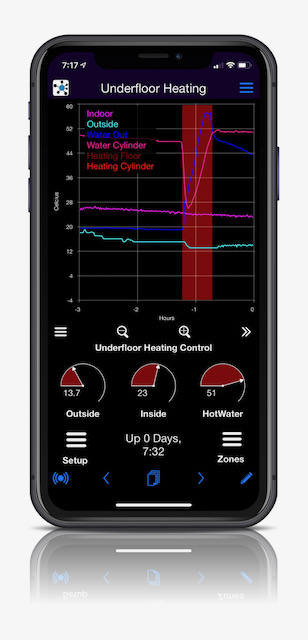
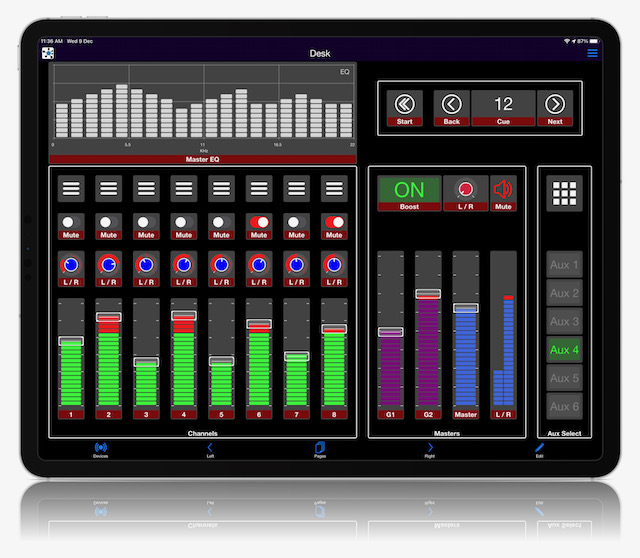
Dash IoT Application
The Dash app is free and available for both Apple and Android devices. Use it to create beautiful and powerful user interfaces to your IoT devices.
| Dashio Phone | Dashio Tablet |
|---|---|
 |
 |
Requirements
Python 3.11 or later. pip installs the other dependencies: paho-mqtt, pyzmq, python-dateutil, zeroconf, shortuuid and pyserial.
Install
From PyPI (Recommended)
pip3 install dashio
From Source
For development (editable install):
git clone https://github.com/dashio-connect/python-dashio.git
cd python-dashio
pip3 install -e .
For regular installation:
git clone https://github.com/dashio-connect/python-dashio.git
cd python-dashio
pip3 install .
A Quick Guide
This guide covers the DashIO python library. For information on the Dash phone app please visit the website.
Basics
So what is DashIO? It is a quick, effortless way to connect your IoT device to your phone, with controls such as Dials, Text Boxes, Maps, Graphs and Notifications set up from your device. What's Dash then? Dash is an MQTT server with extra features: it sends notifications, stores time graph, event log and map data, lets you share your devices, and saves your settings from the Dash app.
Show me some code.
# Examples/ex01.py
import dashio
import random
import time

device = dashio.Device("aDeviceType", "aDeviceID", "aDeviceName")
tcp_con = dashio.TCPConnection()
tcp_con.add_device(device)
first_dial_control = dashio.Dial("dial1")
device.add_control(first_dial_control)

while True:
    first_dial_control.dial_value = random.random() * 100
    time.sleep(5)
This is about the fewest lines of code to get talking to the app. There is a lot happening under the hood to make this work. After the import we create a device with three attributes:
- "aDeviceType": a common name device_type for all IoT devices using this code which is used for device discovery
- "aDeviceID": a device_ID to uniquely identify this device, preferably a UUID.
- "aDeviceName": The name of this device, which can be changed at any time.
These attributes describe the device to the app and allow you to distinguish one of your devices from another.
The next two lines create a TCP connection and then add the device to the connection. This device is discoverable by the Dash app. You can also discover your IoT device using a third party Bonjour/Zeroconf discovery tool. The mDNS service will be "_DashIO._tcp."
Though this device is discoverable by the app it would be nice to have the DashIO app automatically setup a new DeviceView and place your control on the new DeviceView. To do that we need to add a few more lines of code:
# Examples/ex02.py
import dashio
import random
import time

device = dashio.Device("aDeviceType", "aDeviceID", "aDeviceName")
tcp_con = dashio.TCPConnection()
tcp_con.add_device(device)
first_dial_control = dashio.Dial("dial1", control_position=dashio.ControlPosition(0.24, 0.36, 0.54, 0.26))
device.add_control(first_dial_control)

dv_dial = dashio.DeviceView("aView", "A Dial")
dv_dial.add_control(first_dial_control)
device.add_control(dv_dial)

while True:
    first_dial_control.dial_value = random.random() * 100
    time.sleep(5)
First we altered the instantiation of a Dial by including a control_position. This allows us to place the control at a set location. The added lines instantiated a DeviceView control, to which we then added the dial control. Finally we added the DeviceView to the device.
The next piece of the puzzle to consider is how do we get data from the DashIO app? Let's add a Knob and connect it to the Dial:
# Examples/ex03.py
import dashio
import time

device = dashio.Device("aDeviceType", "aDeviceID", "aDeviceName")
tcp_con = dashio.TCPConnection()
tcp_con.add_device(device)
first_dial_control = dashio.Dial("dial1", control_position=dashio.ControlPosition(0.24, 0.36, 0.54, 0.26))
device.add_control(first_dial_control)

dv = dashio.DeviceView("aView", "A Dial")
dv.add_control(first_dial_control)
device.add_control(dv)


def knob_event_handler(msg):
    first_dial_control.dial_value = float(msg[3])


aknob = dashio.Knob("aKNB", control_position=dashio.ControlPosition(0.24, 0.14, 0.54, 0.26))
aknob.add_receive_message_callback(knob_event_handler)
dv.add_control(aknob)
device.add_control(aknob)

while True:
    time.sleep(1)
First we added a function that sets the dial value. Next we added a Knob control and added our new function to be called when it receives data from the DashIO app. We also add it to the DeviceView and to the device. Now when the knob in the DashIO app is moved the dial is set to the same value.
Connecting From Anywhere
A TCPConnection only works on your local network. To reach your device from anywhere, connect it through the Dash server with a DashConnection, using your Dash account username and password. The Dash server can also send notifications to your phone, with an Alarm:
# Examples/ex06.py
import dashio
import random
import time

device = dashio.Device("aDeviceType", "aDeviceID3", "aDeviceName")
dash_con = dashio.DashConnection("your_dash_username", "your_dash_password")
dash_con.add_device(device)

first_dial_control = dashio.Dial("dial1", control_position=dashio.ControlPosition(0.24, 0.36, 0.54, 0.26))
device.add_control(first_dial_control)
dv = dashio.DeviceView("aView", "A Dial")
dv.add_control(first_dial_control)
device.add_control(dv)

alarm = dashio.Alarm("hiAlarm")
device.add_control(alarm)

high = False
while True:
    value = random.random() * 100
    first_dial_control.dial_value = value
    if value > 90 and not high:
        alarm.send("High value", f"The dial is at {value:.0f}")
    high = value > 90
    time.sleep(5)
The alarm is sent when the dial goes above 90. A device can use a TCPConnection and a DashConnection at the same time. The Dash server can also store the data of time graphs, event logs and maps, with device.storage_enable(). See the Documentation.
Using the Config64
The Dash app can generate a CFG64 text string that defines the controls, the controls layout, and device parameters for the Device. For example, run ex03 above, arrange its controls in the Dash app, and export the layout. The layout can then set up the device and its controls:
# Examples/ex04.py
import dashio
import time

cfg64 = "jVTbjtowEP0VlOeqImyXSn1LCLCIXFDiQqWqD97ESywSmzrOAl3x7+sxOAk3qW/jM+Pxseccf1jeLLZ+9H7/+dKzRpOpCj8sVpce"\
    "eacpWVKyqxRkq2SmkYTIeqsQy1JQ+raOyTvkj2o1DyMXOn1YKWdS8GLmQSGehy4U54SucxljSbmC+18HQwVKKguy4BVVKINqN0Io"\
    "CiyTAsjpzRl/BagiLItYcYhYTAqCK0hLUROVKils70NRzncBZQHeK+ANFxWkBcmWuKhhw/dntd5iQZg8E4RbQvuM4iLgmT50Evl+"\
    "tAJ0b+h1qH9T+I5mMm+xZ8A2iuiIF1xAi5hkpmuDucABSMrD6XJhFAeOD9Dh9hwbepb6Ina/f9Qj8ptpJb7XxM7SM2HgLEzoomkT"\
    "B+Pwp4nR+Bcyse/6JvSWy9V5gFK0nFc5laSXlHxzSd11ktlIy0BVu1xkRDzasxY0U7m6ZKCmwQA2XWjEjIAqOMSl7p/8rdWUrqTg"\
    "qddsztysWdZ5WpxuNMFcbTud1uoD6hG0cfn+dks3iwRmldZHejhLqklPFOmE/gMu9vCcUELrwAOoV/5pb2t32d5rfsMGXivm2nhP"\
    "Az11P5o2Hn2JUauAEYrbYaOwmeTM8U+T3AqS0upkrv71s4M0betE+JWIrg/98QRdTHsxG1uPjNNI9MKIW06Z7GjCaL9mVFbmC7n7"\
    "K1y7FXhOaFFcW+v/fg8jmUdGvmO8p+EDg99+Lno+aBovXvTjHz8B"


config_dict = dashio.decode_cfg64(cfg64)
device = dashio.Device("aDeviceType", "aDeviceID2", "aDeviceName1", cfg_dict=config_dict)
tcp_con = dashio.TCPConnection()
tcp_con.add_device(device)

aknob: dashio.Knob = device.get_control(dashio.ControlName.KNOB, "aKNB")
first_dial_control: dashio.Dial = device.get_control(dashio.ControlName.DIAL, "dial1")


def knob_event_handler(msg):
    aknob.knob_dial_value = float(msg[3])
    first_dial_control.dial_value = float(msg[3])


aknob.add_receive_message_callback(knob_event_handler)

while True:
    time.sleep(1)
We've added the cfg64 string. Then decoded it with dashio.decode_cfg64(cfg64). This function returns a dictionary that we can pass into Device so that it can instantiate and add the controls.
The Dash app reports its screen size in columns: 1 for phones, 2 for fold out phones and 3 for tablets. A device can hold a layout for each, e.g. cfg_dict={1: phone_cfg64, 3: tablet_cfg64}, and layouts can also be built in code with dashio.generate_cfg64(). See Layouts.
The Dash app only fetches a new layout when the device's cfgRev changes, so increase device.config_revision whenever the layout changes. device.get_cfg_hash() helps tell when it has changed.
Command Line Utilities
The library installs three command line utilities. Run any of them with -h for its options.
| Command | What it does |
|---|---|
c64_decode layout.c64 |
Decode a CFG64 layout, e.g. one exported from the Dash app, to JSON. |
c64_encode layout.json |
Encode a JSON layout to CFG64, optionally formatted for C or Python code with -f. |
dashio_data_exporter -u USERNAME -p PASSWORD -d DEVICE_ID -c CONTROL_ID |
Export time graph or event log data stored on the Dash server. See the data exporter guide. |
License
MIT, see LICENSE.
1 maintainer

Metadata
1 maintainer
Release files for dashio 3.10.0
For a detailed explanation of source distributions (sdists) and built distributions (wheels), please see the package formats documentation.
Source distribution (sdist)
| File | Size | Uploaded | |
|---|---|---|---|
| dashio-3.10.0.tar.gz | 159.2 kB | Details |
Built distribution (wheel)
| File | Interpreter | ABI | Platform | Reset |
|---|---|---|---|---|
| dashio-3.10.0-py3-none-any.whl | Python 3 | none | any | Details |
Total release size: 403.7 kB
Release files / dashio-3.10.0.tar.gz
| Download URL | dashio-3.10.0.tar.gz |
|---|---|
| Size | 159.2 kB |
| Tags | Source |
|
SHA-256 checksum How to use checksums |
e8f234cd51b81991cd65fe8913cc11fafb8630ab74ab9d5a7fa7d668c6ad2d77
|
|
BLAKE2b-256 checksum How to use checksums |
79391d62d8e0c37090dac1d36caef5640a409ec6f9439881705510fc3ec0e0ad
|
| Upload date | |
|
Uploaded using Trusted Publishing? What is trusted publishing? |
Yes |
| Uploaded via |
twine/7.0.0 CPython/3.13.14
|
Provenance
Provenance describes where a file came from. On PyPI, provenance is shared via attestations, which provide a verifiable record of the build or publishing details. View details, limitations and caveats.


PyPI Publish Attestation
PyPI verified that this artifact, at this checksum, originated from the publisher listed below.
Signed by GitHub Actions, verified by PyPI on Oct 13, 2026.
Transparency logRelease files / dashio-3.10.0-py3-none-any.whl
| Download URL | dashio-3.10.0-py3-none-any.whl |
|---|---|
| Size | 244.5 kB |
| Tags | Python 3 |
|
SHA-256 checksum How to use checksums |
c1a303b20aecf82baa7258e3f5ea01f867b8e94944a0e1c43421f6986f54ae71
|
|
BLAKE2b-256 checksum How to use checksums |
580ee3b0e6c935f31b1396cfaf9f5eae6b91cd3fd8c37abcd30a4b3a0e9b5f68
|
| Upload date | |
|
Uploaded using Trusted Publishing? What is trusted publishing? |
Yes |
| Uploaded via |
twine/7.0.0 CPython/3.13.14
|
Provenance
Provenance describes where a file came from. On PyPI, provenance is shared via attestations, which provide a verifiable record of the build or publishing details. View details, limitations and caveats.
PyPI Publish Attestation
PyPI verified that this artifact, at this checksum, originated from the publisher listed below.
Signed by GitHub Actions, verified by PyPI on Oct 13, 2026.
Transparency log













