
DFD — Data Flow Diagrams as Code




Describe system architectures as text, get diagrams as SVG, PNG, PDF, and more. Version-controlled, diffable, no GUI needed.
DFD generates Data Flow Diagrams from a simple text-based DSL, rendered via Graphviz. It supports the SA/SD and SA/RT methodologies (Structured Analysis / Structured Design, with real-time extensions) as described by Edward Yourdon.
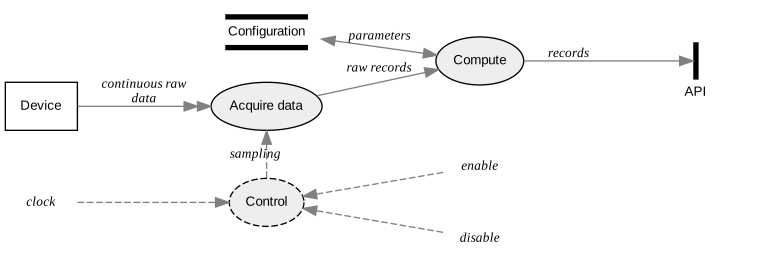
The diagram above is generated from this input:
process   Acquire         Acquire data
process   Compute
control   Control
entity    Device
store     Config          Configuration
channel   API

*         ::>  Control    clock
Control   <::  *          enable
Control   <::  *          disable
Control   ::>? Acquire    sampling

Device    ->>  Acquire    continuous raw data
Acquire   -->  Compute    raw records
Config    <->  Compute    parameters
Compute   -->  API        records
Features
| Feature | Description |
|---|---|
| SA/RT support | Signals, control processes, and channels for real-time and embedded systems |
| Context diagrams | Generate a top-level SA/SD context diagram (style context) |
| Frames and grouping | Visually group related items |
| Filters | Render focused subsets of a large master diagram (neighborhood, only/without) |
| Dependency checking | Verify that all referenced includes and items are consistent |
| Includes and reuse | Split large diagrams across files, share common item definitions via include |
| Markdown embedding | Embed diagrams directly in Markdown files and generate all images in one pass (--markdown mode) |
| Layout control | Horizontal or vertical orientation, placement constraints between items, relaxed constraints on connections |
| Styling | Background color, graph title suppression, inline Graphviz attributes, reusable attribute aliases |
| Multiple output formats | SVG, PNG, PDF, JPG, EPS, and any other format supported by your Graphviz installation (run dot -Thelp for the full list), plus raw DOT source |
Quick start
pip install data-flow-diagram
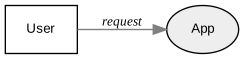
Create a file hello.dfd:
entity    User
process   App
store     DB

User --> App    request
App  --> DB     query
DB   --> App    result
App  --> User   response
Generate the diagram:
data-flow-diagram hello.dfd -o hello.svg --no-graph-title
You should obtain:

Or pipe directly from stdin:
echo 'entity User
process App
User --> App  request' | data-flow-diagram -o quick.svg --no-graph-title
Installing
For users
Requires Python 3.11+ and Graphviz.
Linux (Debian/Ubuntu):
sudo apt install graphviz
pip install data-flow-diagram
macOS (Homebrew):
brew install graphviz python3
pip install data-flow-diagram
If you get a ModuleNotFoundError: No module named 'reportlab.graphics._renderPM'
error at runtime, reinstall reportlab:
pip install --upgrade --force-reinstall reportlab
For developers
Requires GNU Make (pre-installed on most Linux distributions; on macOS, install
the Xcode Command Line Tools if not already present: xcode-select --install).
git clone https://github.com/pbauermeister/dfd.git
cd dfd
make all    # creates venv, installs deps, formats, lints, tests, builds docs
make all auto-detects your OS and installs the required system packages
(Debian apt or macOS brew). Run make help for all available targets.
Documentation
Full syntax reference, examples, and advanced features:
- 1. Methodology and scope
- 2. Syntax
- 3. Details with examples
- 4. Markdown snippets
- 5. Including
- 6. Dependencies
- 7. Filters
- 8. Influencing the layout
Usage
data-flow-diagram -h says:
usage: data-flow-diagram [-h] [--output-file OUTPUT_FILE] [--markdown]
                         [--format FORMAT]
                         [--background-color BACKGROUND_COLOR]
                         [--no-graph-title] [--no-check-dependencies]
                         [--debug] [--version]
                         [INPUT_FILE]

Command-line DFD diagram generator. Converts a textual description into a
graphic file.

positional arguments:
  INPUT_FILE            DFD input file; if omitted, stdin is used

options:
  -h, --help            show this help message and exit
  --output-file OUTPUT_FILE, -o OUTPUT_FILE
                        output file name; pass '-' to use stdout; if omitted,
                        use INPUT_FILE base name with '.svg' extension, or
                        stdout
  --markdown, -m        consider snippets between opening marker: ```data-
                        flow-diagram OUTFILE, and closing marker: ``` allowing
                        to generate all diagrams contained in an INPUT_FILE
                        that is a markdown file
  --format FORMAT, -f FORMAT
                        output format: gif, jpg, tiff, bmp, pnm, eps, pdf, svg
                        (any supported by Graphviz), or dot (raw Graphviz DOT
                        text); default is svg
  --background-color BACKGROUND_COLOR, -b BACKGROUND_COLOR
                        background color name (including 'none' for
                        transparent) in web color notation; see
                        https://developer.mozilla.org/en-
                        US/docs/Web/CSS/color_value for a list of valid names;
                        default is white
  --no-graph-title      suppress graph title
  --no-check-dependencies
                        suppress dependencies checking
  --debug               emit debug messages
  --version, -V         print the version and exit

See https://github.com/pbauermeister/dfd for information, syntax and examples.
Links
- Source code: github.com/pbauermeister/dfd
- Package: pypi.org/project/data-flow-diagram
- Changelog: CHANGES.md
- License: GPLv3
1 maintainer

Download files
Download the file for your platform. If you're not sure which to choose, learn more about installing packages.
Source Distribution
Built Distribution
Filter files by name, interpreter, ABI, and platform.
If you're not sure about the file name format, learn more about wheel file names.
Copy a direct link to the current filters
File details
Details for the file data_flow_diagram-1.16.9.tar.gz.
File metadata
- Download URL: data_flow_diagram-1.16.9.tar.gz
- Upload date:
- Size: 33.1 kB
- Tags: Source
- Uploaded using Trusted Publishing? No
- Uploaded via:
twine/6.1.0 CPython/3.12.3
File hashes
| Algorithm | Hash digest | |
|---|---|---|
| SHA256 |
a8d4213223f55d8ff3b018fc3a41f5105b74a0f7019b943ac380c497848b8dba
|
|
| MD5 |
55a358b76466b596ddb53086b1f176d4
|
|
| BLAKE2b-256 |
89356bcb78765c999c4e4e109e97c19cf96fb7748932b6a7c37cc38dc77b562b
|
File details
Details for the file data_flow_diagram-1.16.9-py3-none-any.whl.
File metadata
- Download URL: data_flow_diagram-1.16.9-py3-none-any.whl
- Upload date:
- Size: 32.0 kB
- Tags: Python 3
- Uploaded using Trusted Publishing? No
- Uploaded via:
twine/6.1.0 CPython/3.12.3
File hashes
| Algorithm | Hash digest | |
|---|---|---|
| SHA256 |
8a26cd38d89034e0045d954b97d6aada33494c3793f639c807ac31d9c96f1ff5
|
|
| MD5 |
a34592edf2403a096fbaa8dfd2648be0
|
|
| BLAKE2b-256 |
03e267407babefb787ef3656aa338c5a4ce29ecc601eff9b88c7f2425a9bc508
|














